A lot of teams end up with four or five AI accounts. OpenAI powers one feature, Anthropic another, there's a Google project because someone tried Gemini once, and a DeepSeek or Grok key is left over from an experiment. Each one has its own billing, its own limits and its own dashboard to check when something breaks.
Aight replaces that with one key and one prepaid balance. This post covers what's on it, how to set it up in your code and in the tools you already use, what it costs, how to handle errors, and the things it doesn't do, so you can decide quickly whether it fits.
What's on one key
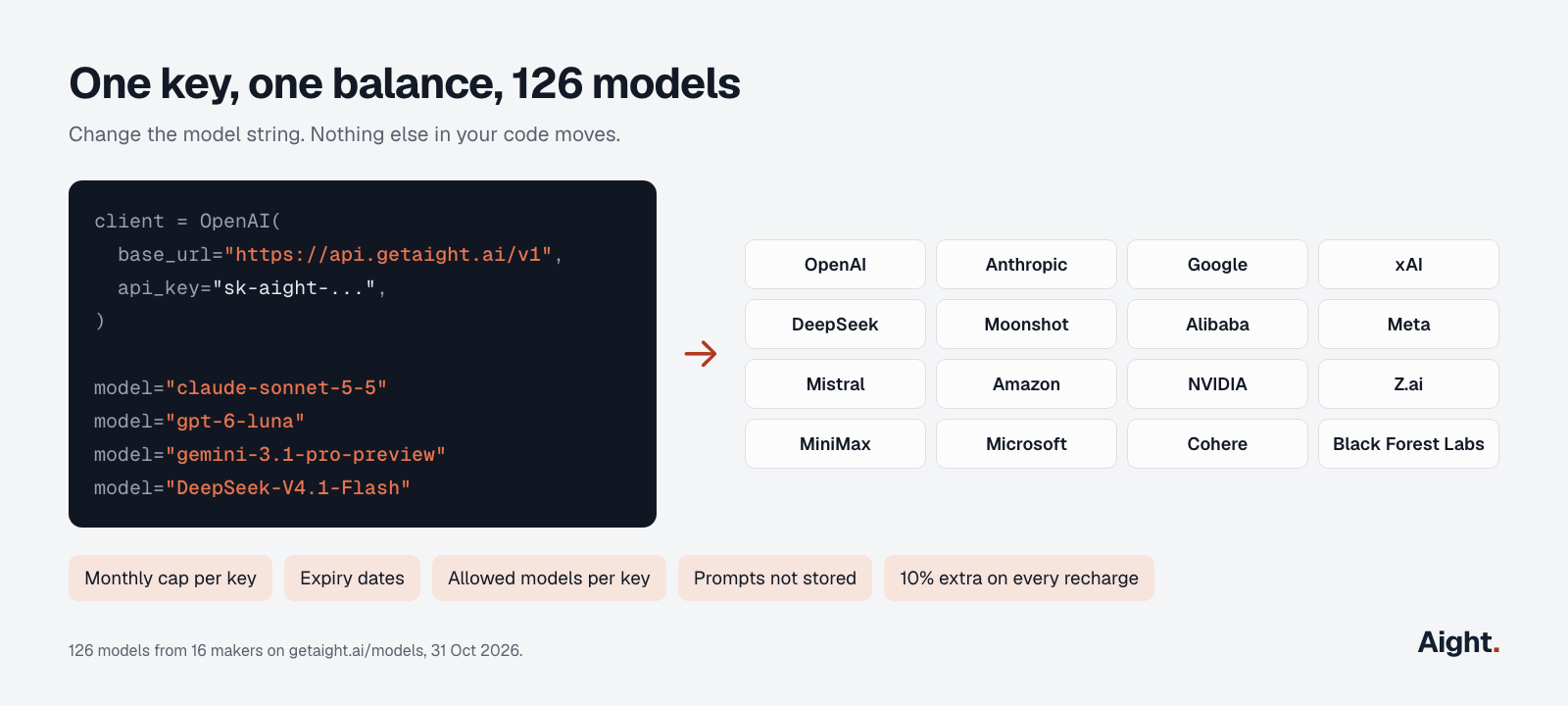
As of 31 October 2026, that's 126 models from 16 makers: 110 text models, 8 image models, 5 speech models and 3 embedding models.
The makers are OpenAI, Anthropic, Google, xAI, DeepSeek, Moonshot (Kimi), Alibaba (Qwen), Meta (Llama), Mistral, Amazon (Nova), NVIDIA, Z.ai (GLM), MiniMax, Microsoft, Cohere and Black Forest Labs (FLUX).
The models page tags each model with where it runs. 51 run in the United States. 74 are tagged Global, which means the provider may process the request in any region. One runs in India. If data location matters for a project, filter by region before you pick a model.
Click any model on that page to see its context window and maximum output, because they vary a lot. claude-sonnet-5-5 takes 1,000,000 tokens of context and can write up to 128,000. gemini-3.1-pro-preview takes 1,048,576 and writes up to 65,536. If your app sets max_tokens high for one model, check it against the next one you try.
Setup in four steps
- Create an account at console.getaight.ai with a work email and your billing country. The account opens once you verify the email with a one-time code.
- Recharge. Outside India it's in US dollars, from $5, plus a 3% processing charge. India accounts pay in rupees from ₹500 plus 18% GST and get a GST invoice. Every recharge adds 10% extra balance.
- Create an API key. Give it a name and, if you want, a monthly spending cap, an expiry date and a list of the models it may call. Keys start with
sk-aight-and are shown once, so put yours in an environment variable straight away. - Point any OpenAI SDK at Aight. Change the base URL and the key. In plain SDK code that's the only change. Some frameworks need one more setting, covered below.
Python:
import os
from openai import OpenAI

client = OpenAI(
    base_url="https://api.getaight.ai/v1",
    api_key=os.environ["AIGHT_API_KEY"],
)

reply = client.chat.completions.create(
    model="claude-sonnet-5-5",
    messages=[{"role": "user", "content": "Write a one-line release note for a login bug fix."}],
)
print(reply.choices[0].message.content)
Node.js:
import OpenAI from "openai";

const client = new OpenAI({
  baseURL: "https://api.getaight.ai/v1",
  apiKey: process.env.AIGHT_API_KEY,
});

const reply = await client.chat.completions.create({
  model: "gpt-6-luna",
  messages: [{ role: "user", content: "Write a one-line release note for a login bug fix." }],
});
console.log(reply.choices[0].message.content);
The OpenAI SDKs also read the base URL from the OPENAI_BASE_URL environment variable, which is handy when you can't edit the code that creates the client.
Switching models means changing one string. The same code runs with "gpt-5.6-terra", "gemini-3.1-pro-preview", "grok-4.7" or "DeepSeek-V4.1-Flash". To see exactly which models a key can call:
curl https://api.getaight.ai/v1/models \
  -H "Authorization: Bearer $AIGHT_API_KEY"
Using it from the tools you already have
Most AI frameworks and coding tools accept a custom OpenAI-compatible base URL. The catch is that several of them now call OpenAI's newer Responses API by default, while Aight's documented route is Chat Completions (POST /v1/chat/completions). If a tool returns 404s after you change the base URL, that's usually why. Here's where the setting lives in each one:
| Tool | Where to set Aight's base URL | Watch out for |
|---|---|---|
| OpenAI SDKs | base_url (Python) or baseURL (Node), or OPENAI_BASE_URL | Nothing else to change |
| LangChain | ChatOpenAI(model=..., base_url=..., api_key=...) | Set stream_usage=True if you want token counts while streaming. It's off by default with a custom base URL |
| LlamaIndex | OpenAILike(model=..., api_base=..., api_key=...) | Set is_chat_model=True, is_function_calling_model=True and context_window. The defaults are False, False and 3,900 tokens. It also sends temperature=0.1 by default |
| Vercel AI SDK | createOpenAI({ baseURL, apiKey }) | Create models with aight.chat("model-id"). The default factory uses the Responses API |
| OpenAI Agents SDK | set_default_openai_client(AsyncOpenAI(...)) | Also call set_default_openai_api("chat_completions"), and turn tracing off |
| Continue | provider: openai, apiBase, apiKey | Add useResponsesApi: false |
| Cline | API Provider: "OpenAI Compatible" | Fill in Base URL, API key and model ID |
| Aider | OPENAI_API_BASE and OPENAI_API_KEY | Run aider --model openai/<model-id> |
| Open WebUI | Settings > Admin > Connections, or OPENAI_API_BASE_URL | Add it as an OpenAI API connection |
| n8n | The OpenAI credential's Base URL field | Leave "Use Responses API" off in the OpenAI Chat Model node |
That LlamaIndex default matters if you call Claude, because newer Claude models reject temperature. Read the Claude temperature post before you point LlamaIndex at a Claude model.
The OpenAI Agents SDK, pointed at Aight:
import os
from openai import AsyncOpenAI
from agents import Agent, Runner, set_default_openai_api, set_default_openai_client, set_tracing_disabled

set_default_openai_client(AsyncOpenAI(base_url="https://api.getaight.ai/v1", api_key=os.environ["AIGHT_API_KEY"]))
set_default_openai_api("chat_completions")
set_tracing_disabled(True)  # traces are uploaded to OpenAI's platform, which needs an OpenAI key

agent = Agent(name="Release notes", instructions="Write short, plain release notes.", model="claude-sonnet-5-5")
print(Runner.run_sync(agent, "Login bug fixed on Safari.").final_output)
And the Vercel AI SDK:
import { createOpenAI } from "@ai-sdk/openai";
import { generateText } from "ai";

const aight = createOpenAI({ baseURL: "https://api.getaight.ai/v1", apiKey: process.env.AIGHT_API_KEY });

const { text } = await generateText({
  model: aight.chat("gemini-3.1-pro-preview"),
  prompt: "Write a one-line release note for a login bug fix.",
});
Test the features you depend on, model by model
One API format doesn't mean every model supports every option in it. Tool calling, JSON schema output, image input, token counts while streaming and reasoning settings all vary by model. Some makers' own OpenAI-compatible endpoints quietly ignore fields they don't support rather than returning an error. Anthropic's docs say exactly that about theirs, and Google's says reasoning can't be turned off on Gemini 3 models.
So before you move a feature to a new model, check what comes back, not just that no error did:
probes = {
    "tools": {"tools": [{"type": "function", "function": {
        "name": "get_order", "parameters": {"type": "object", "properties": {"id": {"type": "string"}}}}}]},
    "json": {"response_format": {"type": "json_schema", "json_schema": {"name": "r", "strict": True, "schema": {
        "type": "object", "properties": {"ok": {"type": "boolean"}}, "required": ["ok"], "additionalProperties": False}}}},
}
question = [{"role": "user", "content": "Look up order 1042 and tell me if it shipped."}]

for model in ["claude-sonnet-5-5", "gpt-6-luna", "gemini-3.1-pro-preview", "DeepSeek-V4.1-Flash"]:
    for name, extra in probes.items():
        try:
            msg = client.chat.completions.create(model=model, messages=question, **extra).choices[0].message
            print(model, name, msg.tool_calls or msg.content)
        except Exception as e:
            print(model, name, "error:", e)
If structured output is new to you, OpenAI's DevDay talk is a good grounding in why strict schemas beat "please reply in JSON". It covers OpenAI's models only, which is exactly why the per-model check above is still worth running.
What it costs
Some current prices, per million tokens, input / output:
| Model | Maker | Price on Aight |
|---|---|---|
| gpt-6-luna | OpenAI | $0.10 / $0.50 |
| gpt-5.6-terra | OpenAI | $2.00 / $12.00 |
| gpt-6-sol | OpenAI | $2.00 / $10.00 |
| claude-haiku-4-5 | Anthropic | $1.00 / $5.00 |
| claude-sonnet-5-5 | Anthropic | $2.00 / $10.00 |
| claude-opus-5-5 | Anthropic | $4.00 / $20.00 |
| gemini-3.1-flash-lite | $0.25 / $1.50 | |
| gemini-3.1-pro-preview | $2.00 / $12.00 | |
| grok-4.7 | xAI | $2.00 / $6.00 |
| DeepSeek-V4.1-Flash | DeepSeek | $0.30 / $1.20 |
Long prompts cost more on some models, as they do with the makers directly. Above 272,000 tokens, gpt-5.6-terra is $4 / $18. Above 200,000, gemini-3.1-pro-preview is $4 / $18. Above 128,000, grok-4.7 is $4 / $12. The models page lists every tier.
Every model in that table except DeepSeek is at the maker's own list price. A few models are priced at the cloud host's rate instead. DeepSeek V4.1 Flash, for example, has one flat price that matches DeepSeek's peak-hour rate, while DeepSeek's own API charges half that off-peak. The models page shows the exact price for every model.
Here's how the 10% extra works, using the example from Aight's refund policy:
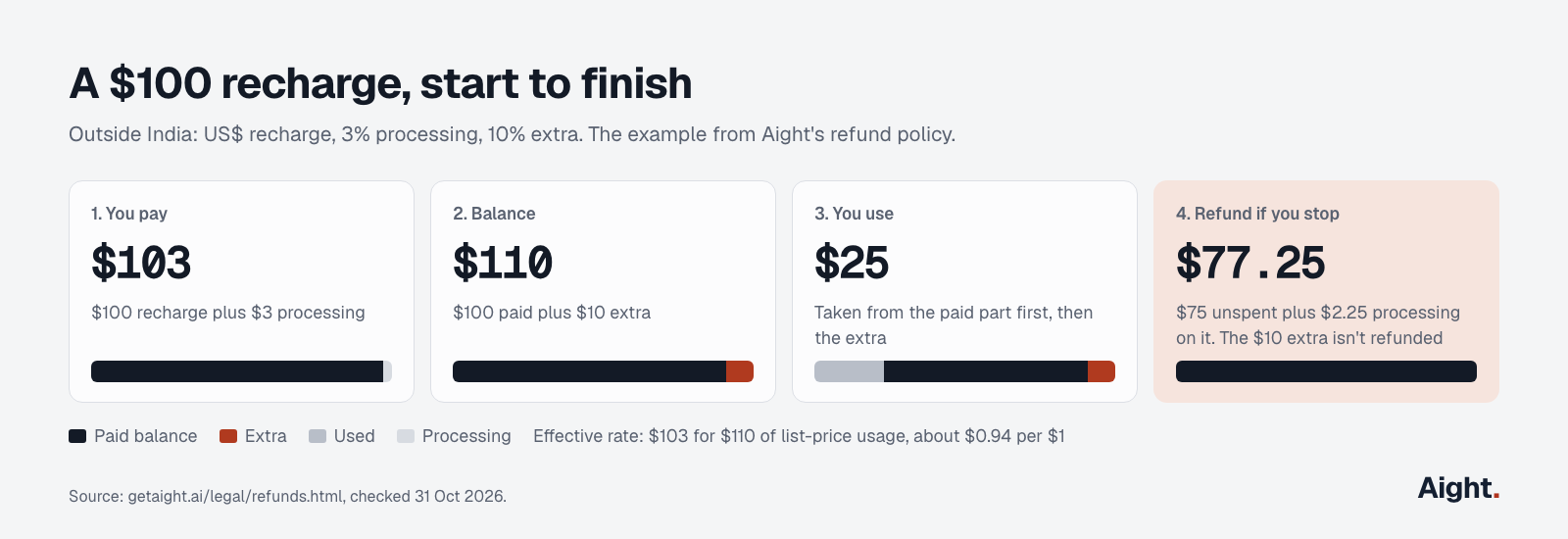
Recharge $100 and pay $103 with the 3% processing charge. You get $110 of balance: $100 paid and $10 extra. Requests use the paid part first, then the extra. Per dollar of list-price usage, that works out to about $0.94.
The balance never expires. If you stop using it, unspent paid balance is refunded to the original payment method at the original rate, including the 3% on that money. In the example, after $25 of use the refund is $77.25: $75 of unspent balance plus $2.25 of processing. The $10 extra isn't refunded. There's no subscription and no monthly minimum.
Keeping spend under control
This is the section to send to a finance lead.
- Each key can have a monthly cap that resets on the 1st. When a key hits it, requests get a 403 with the code
key_cap_reached, and every other key keeps working. - You can set an expiry date, so a contractor, a trial or a demo gets a key that simply stops working on that day.
- A key can be limited to the models a project actually needs. Anything else returns a 403, so a forgotten script can't quietly start calling the most expensive model you have access to.
- An empty balance returns a 402 with the code
out_of_balance, never a 429, so retry logic can tell "out of money" from "slow down". - Keys are stored hashed and can't be read back. If one leaks, freeze it in the console, or email support with "key leaked" as the first words.
Handling errors, and falling back to another model
Aight puts its error code in the param field of the error body, so in the Python SDK it's e.param, not e.code. Branch on the status and that code, never on the message text:
| Status | Code | What it means | What to do |
|---|---|---|---|
| 401 | none | Missing or unknown API key | Check the Authorization header |
| 402 | out_of_balance | Balance is empty | Recharge. Don't retry automatically |
| 403 | key_cap_reached | The key hit its monthly cap | Raise the cap or use another key. It resets on the 1st |
| 403 | none | Key frozen or expired, or model not allowed for this key | Read the message, or call GET /v1/models |
| 429 | none | Too many requests for the key in one minute | Wait for Retry-After, then retry |
| 503 | balance_unverifiable | The balance couldn't be checked. The request wasn't run or charged | Retry after a few seconds |
The OpenAI SDKs already retry 429s and server errors twice by default. If you want a second model to take over when the first one keeps failing, a fallback loop looks like this:
from openai import APIStatusError, APITimeoutError

MODELS = ["claude-sonnet-5-5", "gpt-5.6-terra", "gemini-3.1-pro-preview"]

def complete(messages):
    for model in MODELS:
        try:
            return client.chat.completions.create(model=model, messages=messages)
        except APITimeoutError:
            continue
        except APIStatusError as e:
            if e.status_code == 402 or e.param == "key_cap_reached":
                raise  # out of balance or over the cap: another model won't help
            if e.status_code == 429 or e.status_code >= 500:
                continue
            raise
    raise RuntimeError("every model in MODELS failed")
If the key has an allowed-models list, every fallback model has to be on it, or the fallback gets a 403.
Every reply also carries a request ID. Log it. Requests that fail on Aight's side aren't charged, and if a charge looks wrong, support needs that ID to look into it.
What happens to your data
Prompts and outputs pass through Aight's servers only long enough to get the reply. They aren't written to disk or used for training. Aight keeps the metadata it needs for billing: time, key, model, token counts, cost and status, for one year after your last activity. Debug logging is off unless you ask for it, and then prompts and outputs are kept for 7 days.
Aight's own servers run in India. The model itself runs wherever the models page says, United States, Global or India.
What one key doesn't do
It's better to know these before you sign up than after.
- The documented API is three endpoints:
POST /v1/chat/completionswith streaming,POST /v1/embeddingsandGET /v1/models. Image and speech models are in the catalog, but no image-generation or audio endpoint is documented, so check the API reference before you plan around one. - Tools that only speak Anthropic's Messages API or OpenAI's Responses API won't work until they can be switched to Chat Completions. Most can, as the table above shows. Some coding agents can't.
- It isn't the lowest-priced way to buy every model. DeepSeek off-peak, for example, costs less direct. What you get instead is predictable terms: list prices on most models, 10% extra, refunds of unspent balance, at least 7 days' notice before a price rise, and at least 14 days' notice before a model is removed, where the provider allows it, with a named replacement.
If that fits, create an account and run the snippet above with your own prompt. If a model you need is missing, email hello@getaight.ai with its name.
Sources
- Aight, Models and pricing, Quickstart, API reference
- Aight, Terms, Refund policy, Enterprise and data handling
- Tool docs: openai-python, LangChain ChatOpenAI, LlamaIndex OpenAILike, Vercel AI SDK OpenAI provider, OpenAI Agents SDK models, Continue, Cline, Aider, Open WebUI, n8n OpenAI Chat Model
- Makers' compatibility notes: Anthropic OpenAI SDK compatibility, Gemini OpenAI compatibility
- Maker list prices: OpenAI, Anthropic, Google, xAI, DeepSeek
Prices and counts checked on 31 October 2026.