Two things send developers looking for help with Claude API billing. Either every request starts failing with this:
Your credit balance is too low to access the Anthropic API. Please go to Plans & Billing to upgrade or purchase credits.Or the card is declined when they try to buy more.
This post covers both, from Anthropic's help center and docs as of 31 October 2026, plus other ways to pay for Claude if the card keeps failing.
The short version:
- The balance belongs to one Console organization. A user with the Admin or Billing role buys more on the Billing page (
platform.claude.com/settings/billing), and it's usable right away. - If you've bought more and requests still fail, check for a spend cap. A tier's monthly cap returns a 429, and buying more doesn't clear it.
- Most declines come from the bank, not from Anthropic: a billing address that doesn't match, an unfinished 3-D Secure check, or a card that blocks this kind of charge.
How Claude API credits work
Claude API usage on Anthropic's own platform is prepaid. You buy a balance in the Claude Console, and each request is deducted from it at Anthropic's list prices. Organizations with an invoicing arrangement through Anthropic's sales team are billed monthly in arrears instead.
| Anthropic Console, prepaid | |
|---|---|
| Who can buy | Users with the Admin or Billing role |
| Where | Billing page in the Claude Console |
| When it's usable | Immediately after purchase |
| What it pays for | The API, the Console playground, and Claude Code run with an API key |
| What's charged | Successful requests only. A request that was on track to succeed is still charged if your client disconnects or times out |
| Expiry | One year from the purchase date. Anthropic won't extend it |
| Refunds | None. Purchases are non-refundable |
| Payment methods | Cards. ACH bank transfer only for accounts on monthly invoicing. No PayPal or Venmo |
| Tax | Set by the billing address on your card |
| Receipts | Emailed after each charge, subject "Your receipt from Anthropic", and listed under Invoice history |
The one-year expiry plus no refunds means a large purchase can simply lapse if your usage drops, so buy a few months ahead at most. Anthropic's terms add that a balance can't be moved to another organization and is lost if you close the account. The help pages don't state a minimum purchase amount.
Buying more, and setting up auto-reload
To buy by hand:
- Log in to the Console with the Admin or Billing role.
- Open the Billing page.
- Click Buy credits, enter the amount and confirm.
Auto-reload buys more automatically when the balance falls to a level you choose:
- On the Billing page, in the Credit balance section, click Set up auto-reload (it reads Manage auto-reload if it's already on).
- In When credit balance reaches, enter the level that triggers a purchase.
- In Bring credit balance back up to, enter the level to reload to.
- Click Turn on. If the balance is already at or below your trigger, the button reads Turn on and purchase, and your card is charged at once, plus applicable taxes.
Set the trigger to at least one busy day of spend. If a busy day costs $60, a trigger of $100 and a target of $300 means each reload charges about $200.
Don't treat auto-reload as a guarantee, though. It charges your card while nobody is at the keyboard. Anthropic's invoices come through Stripe, and Stripe's decline codes include authentication_required: the issuer wanted 3-D Secure, and for an off-session charge like this one, the customer may have to retry by hand. Anthropic doesn't say how a failed auto-reload is reported, so alert on the out-of-balance error itself (code below).
The error when the balance runs out
The message at the top of this post is the exact text Anthropic's docs give for an empty balance. In developer reports it arrives as HTTP 400 with the type invalid_request_error, so the Python SDK raises BadRequestError, the same class as a malformed request. "Plans & Billing" is an old name: the page is now Billing, at platform.claude.com/settings/billing. Claude Code shows a shorter version, Credit balance is too low.
If the Billing page shows money and you still get the error, check three things:
- Which organization the key belongs to. Every key and workspace in an organization draws from that organization's balance, so a key created in another organization can hit an empty balance while yours is full.
- Whether Claude Code is using an API key instead of your subscription. Per Anthropic's Claude Code docs, an
ANTHROPIC_API_KEYyou've approved overrides a Pro, Max, Ultra or Team login, and in non-interactive mode (claude -p) the key is always used when present. Run/status, unset the variable, and remove it from your shell profile. - Whether the Console has a problem. status.claude.com tracks the Console as its own component. If a charge went through and the balance didn't change, look there before you pay again.
Three limits that look like an empty balance
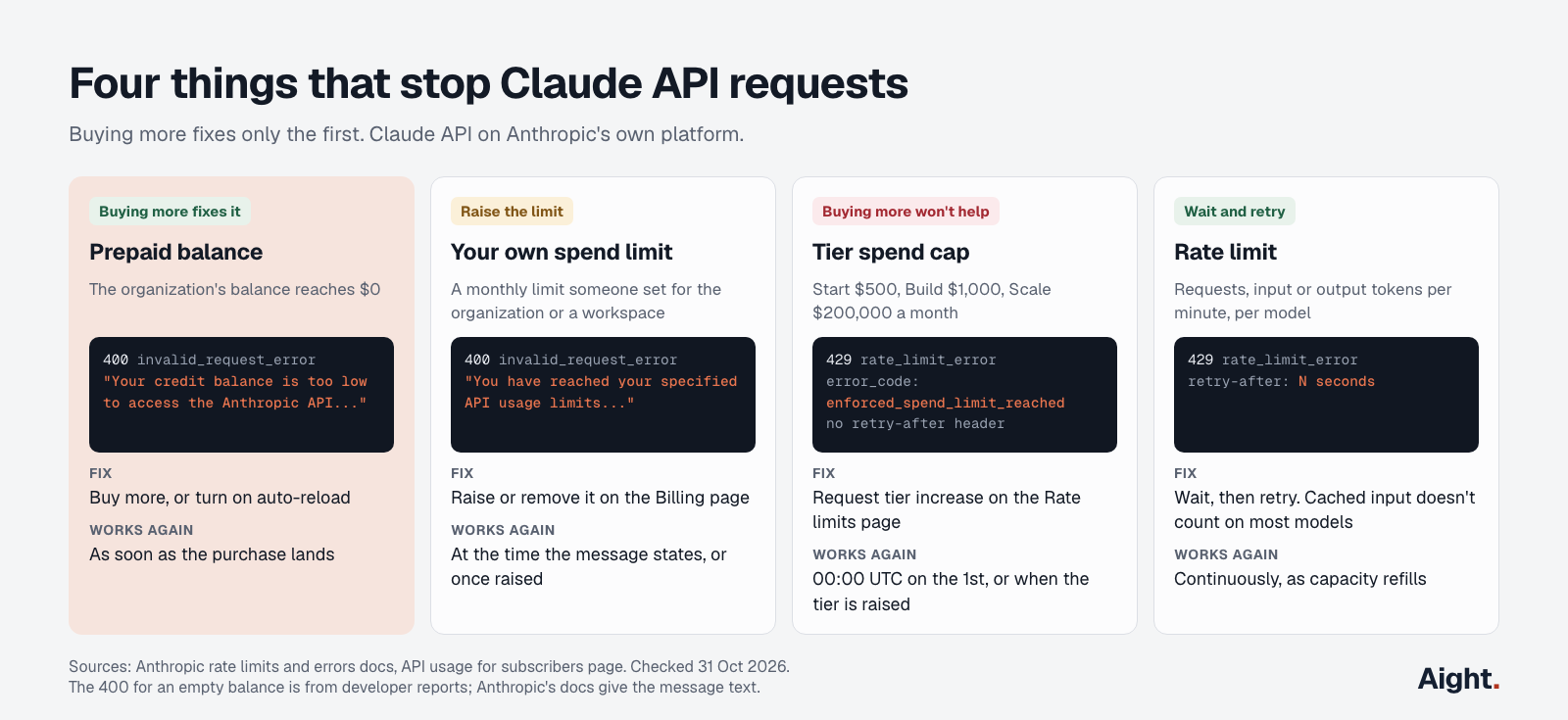
An organization can have money in its balance and still be blocked. Buying more fixes only the first of these:
| What you see | What it is | Fix |
|---|---|---|
400, Your credit balance is too low... | The prepaid balance is empty | Buy more, or turn on auto-reload |
400 invalid_request_error, message starts "You have reached your specified API usage limits" | A spend limit someone in your organization set, for the organization or a workspace | Raise or remove it on the Billing page |
429 rate_limit_error, error_code is enforced_spend_limit_reached, no retry-after header | Your usage tier's monthly spend cap | Use Request tier increase on the Rate limits page, or wait until 00:00 UTC on the 1st |
402 billing_error | A problem with your billing or payment information | Check the payment method on the Billing page |
429 with a retry-after header | An ordinary rate limit | Wait that many seconds, then retry |
The spend-cap response is the one that wastes the most time, because it has the same type as a rate limit. Here's the example from Anthropic's rate-limit docs:
{
  "type": "error",
  "error": {
    "type": "rate_limit_error",
    "message": "You have reached your API usage limits: your organization has crossed its monthly API usage threshold, set based on your organization's API tier. You will regain access on 2026-09-01 at 00:00 UTC.",
    "details": { "error_code": "enforced_spend_limit_reached" }
  },
  "request_id": "req_018EeWyXxfu5pfWkrYcMdjWG"
}
The SDKs retry 429s on their own, twice by default. For this one, Anthropic says retrying, "including the SDK's automatic retries", fails until access resumes.
Catching billing errors in code
Anthropic recommends branching on the SDK's typed errors rather than message text. For these cases you need both: the empty-balance error and your own spend limit are both 400s with no code of their own, so the message is the only way to tell them apart from a bad request. This works with anthropic 2.3.0, the Python SDK release of 23 October:
import logging

import anthropic

client = anthropic.Anthropic()

def billing_block(e: anthropic.APIStatusError) -> str | None:
    """Say why a request was refused for money reasons, or None if it wasn't."""
    error = e.body.get("error", {}) if isinstance(e.body, dict) else {}
    message = error.get("message", "").lower()
    code = (error.get("details") or {}).get("error_code")

    if code == "enforced_spend_limit_reached":
        return "tier spend cap: request a tier increase, buying more won't help"
    if e.type == "billing_error":
        return "billing problem: check the payment method in the Console"
    if "credit balance is too low" in message:
        return "balance is empty: buy more and check auto-reload"
    if "reached your specified" in message:
        return "your own spend limit: raise it on the Billing page"
    return None

try:
    reply = client.messages.create(
        model="claude-sonnet-5-5",
        max_tokens=4096,  # thinking is on by default on Sonnet 5.5 and counts toward this
        messages=[{"role": "user", "content": "Summarize this support ticket in one line: ..."}],
    )
    print("".join(b.text for b in reply.content if b.type == "text"))
except anthropic.APIStatusError as e:
    reason = billing_block(e)
    if reason:
        # Retrying won't fix any of these. Page a person instead.
        logging.error("Claude API blocked (request %s): %s", e.request_id, reason)
    raise
Log e.request_id with it. Anthropic's errors guide asks for it when you contact support. Most other 400s are a problem with the request itself, such as the temperature change in API version 2026-10-21.
Usage tiers: no deposit moves you up
Many guides still say you reach a higher rate-limit tier by buying more. That's out of date. Anthropic's help center now says tiers are assigned automatically and "There's no deposit or purchase that moves you up."
| Tier | How you get there | Monthly spend cap | Sonnet 5.5, Opus 5.5, Haiku 5.5 (RPM / input TPM / output TPM) |
|---|---|---|---|
| Evaluation | New organizations with little usage history | Not published | Below Start |
| Start | Automatic | $500 | 4,000 / 2,000,000 / 400,000 |
| Build | Automatic, or on request | $1,000 | 10,000 / 5,000,000 / 1,000,000 |
| Scale | Automatic, or on request | $200,000 | 13,000 / 10,000,000 / 2,000,000 |
| Custom | Arranged with sales | None | Arranged |
You can request higher limits on the Console's Rate limits page once you're using at least 50% of your current ones. A spend limit you set yourself can't be higher than your tier's cap.
The Start cap is low enough to matter. At $20 a day it runs out on day 25 of the month, and every request then fails until the 1st unless the tier is raised.
Why the card was declined
Anthropic says it doesn't get detailed reasons from the banks that issue cards, so the decline screen won't tell you much. Its help article and Stripe's decline documentation point to a short list.
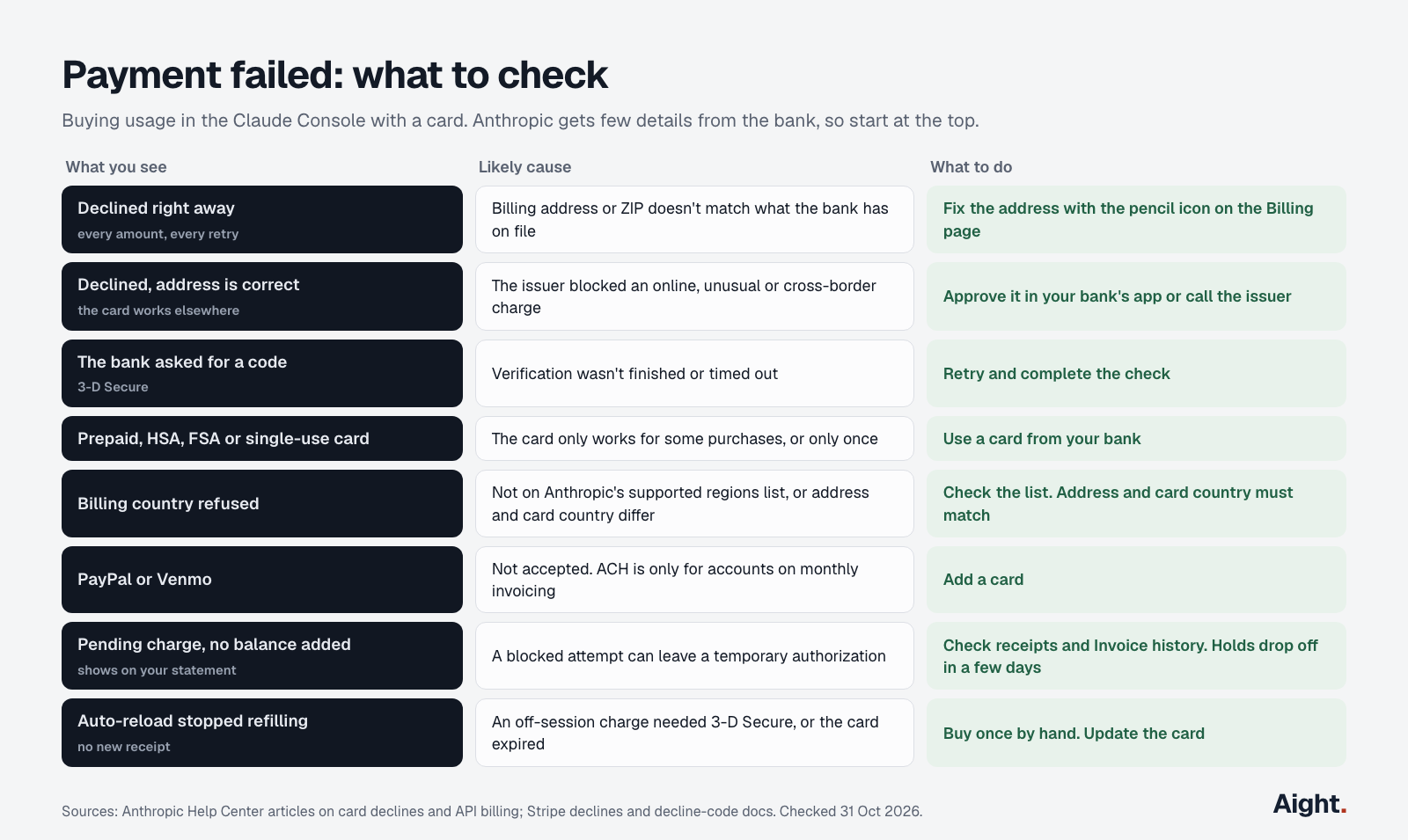
- The billing address on the card doesn't match what your bank has on file. Anthropic says "even minor discrepancies" such as a missing accent or a misspelled street can cause a decline. Stripe adds that a wrong postal code is its own decline reason (
incorrect_zip). Fix it with the pencil icon next to your payment method on the Billing page. - The billing location isn't supported. The card's billing address and its country of origin have to be on Anthropic's list of supported regions, and they have to match each other.
- 3-D Secure wasn't completed. If your bank sends a one-time code or asks you to approve the charge in its app, finish that step and try again.
- The payment method isn't accepted. Anthropic takes cards. ACH bank transfer is only for accounts on monthly invoicing. PayPal and Venmo aren't accepted.
- The card can't cover it. That's not enough funds, or a per-transaction or monthly limit on the card (Stripe's
card_velocity_exceeded). - The issuer blocked the charge. Stripe says issuers weigh spending habits and card details, some block purchases from other countries, and some cards (HSA and FSA cards, for example) only work at certain merchants. Anthropic doesn't mention prepaid cards, so if one fails, try a card from your bank. A single-use virtual number can't be charged twice, so it won't work for auto-reload.
If your statement shows a pending charge but your balance didn't change, don't pay again yet. Stripe says that when it blocks a payment, some cards still show the authorization on the statement, and the issuer typically removes it within a few days. Check your email for a receipt and the Billing page's Invoice history first.
When none of that explains it, Anthropic's advice is to retry later (temporary network problems cause some declines), try another payment method, and call your bank, which is the only party that can tell you the actual reason. Then contact Anthropic support.
Paying for Claude without a card in the Console
If the card keeps failing, there are other routes to the same models.
| Route | Who bills you | Prepaid balance? | Prices |
|---|---|---|---|
| Claude Max, Ultra or Team plan | Anthropic, through the plan you already pay for | Included monthly usage | Claude API list prices |
| Claude Platform on AWS | AWS Marketplace, monthly | No | Claude API list prices, metered in units of $0.01 |
| Amazon Bedrock | AWS | No | AWS's prices |
| Claude Models on Google Cloud (Anthropic managed) | Google Cloud Marketplace | No | Claude API list prices, metered in units of $0.01 |
| Claude Models on Google Cloud (Google managed) | Google Cloud | No | Google Cloud's prices |
| Microsoft Foundry | Azure Marketplace, monthly | No | Claude API list prices, metered in units of $0.01 |
| Aight | Aight, prepaid in US$ | Yes | Claude API list prices |
Max, Ultra and Team plans now include monthly Claude API usage: $100 a month on Max, $200 on Ultra, and on Team $20 per Standard seat and $100 per Premium seat, pooled and capped at $500. You claim it on claude.ai by linking a Console organization after seven days on the plan, and no card is needed in the Console. It's spent before anything you've bought, expires at the end of each billing cycle, and doesn't cover interactive Claude Code sessions.
The cloud routes put Claude on a bill your finance team already pays. Claude Platform on AWS and the Anthropic-managed Google Cloud option are run by Anthropic and use the Claude API itself, and new Claude Platform on AWS organizations start on the Start tier. Amazon Bedrock and Google Cloud's Agent Platform (formerly Vertex AI) are run by AWS and Google, which set their own prices. On Bedrock, regional endpoints cost 10% more than global ones. Larger teams can also ask Anthropic's sales team for monthly invoicing.
Paying for Claude from an Aight balance
Aight sells Claude through one OpenAI-compatible API, paid from a prepaid US dollar balance that's shared with GPT, Gemini, DeepSeek, Grok and the rest of its 126 models. Claude is at Anthropic's list prices, per million tokens, input / output:
| Model | Anthropic list price | Aight price |
|---|---|---|
| claude-haiku-4-5 | $1.00 / $5.00 | $1.00 / $5.00 |
| claude-sonnet-5-5 | $2.00 / $10.00 | $2.00 / $10.00 |
| claude-opus-5-5 | $4.00 / $20.00 | $4.00 / $20.00 |
| claude-fable-5-1 | $10.00 / $50.00 | $10.00 / $50.00 |
Outside India, recharges are in US dollars from $5, plus a 3% processing charge, and every recharge adds 10% extra. A $100 recharge costs $103 and adds $110 of balance, about $0.94 per $1 of list-price usage. The balance doesn't expire, and unspent paid balance can be refunded at the original rate, including the 3% (the extra isn't refunded). That's the main difference from Anthropic's terms, where a purchase expires after a year and isn't refundable.
Each key can have a monthly cap, an expiry date and a list of allowed models. An empty balance always returns a 402 with out_of_balance in the error body's param field, so code can branch on it without reading the message:
import os

from openai import APIStatusError, OpenAI

client = OpenAI(
    base_url="https://api.getaight.ai/v1",
    api_key=os.environ["AIGHT_API_KEY"],
)

try:
    reply = client.chat.completions.create(
        model="claude-sonnet-5-5",
        messages=[{"role": "user", "content": "Summarize this support ticket in one line: ..."}],
    )
    print(reply.choices[0].message.content)
except APIStatusError as e:
    if e.status_code == 402:  # param is "out_of_balance": recharge, don't retry
        raise SystemExit("Aight balance is empty")
    if e.status_code == 403 and e.param == "key_cap_reached":
        raise SystemExit("This key hit its monthly cap, which resets on the 1st")
    raise
The trade-offs, plainly:
- Aight documents only the OpenAI-compatible Chat Completions route. For the full feature set, including PDF processing, citations, thinking and prompt caching, Anthropic points you to its native API, and the Message Batches API's 50% discount isn't available through Aight. For batch or cache-heavy workloads, going direct costs less.
- Claude Code talks to Anthropic's Messages format (or Bedrock's or Google Cloud's), which Aight doesn't document. Aight is not a fix for a Claude Code balance error.
- Aight doesn't list Claude Haiku 5.5, which Anthropic sells at $0.10 / $0.50 for prompts up to 100,000 tokens. If Haiku 5.5 handles your task, buy it direct.
- Payments go to Ashva Intelligence Pvt Ltd, a company in India, and that's the name on your statement. Your bank sees a merchant outside the US, so allow international online payments on the card first, and check whether your card adds a foreign transaction fee.
- Aight's own servers are in India. Claude is tagged Global on the models page, and prompts and outputs aren't stored.
Where it fits: you call Claude through Chat Completions alongside other models, you want per-key caps and a balance that doesn't expire, and you don't depend on Anthropic-only features. The one-key guide covers setup, and the aggregator comparison shows where other gateways cost less.
Whichever way you pay, wire the out-of-balance error into your alerting. A failed payment at 2 am is a billing chore. Finding out from users at 9 am is an outage.
Sources
- Anthropic Help Center, paying for Claude API usage: prepaid billing, buying, auto-reload labels, expiry, refunds, invoicing, payment method updates
- Anthropic Help Center, card declines: causes and what to try
- Anthropic Help Center, Claude API invoices, billing address and tax, higher rate limits (no deposit moves you up), rate-limit approach, monthly API usage on Max, Ultra and Team plans
- Anthropic, supplemental terms for prepaid usage and supported regions
- Anthropic docs, Errors, Rate limits: tiers, spend caps, spend-cap error, own spend limits
- Anthropic docs, API usage for subscribers: the exact out-of-balance message
- Anthropic docs, Pricing, Models overview, OpenAI SDK compatibility
- Anthropic docs, Claude Platform on AWS, Claude in Amazon Bedrock, Claude Models on Google Cloud
- Claude Code docs, Errors, Authentication, Gateway API formats
- Anthropic, Python SDK error classes; developer report of the 400 response
- Stripe, Declines, Card declines, Decline codes
- Aight, Models and pricing, API reference, Terms, Refunds
Checked on 31 October 2026.