You can't put a spending limit on a single OpenAI API key. As of 31 October 2026, every OpenAI spending limit that stops requests is set on an organization or a project. A key gets the limits of the project it belongs to, and two keys in the same project share one limit.
What has changed is that those limits now stop traffic. OpenAI added hard spend limits for organizations and projects on 22 July 2026. In the months before that, the monthly amount you could set on a project only triggered an email, which is why so many forum answers still say OpenAI can't cap spend at all.
So the practical answer looks like this:
- Give each app, environment or person its own project, and turn on a hard spend limit for it. Once the project reaches the limit, requests fail with a 429 and the code
project_spend_limit_exceeded. - Expect a small overshoot. OpenAI says enforcement "is not instantaneous", so recorded spend can end up slightly above the limit.
- Use project rate limits to decide how fast a runaway job can spend, and key expiry dates and permissions to decide how long and where a key works.
Below: what each control does, why spend runs past it, a script that sets all of it up through the Admin API, and how per-key caps work on Aight if you'd rather not run a project per key.
What changed in 2026
Most of these controls are new this year, so older advice is often wrong. From OpenAI's changelog:
| Date | Change |
|---|---|
| 26 May 2026 | Admin API support for spend alerts and project model allowlists |
| 22 Jul 2026 | Hard spend limits for organizations and projects |
| 4 Aug 2026 | Usage and Costs dashboards and APIs can group by API key |
| 10 Sep 2026 | Expiry dates on project API keys, and a maximum key lifetime per organization or project |
| 15 Sep 2026 | Admins can restrict which kinds of API keys can be created |
| 6 Oct 2026 | Usage tiers cut from five to three: Build, Launch and Grow |
None of these put a money limit on an individual key. You can now see what each key spent, but you can only stop the spending at the project or organization level.
Where each limit lives
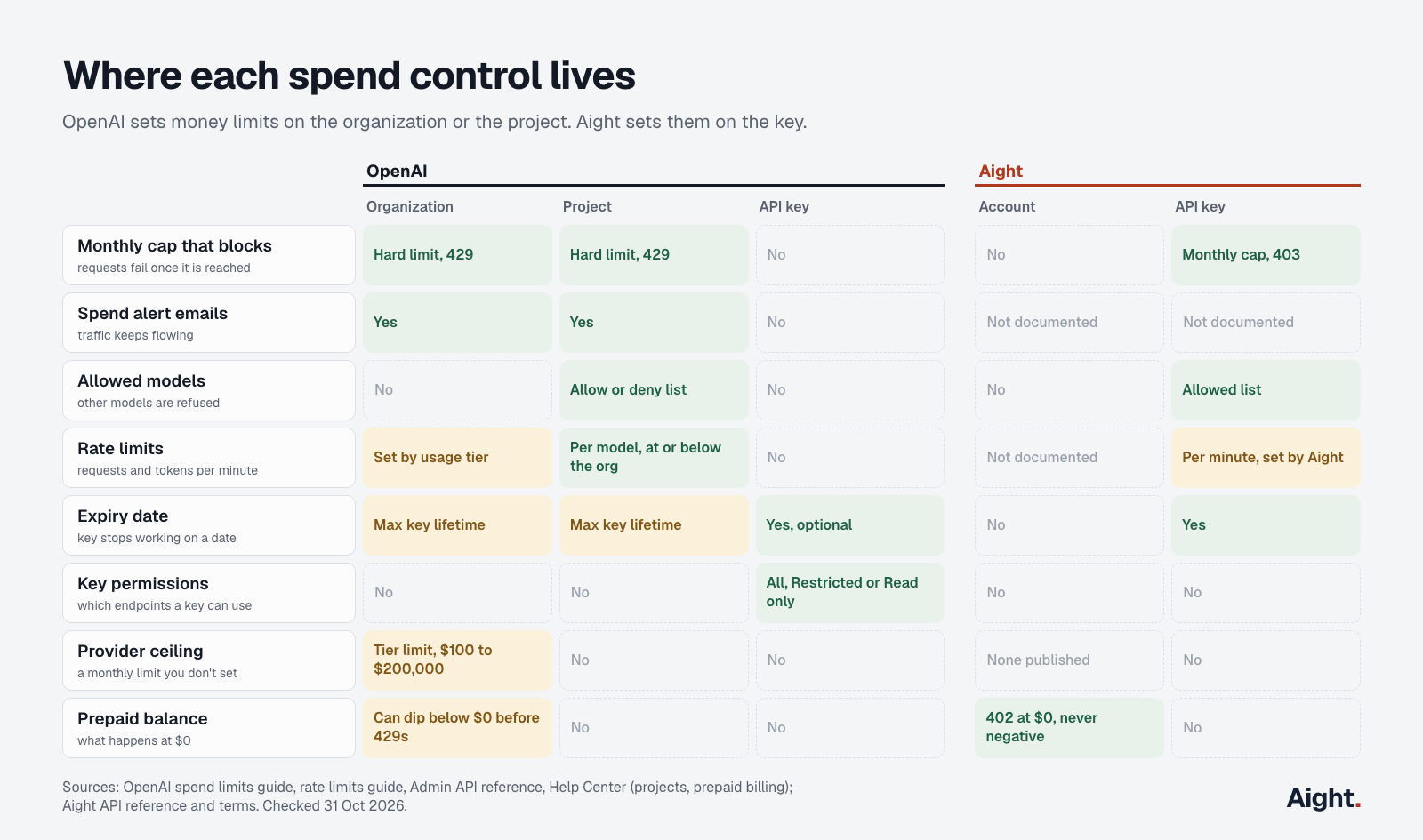
| Control | OpenAI | Aight |
|---|---|---|
| Monthly limit that blocks requests | Organization or project (hard spend limit, 429) | Per key (monthly cap, 403) |
| Spend alert emails | Organization or project | Not documented |
| Allowed models | Project (allowlist or denylist) | Per key |
| Rate limits | Organization (by usage tier) and project (per model) | Per key, per minute, set by Aight |
| Expiry date | Per key, optional; maximum lifetime per organization or project | Per key |
| Key permissions | Per key: All, Restricted or Read only | None |
| Ceiling set by the provider | Organization, by usage tier | None published |
| Prepaid balance | Organization; can dip below $0 | Account; requests stop at $0 |
Two OpenAI details catch people out. A monthly spend limit blocks nothing unless you also turn on "Enforce a hard limit". Without that switch it only tracks spending. And the per-key settings that do exist, expiry and permissions, control what a key can reach and for how long, not how much it can spend.
What happens when each limit is hit
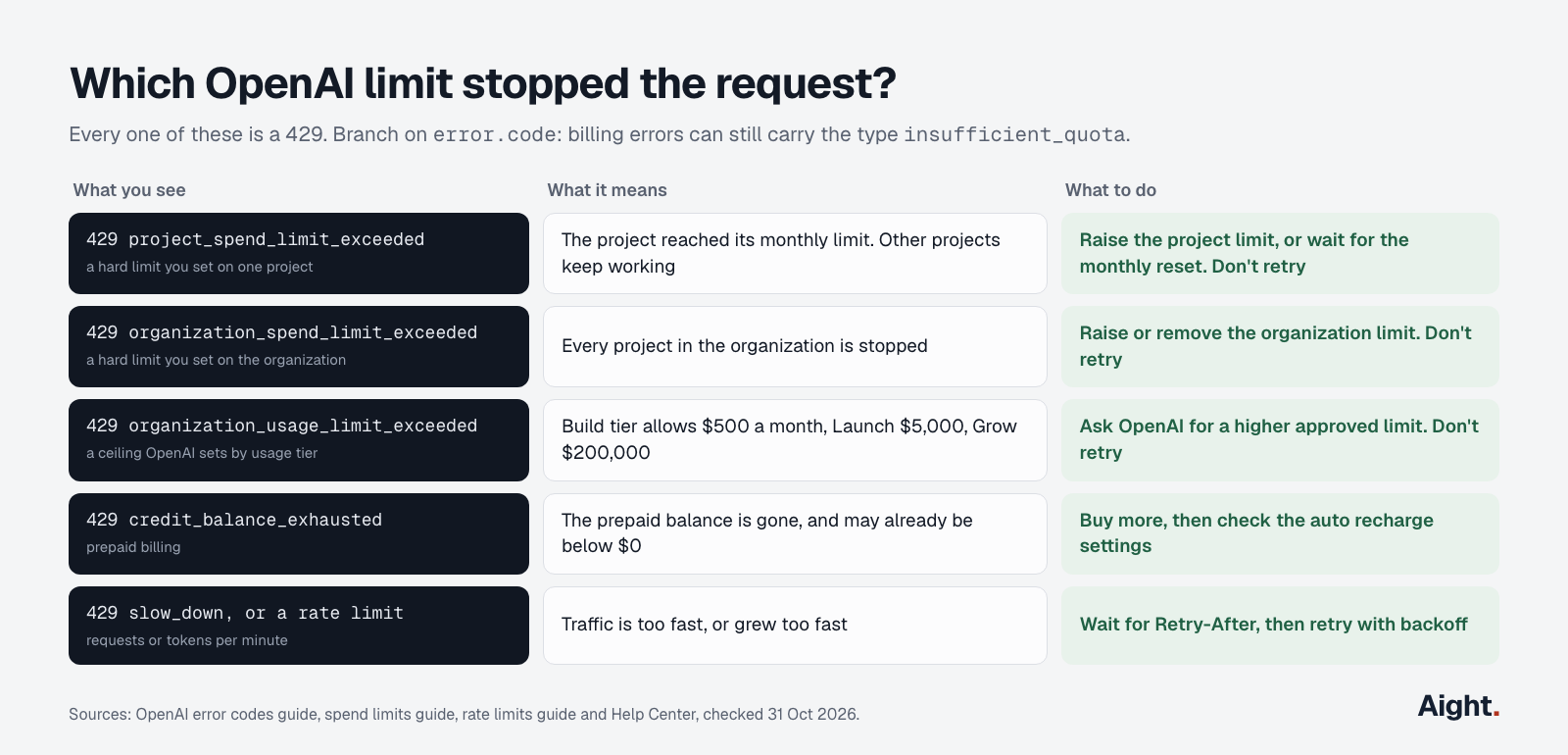
Every OpenAI limit that blocks a request returns HTTP 429, the same status as an ordinary rate limit. The code field in the error body is the only reliable way to tell them apart. OpenAI's error guide adds that billing errors can still carry the broader type insufficient_quota, so code that only checks type lumps them together.
| Limit | Who sets it | What happens | Error code |
|---|---|---|---|
| Spend alert | You | An email; traffic continues | None |
| Project hard spend limit | You | 429 for that project only | project_spend_limit_exceeded |
| Organization hard spend limit | You | 429 for every project | organization_spend_limit_exceeded |
| Approved usage limit | OpenAI, by tier | 429 for the whole organization | organization_usage_limit_exceeded |
| Prepaid balance at zero | You, by how much you buy | 429 for the whole organization, after a delay | credit_balance_exhausted |
| Rate limits | OpenAI, and you per project | 429 until the limit resets | A rate limit error, or slow_down |
The approved usage limit is the one people forget. OpenAI gives every organization a monthly ceiling based on its usage tier, separate from anything you configure:
| Tier | How you qualify | Monthly usage limit |
|---|---|---|
| Free | Be in a supported country | $100 |
| Build | $5 in total purchases | $500 |
| Launch | $100 in total purchases | $5,000 |
| Grow | $500 in total purchases | $200,000 |
Your own limits and OpenAI's stack, and the lower one stops you first. A team on the Build tier with a $2,000 organization limit will hit OpenAI's $500 ceiling long before its own.
A hard spend limit resets "with the next monthly cycle", in OpenAI's words, or sooner if someone raises or removes it and the change propagates. Retrying doesn't help. Neither does buying more prepaid balance, unless the code says the balance is what ran out.
Why spend runs past a limit
A hard limit is a backstop, not a guarantee to the cent. Four things let spend overshoot:
- Enforcement lags. OpenAI's spend limits guide says the platform "can process a small amount of extra usage while the limit state propagates". It doesn't say how long that takes.
- The prepaid balance isn't a cutoff either. OpenAI's billing help page says API access may not stop immediately when the balance runs out, and usage processed in the meantime shows up as a negative balance, taken from your next purchase. Its advice is not to rely on the prepaid balance as a spending cutoff.
- Auto recharge refills the balance. When you first set up prepaid billing, auto recharge is on by default. It buys more whenever the balance falls below your threshold, so the balance stops nothing unless you turn auto recharge off or set its optional monthly recharge limit. Even that limit only caps automatic purchases. OpenAI notes that it isn't an API usage limit.
- Your own monitoring lags. The Costs API reports spend in daily buckets only, and OpenAI doesn't publish how soon a request's cost appears in it. A script that polls every 15 minutes is only as current as that data.
Retries make a hard limit look softer than it is. All of these errors are 429s, and the Python SDK retries a 429 twice by default unless the response tells it not to. A retry wrapper such as tenacity, set to retry RateLimitError, will keep going at a project that is already capped, and the logs fill up with what looks like rate limiting while the real problem is a spend limit.
Rate limits decide how far it overshoots
Because enforcement isn't immediate, the overshoot depends on how fast the project can spend in that window. Rate limits set that speed, and a project rate limit is the only OpenAI control you set that works per minute rather than per month.
Tokens per minute (TPM) put a ceiling on spend per minute. The worst case is every token billed at the output price. With gpt-6.1-sol at $2.00 / $10.00 per million tokens and gpt-6-luna at $0.10 / $0.50:
| Model and TPM limit | Mostly input (90% in, 10% out) | Worst case (all output) |
|---|---|---|
| gpt-6-luna at 2M TPM (Build tier) | $16.80 an hour | $60 an hour |
| gpt-6.1-sol at 100K TPM (set by you) | $16.80 an hour | $60 an hour |
| gpt-6.1-sol at 1M TPM (Build tier) | $168 an hour | $600 an hour |
| gpt-6.1-sol at 4M TPM (Launch tier) | $672 an hour | $2,400 an hour |
| gpt-6.1-sol at 40M TPM (Grow tier) | $6,720 an hour | $24,000 an hour |
These are ceilings, not predictions, at short-context prices with no cached input. They show why the gap between "limit reached" and "429s start" matters far more on a Grow organization than on Build. If a project only needs 100,000 TPM, set its limit there, and a runaway loop can't burn more than about $1 a minute on gpt-6.1-sol, however long anyone takes to notice.
Project rate limits are set per model on the project's Limits page or through the Admin API, and can't go above what the organization has.
Give every key its own project
This is as close as OpenAI gets to a per-key hard cap. One project per app, environment or person, each with:
- A hard spend limit, with "Enforce a hard limit" turned on.
- A spend alert below it. Creating a project spend limit also adds an alert at 100% by default. Add one at 75% or 80% so someone hears about it before the 429s start.
- A model allowlist, so a leaked key can't be pointed at the most expensive model your organization can use.
- Rate limits sized to the job, which caps the overshoot as shown above.
- One service account key with an expiry date, instead of personal keys that stay valid after someone leaves.
- An organization hard limit above the sum of the project limits, as the last stop. It halts every project when reached, so leave headroom.
An organization can have up to 2,000 projects by default, so one per key is realistic for most teams. Two catches. Projects can't be deleted, only archived, and archiving is permanent. And every key in a project shares its limit: if a teammate adds a second key, the "per-key" cap is per-project again. The key creation controls added on 15 September make that rarer: allow only service-account keys, which need service-account management permissions to create.
Doing this by hand gets old quickly. The Admin API covers all of it. This uses the openai Python SDK (3.42.0) and an Admin API key, which works only on administration endpoints:
import os
from openai import OpenAI

client = OpenAI(admin_api_key=os.environ["OPENAI_ADMIN_KEY"])
projects = client.admin.organization.projects


def capped_key(name, monthly_cap_usd, models, days_valid, alert_email):
    project = projects.create(name=name)
    cap_cents = int(monthly_cap_usd * 100)

    # Hard monthly cap: requests get a 429 once tracked spend reaches it
    projects.spend_limit.update(
        project.id, threshold_amount=cap_cents, currency="USD", interval="month"
    )
    # Email at 80% so someone hears about it before the 429s start
    projects.spend_alerts.create(
        project.id,
        threshold_amount=int(cap_cents * 0.8),
        currency="USD",
        interval="month",
        notification_channel={"type": "email", "recipients": [alert_email]},
    )
    # Only these models; requests for anything else are rejected
    projects.model_permissions.update(project.id, mode="allow_list", model_ids=models)

    # A service account whose key stops working after days_valid days
    account = projects.service_accounts.create(
        project.id, name=f"{name}-svc", expires_in_seconds=days_valid * 86400
    )
    return project.id, account.api_key.value


project_id, key = capped_key(
    "support-bot-prod", 200, ["gpt-6-luna", "gpt-6.1-sol"], 90, "ops@example.com"
)
print(project_id)  # store key in your secret manager, never in code
The secret comes back once, in account.api_key.value. An Admin API key can do all of this and more across the whole organization, so keep OPENAI_ADMIN_KEY off application servers.
With curl, the hard limit is a single call. threshold_amount is in cents, so 20000 is $200:
curl -X POST https://api.openai.com/v1/organization/projects/$PROJECT_ID/spend_limit \
  -H "Authorization: Bearer $OPENAI_ADMIN_KEY" \
  -H "Content-Type: application/json" \
  -d '{"threshold_amount": 20000, "currency": "USD", "interval": "month"}'
Developers report that a request for a model outside the allowlist fails with a 403 model_not_found, not a 429. The post on OpenAI's "model not found" errors covers what that error looks like and how to tell it apart from a retired model.
Watch spend per key with the Costs API
If several keys have to share a project, you can still watch each one. Since 4 August the Costs API can group by api_key_id. This script totals month-to-date cost per key, warns at 80% of a cap you choose, and deletes the key at 100%:
import os
from datetime import datetime, timezone
from openai import OpenAI

client = OpenAI(admin_api_key=os.environ["OPENAI_ADMIN_KEY"])

CAPS = {"key_abc123": 50.00, "key_def456": 200.00}  # API key ID -> your monthly cap, US$
WARN_AT = 0.8
REVOKE_AT = 1.0  # set to None to only warn


def cost_by_key_this_month():
    now = datetime.now(timezone.utc)
    start = int(datetime(now.year, now.month, 1, tzinfo=timezone.utc).timestamp())
    totals, page = {}, None
    while True:
        kwargs = {"page": page} if page else {}
        resp = client.admin.organization.usage.costs(
            start_time=start, group_by=["project_id", "api_key_id"], limit=31, **kwargs
        )
        for bucket in resp.data:
            for r in bucket.results:
                if r.api_key_id and r.amount:
                    key = (r.project_id, r.api_key_id)
                    totals[key] = totals.get(key, 0.0) + (r.amount.value or 0.0)
        if not resp.has_more:
            return totals
        page = resp.next_page


for (project_id, key_id), spent in cost_by_key_this_month().items():
    cap = CAPS.get(key_id)
    if cap is None or spent < cap * WARN_AT:
        continue
    print(f"{key_id} in {project_id}: ${spent:.2f} of ${cap:.2f} this month")
    if REVOKE_AT and spent >= cap * REVOKE_AT:
        client.admin.organization.projects.api_keys.delete(key_id, project_id=project_id)
        print(f"deleted {key_id}")
Run it on a schedule, every 15 minutes or so, and send the warning somewhere people read instead of printing it. Two caveats. The Costs API works in daily buckets in UTC and OpenAI doesn't say how fresh they are, so this reacts more slowly than a project hard limit. And deleting a key can't be undone: whatever uses it fails until it gets a new one. Set REVOKE_AT = None if you only want the warning.
Handle the 429 without retrying it
Whatever stops the spending, your code has to tell a billing 429 from a rate limit: retry the second, stop on the first. OpenAI's rate limit guide says to turn off SDK retries if you run your own, so the two don't multiply:
import os
import random
import time
from openai import OpenAI, InternalServerError, RateLimitError

client = OpenAI(api_key=os.environ["OPENAI_API_KEY"], max_retries=0)  # retries happen below

STOP_CODES = {
    "project_spend_limit_exceeded",
    "organization_spend_limit_exceeded",
    "organization_usage_limit_exceeded",
    "credit_balance_exhausted",
    "usage_limit_exceeded",  # generic billing code listed in OpenAI's Agents API errors
}


class SpendStop(Exception):
    """A billing limit, not a rate limit. Retrying won't help."""


def ask(messages, model="gpt-6-luna", attempts=5):
    for attempt in range(attempts):
        try:
            return client.chat.completions.create(model=model, messages=messages)
        except (RateLimitError, InternalServerError) as e:  # 429 and 5xx
            if e.code in STOP_CODES:
                raise SpendStop(e.code) from e
            wait = e.response.headers.get("retry-after")
            delay = float(wait) if wait else 2**attempt
            time.sleep(delay + random.random())
    raise RuntimeError(f"still failing after {attempts} attempts")
When SpendStop fires, page a person, fail the job or switch to a fallback, but don't loop.
Per-key caps on Aight
Aight is one OpenAI-compatible API for 126 models from 16 makers, OpenAI's among them. Its spending controls sit on the key itself, which is the thing this post's title asks for. When you create a key in the console, you can set:
- A monthly cap. Once the key reaches it, requests return 403 with the code
key_cap_reached. The cap resets on the 1st of each month. - An expiry date, after which the key stops working.
- A list of allowed models. Requests for any other model return 403, and
GET /v1/modelslists what the key can call.
Ten keys means ten caps, with no projects to create or archive. The account's prepaid balance sits above them: when it reaches zero, every key gets a 402 out_of_balance, and Aight's terms say an account never goes into debt. A leaked key can spend at most its remaining cap or the remaining balance, whichever is smaller.
Neither error is a 429, so retry logic can't confuse them with rate limiting. Aight puts its error code in the param field of the error body, not code:
import os
from openai import OpenAI, APIStatusError, PermissionDeniedError

client = OpenAI(
    base_url="https://api.getaight.ai/v1",
    api_key=os.environ["AIGHT_API_KEY"],
)


class KeyCapReached(Exception):
    pass


class BalanceEmpty(Exception):
    pass


def ask(messages, model="gpt-6-luna"):
    try:
        return client.chat.completions.create(model=model, messages=messages)
    except PermissionDeniedError as e:  # 403
        if e.param == "key_cap_reached":
            raise KeyCapReached("monthly cap reached; resets on the 1st") from e
        raise  # frozen or expired key, model not allowed, or account on hold
    except APIStatusError as e:
        if e.status_code == 402:  # param == "out_of_balance"
            raise BalanceEmpty("balance is empty; every key is stopped") from e
        raise
The SDK's default retries can stay on here. They already do what Aight's API reference asks for a 429 (too many requests for the key in one minute, so wait for Retry-After) and for a 503 balance_unverifiable (not run or charged, so retry after a few seconds). A 402 or 403 is never retried.
The gaps, plainly:
- Aight's docs don't say whether a long request that is already running stops when the cap is crossed, so leave a small margin, as with OpenAI.
- Aight doesn't document spend alert emails or a usage API. You check spend in the console.
- The documented endpoints are Chat Completions (with streaming), embeddings and the model list. If you need OpenAI's Responses API, Batch API or Admin API, keep that work on OpenAI.
- OpenAI models on Aight run on Microsoft Azure, tagged Global on the models page, at OpenAI's list prices: gpt-6-luna at $0.10 / $0.50 and gpt-6.1-sol at $2.00 / $10.00 for prompts up to 272K tokens. Outside India a recharge carries a 3% processing fee and adds 10% extra, so $103 buys $110 of balance, about $0.94 per $1 of list-price usage. Work that can wait for OpenAI's Batch API at half price still costs less on OpenAI directly. The OpenAI cost post has the numbers.
One more difference matters for anyone holding a large prepaid balance. OpenAI's purchased prepaid balance expires after a year and is non-refundable except in narrow cases. Aight's balance doesn't expire, and unspent paid balance is refundable (the 10% extra isn't).
Which setup fits
- If all your traffic is OpenAI and you run a handful of apps, use OpenAI projects with hard limits, alerts and project rate limits. It costs nothing extra, and the script above sets up a project in seconds.
- If you need dozens of capped keys, one per customer, contractor or CI job, or keys that also call Claude and Gemini, a cap on each key is less work than a project per key. That is what Aight is for, and one key for every model covers the setup.
- Either way, keep an organization-wide stop above everything, size rate limits to the job, and make your code treat a billing error as a stop sign rather than something to retry.
Test it before you need it. Set a $1 hard limit on a scratch project, run a loop against it, note which error comes back, and check the Costs API the next day to see how far past $1 the spend went. That number tells you how much margin to leave on the real ones.
Sources
- OpenAI, Spend limits: alerts versus hard limits, error codes, enforcement delay, reset
- OpenAI, Rate limits: usage tiers, monthly usage limits, TPM limits by tier, retry guidance
- OpenAI, Error codes: billing 429 codes and
insufficient_quota - OpenAI, Changelog: dates of hard spend limits, per-key reporting, key expiry, key creation controls, tier changes
- OpenAI, Production best practices and Admin APIs: key expiry, maximum key lifetime, key creation controls, model allowlists, SDK versions
- OpenAI API reference: project spend limit, project API keys, Costs
- OpenAI, Pricing: gpt-6.1-sol and gpt-6-luna
- OpenAI Help Center, Setting up and managing prepaid API billing, Troubleshooting API usage and spend limits, Managing projects in the API platform, Best practices for API key safety
- OpenAI developer forum, request for API-key specific spending limits (February 2026)
- openai-python 3.42.0: Admin API methods, error attributes and default retry behavior
- Aight, API reference, Models and pricing, Terms and Refunds
Checked on 31 October 2026.