Yes, Claude Code runs on Ollama. An Ollama Claude Code setup takes three steps: install Ollama 0.14 or later, pull a model, and run ollama launch claude, which points Claude Code at Ollama's Anthropic-compatible API on localhost:11434. OpenCode works the same way with ollama launch opencode, and OpenCode 2 also finds a running Ollama server on its own. The catch for both: set Ollama's context length to at least 64K tokens, because the default on most laptops is 4K and the agent silently loses most of its prompt.
This guide covers Ollama 0.40.16 (9 November 2026), Claude Code 2.1.322 and OpenCode 2.2.6. Ollama supports the Claude Code setup; Anthropic does not. Its gateway docs say it "doesn't support routing Claude Code to non-Claude models through any gateway", so problems go to Ollama's issue tracker, not Anthropic's.
Does Claude Code officially support Ollama?
Ollama supports it, Anthropic doesn't. Ollama added the Anthropic Messages API in v0.14.0 in January 2026, then the ollama launch command in v0.15, and its Claude Code page is maintained docs. On Anthropic's side, Claude Code reads ANTHROPIC_BASE_URL and ANTHROPIC_AUTH_TOKEN like any gateway, but the LLM gateway docs rule out support for non-Claude models.
What that means in practice:
- Ollama's endpoint covers a subset of the Messages API. Messages, streaming, tools, images and thinking work.
tool_choice,count_tokens,cache_controlprompt caching, PDFs, citations and the Batches API don't, per Ollama's compatibility table. - Remote Control turns off whenever
ANTHROPIC_BASE_URLpoints anywhere other thanapi.anthropic.com(Claude Code env vars, since v2.1.196). ollama launch claudealso turns off claude.ai MCP connectors and Anthropic's server-side auto mode check, and sets every model tier (Opus, Sonnet, Haiku and subagents) to the one model you pick. That's in the launch source for v0.40.16.- No Claude model is involved. You get Claude Code's agent loop, tools and permission prompts driving an open model.
Ollama Claude Code setup
Install both tools, pull a model, set the context, launch.
# 1. Ollama (macOS/Linux; Windows: irm https://ollama.com/install.ps1 | iex)
curl -fsSL https://ollama.com/install.sh | sh

# 2. Claude Code (Windows: irm https://claude.ai/install.ps1 | iex)
curl -fsSL https://claude.ai/install.sh | bash

# 3. A model that fits your memory (see the next sections)
ollama pull qwen3.8:27b

# 4. Start Ollama with a 64K context, then launch Claude Code on it
OLLAMA_CONTEXT_LENGTH=65536 ollama serve
CLAUDE_CODE_MAX_CONTEXT_TOKENS=65536 ollama launch claude --model qwen3.8:27b
On macOS with the Ollama app running, set the context slider in the app's settings instead of running ollama serve. For scripts and CI, ollama launch claude --model <name> --yes -- -p "your prompt" skips the menus, pulls the model if needed and passes everything after -- to Claude Code. The Claude Code install guide covers the other install routes.
Without ollama launch, set the variables yourself. These are the values from Ollama's manual setup:
export ANTHROPIC_BASE_URL=http://localhost:11434
export ANTHROPIC_AUTH_TOKEN=ollama        # required by Claude Code, ignored by Ollama
export ANTHROPIC_API_KEY=""
export CLAUDE_CODE_MAX_CONTEXT_TOKENS=65536
claude --model qwen3.8:27b
If you're signed in to a Claude plan, setting only ANTHROPIC_BASE_URL isn't enough: the saved claude.ai login stays the active credential (per the gateway docs), so keep ANTHROPIC_AUTH_TOKEN set. Run /status inside Claude Code to confirm the endpoint. For other ways to point Claude Code at a different backend, including claude-code-router and Bedrock, see Claude Code API key options.
Fix the context window first
Most "Claude Code on Ollama is stupid" reports come down to context. Two settings disagree by default:
| Side | Default | Where it comes from |
|---|---|---|
| Ollama, under 24 GiB of VRAM | 4K tokens | Context length docs |
| Ollama, 24 to 48 GiB | 32K tokens | Same page |
| Ollama, 48 GiB and up | 256K tokens | Same page |
| Claude Code, unrecognized model name | Assumes 200K | Model config docs |
| What Ollama recommends for coding agents | 64K or more | Claude Code and OpenCode integration pages |
Claude Code fills its prompt toward the 200K it assumes, and Ollama drops whatever doesn't fit its window, with no error. The model then forgets instructions, repeats tool calls or answers generically. ollama launch claude sets Claude Code's window only for cloud models; for a local model it leaves CLAUDE_CODE_MAX_CONTEXT_TOKENS unset, so set it yourself, as above.
The rule: pick one number, set OLLAMA_CONTEXT_LENGTH to it, and set CLAUDE_CODE_MAX_CONTEXT_TOKENS to the same or lower. Claude Code then compacts before it overflows. To keep it per project, put it in .claude/settings.local.json:
{
  "env": {
    "CLAUDE_CODE_MAX_CONTEXT_TOKENS": "65536"
  }
}
Check what Ollama actually allocated with ollama ps: the CONTEXT column should show your number and PROCESSOR should say 100% GPU. If part of the model spills to the CPU, it gets much slower. A larger context needs more memory; Ollama's FAQ suggests OLLAMA_FLASH_ATTENTION=1 with OLLAMA_KV_CACHE_TYPE=q8_0, which uses about half the cache memory of the f16 default with "a very small loss in precision".
OpenCode with Ollama
An OpenCode Ollama setup needs even less work. Run ollama launch opencode, or start Ollama and open OpenCode 2: its providers docs say it probes http://127.0.0.1:11434, discovers models that can chat, and adds them to /models without any account. The same 64K context rule applies; Ollama's OpenCode page says "OpenCode requires a context length of 64k or higher."
ollama launch opencode handles context better than the Claude Code launcher. For a local model it loads the model, reads the window Ollama actually allocated, and writes that into OpenCode's limits, keeping a quarter of it (up to 8,192 tokens) for output (launch source). It passes the config inline and doesn't touch ~/.config/opencode/opencode.json. ollama launch opencode --config writes the setup without starting a session.
Watch the version. If OpenCode isn't installed, the launcher runs curl -fsSL https://opencode.ai/install | bash, which installs OpenCode 1 (1.19.5 on npm on 10 November). Ollama's manual setup page also shows OpenCode 1's provider config format. OpenCode 2 uses providers with settings, and a 9 October OpenCode issue shows the old format being ignored. Install OpenCode 2 first with curl -fsSL https://opencode.ai/v2/install | bash, and if Ollama runs on another machine, point OpenCode at it:
{
  "$schema": "https://opencode.ai/config.json",
  "providers": {
    "ollama": {
      "settings": {
        "baseURL": "http://gpu-box.local:11434/v1"
      }
    }
  }
}
The /v1 suffix matters: OpenCode derives Ollama's /api/tags and /api/show discovery paths from it. The OpenCode vs Claude Code comparison covers the rest of OpenCode 2.
Which Ollama models work with Claude Code
A model needs tool calling, a 64K or larger window and enough memory to stay fully on the GPU. In v0.40.16, ollama launch recommends gemma4 (about 12 GB of VRAM) and qwen3.5 (about 14 GB) for local use, and four cloud models. Sizes below are the default 4-bit downloads on ollama.com/library, checked 10 November.
| Model | Download | Context | Fits |
|---|---|---|---|
gemma4:12b | 8.0 GB | 256K | 16 GB laptop, small tasks |
qwen3.5:9b (the qwen3.5 default) | 6.6 GB | 256K | 16 GB laptop, small tasks |
gpt-oss:20b | 14 GB | 128K | 24 GB GPU or 32 GB Mac |
qwen3.8:27b | 18 GB | 256K | 32 GB GPU or 48 GB Mac |
qwen3-coder:30b (3B active) | 19 GB | 256K | 32 GB GPU or 48 GB Mac |
qwen3.6:35b-a3b (3B active) | 23 GB | 256K | 32 GB GPU or 48 GB Mac |
ripple-preview:65b | 39 GB | 2M | 64 GB Mac |
qwen3-coder-next (80B) | 52 GB | 256K | 64 GB Mac, little room left |
gpt-oss:120b | 65 GB | 128K | 96 GB and up |
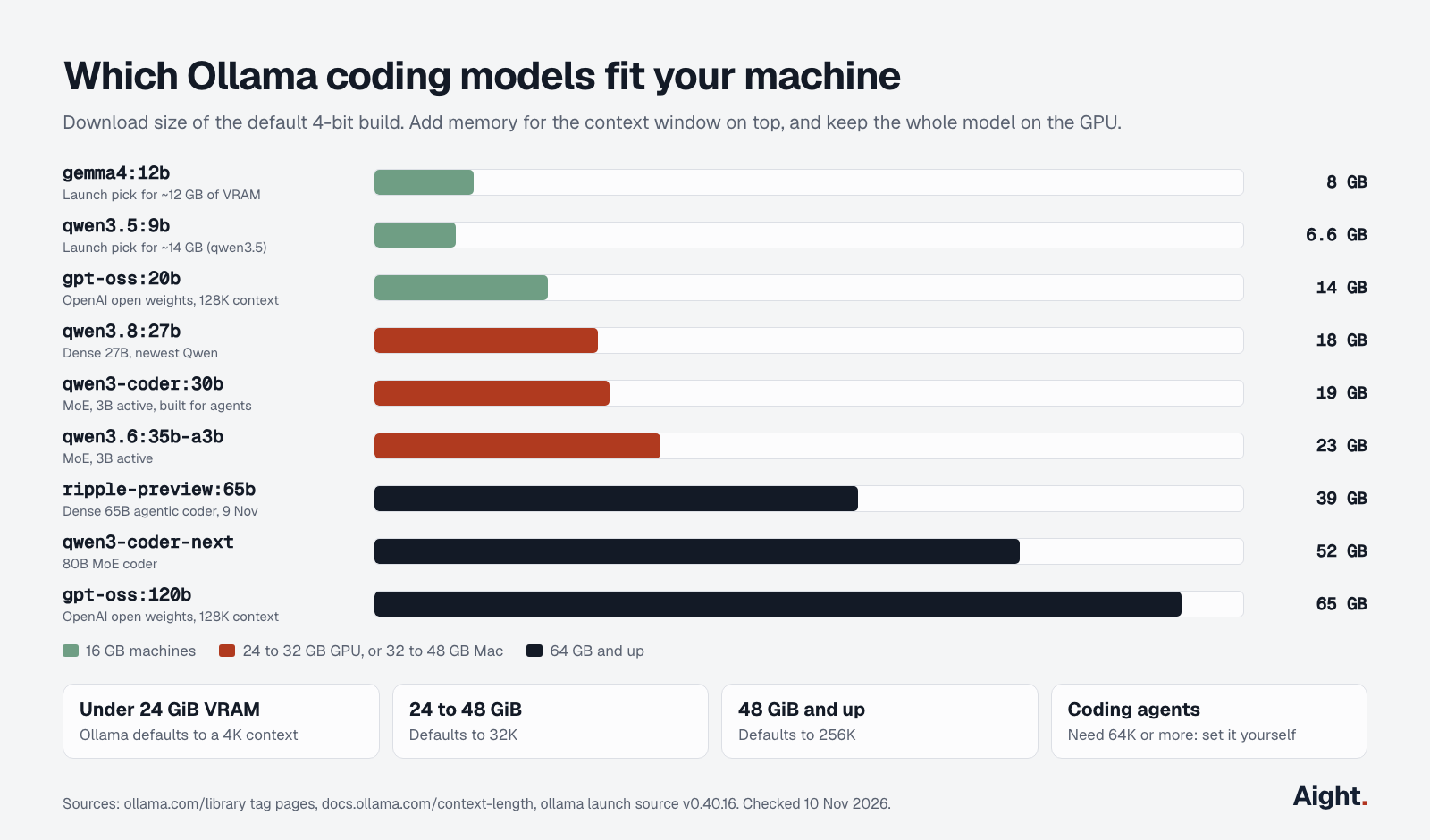
The "Fits" column leaves room for a 64K context, which adds several gigabytes on top of the download. The mixture-of-experts models (3B active parameters) generate faster than the dense 27B at the same size, but need the same memory. ripple-preview, a 65B dense model built for agentic coding, arrived in Ollama on 9 November, so there are no independent results for it yet.
How good are local models in Claude Code?
Good enough for scoped edits, scripts and explaining code; noticeably weaker on long multi-file tasks. The strongest small model's vendor numbers are close to older Claude models. Qwen's Qwen3.8-27B model card reports 61.7 on SWE-bench Pro, run in the Claude Code harness, and 73.0 on Terminal Bench 2.1, against 53.4 and 78.2 for Claude Opus 4.6. The Qwen3.6-27B card puts Gemma 4 31B at 52.0 on SWE-bench Verified, against 77.2 for Qwen3.6-27B. These are Qwen's own runs at 256K context with full weights, not a 4-bit model squeezed into 64K.
Independent results are lower. On Artificial Analysis's Coding Agent Index on 5 November, Claude Code with Opus 5.5 scored 62 and Claude Code with Qwen3.8 Max, Qwen's largest hosted model, scored 39, just above Haiku 5.5 at 37. A 27B model on your desk should land below its hosted big brother.
The common failures are mechanical, not just "less smart":
- Tool calls arrive as text. In Ollama issue #18346,
qwen3-coderhandled small tool schemas but wrote Claude Code's larger Bash tool call as plain text, so nothing ran. - Edits fail to apply. Long files, indentation and exact-match edit strings trip smaller models, which then retry.
- Context loss from the 4K default, covered above.
- Server-side features Claude Code expects aren't there: Anthropic's web search (Ollama offers its own after
ollama signin), the auto mode classifier and token counting.
Speed and hardware
Generation speed is rarely the problem. Prompt processing is. Every tool call is a new request carrying the whole transcript, and Ollama's own MLX post puts it plainly: "Agent workloads are dominated by prompt processing." Claude Code's system prompt and tool definitions alone run to tens of thousands of tokens.
One measured case: on a 64 GB Mac Mini M4 Pro running the 80B qwen3-coder-next, a Django API scaffold took about 66 minutes, while its 13,000 output tokens at 23 tokens a second should have taken about 9 (Vijay Kodam, 14 Feb 2026). Prompt evaluation ran near 20 tokens a second and per-request waits grew from 15 to 194 seconds over 57 round trips. The fixes: a 256K context, flash attention with a q8_0 cache, OLLAMA_KEEP_ALIVE=60m so the model stays loaded, the same model for ANTHROPIC_DEFAULT_HAIKU_MODEL, and CLAUDE_CODE_EFFORT_LEVEL=low to shorten prompts.
What to buy, if you buy anything:
- Memory decides which models you can run; bandwidth decides speed. A Mac Studio M5 Max starts at $2,499 with 36 GB; the 40-core GPU version with 64 GB is $3,099 and has 614 GB/s of bandwidth; the M5 Ultra starts at $5,499 with 96 GB and 1.2 TB/s (Apple store, specs). Apple lists the M5 Max at 200 W maximum (power page).
- An RTX 5090 has 32 GB and is the fastest single card for models up to about 30B, but its $1,999 list price is fiction this fall: Tom's Hardware's 3 November index had the lowest US price at $6,919, as reported by Tech Insider. NVIDIA specifies a 1,000 W system power supply.
- A 16 GB laptop runs
gemma4:12borqwen3.5:9bat 64K. That's useful for questions and small edits, not for long autonomous runs.
When a hosted key costs less than your own GPU
Almost always, unless the code can't leave your machine or you already own the hardware. The math below uses the "daily" month from the Claude Code pricing guide: 20 days of 300 model calls, 60K tokens of context per call with 92% read from the prompt cache, and 600 output tokens per call. That's 360 million input tokens and 3.6 million output tokens a month. Hardware is written off over 36 months, run 8 hours a day at its maximum rated power, at the US average residential rate of 18.16 cents per kWh for August 2026 (EIA).
| Route | Monthly cost |
|---|---|
Ollama cloud, gpt-oss:120b, pay as you go | $11.12 |
Ollama cloud, deepseek-v4.1-flash, peak rate | $14.95 |
Ollama cloud, glm-5.3-flash | $16.06 |
| Claude Pro plan, real Claude models | $20.00 |
| Mac Studio M5 Max 64 GB, $3,099 plus power | $91.89 |
| Claude Max plan | $100.00 |
Ollama cloud, kimi-k2.7-code | $104.69 |
| Anthropic API, Sonnet 5.5 | $141.12 |
| RTX 5090 at $6,919 plus power, rest of the PC extra | $221.25 |
| Anthropic API, Opus 5.5 | $282.24 |
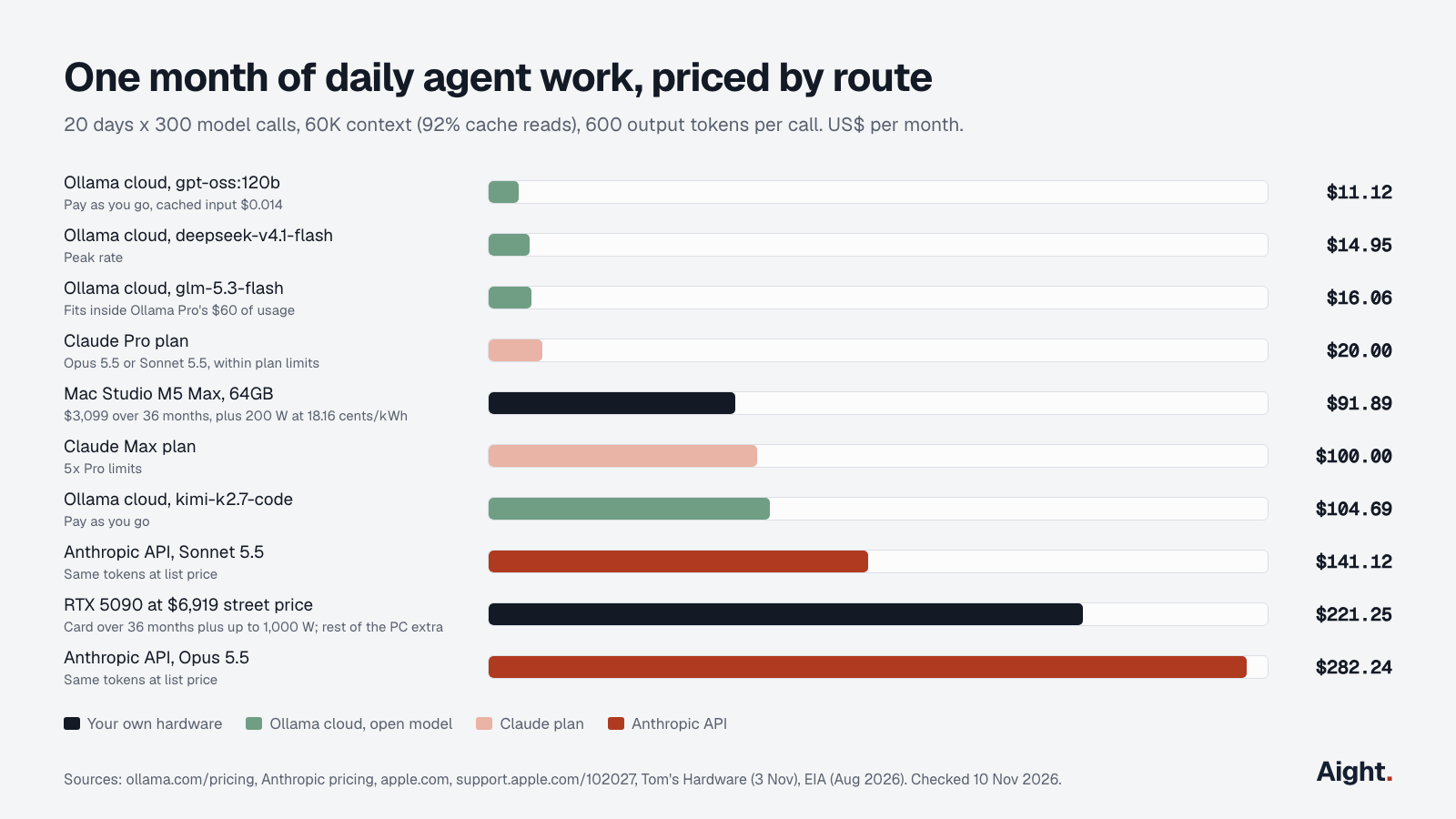
Three things stand out. Hosted open models on Ollama's cloud cost $11 to $16 for the whole month, because cached input costs $0.006 to $0.03 per million tokens; $3,099 buys about 16 years of glm-5.3-flash at that rate. The local Mac costs about the same as Claude Max, which gets you Opus 5.5 instead of a 27B model. And the local route can't even do the same volume: at local prompt-processing speeds, 6,000 calls at 60K context is far more than one machine works through in 160 hours.
The prompt cache matters as much as the price per token. Ollama's cloud had a bug where Claude Code's per-turn token reminder broke caching (6.5 million uncached tokens in one run); ollama launch claude now turns that reminder off. If you connect Claude Code to https://ollama.com directly, set CLAUDE_CODE_TOTAL_TOKENS_REMINDER=off yourself.
Ollama's cloud plans: pay as you go is $0 a month with per-token billing and 3 concurrent requests; Pro is $20 a month with $60 of usage included; Max is $100 with $300 included and 10 concurrent requests. Ollama says cloud requests run in the US and Europe with zero data retention (pricing change, 31 Aug 2026). To price your own workload, use the token cost calculator.
Local hardware wins in three cases: code that legally or contractually can't leave the machine, offline work, and a machine you already own for other reasons. In those cases its cost is close to the power bill, about $6 a month for the Mac above.
Using Aight with OpenCode
Claude Code can't use Aight: it speaks Anthropic's Messages API, and Aight documents an OpenAI-compatible Chat Completions API. OpenCode can, as a custom OpenAI-compatible provider. Aight lists qwen3-coder-30b-a3b, the same model as Ollama's local qwen3-coder:30b, at $0.15 / $0.60 per million tokens, served in the United States with a 262,144-token window. That's useful when a laptop can't hold the model but you want the same one at work and at home, next to 126 other models on one key.
{
  "$schema": "https://opencode.ai/config.json",
  "providers": {
    "aight": {
      "name": "Aight",
      "env": ["AIGHT_API_KEY"],
      "package": "@opencode/ai/providers/openai-compatible",
      "settings": { "baseURL": "https://api.getaight.ai/v1" },
      "models": { "qwen3-coder-30b-a3b": { "name": "Qwen3 Coder 30B" } }
    }
  }
}
That's configured as an OpenAI-compatible provider with a sk-aight-… key in AIGHT_API_KEY. Be clear on the cost: Aight lists no cache price for this model, so the daily month above comes to $56.16 at list price ($52.59 after the 10% extra on a recharge). Ollama's cloud models with cached input cost less for this kind of heavy agent use.
What developers report
- "The single biggest fix was increasing the Ollama context to 256K." (Vijay Kodam, 14 Feb 2026, link)
- "Everything past 4,096 tokens is dropped before the model sees it" (GenAI Unplugged, 1 Oct 2026, on
gemma4:12bwith Claude Code, link) - A Hacker News commenter called Claude Code on Ollama "doable, but not really viable", rating the best local models near Haiku or Sonnet (14 Jun 2026, link)
- With Qwen 3.8 27B on Ollama, "the coding harnesses (Claude Code and OpenCode) seem to fail way more often" than with cloud models (Hacker News commenter, 31 Aug 2026, link)
- Another Hacker News commenter runs
qwen3.6:35b-a3bon a 32 GB Mac Mini for small local changes, noting it is slower than cloud servers and lacks built-in web search (22 Apr 2026, link) - Ollama issue #18346 reports
qwen3-coderwriting Claude Code's Bash tool call as plain text instead of a tool call (9 Sep 2026, link)
FAQ
Is Claude Code with Ollama free?
The software is. Claude Code installs without a paid plan when you point it at Ollama, and local models cost nothing per token. You pay for the hardware and electricity, or per token if you use Ollama's cloud models.
What is the best Ollama model for Claude Code?
On a 32 GB GPU or a 48 GB Mac, qwen3.8:27b has the strongest published coding scores among models that size; qwen3-coder:30b and qwen3.6:35b-a3b respond faster. On a 16 GB machine, use the ollama launch picks, gemma4:12b or qwen3.5, and keep tasks small.
Why does Claude Code on Ollama forget things or not edit files?
Usually the context: Ollama gives 4K tokens below 24 GiB of VRAM while Claude Code assumes 200K. Set OLLAMA_CONTEXT_LENGTH and CLAUDE_CODE_MAX_CONTEXT_TOKENS to the same value of 64K or more and check ollama ps. If tool calls still appear as text, try another model; some handle Claude Code's large tool schemas poorly.
Can OpenCode use Ollama's cloud models?
Yes. Sign in with ollama signin, then pick a :cloud model in ollama launch opencode; the local server forwards it to Ollama's cloud. OpenCode's own config also accepts a remote Ollama server's baseURL with an apiKey read from OLLAMA_API_KEY.
Can Claude Code use Ollama cloud without installing Ollama?
Yes. Set ANTHROPIC_BASE_URL=https://ollama.com, ANTHROPIC_AUTH_TOKEN to your Ollama API key and ANTHROPIC_API_KEY="", then run claude --model glm-5.3-flash or another cloud model. Ollama notes that hosted web search and some tool controls aren't fully supported.
How much RAM do you need to run Claude Code locally?
16 GB runs a 9B to 12B model at 64K context for small tasks. 32 GB of GPU memory or a 48 GB Mac runs the 27B to 35B models that handle real agent work, and 64 GB or more opens up the 65B to 80B coders. Keep the whole model on the GPU.
Sources
- Ollama docs: Claude Code, OpenCode, Anthropic compatibility, Context length, CLI reference, FAQ, Integrations
- Ollama blog: Claude Code with Anthropic API compatibility (16 Jan 2026), ollama launch (23 Jan 2026), MLX performance (11 Jun 2026), Faster Gemma 4 with MTP (29 Jun 2026), Transparent pricing (31 Aug 2026)
- Ollama: pricing, model library, download
- Ollama on GitHub: releases v0.40.14 to v0.40.16, launch source claude.go, opencode.go, models.go, issues #18346, #18431
- Anthropic, Claude Code docs: LLM gateway, Environment variables, Model configuration, Gateway protocol; npm package (2.1.322)
- OpenCode: providers docs, npm @opencode/cli (2.2.6), issue #54109
- Qwen on Hugging Face: Qwen3.8-27B, Qwen3.6-27B
- Artificial Analysis, Claude Code vs OpenCode coding agent comparison, checked 5 Nov 2026
- Apple: Mac Studio store, Mac Studio specs, Mac Studio power consumption
- NVIDIA, GeForce RTX 5090; Tech Insider, Tom's Hardware GPU price index, 3 Nov 2026
- US EIA, Electric Power Monthly, table 5.6.a
- Vijay Kodam, 80B coding model locally with Claude Code, 14 Feb 2026; GenAI Unplugged, Claude Code on Ollama and the 4,096-token window, 1 Oct 2026
- Hacker News comments: 48524266, 49514064, 47862921
- Leon van Zyl, OpenCode 2.0 walkthrough, 22 Oct 2026
- Aight, models and docs
Checked on 10 November 2026.