Claude vs Claude Code is a question of where the work happens. Claude is the chat app at claude.ai, on desktop and on mobile: you ask, it answers, writes code you copy out, and runs code in a sandbox at Anthropic. Claude Code is Anthropic's coding agent: it works inside your project, reads the codebase, edits files, runs your tests and commits, usually on your own machine.
Both run the same Claude models and come with every paid plan, and they draw from one shared set of usage limits. The Free plan includes chat but not Claude Code. This guide covers what each does, where it runs, how it's billed, and which to open for which job, checked on 10 November 2026 against Anthropic's Help Center and Claude Code 2.1.322.
Claude vs Claude Code at a glance
| Claude (chat app) | Claude Code | |
|---|---|---|
| What it is | A conversation: answers, drafts, explanations, Artifacts | An agent that works in your codebase |
| Where you use it | claude.ai, desktop app, iOS and Android | Terminal, VS Code, JetBrains, the desktop app's Code tab, claude.ai/code, mobile |
| Where the work runs | Anthropic's servers; code runs in an isolated sandbox | Your machine by default; a cloud VM for cloud sessions |
| Your code | What you paste, upload (30MB a file) or sync from GitHub | The whole repository it starts in |
| Can run your tests and git | No | Yes, as your user account |
| Default model on paid plans | Your pick in the model menu | Opus 5.5 |
| Plans | Free and all paid plans | Pro, Max, Ultra, Team, Enterprise, or a Console API key |
| How it's billed | Plan limits | Same plan limits, or per token with an API key |
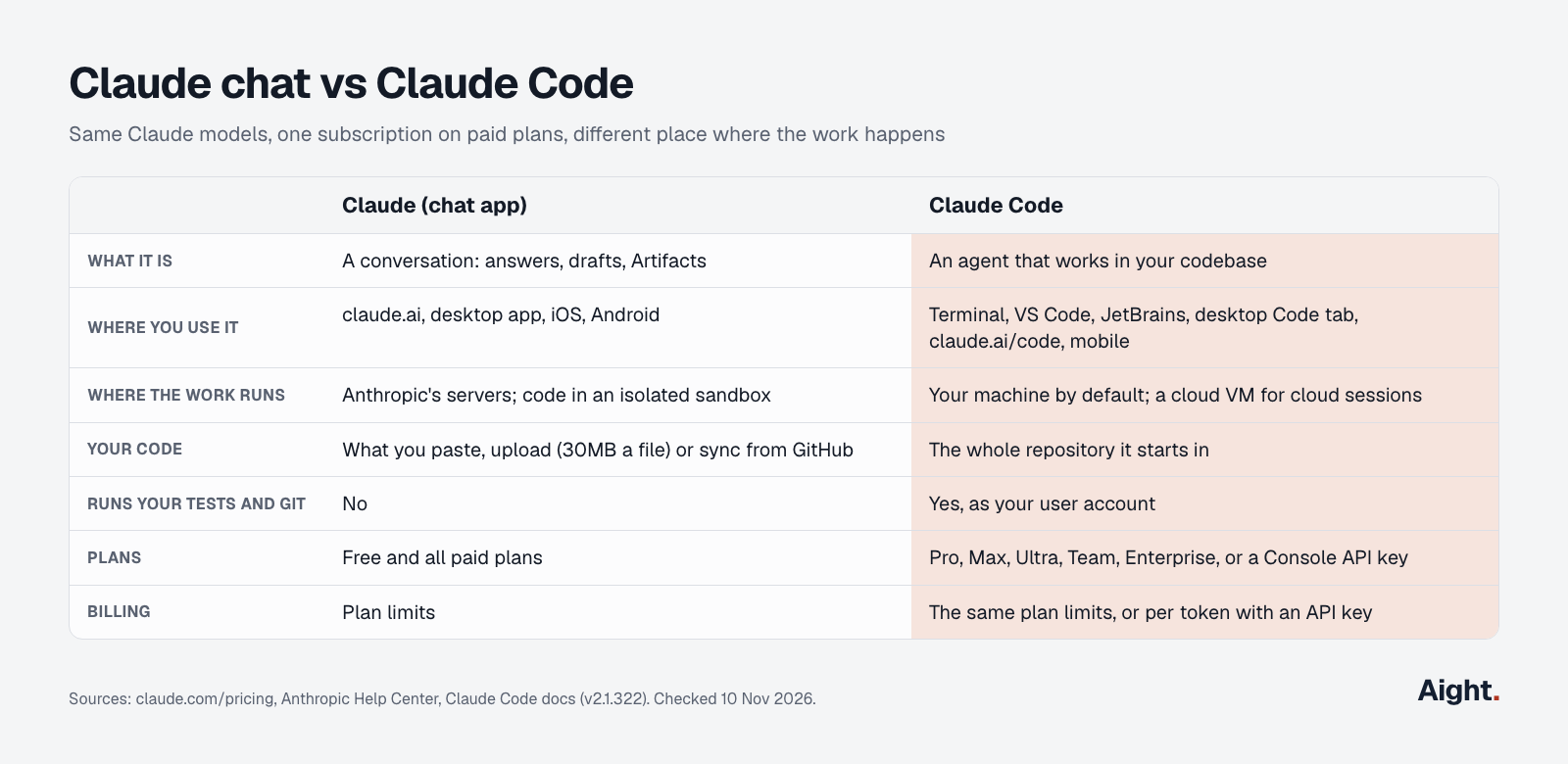
The short version: chat produces text and files for you to use. Claude Code produces changes in your repository.
What Claude (the chat app) does
Claude, the app, is a conversation on claude.ai, the desktop app and the mobile apps. It answers questions, writes and explains code, searches the web, builds Artifacts and keeps memory across conversations. Claude's pricing page lists web search, file creation with code execution, memory, connectors and Artifacts on every plan, Free included. Opus is not on Free.
It does more coding than many people expect:
- It can run code and create files in "an isolated, sandboxed container" at Anthropic, including Excel, Word, PowerPoint and PDF files, up to 30MB a file. File creation uses more of your limit than a plain chat.
- The GitHub integration adds files from a repository to a chat or a project. It syncs "files (names and contents) in a repo on a specific branch" only, with no commit history or pull requests, and you press "Sync now" to refresh. The repository must fit in the context window.
- On Pro, Max and Ultra with the combined chat and Cowork experience (rolling out since 16 September 2026), a conversation that needs files or several steps continues in a cloud sandbox without you switching modes.
What chat can't do is touch your project. It never sees files you didn't give it, can't run your test suite against your dependencies, and can't commit. You copy its code into your editor, run it, and paste errors back.
What Claude Code does
Anthropic's overview calls Claude Code "an agentic coding tool that reads your codebase, edits files, runs commands, and integrates with your development tools." You describe a task; it plans, edits across files, runs the tests and fixes failures. It stages changes, writes commit messages, opens pull requests, and can run in CI through GitHub Actions or GitLab. The current release is 2.1.322, published 10 November 2026 on npm.
You install it once and start it inside a project:
# macOS, Linux, WSL
curl -fsSL https://claude.ai/install.sh | bash

# Windows PowerShell
irm https://claude.ai/install.ps1 | iex

# then, in any project
cd your-project
claude
It asks you to log in on first run. The Claude Code install guide covers Homebrew, WinGet, VS Code and Cursor.
Claude Code runs in more places than the terminal. The desktop docs say "In the Claude Desktop app, Claude Code is the Code tab," next to chat and Cowork, and the app includes Claude Code, so you don't need the CLI. There are VS Code and JetBrains extensions, and cloud sessions at claude.ai/code or in the mobile app run in an Anthropic-managed VM against a GitHub repository and keep going after you close the laptop.
Your project shapes how it works: a CLAUDE.md file in the repository root sets coding standards it reads every session, hooks run your scripts before or after its actions, and MCP servers connect it to tools such as Jira or Slack. The Claude Code cheat sheet lists the commands.
Where each one runs
This is the practical difference. Chat works on Anthropic's servers with only what you hand it. Claude Code, by default, acts on your computer.
| Claude chat | Claude Code (local) | Claude Code (cloud session) | |
|---|---|---|---|
| Runs code | In Anthropic's sandbox | On your machine, as your user | In an isolated VM |
| Sees your files | Uploads and synced GitHub files | The repository it starts in, and more with your approval | A clone of your GitHub repository |
| Keeps going when you close the laptop | No | No | Yes |
| Uses your local tools and dependencies | No | Yes | Only what the VM installs |
Claude Code's security docs say the working-folder boundary is a permission prompt, so "a Bash command you approve can still write anywhere your user account can." Auto mode, where a separate classifier model reviews each action before it runs, is the default in the terminal and VS Code since v2.1.283. Turn on /sandbox or use a dev container if you want OS-level limits. Your files stay on disk, but the contents it reads go to the model like anything you paste into chat.
Cowork sits between the two: the chat app's agent for documents and spreadsheets, running in Anthropic's cloud. The Claude Cowork vs Claude Code guide covers that three-way split.
How each is billed: one plan, shared limits
Claude and Claude Code share one subscription and one pool of usage. Anthropic's Claude Code plan article says the limits "are shared across Claude and Claude Code, meaning all activity in both tools counts against the same limits." The usage-limit article names claude.ai, Claude Code and Claude Desktop as counting toward the same limit. Plans as of 10 November 2026, before tax:
| Plan | Price | Claude chat | Claude Code | Limits |
|---|---|---|---|---|
| Free | $0 | Yes | No | Limited, every 5 hours and every week |
| Pro | $20 a month, or $200 a year | Yes | Yes | 5-hour and weekly |
| Max | $100 a month | Yes | Yes | 5x Pro, 5-hour and weekly |
| Ultra | $200 a month | Yes | Yes | 10x Pro weekly; no 5-hour limit once verified |
| Team | $25 or $125 a seat a month ($20 or $100 yearly) | Yes | Yes | Per-seat, shared with chat and Cowork |
| Enterprise | $20 a seat a month yearly, plus usage at API rates | Yes | Yes | Set by the admin |
The pool is shared, but the two don't spend it at the same rate. Anthropic's Enterprise consumption guide rates chat "Lower intensity" and Claude Code "Higher intensity," because each Claude Code session carries system prompts, file contents, tool calls and multi-turn reasoning. The Claude Code cost docs put it more bluntly: "one debugging session can consume more than a day of chat."
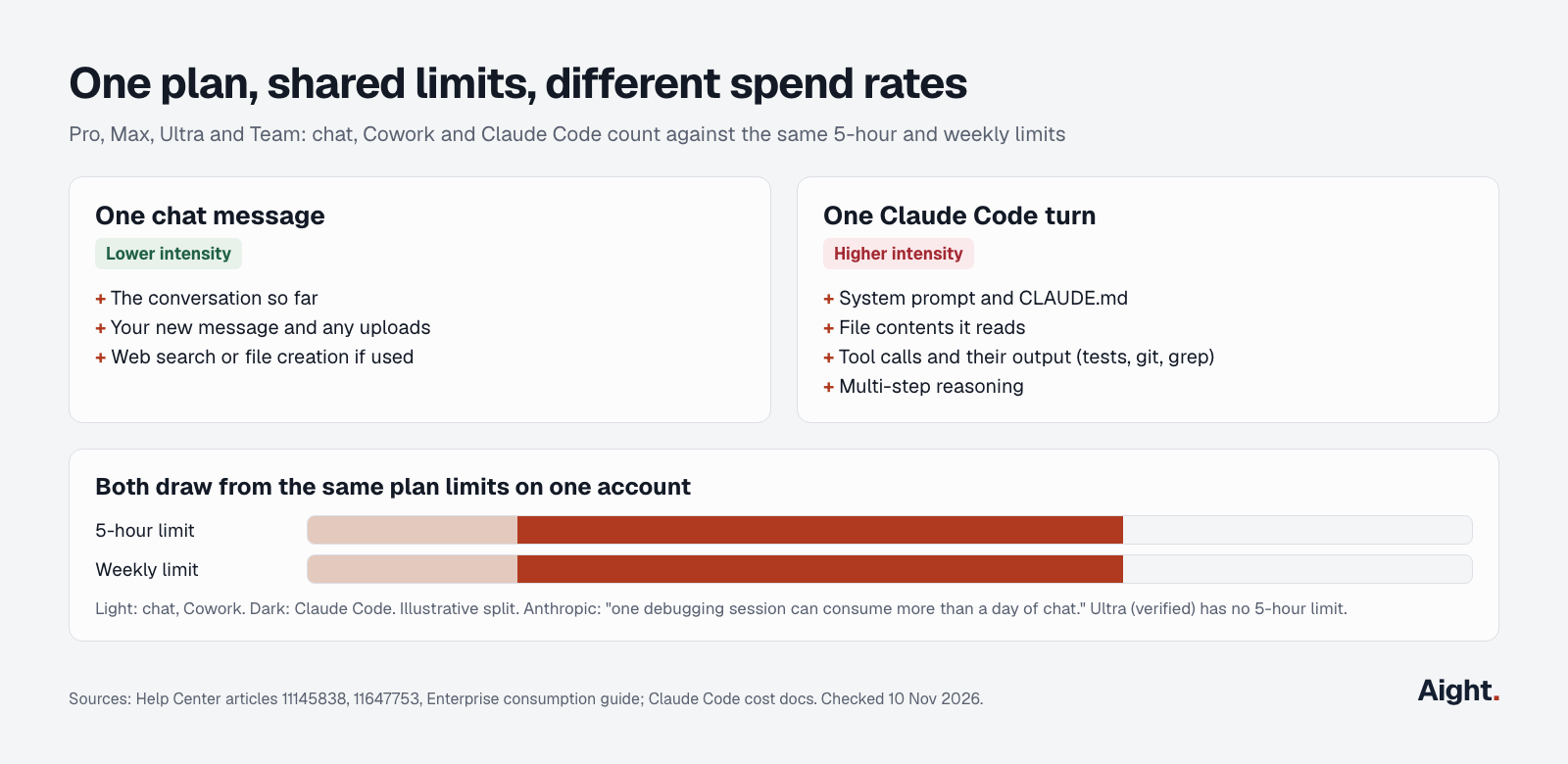
Three things catch people out:
- A long Claude Code session in the morning can leave you rate limited in chat in the afternoon. Check Settings > Usage on claude.ai, or run
/usagein Claude Code, which shows the same plan bars. - If
ANTHROPIC_API_KEYis set in your shell, Claude Code bills that key per token instead of your plan. Run/loginto switch to the subscription. - The monthly API allowance included with Max, Ultra and Team can't be used in Claude Code or the Claude apps.
When you hit a limit you can wait for the reset, upgrade, or turn on extra usage billed at API rates. The Claude Code pricing guide breaks down when Max or Ultra pays for itself.
Is Claude Code free?
No. Claude Code isn't on the Free plan; the cheapest way in is Pro at $20 a month ($17 a month billed yearly). The installer itself costs nothing, but it needs a paid Claude plan or a Claude Console account billed per token before it will run a task.
The only free route is a guest pass: Pro, Max and Ultra subscribers can send seven days of Pro, which includes Claude Code, to someone new to paid Claude plans. It asks for payment details and becomes a paid Pro plan unless cancelled.
Claude Code vs Claude: which to use when
Claude Code vs Claude comes down to what you want at the end. If it's an answer, a draft or a snippet, use chat. If it's a change in a repository, a passing test run or a pull request, use Claude Code.
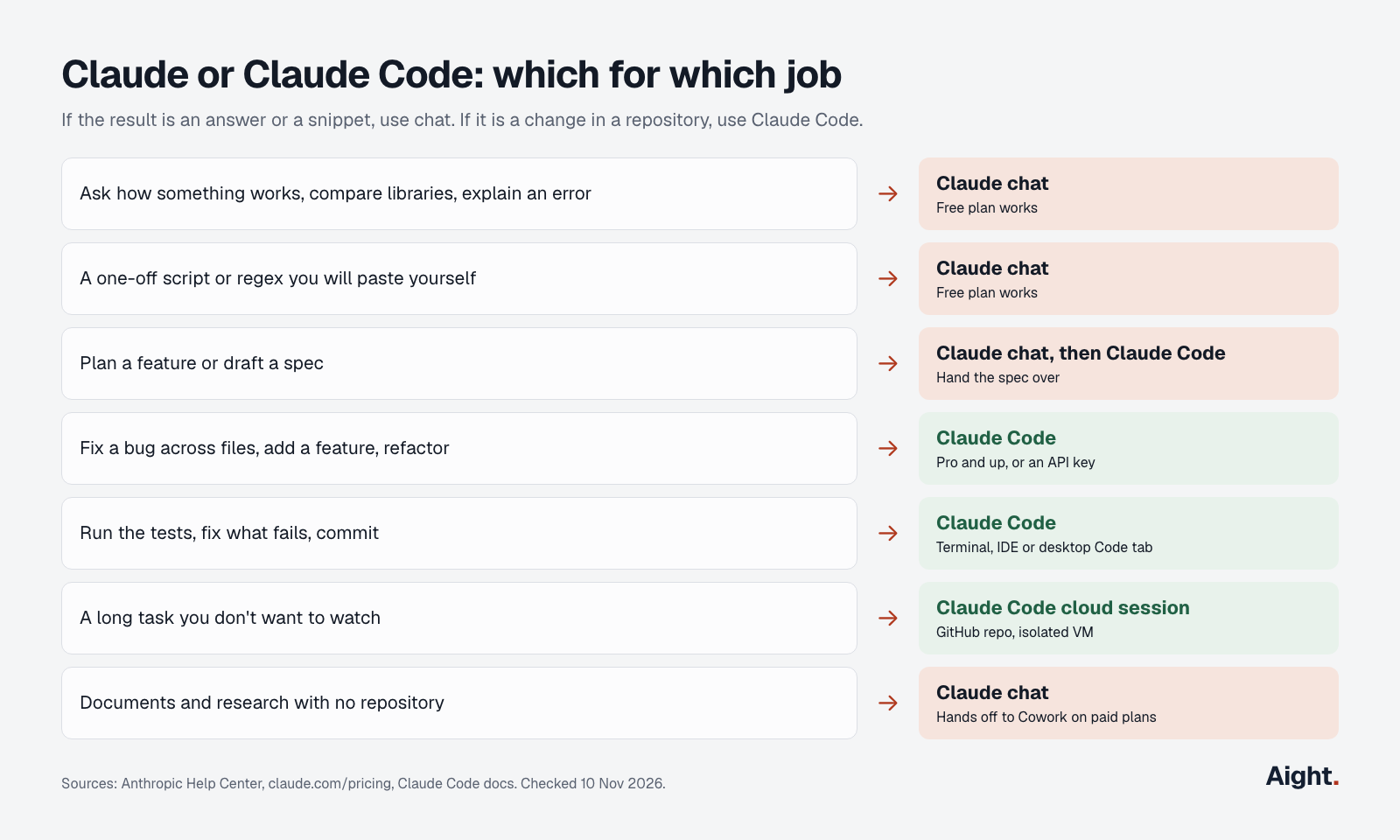
- Ask how something works, compare libraries, explain an error message: Claude chat.
- Write a one-off script or a regex you'll paste yourself: Claude chat.
- Plan a feature or draft a spec before writing code: Claude chat, then hand the spec to Claude Code.
- Fix a bug across several files, add a feature, refactor, update dependencies: Claude Code.
- Run the tests, fix what fails, and commit: Claude Code.
- A long task you don't want to watch: a Claude Code cloud session.
- Documents, spreadsheets and research with no repository: chat, which hands off to Cowork on paid plans.
- On the Free plan: chat is the only option.
The same model gives different results in the two because of what surrounds it. In chat, Claude sees what you paste and can't check its own work against your code. In Claude Code it reads the files it needs, runs the code and sees real errors. For anything larger than a snippet, that loop is the reason to switch. For quick questions, chat costs less of your limit and is faster to open.
API prices for builders
If you'd rather pay per token, Claude Code also runs on a Claude Console API key, or on Amazon Bedrock, Google Cloud's Agent Platform and Microsoft Foundry. The chat app has no per-token option. API prices on 10 November 2026, per million tokens:
| Model | Input / output | Cache read |
|---|---|---|
| Claude Fable 5.2 | $8.00 / $40.00 | $0.20 |
| Claude Opus 5.5 (Claude Code default) | $4.00 / $20.00 | $0.20 |
| Claude Sonnet 5.5 | $2.00 / $10.00 | $0.10 |
| Claude Haiku 5.5 (prompts up to 100K) | $0.10 / $0.50 | $0.01 |
Anthropic says enterprise Claude Code use averages "around $13 per developer per active day and $150-250 per developer per month." At that rate a subscription costs less for anyone coding more than a couple of days a month. The Claude Code API key guide covers per-token setup, and the token cost calculator prices your own workload.
What developers report
- A Hacker News commenter noted that you get "vastly different outcomes from the exact same model in a different harness" (Hacker News, 28 Jun 2026, link).
- Another commenter said people install Claude Code "to have models work inside their repositories and run the code or tests themselves" instead of copying code between an IDE and a chat (Hacker News, 13 Aug 2026, link).
- A developer who uses Claude Code over the chat apps even for non-coding work asked, "Why use a limited version?" (Hacker News, 11 Sep 2026, link).
- Going the other way, a commenter prefers website chatbots because they can see exactly what is sent, and pointed out that chat sandboxes can now run end-to-end tests and return a patch or zip to merge (Hacker News, 5 Nov 2026, link).
- Anthropic's own planning guide for admins says Claude Code and Cowork "consume tokens at a significantly higher rate than standard chat" (Claude Help Center, link).
FAQ
Do Claude and Claude Code share usage limits?
Yes. On Pro, Max, Ultra and Team, chat, Cowork and Claude Code on one account all draw from the same 5-hour and weekly limits. Claude Code uses them faster per session, so a heavy coding day leaves less for chat.
Is Claude Code better than Claude for coding?
For work inside a real project, yes, because it can read your files, run your tests and fix what fails. Both use the same models, so for a short question or a self-contained snippet, chat gives an equally good answer and uses less of your limit.
Does Claude Code use the same model as the Claude app?
Yes. Claude Code defaults to Opus 5.5 on paid plans and the API, and /model switches to Sonnet 5.5, Haiku 5.5 or Fable 5.2. The chat app offers the same family in its model menu, though Opus isn't on the Free plan.
Do you need to know how to code to use Claude Code?
Not to start it, since the desktop app's Code tab needs no terminal. But it changes files and runs commands in a real project, so you need to judge its diffs and understand what it's about to run. For documents and research with no code, Cowork in the Claude app is the better fit.
Can you use Claude Code with a free Claude account?
No. The Free plan includes chat only. Claude Code needs Pro or a higher plan, a Team or Enterprise seat, or a Claude Console API key billed per token.
Sources
- Anthropic Help Center: Use Claude Code with your Pro, Max, or Ultra plan, How do usage and length limits work?, Claude Enterprise consumption guide, Create and edit files with Claude, Use the GitHub integration, Guest passes
- Anthropic: Plans and pricing, API pricing, Claude Cowork and chat are now one Claude
- Claude Code docs: Overview, Desktop application, Security, Permission modes, Model configuration, Manage costs, Use Claude Code in the cloud
- npm: @anthropic-ai/claude-code
- Hacker News comments: 48710213, 49287600, 49652257, 50385526
- Claude on YouTube: Coding on the go with Claude Code
Checked on 10 November 2026.