This Claude Code cheat sheet covers every built-in slash command, keyboard shortcut and CLI flag in Claude Code 2.1.326, the latest release on npm on 17 November 2026 (the stable channel is on 2.1.311). The ones you'll use every day: /clear between tasks, /compact to shrink a long conversation, /model and /effort to change the model and how hard it thinks, /context and /usage to see where tokens go, Esc to stop and Esc Esc to rewind, Shift+Tab to cycle permission modes, and claude -c or claude -r <name> to pick a session back up.
Below: the full tables, a paragraph and an example for each configuration file, Anthropic's best practices, and the habits that shrink a session's token bill. Commands vary by plan and platform (/desktop needs macOS or x64 Windows and a subscription), so type / to see yours. New to the tool? Start with the Claude Code install guide.
The Claude Code cheat sheet at a glance
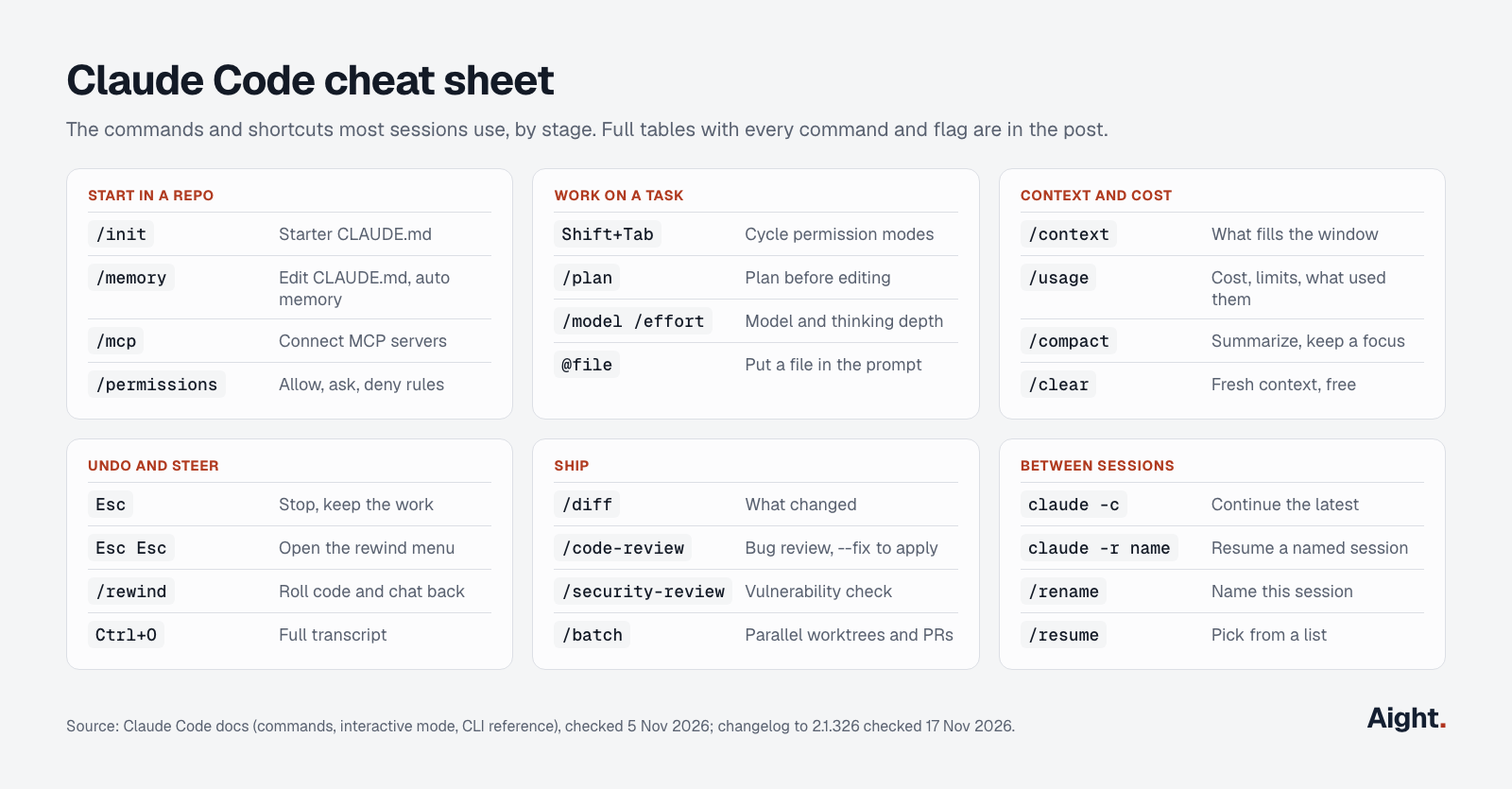
Every item on the card is in the full tables below, with its arguments and aliases.
Claude Code slash commands
A command works only at the start of a message; text after its name becomes its arguments. (skill) marks a bundled skill, a prompt Claude follows rather than fixed code. Aliases are in parentheses. Source: Anthropic's commands reference.
Session and context
| Command | What it does |
|---|---|
/clear [name] (/reset, /new) | Empty context; the old conversation stays in /resume |
/compact [focus] | Summarize the history, keeping what you name |
/context [all] | What fills the context window |
/autocompact [size] | When auto-compaction starts (500k, or auto) |
/resume [session] (/continue) | Reopen a conversation by name or ID |
/rename [name] | Name the session for claude -r |
/branch [name], /fork [prompt] | Branch the conversation; copy it to a background session |
/subtask <task> | Forked subagent that reports back |
/rewind (/checkpoint, /undo) | Roll code and conversation back |
/btw [question] | Side question kept out of the history |
/recap, /copy [N], /export [file] | One-line recap; copy a reply; save the conversation |
/plan [task] | Enter plan mode |
/goal [condition] | Keep working until the condition holds; /goal clear ends it |
/loop [interval] [prompt] (skill) | Repeat a prompt on an interval |
/tasks (/bashes) | Background shells and subagents |
/background (/bg), /stop | Detach as a background agent; stop one |
/add-dir <path>, /cd <path> | Add a directory; move the session |
/exit (/quit) | Leave |
Model, effort and cost
| Command | What it does |
|---|---|
/model [model] | Switch and save as default; s in the picker switches this session only |
/effort [level] | low to xhigh, max (this session only) or auto |
/fast, /advisor [model] | Fast mode on or off; a second model that advises |
/usage (/cost, /stats) | Cost estimate, plan limits and what used them |
/usage-credits, /rate-limit-options | Pay-as-you-go overflow; your options at a limit |
/upgrade, /passes, /insights | Upgrade the plan; share a free week; usage report |
Setup and configuration
| Command | What it does |
|---|---|
/init | Starter CLAUDE.md |
/memory | Edit CLAUDE.md; auto memory on or off |
/config [key=value] (/settings) | Settings panel, or /config model=sonnet |
/status | Version, model, account and loaded settings files |
/permissions (/allowed-tools) | Allow, ask and deny rules |
/fewer-permission-prompts (skill), /auto-mode-setup | Allowlist frequent read-only commands; describe your environment to auto mode |
/hooks, /agents | Browse hooks; reminder to ask Claude for subagents (a wizard up to 2.1.197) |
/mcp | Connect, authenticate, enable or disable servers |
/skills, /reload-skills, /skill-doctor | List skills, rescan them, see each one's context cost |
/plugin, /reload-plugins | Manage plugins |
/output-style, /update-config (skill), /import [source] | Output style; settings edits by description; import Codex, Gemini CLI or Cursor config |
/statusline, /keybindings, /theme, /color, /tui, /focus, /scroll-speed, /terminal-setup | Terminal look and keys; /terminal-setup adds Shift+Enter |
/sandbox | OS-level sandbox for shell commands |
/login, /logout, /privacy-settings | Account and privacy |
/ide, /chrome, /desktop (/app), /mobile, /voice | IDE, Chrome, desktop and phone apps, dictation |
/doctor (/checkup, skill), /debug (skill), /heapdump | Setup checkup with fixes; debug log; memory snapshot (hidden) |
/setup-bedrock, /setup-vertex | Cloud-provider wizards, hidden until their environment variable is set |
/restart (/update), /release-notes, /help, /powerup | Apply an update; changelog; help (/help <command> for one command); lessons |
/bug (/share), /feedback | Report a problem |
Review and ship
| Command | What it does |
|---|---|
/diff | Working-tree changes |
/code-review (/review, skill) | Bug review of the diff, a branch or a PR; --fix applies, ultra runs in the cloud |
/ultrareview | Alias of /code-review ultra; three free runs on Pro, Max and Ultra |
/security-review | Vulnerability check of the branch's diff |
/simplify (skill) | Cleanup suggestions, not bug hunting |
/verify, /run, /run-skill-generator (skills) | Build and run the app to check a change |
/batch <instruction> (skill) | Split a change into 5 to 30 units, each with its own worktree and PR |
/autofix-pr | Cloud session that fixes CI failures and review comments |
/install-github-app, /install-slack-app | GitHub Actions or Slack setup |
Cloud, remote and the rest
| Command | What it does |
|---|---|
/remote-control (/rc), /teleport (/tp), /remote-env, /web-setup | Remote Control and cloud sessions |
/schedule (/routines), /list-agents (/peers), /team-onboarding | Cloud scheduled tasks; sessions to message; onboarding guide |
/claude-api, /claude-in-chrome, /dataviz, /workflow-authoring, /plugin-authoring (skills) | Reference Claude loads for those jobs |
/deep-research, /workflows | Cited research across subagents; running workflows |
/artifacts, /artifact-capabilities, /artifact-diagramming, /slides, /design, /design-login, /design-sync | Artifacts, decks and design canvases |
/radio, /stickers | Lo-fi radio; stickers |
Removed: /pr-comments (2.1.91), /vim (2.1.92; editor mode is in /config) and /ultraplan (use plan mode). The # memory shortcut in older cheat sheets went in 2.0.70; ask Claude to "add this to CLAUDE.md" instead. Your own commands are skills: .claude/skills/deploy/SKILL.md or .claude/commands/deploy.md becomes /deploy.
Keyboard shortcuts
From the interactive mode docs. On macOS, Alt+B, Alt+F, Alt+D, Alt+Y and Option+P need Option set as Meta in your terminal; Option+T works without it.
| Shortcut | What it does |
|---|---|
Esc | Stop Claude and keep its work; decline a permission prompt |
Esc Esc | Clear the draft; on an empty prompt, open the rewind menu |
Shift+Tab | Cycle modes: Manual, acceptEdits, plan, then bypassPermissions and auto when available |
Ctrl+C, Ctrl+D | Interrupt or clear the input; a second press exits |
Ctrl+O | Transcript with full tool output |
Ctrl+R | Search prompt history |
Ctrl+B | Background the running command or agent (twice in tmux) |
Ctrl+X Ctrl+K | Stop all background subagents (twice within 3 seconds) |
Ctrl+T | Claude's task checklist |
Ctrl+S | Stash the prompt, or restore it |
Ctrl+G or Ctrl+X Ctrl+E | Edit the prompt in your editor |
Ctrl+V (Cmd+V in iTerm2, Alt+V on Windows and WSL) | Paste an image |
Ctrl+Enter or Ctrl+X Ctrl+S | Send queued messages now |
Option+P or Alt+P | Switch model |
Option+T or Alt+T | Extended thinking (always on for the 5.5 models and Fable) |
Option+O or Alt+O | Fast mode |
Ctrl+L, Ctrl+Z | Redraw; suspend (fg resumes) |
Up, Down, Ctrl+P, Ctrl+N | Cursor, then history |
Tab, Left, Right | Accept a suggestion or comment on a permission answer; switch dialog tabs |
\ then Enter, Ctrl+J, Shift+Enter, Option+Enter | New line; the first two work in any terminal |
Ctrl+A, Ctrl+E, Ctrl+K, Ctrl+U, Ctrl+W, Ctrl+Y, Alt+Y, Alt+B, Alt+F, Alt+D, Ctrl+_ | Readline editing, and undo |
/, !, @, : first in the prompt | Command, shell mode, file mention, emoji |
? on an empty prompt | Shortcut help |
?, {, }, [, v, q | In the transcript viewer: help, jump, scrollback, editor, exit |
Space, held or tapped | Dictation, once /voice is on |
CLI commands and flags
From the CLI reference; claude --help doesn't list every flag.
| Command | What it does |
|---|---|
claude, claude "task" | Interactive session, optionally with a first prompt |
claude -p "task" | One-shot run that prints and exits; reads piped input |
claude -c, claude -r <name> | Continue the latest conversation here; resume a named one |
claude update, claude install <version> | Update; install stable, latest or a pinned version |
claude auth login, logout, status | Sign in (--console for API billing), out, or check |
claude setup-token | Long-lived token for CI (needs a subscription) |
claude mcp add, add-json, list, get, remove, login, logout, reset-project-choices | MCP servers |
claude plugin, claude doctor, claude import, claude purge | Plugins; diagnostics; import config; delete local state |
claude agents, attach, logs, stop, respawn, rm, daemon | Background sessions and their supervisor |
claude remote-control, claude ultrareview, claude auto-mode | Remote Control server (--settings <file> applies to every session it starts); scripted cloud review; auto mode rules |
claude gateway, claude self-hosted-runner | Admin infrastructure |
| Flag | What it does |
|---|---|
-p, --print | Non-interactive |
-c, -r, --fork-session, --from-pr, --session-id, -n | Continue, resume, copy, find by PR, set the ID, name |
--model, --fallback-model, --effort | Model alias or ID, fallback chain, effort (ultracode too) |
--permission-mode | default or manual, acceptEdits, plan, auto, dontAsk, bypassPermissions |
--dangerously-skip-permissions, --allow-dangerously-skip-permissions | Start in bypass mode, or allow switching to it |
--allowedTools, --disallowedTools, --tools | Pre-approve, deny or restrict tools |
--permission-prompt-tool, --permission-prompts | Who answers prompts in -p runs |
--max-turns, --max-budget-usd | Turn cap and estimated-spend cap for -p |
--output-format, --input-format, --json-schema | text, json or stream-json; schema-checked JSON |
--verbose, --include-partial-messages, --include-hook-events, --forward-subagent-text, --replay-user-messages, --prompt-suggestions | Fuller output and extra stream events |
--bare, --safe-mode, --restricted | Skip auto-discovery; all customizations off; locked-down mode |
--no-session-persistence | Don't save the -p session |
--system-prompt, --system-prompt-file, --append-system-prompt, --append-system-prompt-file, --system-prompt-snapshot, --exclude-dynamic-system-prompt-sections | Replace, extend or cache the system prompt |
--agent, --agents, --append-subagent-system-prompt, --append-subagent-system-prompt-file | Run as or define subagents; extend their prompts |
--add-dir, --settings, --setting-sources | More directories; one-session settings; which files load |
--mcp-config, --strict-mcp-config, --plugin-dir, --plugin-url | MCP servers and plugins for one session |
--channels, --dangerously-load-development-channels | MCP channels (research preview) |
-w, --worktree, --tmux, --bg, --exec | Worktree session, in tmux; background agent or job |
--cloud (--remote), --teleport, --environment, --ref, --remote-control (--rc), --remote-control-session-name-prefix | Cloud and Remote Control sessions |
--desktop, --ide, --chrome, --no-chrome | Desktop app, IDE, Chrome |
--autocompact, --advisor, --betas, --teammate-mode | Compaction window, advisor, API beta headers, agent team display |
--init, --init-only, --maintenance | Run Setup hooks |
--disable-slash-commands, --debug, --debug-file, --ax-screen-reader, -v | No commands; debug logs; screen-reader output; version |
--enable-auto-mode was removed in 2.1.111; auto mode is in the Shift+Tab cycle by default. Two script patterns:
cat build.log | claude -p "why did this build fail?"
claude --bare -p "list the TODOs in src/ as JSON" \
  --output-format json --max-turns 10 --permission-mode dontAsk
CLAUDE.md, settings and permissions
CLAUDE.md, rules and skills are text Claude reads and may judge doesn't apply. Permission rules and hooks are enforced by Claude Code itself, whatever the model decides. They also differ in context cost: CLAUDE.md rides along on every request, while a hook costs nothing unless it returns output.
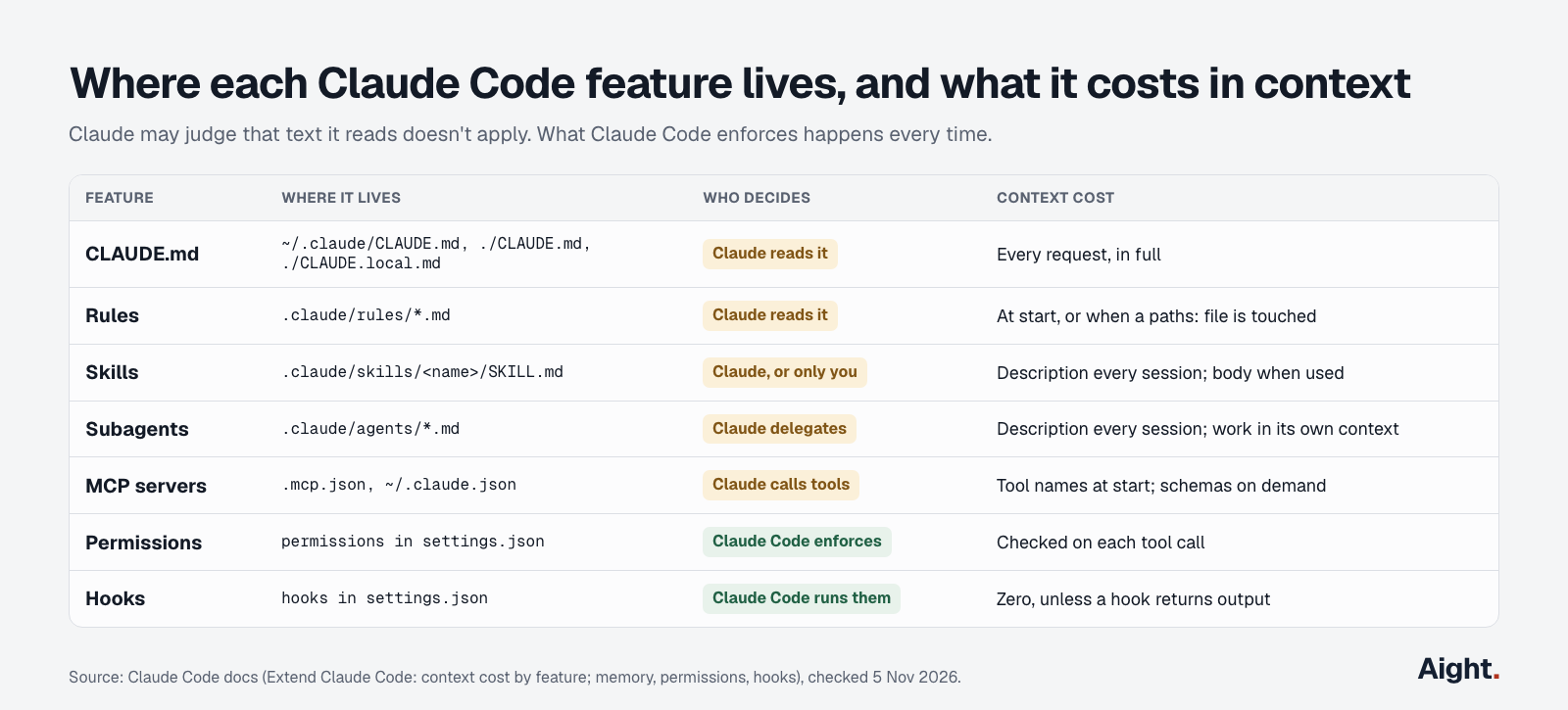
CLAUDE.md
Claude Code loads ~/.claude/CLAUDE.md (you, every project), ./CLAUDE.md or ./.claude/CLAUDE.md (the team, committed) and ./CLAUDE.local.md (you, this project) into every session, joined rather than overriding each other; files in subdirectories load when Claude works there. The memory docs recommend under 200 lines per file. @path imports organize a file without shrinking it, block-level HTML comments are stripped before Claude sees them, and .claude/rules/*.md files with a paths: filter load only when Claude touches matching files. With no CLAUDE.md, version 2.1.277 and later reads AGENTS.md. /init writes a starter; the later work is mostly cutting.
# Commands
- Test one file: npm test -- path/to/file.test.ts
- Typecheck: npm run typecheck

# Conventions
- New API errors go through src/lib/http-error.ts
- src/v1/ still serves traffic; don't copy its patterns

# Gotchas
- Integration tests need REDIS_URL (see .env.example)
Settings files
Settings live in ~/.claude/settings.json (you), .claude/settings.json (the team, committed), .claude/settings.local.json (you, this project, kept out of git) and managed settings from your organization. For a key set twice, managed wins, then --settings on the command line, then local, project and user; list keys such as permissions.allow merge instead. Most edits apply mid-session, but model and effort are read at start. /status shows which files loaded.
{
  "$schema": "https://json.schemastore.org/claude-code-settings.json",
  "model": "sonnet",
  "promptCacheTtl": "1h"
}
Permissions
Permission rules look like Tool or Tool(specifier) and are checked deny, then ask, then allow; the first match wins, so an allow can't carve an exception out of a deny. Put the * after the subcommand: Bash(git log *) allows only git log, Bash(git *) every git command. Deny rules hold in every mode, auto and bypassPermissions included. Interactive sessions start in auto mode from 2.1.283, where a classifier checks risky actions; claude -p starts in Manual. "Yes, and don't ask again" on a command prompt saves the rule to .claude/settings.local.json.
{
  "permissions": {
    "allow": ["Bash(npm test *)", "Bash(git diff *)"],
    "ask": ["Bash(git push *)"],
    "deny": ["Read(./.env)", "Read(./.env.*)", "Read(./secrets/**)"]
  }
}
Hooks, subagents, skills and MCP
Hooks
Hooks run a command, an HTTP call, an MCP tool or a model check at 33 points in the loop, from SessionStart and PreToolUse to Stop and PreCompact. A command that exits 2 blocks the action, and its stderr goes back to Claude as the reason. This Stop hook won't let a turn end while the typecheck fails; after eight blocked stops in a row, Claude Code ends the turn anyway. /hooks lists what's configured.
{
  "hooks": {
    "Stop": [
      { "hooks": [{ "type": "command", "command": "npm run typecheck 1>&2 || exit 2" }] }
    ]
  }
}
Subagents
A subagent is a Markdown file in .claude/agents/ (project) or ~/.claude/agents/ (you). Only name and description are required; tools, model, effort, permissionMode and isolation: worktree are optional. Its description sits in context every session (Claude Code warns past 15,000 tokens of them); the work happens in its own context and comes back as a summary, but its requests count against the same usage. Claude also uses the built-in Explore agent for searches and the Plan agent in plan mode. Simple jobs belong on Haiku:
---
name: import-finder
description: Lists every file that imports a given module. Use before renaming or deleting one.
tools: Read, Grep, Glob
model: haiku
---
Find every import of the module you are given. Reply with file paths and line numbers only.
Skills and custom commands
A skill is .claude/skills/<name>/SKILL.md (or ~/.claude/skills/ for every project). Custom commands were merged into skills, so .claude/commands/*.md files still work. Claude sees each skill's name and description every session but reads the body only when used, which makes skills the home for procedures that would bloat CLAUDE.md. disable-model-invocation: true means only you can start one, and keeps its description out of context.
---
name: release
description: Bump the version, update CHANGELOG.md, tag and push.
disable-model-invocation: true
---
1. Stop if the tree isn't clean or the branch isn't main.
2. Run npm version minor and commit.
3. Add one changelog line per merged PR since the last tag.
4. Push the tag. CI publishes; never publish locally.
MCP servers
MCP servers connect Claude to systems without a CLI. Local scope (the default) and user scope are stored in ~/.claude.json; project scope writes .mcp.json for the team and asks for approval before first use. Tool definitions load on demand, but each server still adds its tool names and instructions, so turn off unused ones in /mcp.
claude mcp add --transport http notion https://mcp.notion.com/mcp
claude mcp add --scope project --transport http internal-docs https://docs.example.com/mcp
claude mcp listClaude Code best practices
Anthropic's best-practices page starts from the defaults (Opus 5.5 at medium effort, auto mode, automatic subagents and compaction) and covers what they can't know. With Anthropic's Opus 5.5 guide and experienced users:
- Write down only what Claude can't learn by reading the repo, or would have to rediscover every session.
- Name the file, the symptom and what "fixed" means. "Checkout returns a 500 when the cart holds a deleted product; look at src/cart/, write a failing test, then fix it" saves a round of corrections over "fix the checkout bug".
- Say what done looks like, then let it run. Opus 5.5 always thinks before replying, so delete "think hard" lines:
/effortis the control, andultrathinkraises it for one turn. - Give it a pass-or-fail check (tests, a build, a linter) and ask for the command and its output, not "all tests pass".
- Move rules with no exceptions into a hook or deny rule. A CLAUDE.md line that needs IMPORTANT to be followed belongs in configuration.
- For fuzzy work, have Claude interview you and write SPEC.md, then build from it in a fresh session.
- Press
Escthe moment it drifts. After two failed corrections,/clearand write one better prompt. - Review with fresh eyes:
/code-reviewruns in a subagent that never saw your conversation. Tell a reviewer to skip style, or it always finds something. - Run parallel work in worktrees with
claude -w <name>; list gitignored files such as.envin.worktreeinclude. - On long runs, have Claude keep its task list in a file such as TASKS.md, which survives compaction.
I want retries for failed webhook deliveries but haven't worked out the details.
Interview me until you could write the spec, then save it to SPEC.md.Habits that cut token use and cost
Every request resends the whole conversation. What's still in the prompt cache is billed at the cache-hit rate; anything that dropped out is written again at more than the input price. On an API key that's money; on Pro, Max or Ultra the same arithmetic counts against your limits. Reading a 150,000-token conversation once, at Anthropic's list prices:
| Model | Cache hit | Miss, 5-minute write | Miss, 1-hour write |
|---|---|---|---|
| Opus 5.5 (default) | $0.03 | $0.75 | $1.20 |
| Sonnet 5.5 | $0.015 | $0.375 | $0.60 |
| Haiku 5.5 (prompt over 100K) | $0.0075 | $0.094 | $0.15 |
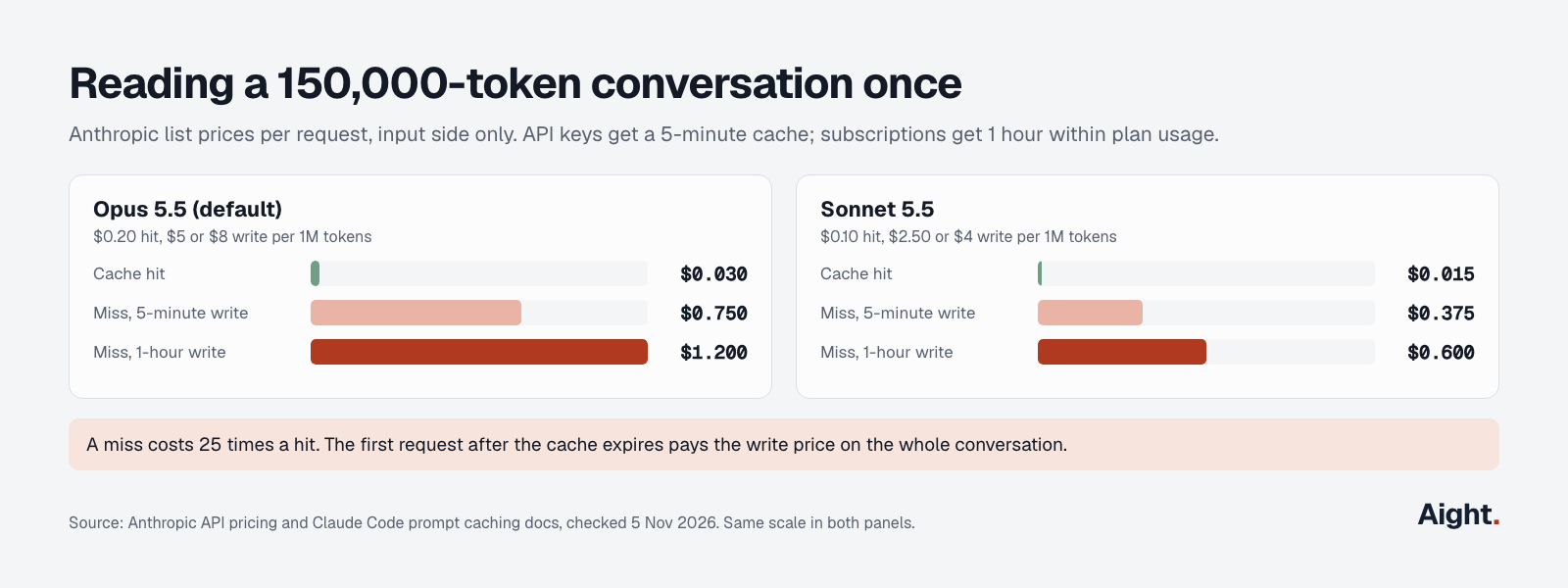
On Opus 5.5 a miss costs 25 times a hit. Across a month it adds up: in the LLM API cost examples, a ten-person team's coding agent goes from $2,112 to $3,696 when its cache hits fall from 90% to 70%. Most of these habits protect the hit rate or shrink what gets resent:
/clearbetween unrelated tasks. It's free, and the next task stops paying for the last one's history;/renamefirst if you'll want it back.- Mind the cache clock. With an API key the main conversation's cache lasts five minutes, so the first message after a break rewrites everything. If you pause often, set
promptCacheTtlto1h: writes cost $8 instead of $5 per million on Opus 5.5 but survive the break. Subscriptions already get an hour within plan usage. - Don't change course mid-task. Switching models, toggling fast mode, adding or removing an MCP server or plugin, denying a whole tool, compacting and upgrading Claude Code all force a full re-read, per the prompt caching docs. With an API key or a Claude subscription, effort changes keep the cache on the 5.5 models and on Fable 5.1 and later.
- Match the model to the job. Sonnet 5.5 costs half of Opus 5.5 per token, and thinking is billed as output, so
/effort lowsuits quick back-and-forth. - Put simple subagents on Haiku: Haiku 5.5 input costs $0.10 per million up to 100,000 tokens, a fortieth of Opus 5.5. Ask for short summaries back.
- Keep always-loaded context small: CLAUDE.md under 200 lines, procedures in skills, area rules in
.claude/rules/, and a CLI such asghover an MCP server where one exists. - Filter noisy output with a hook; the cost docs show a
PreToolUsehook that trims test output to the failures. - Watch what runs while you're idle:
/loop, goal check-ins, background agents, prompt suggestions and idle compaction all send requests. /compactwith a focus only when you need continuity; it reads the whole conversation, so it's a large request, especially on a cold cache.- Cap unattended runs with
--max-turnsand--max-budget-usd, plus a workspace spend limit on an API key, as the Claude Code API key guide explains.
Then check /usage: on a plan it breaks usage down by skill, subagent, plugin and MCP server, flags any pattern behind 10% or more, and shows the share of input served from cache. Whether a plan or per-token billing costs less for your hours is worked out in Claude Code pricing.
What developers report
- Logging a four-hour session with 27 subagents, one user found subagent status summaries were 22.7% of requests and about 18% of weighted tokens (GitHub issue #86879, 15 Aug 2026, link).
- A Claude Code team member replied that across telemetry those summaries were about 2% of cost at list prices and about 6% in the terminal, that a fix for summaries missing the cache shipped in 2.1.311, and that a lower-cost mode was in progress (Hacker News, 29 Oct 2026, link).
- "the biggest trick is just to tell it what complete looks like" (a Hacker News commenter describing their agent setup, 4 Nov 2026, link)
- A subscriber on the plan then called Max 20x said asking Opus 5.5 to parallelize big tasks used up the weekly allowance in about a day, though the output was on point (a Hacker News commenter, 3 Oct 2026, link).
- A controlled test found headless
claude -pused about 1.8 times more of the 5-hour window per token than the interactive CLI on the same workload (GitHub issue #97074, 25 Sep 2026, link). - "Opus 5.5 already thinks before every reply." (Addy Osmani, claude.dev blog, 22 Sep 2026, link)
When /doctor doesn't explain a failure and an editor reports that the Claude Code process exited with code 1, see every cause and fix for exit code 1.
Where Aight fits
Claude Code can't run on Aight: it speaks Anthropic's Messages API, and Aight documents an OpenAI-compatible API with chat completions, embeddings and a model list. For interactive coding a Claude plan is also the lower-cost route; a typical daily month at Opus 5.5 API prices comes to $282.24 in the pricing breakdown, against $20 for Pro or $100 for Max.
Aight fits the per-token work around it: scripts and CI jobs calling Claude Opus 5.5 ($4 / $20 per million tokens) or Sonnet 5.5 ($2 / $10) at Anthropic's list prices through an OpenAI SDK, or tools such as Aider and Cline that take an OpenAI-compatible base URL. Each key can carry a monthly cap that returns 403 key_cap_reached and a list of allowed models, a server-side stop where --max-budget-usd is only an estimate. A $100 recharge costs $103 with the 3% processing fee and adds $110 of balance, about $0.94 per $1 of list-price usage.
Haiku 5.5 is on Aight's models page at Anthropic's $0.10 / $0.50 for Haiku-sized jobs; Fable 5.2 isn't listed yet.
FAQ
What's the difference between /clear and /compact?
/clear starts a new conversation with empty context, keeps the old one in /resume, and costs nothing. /compact keeps the conversation but replaces its history with a summary, and writing that summary means reading everything, so it's a large request. Use /clear for an unrelated task and /compact with a focus when you need the thread.
How can you see how many tokens Claude Code is using?
/usage shows the session's estimated cost at list price, plan limit bars and a breakdown of what used them. /context shows what's filling the context window right now, and a status line set up with /statusline can show context use all the time.
How do you stop Claude Code asking for permission?
Interactive sessions on 2.1.283 and later start in auto mode, where a classifier approves routine actions and stops risky ones. To pre-approve specific commands, add allow rules in /permissions or run /fewer-permission-prompts. --dangerously-skip-permissions skips prompts entirely and belongs only in a container or VM.
Does Claude Code read AGENTS.md?
Yes, from 2.1.277, when there's no CLAUDE.md or CLAUDE.local.md in the working directory or above it. When both exist it reads only CLAUDE.md, unless you change Project instructions in /config or import the file from CLAUDE.md with @AGENTS.md.
Sources
- Anthropic, Claude Code docs: Commands, Interactive mode, CLI reference, Changelog, Best practices
- Anthropic, Claude Code docs: Memory and CLAUDE.md, Settings, Permissions, Permission modes, Hooks guide, Hooks reference, Subagents, Skills, MCP
- Anthropic, Claude Code docs: Extend Claude Code, Manage costs, Prompt caching, Model configuration, Agent view
- Anthropic, API pricing
- Anthropic, @anthropic-ai/claude-code on npm (dist-tags checked through the registry)
- claude.dev blog, Addy Osmani, Getting the most out of Opus 5.5 in Claude and Claude Code
- GitHub, anthropics/claude-code issues #86879 and #97074
- Hacker News: Claude Code regularly sends each background agent's transcript to its model, Getting the most out of Opus 5.5, Ask HN: What's your current AI agentic setup?
- YouTube: Claude, How the Claude Code team uses Claude Code; Tech With Tim, full Claude Code walkthrough
- Tool docs: Aider with OpenAI-compatible APIs, Cline OpenAI Compatible
- Aight, Models and pricing, API reference, Refund policy
Checked on 5 November 2026. Updated 17 November 2026: Claude Code 2.1.326, Fable 5.2 and Aight's current model list.