"Claude Code process exited with code 1" means the claude program that an editor, the Desktop app or your Agent SDK code started has quit with an error, and the message doesn't say which one. To find it, open a terminal in the same project folder and run claude: the failure usually reproduces there with its real message. Then run claude doctor, match the message to the table below, and apply the fix.
The wrapper prints the generic line; the cause is in the process's own output. Anthropic's error reference puts it plainly: the exit code "doesn't say what failed". Everything below was checked on 10 November 2026 against Claude Code 2.1.322, the newest release on the latest channel, and 2.1.311 on stable. If claude isn't installed or won't run at all, start with the Claude Code install guide instead.
Where the error appears
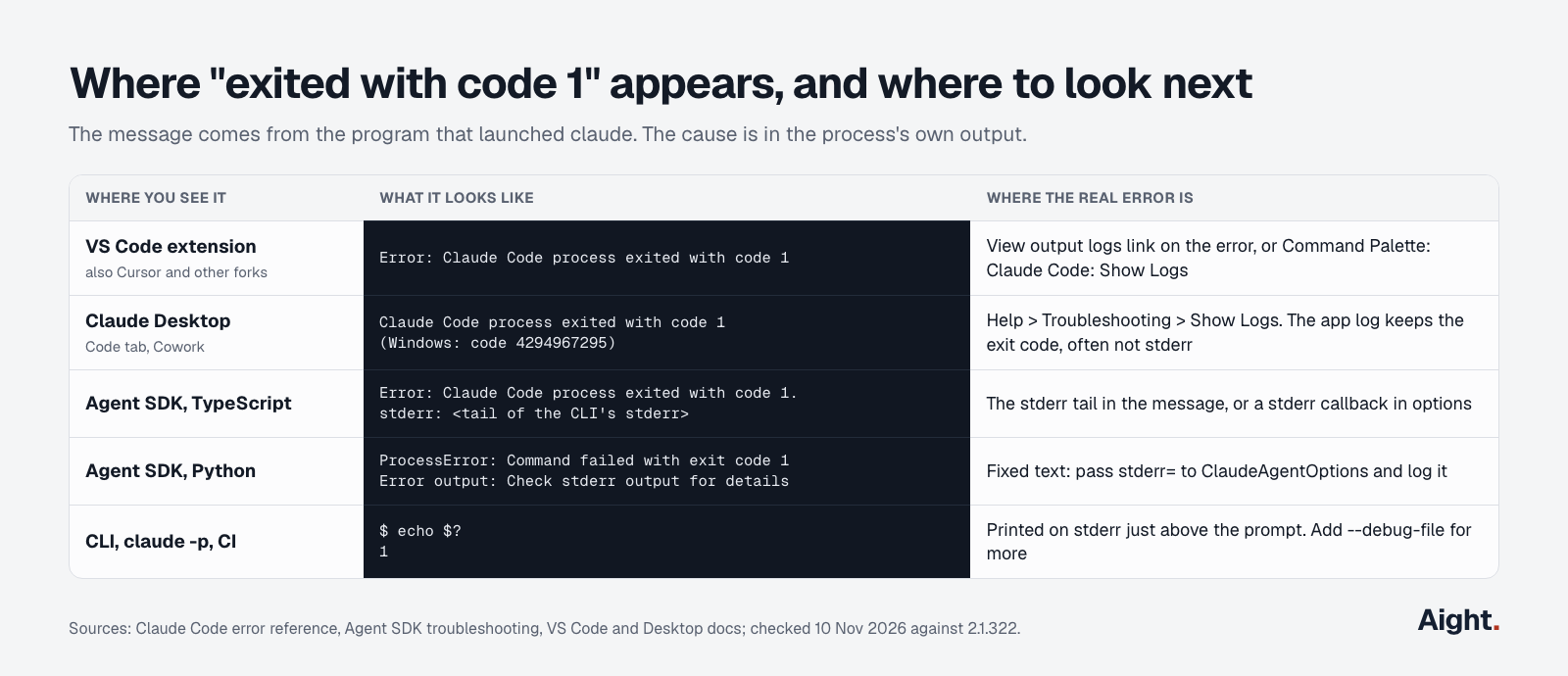
The message comes from whatever launched claude for you, so its wording and the place the real error hides depend on the surface.
| Where you see it | What it looks like | Where the real error is |
|---|---|---|
| VS Code extension (also Cursor and other forks) | Error: Claude Code process exited with code 1 | The View output logs link on the error, or Claude Code: Show Logs in the Command Palette |
| Claude Desktop, Code tab or Cowork | Same text; on Windows often exited with code 4294967295 | Help > Troubleshooting > Show Logs; the app log often keeps only the exit code |
| Agent SDK, TypeScript | Claude Code process exited with code 1. stderr: <tail> | The stderr tail in the message, or a stderr callback |
| Agent SDK, Python | Command failed with exit code 1 (exit code: 1) and Error output: Check stderr output for details | Nowhere yet: that last line is fixed text. Pass a stderr callback |
CLI, claude -p, CI | Exit status 1 | stderr, just above your prompt |
One Windows case is harmless. The native build can exit with code 4294967295 right after a turn finishes. Since v2.1.273 the VS Code extension closes that session quietly and your next message resumes it; before that, it showed the red error at every turn boundary with nothing lost. Update the extension if you still see it after each reply.
Diagnostics: four commands that find the cause
Run these in a normal terminal, in the same folder the editor or app had open.
claude                        # reproduces most startup failures with the real message
claude doctor                 # read-only check of install, settings files, auth, without starting a session
claude auth status --text     # are you signed in, and how (exits 1 if not)
claude --safe-mode            # starts with CLAUDE.md, plugins, hooks, MCP servers and skills off
If claude --safe-mode works and plain claude doesn't, one of your customizations is the cause; the Claude Code cheat sheet lists where each one lives. For a full trace, add --debug-file /tmp/claude-debug.log, or use a category filter such as --debug='mcp,startup' (CLI reference). Debug logs otherwise land in ~/.claude/debug/<session-id>.txt. Inside a working session, /doctor runs the same checks and offers to apply fixes.
If claude doctor itself exits, the cause is something it reads at startup: a broken managed settings file or ~/.claude.json, both covered below.
Every common cause and its fix
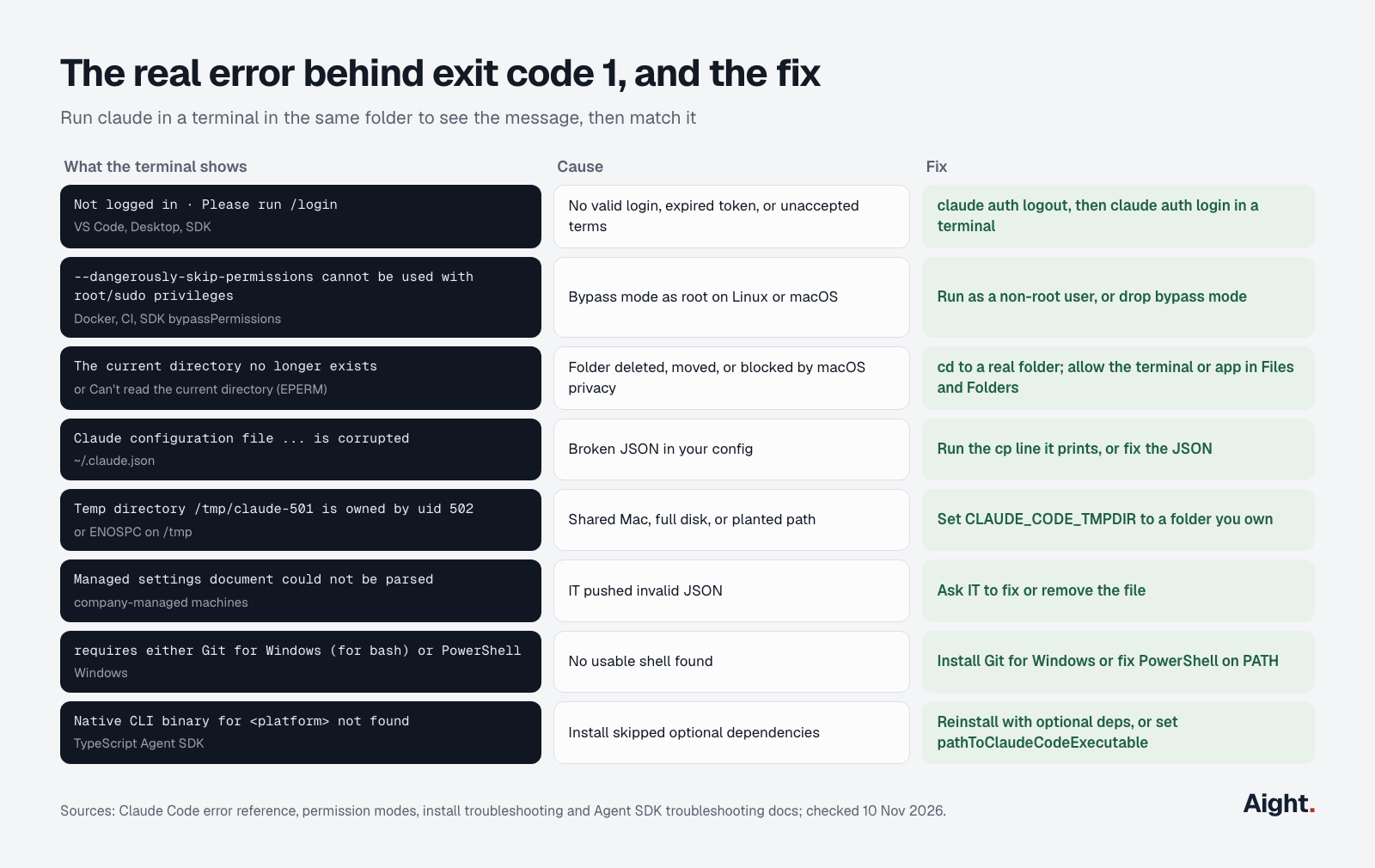
These are the startup failures that Anthropic's error reference, install troubleshooting and permission modes pages document as ending in exit code 1, plus the ones that keep recurring in GitHub issues.
| What the terminal shows | Cause | Fix |
|---|---|---|
Not logged in · Please run /login | No valid login, an expired token, or new terms not yet accepted | claude auth logout, then claude auth login in a terminal; restart the editor |
--dangerously-skip-permissions cannot be used with root/sudo privileges for security reasons | Bypass permissions mode as root on Linux or macOS | Run as a non-root user, or use a normal permission mode |
The current directory no longer exists or Can't read the current directory (EPERM) | Folder deleted or moved, or macOS privacy blocking it | cd to a real folder; grant access under Files and Folders |
Claude configuration file at ... is corrupted | Broken JSON in ~/.claude.json | Run the cp -f line it prints, or repair the file |
Temp directory /tmp/claude-501 is owned by uid 502 or an ENOSPC message | Another user's temp folder, a full disk, or a planted path | Set CLAUDE_CODE_TMPDIR to a folder you own |
Managed settings document could not be parsed | Your company's deployed policy file is invalid JSON | Ask IT to fix or remove it |
Claude Code on Windows requires either Git for Windows (for bash) or PowerShell | No usable shell on Windows | Install Git for Windows or put PowerShell back on PATH |
Native CLI binary for <platform>-<arch> not found | The TypeScript SDK install skipped optional dependencies | Reinstall with optional dependencies, or set pathToClaudeCodeExecutable |
Sign-in, expired tokens and new terms
This is the most common cause in the VS Code extension and the Desktop app. The wrapper starts claude, claude finds no usable login (or a prompt it can't show inside the editor), and it exits. In GitHub issue #8557, the most-upvoted fix was to run claude in a separate terminal, sign in there, accept the updated terms, and relaunch the extension.
claude auth logout
claude auth login            # add --console to bill a Console account per token
claude auth status --text
Two related traps. An old ANTHROPIC_API_KEY in your shell or in the extension's claudeCode.environmentVariables setting overrides your plan login; see which credential Claude Code uses. And if claude -p jobs started failing when someone signed in again to the same claude.ai account, update to 2.1.318 or later: older versions removed the stored login during that sign-in, before saving the new one.
Running as root with bypass permissions (Docker, CI, SDK)
On Linux and macOS, Claude Code refuses to start in bypassPermissions mode as root or under sudo. In a container where everything runs as root, this is the usual reason an Agent SDK call with permissionMode: "bypassPermissions" dies with exit code 1. The check is skipped inside a sandbox Claude Code recognizes, and Anthropic's dev container runs as a non-root user. Add a user to your image and switch to it:
RUN useradd -m agent
USER agent
Several SDK users reported setting IS_SANDBOX=1 as a workaround; others said it didn't help, and it isn't in Anthropic's environment variable reference. A non-root user is the documented fix. The dangerously-skip-permissions guide covers when bypass mode is worth the risk at all.
Working directory deleted, moved or blocked
If the folder was removed after your shell entered it (a deleted git worktree or temp folder is typical), claude can't read its working directory and exits with code 1. Change to a folder that exists, or run cd "$PWD" if it was recreated at the same path.
On macOS, EPERM for a folder in ~/Desktop, ~/Documents, ~/Downloads or iCloud Drive means macOS is blocking the app. Quit the terminal or the Desktop app with Cmd+Q, reopen it, and if it still fails, turn the folder on for that app in System Settings > Privacy & Security > Files and Folders. Desktop users filed this one repeatedly, for example in #51984.
Corrupted ~/.claude.json
That file holds your account details, MCP servers and per-project state. When it isn't valid JSON, claude -p (and so every SDK call) exits with code 1 until you repair it. The error names a backup and prints a line like this; run it:
cp -f "$HOME/.claude/backups/.claude.json.backup.<timestamp>" "$HOME/.claude.json"With no backup, fix the JSON by hand or rename the file; Claude Code then starts with defaults and you add your MCP servers back. Since 2.1.318, a failed non-interactive start no longer overwrites the file with defaults.
Temp directory, shared Macs and full disks
At startup Claude Code creates a private folder, claude-<uid>, under /tmp on macOS or the system temp directory on Linux. If another account on the same machine already owns that path, it's a symlink, or the volume is full, Claude Code exits with code 1 rather than use it. Point it elsewhere in your shell or user settings:
export CLAUDE_CODE_TMPDIR="$HOME/.cache/claude-tmp"
mkdir -p "$CLAUDE_CODE_TMPDIR"
A related collision on multi-user Macs, a shared /tmp/claude-settings-<hash>.json owned by the other user, was traced in #52127.
Managed settings from your IT team
When an organization deploys a managed-settings.json file, a macOS profile or the Windows registry value HKLM\SOFTWARE\Policies\ClaudeCode\Settings, and that document can't be parsed, Claude Code refuses to start everywhere: interactive sessions, claude -p, Agent SDK sessions and even claude doctor. It fails closed on purpose. The error line names the source; send it to whoever manages your machine. Since 2.1.312, the VS Code tab says why and offers Retry or Sign in again instead of a bare exit code.
Windows: shell, PATH and the wrong binary
Claude Code on Windows needs Git Bash or PowerShell. If Git is installed somewhere unusual, set CLAUDE_CODE_GIT_BASH_PATH to its bin\bash.exe in settings.json. Two neighboring VS Code errors have their own messages: Could not locate the Claude CLI on PATH (put the install folder on the user or system PATH, not only in your PowerShell profile, then restart VS Code) and The Claude Code program for this computer ... could not be found (you installed the extension package for another platform; reinstall it, or set claudeCode.claudeProcessWrapper to a separately installed claude). PATH fixes are in the install guide.
Bad flags and resume failures
Command-line mistakes also end in exit code 1, which matters when a wrapper builds the command for you: invalid JSON in --agents, a --json-schema that doesn't compile, a --settings file over 2 MiB, a --permission-prompt-tool whose MCP server never connected, or --resume with a session ID that has no saved transcript or a transcript that fails to load. On Windows, starting claude interactively with piped input also exits; use claude -p for that.
In the Agent SDK: catch it and read stderr
The SDKs report the exit differently. TypeScript rejects the for await loop with a plain Error that carries the stderr tail. Python raises ProcessError, whose Error output line is fixed text, so you only see the cause if you pass a stderr callback (SDK troubleshooting). When the CLI reported an error result before exiting, both SDKs raise Claude Code returned an error result: ... instead, and Python's ResultError (claude-agent-sdk 0.2.140 and later) subclasses ProcessError.
import asyncio
from claude_agent_sdk import query, ClaudeAgentOptions, ProcessError, ResultError

stderr_lines: list[str] = []
options = ClaudeAgentOptions(stderr=stderr_lines.append)

async def main():
    try:
        async for message in query(prompt="Say hi", options=options):
            print(message)
    except ResultError as e:          # the CLI reported why it stopped
        print("Error result:", e)
    except ProcessError as e:         # bare exit: the reason is in stderr
        print("Exit code:", e.exit_code)
        print("".join(stderr_lines)[-2000:])

asyncio.run(main())
In TypeScript, setting CLAUDE_CODE_STARTUP_FAILURE_RESULTS=1 makes the CLI write an error result with a startup_failure_reason such as bypass_root, cwd_unavailable, temp_dir_unusable, shell_tool_missing or config_file_invalid before it exits (Agent SDK 0.3.274 or later). Note that env replaces the child's environment in the TypeScript SDK, so spread process.env.
import { query } from "@anthropic-ai/claude-agent-sdk";

const stderr: string[] = [];
try {
  for await (const msg of query({
    prompt: "Say hi",
    options: {
      stderr: (data) => stderr.push(data),
      env: { ...process.env, CLAUDE_CODE_STARTUP_FAILURE_RESULTS: "1" },
    },
  })) {
    if (msg.type === "result" && msg.subtype !== "success") {
      console.error(msg.startup_failure_reason, msg.errors);
    }
  }
} catch (err) {
  console.error(String(err));
  console.error(stderr.join("").slice(-2000));
}
Two SDK-specific causes: a URL-based MCP server without type: "http" or "sse" crashed with a bare exit in older releases (TypeScript SDK #131), and a package manager that skips optional dependencies leaves no bundled binary. The TypeScript SDK version tracks the CLI it bundles: SDK 0.3.322 ships Claude Code 2.1.322. The MCP server setup guide shows valid server entries.
When the terminal works but the app doesn't
If claude runs fine in a terminal and only the Desktop app or the extension fails, the difference is the environment the app passes: PATH, working folder, permissions, or how it starts the child process. Quit the app completely (not just the window), reopen it, and sign in again. Launch the Desktop app from /Applications rather than a mounted disk image. Check that the app, not just your terminal, has access to the folder. If nothing helps, keep working with claude in a terminal and file an issue with the app version, the app log and the stderr you captured.
What developers report
- "Terminal CLI and the VS Code plugin both work fine." (a Desktop user on the long-running Desktop issue, 28 Apr 2026, link)
- After replaying the Desktop app's exact spawn command from a shell and getting exit 0, a Windows user concluded "the fault is in the app's spawn, not the agent/config/env/auth." (GitHub issue #39270, 13 Jun 2026, link)
- A macOS user found the Desktop log "captures only the exit code, not the child's stderr", wrapped the binary to capture stderr, and found an
EACCESon a temp file owned by another account (GitHub issue #52127, 22 Apr 2026, link). - An Anthropic team member closed a bypass-permissions exit-code-1 report after two reporters confirmed the cause was running as root, with non-root or
IS_SANDBOX=1as the fixes (TypeScript SDK issue #54, 31 Mar 2026, link). - In the VS Code report from the 2.0 era, several users fixed it by signing in and accepting new terms in a terminal outside the editor; the reporter later said 2.0.8 resolved it (GitHub issue #8557, October 2025, link).
FAQ
What does exit code 1 mean in Claude Code?
It means the claude process ended with a general failure. The number is the same for a missing login, a broken config file, a deleted working folder or a refused root start, so it tells you only that something failed at startup or during the run. The real message is on the process's stderr.
Will reinstalling Claude Code fix it?
Usually not. A reinstall replaces the binary, but most causes live outside it: your login, ~/.claude.json, managed settings, folder permissions or the user you run as. Reinstall only when claude doctor reports a broken install or the binary itself won't run.
Why does it work in the terminal but not in VS Code or Desktop?
The app starts claude with its own PATH, environment and folder permissions, which can differ from your shell's. A PATH set only in a shell profile, an ANTHROPIC_API_KEY set only in the extension's settings, or a macOS folder permission granted to Terminal but not to the app all produce this split.
What is "exited with code 4294967295"?
It's the Windows form of exit code -1. Right after a completed turn it's harmless, and since v2.1.273 the VS Code extension resumes quietly on your next message. If it appears on every message in the Desktop app, treat it like code 1 and check the logs.
Is the error caused by an Anthropic outage?
Rarely. An outage shows up as API errors such as 500, 529 overloaded or timeouts inside a running session, not as a process that exits at startup. Check status.claude.com if requests were failing too, and see the guide to LLM API outages.
Sources
- Claude Code docs: Error reference (Wrapper and IDE errors, command-line errors, authentication), Troubleshoot installation and login, Troubleshooting, CLI reference, Environment variables, Permission modes, VS Code, Desktop, Development containers
- Agent SDK docs: Troubleshoot the Agent SDK, Python reference, TypeScript reference
- Anthropic on GitHub: Claude Code changelog (2.1.273, 2.1.312, 2.1.318, 2.1.322); issues #8557, #39270, #51984, #52127, #77162; TypeScript SDK issues #54, #131, #259
- Package registries: @anthropic-ai/claude-code on npm (2.1.322 latest, 2.1.311 stable), @anthropic-ai/claude-agent-sdk on npm (0.3.322), claude-agent-sdk on PyPI (0.2.180)
- Anthropic: Claude status page
Checked on 10 November 2026.