claude --dangerously-skip-permissions starts Claude Code in bypassPermissions mode: every file edit, shell command and network call runs at once, with no permission prompt and no protected-path check. It is the same as claude --permission-mode bypassPermissions, and Anthropic's docs list it for isolated containers and VMs only. On your own laptop, auto mode (the default since 2.1.283) removes most prompts while a classifier still blocks risky actions.
This guide covers what the Claude Code dangerously-skip-permissions flag skips and what still stops it, how it compares with the other five permission modes, the Claude Code sandbox and container setups that make "yolo mode" safe enough to leave running, and the public incidents behind the warnings. Everything was checked against Claude Code 2.1.322, the latest release on npm on 10 November 2026 (the stable channel is on 2.1.311).
The short answer
- The flag turns off prompts but adds no isolation: Claude keeps your account's full access to files, credentials and the network.
- Deny rules, explicit ask rules and
rmon critical paths such as/and~still stop it. It refuses to run as root. - On your own machine, auto mode is the safer default. For unattended runs, put the whole Claude Code process in a dev container, the
srtsandbox runtime, Docker Sandboxes, a VM or a cloud session, and limit its network. - The built-in
/sandboxwraps shell commands only, so it is not enough on its own for bypass mode. - Admins can block the mode with
permissions.disableBypassPermissionsMode.
What --dangerously-skip-permissions does
The CLI reference describes the flag in one line: "Skip permission prompts. Equivalent to --permission-mode bypassPermissions." Per the permission modes docs, the mode "disables permission prompts and safety checks so tool calls execute immediately, including writes to protected paths."
Protected paths are files that are normally never auto-approved because a write to them can run code later: .git, .claude, .vscode, .husky, .devcontainer, shell startup files such as .bashrc and .zshrc, .npmrc, .gitconfig and .mcp.json, among others. In bypass mode Claude can edit all of them without asking. Allow rules also stop mattering, since everything is already allowed.
Three ways to get there:
# start in bypass mode
claude --dangerously-skip-permissions

# same thing, spelled as a mode
claude --permission-mode bypassPermissions

# start in plan mode, but put bypass in the Shift+Tab cycle for later
claude --permission-mode plan --allow-dangerously-skip-permissions
You can't switch into bypass mode from a session that wasn't started with one of these, or with "defaultMode": "bypassPermissions" in ~/.claude/settings.json, --settings or managed settings. Since 2.1.257 the same value in a repository's .claude/settings.json or .claude/settings.local.json is ignored, so a cloned repo can't put you in bypass mode. The status bar shows ⏵⏵ bypass permissions on while it's active.
The first interactive launch shows a warning; accepting writes "skipDangerousModePermissionPrompt": true to ~/.claude/settings.json. Cloud sessions on claude.ai/code and Remote Control never offer Bypass, and --restricted refuses it.
What still stops Claude in bypass mode
Bypass mode is not quite "anything goes." Per the docs' list of actions no mode auto-approves:
- Deny rules block in every mode, so
"deny": ["Bash(git push *)"]still holds. - An explicit ask rule still prompts, and
AskUserQuestionand MCP tools markedrequiresUserInteractionstill need you. rmandrmdiron a critical path (the filesystem root, top-level directories, your home directory, the working directory and its parents) get a prompt with a two-minute countdown in the terminal. If nobody answers, the command is denied and Claude is told to try something else; after three unanswered prompts in a session, further ones are denied at once. In the VS Code panel, the desktop app and-pruns without a prompt tool, they are denied outright.- A
PreToolUsehook that returnsdenystill blocks, per the hooks guide. - On Linux and macOS the flag fails as root with
--dangerously-skip-permissions cannot be used with root/sudo privileges for security reasons, unless Claude Code detects a recognized sandbox.
The critical-path check is a text check, and the docs warn that "the check can miss some commands." Until 2.1.288 (2 October 2026), bash -c 'rm -rf <dir>' got past it in bypass mode (issue #96300). A Python script that deletes your home folder was never covered. Since 2.1.311 there is also CLAUDE_CODE_EVEN_MORE_DANGEROUSLY_SKIP_PERMISSIONS=1, read only from the launch environment, which removes even that prompt; set it only somewhere you can afford to lose.
Two more side effects are easy to miss. In an interactive session where bypass is available, plan mode's blocks aren't enforced, so an edit Claude attempts while "planning" runs. And if you have the sandbox on, a command that fails inside it can be retried with dangerouslyDisableSandbox, which in bypass mode runs with no prompt unless you set "allowUnsandboxedCommands": false.
The six Claude Code permission modes
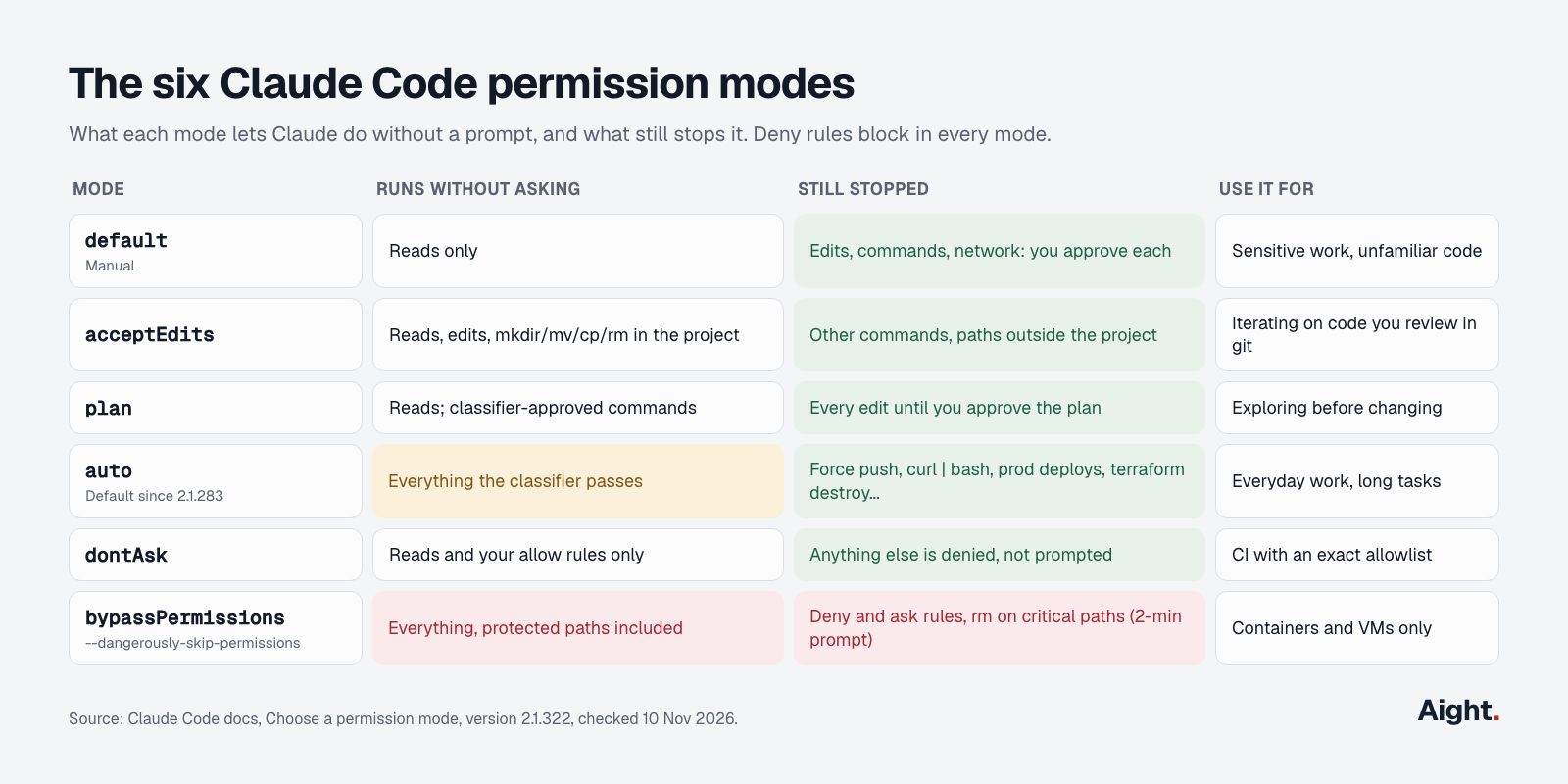
A permission mode decides whether Claude asks; a sandbox decides what an action can reach. The modes in 2.1.322:
| Mode | How to start it | Runs without asking | Best for |
|---|---|---|---|
default (Manual) | --permission-mode default or manual | Reads only | Sensitive work, unfamiliar code |
acceptEdits | Shift+Tab once from Manual | Reads, edits, mkdir, touch, rm, mv, cp, sed inside the project | Reviewing changes in git afterward |
plan | --permission-mode plan or /plan | Reads, plus classifier-approved commands | Exploring before editing |
auto | Default for interactive sessions from 2.1.283 | Everything the classifier approves | Long tasks on your own machine |
dontAsk | --permission-mode dontAsk | Reads and your allow rules; everything else denied | CI and scripts |
bypassPermissions | --dangerously-skip-permissions | Everything except the checks above | Isolated containers and VMs only |
Shift+Tab cycles from auto to Manual, acceptEdits and plan; bypass joins the cycle only when you started with one of the flags. claude -p and the Agent SDK start in Manual since 2.1.302 and deny anything that would prompt, so a script that used to rely on auto mode needs --permission-mode auto or allow rules. The cheat sheet lists the rest of the flags.
Auto mode: the alternative to yolo mode
Anthropic's engineering write-up (25 March 2026) found that users accept 93% of permission prompts anyway, and called --dangerously-skip-permissions "unsafe in most situations."
In auto mode a second model, the classifier, reviews each action before it runs. Reads and edits inside the working directory skip it; shell commands, network calls and writes to protected paths go to it. It runs on Claude Sonnet 5 by default and sees your messages, Claude's tool calls and CLAUDE.md, but not tool results, so text in a hostile web page or file can't argue with it directly. The default block list includes:
curl | bashand other download-and-execute patterns- sending sensitive data to outside hosts, and printing live credentials
- production deploys, migrations,
terraform destroyand its Pulumi and CDK equivalents - force push,
git reset --hard,git clean -fdand deleting files that existed before the session - launching another agent loop with
--dangerously-skip-permissionsor--no-sandbox
After 3 blocks in a row or 20 in a session it pauses and prompts you. To teach it your infrastructure, run /auto-mode-setup or add prose entries to autoMode.environment in ~/.claude/settings.json; the classifier ignores autoMode blocks in project files.
It is not a sandbox. On Anthropic's tests the full pipeline had a 0.4% false-positive rate on 10,000 real actions and a 17% false-negative rate on 52 real "overeager" actions, which Anthropic calls "the honest number." Two more limits from the docs: a boundary you state in chat ("don't push") can be lost when the conversation is compacted, so use a deny rule for anything that matters, and on Enterprise plans and API, Bedrock, Vertex and Foundry accounts, classifier calls count toward your token usage unless the server reviews them. The Claude Code pricing guide covers what that usage costs.
Anthropic calls auto mode "a substantial improvement" over skipping permissions; for auto mode a container is optional defense in depth, for the flag it is required.
Claude Code sandbox: what /sandbox covers
The built-in Claude Code sandbox wraps shell commands with operating-system controls: Seatbelt on macOS, bubblewrap and socat on Linux and WSL2. It is off by default and doesn't run on native Windows, where commands run unsandboxed. Turn it on with /sandbox or in settings.
By default a sandboxed command can write only to the working directory, a per-user temp directory and folders you added with --add-dir. It can read most of the machine, including ~/.ssh and ~/.aws/credentials, unless you deny them. Network traffic goes through a local proxy that checks each host against allowedDomains, which starts empty.
What it doesn't cover, per the sandboxing docs: Claude's own Read, Edit, Write, WebFetch and WebSearch tools, hooks, local MCP servers, plugin monitors, LSP servers, your status line command, commands you type after !, and any command matching excludedCommands. Those follow permission rules, and in bypass mode there effectively are none. The proxy also doesn't inspect TLS, and the docs warn that broad entries like github.com open a path for data exfiltration.
A strict setup that refuses to fall back to unsandboxed commands:
{
  "sandbox": {
    "enabled": true,
    "failIfUnavailable": true,
    "allowUnsandboxedCommands": false,
    "filesystem": { "denyRead": ["~/.ssh", "~/.aws"] },
    "network": { "allowedDomains": ["registry.npmjs.org"] }
  },
  "permissions": {
    "deny": ["Bash(git push *)", "Read(./.env)", "Read(~/.ssh/**)"]
  }
}
To test it, ask Claude (not the ! prompt) to run touch ~/sandbox-probe; it should fail with Operation not permitted on macOS or Read-only file system on Linux. Choosing auto-allow in /sandbox runs sandboxed commands without prompts even in Manual mode, a middle ground for local work.
Safer setups for running without prompts
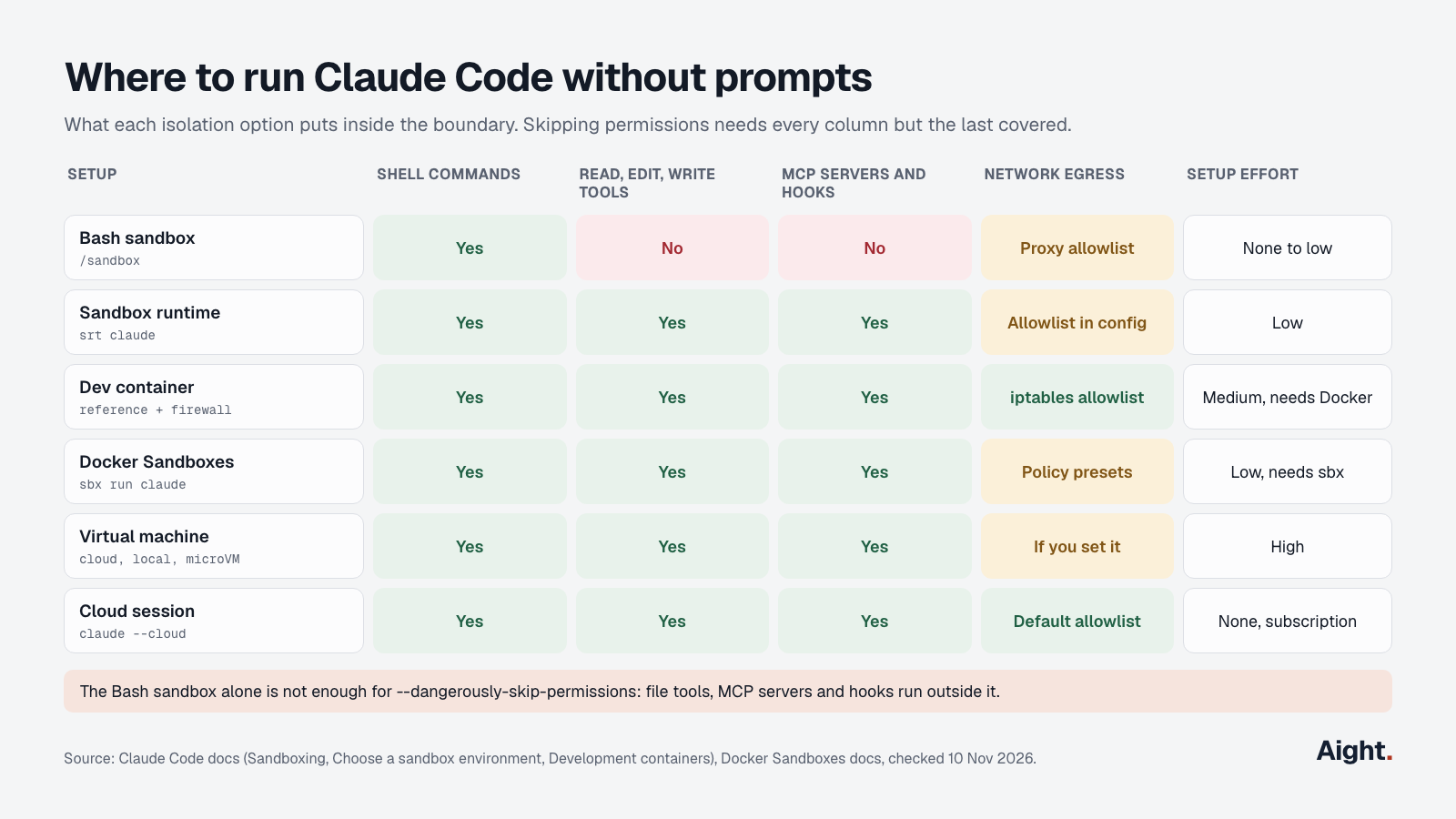
Anthropic's sandbox environments page is direct: "Always run --dangerously-skip-permissions sessions inside a container, a VM, or the sandbox runtime, so that file tools, MCP servers, and hooks are also inside the boundary." Each option below puts the whole Claude Code process inside.
| Setup | Isolates | Network control | Needs |
|---|---|---|---|
| Built-in Bash sandbox | Shell commands only | Proxy allowlist | macOS, Linux or WSL2 |
Sandbox runtime (srt claude) | Whole process: tools, hooks, MCP servers | Allowlist in ~/.srt-settings.json | npm; bubblewrap and socat on Linux |
| Dev container | Whole dev environment | Reference init-firewall.sh | Docker, a Dev Containers editor |
Docker Sandboxes (sbx) | microVM with its own Docker daemon | Policy presets | Docker's free sbx CLI |
| Virtual machine | Full OS and kernel | Whatever you configure | A hypervisor or cloud instance |
| Cloud session | Anthropic-managed VM | Default allowlist proxy | A Claude subscription |
Dev container
The dev container docs add Claude Code as a feature:
{
  "image": "mcr.microsoft.com/devcontainers/base:ubuntu",
  "features": {
    "ghcr.io/anthropics/devcontainer-features/claude-code:1.0": {}
  }
}
Anthropic's reference container goes further: it runs as the non-root user node, keeps ~/.claude in a named volume with CLAUDE_CONFIG_DIR pointed at it, and runs init-firewall.sh at start. That script drops all outbound traffic except GitHub's IP ranges, registry.npmjs.org, api.anthropic.com, sentry.io, statsig.com and VS Code's hosts, and needs the NET_ADMIN and NET_RAW capabilities.
The docs warn that with the flag, a dev container doesn't stop a malicious project from exfiltrating anything inside it, "including the Claude Code credentials stored in ~/.claude," and your bind-mounted project still changes on the host. Don't mount ~/.ssh or cloud credential files; use short-lived, repository-scoped tokens.
Sandbox runtime without Docker
@anthropic-ai/sandbox-runtime (GitHub; 0.0.82 on 10 November 2026, a beta research preview) wraps the entire process in the same Seatbelt or bubblewrap boundary:
npm install -g @anthropic-ai/sandbox-runtime
mkdir -p ~/.claude && { [ -f ~/.claude.json ] || echo '{}' > ~/.claude.json; }
srt claude --dangerously-skip-permissions
Configure ~/.srt-settings.json first. Allow writes to the project, ~/.claude, ~/.claude.json and /tmp (/private/tmp on macOS); allow api.anthropic.com, plus claude.ai and platform.claude.com if you sign in with a subscription:
{
  "network": {
    "allowedDomains": ["api.anthropic.com", "claude.ai", "platform.claude.com", "registry.npmjs.org"],
    "deniedDomains": []
  },
  "filesystem": {
    "denyRead": ["~/.ssh", "~/.aws"],
    "allowWrite": [".", "~/.claude", "~/.claude.json", "/tmp"],
    "denyWrite": [".env"]
  }
}
An invalid settings file makes srt refuse to start; a missing one starts it with no network. Deny writes to other places Claude Code loads configuration from, or a session can plant hooks that run unsandboxed next time.
Docker Sandboxes and cloud sessions
Docker Sandboxes runs agents in a free microVM; sbx run claude ~/my-project starts claude --dangerously-skip-permissions by default and doesn't read your host's ~/.claude. A cloud session runs in an Anthropic-managed VM with auto mode but no Bypass. For an untrusted repository, the docs recommend a dedicated VM or a cloud session.
Allowlists and dontAsk for CI
In CI you usually know exactly what Claude should run, so an allowlist beats both bypass and the classifier. dontAsk denies anything not pre-approved instead of waiting for input:
claude -p "run the test suite and fix failures" \
  --permission-mode dontAsk \
  --allowedTools "Read" "Edit" "Bash(npm test)" "Bash(npm run lint)"
Rules are checked deny, then ask, then allow, and the first match wins. Put the * after the subcommand: Bash(git log *) allows only git log. Text rules have gaps, and the permissions docs give examples: Bash(rm *) in a deny list stops rm -rf build/ but not /bin/rm -rf build/ or bash -c 'rm -rf build/'. Pair deny rules with a sandbox when the restriction has to hold. For a PreToolUse script that checks commands your way, see the Claude Code hooks guide.
Before running claude -p in a repository you didn't write, add --setting-sources user or --bare, because -p never shows the workspace trust dialog and a project's hooks and .mcp.json servers can still load.
To lock bypass mode out for a whole organization, put this in managed settings (it also works in your own ~/.claude/settings.json if you want to stop yourself):
{ "permissions": { "disableBypassPermissionsMode": "disable" } }permissions.disableAutoMode does the same for auto mode, and sandbox.enabled with failIfUnavailable in managed settings makes the Bash sandbox mandatory.
Real incidents and what they teach
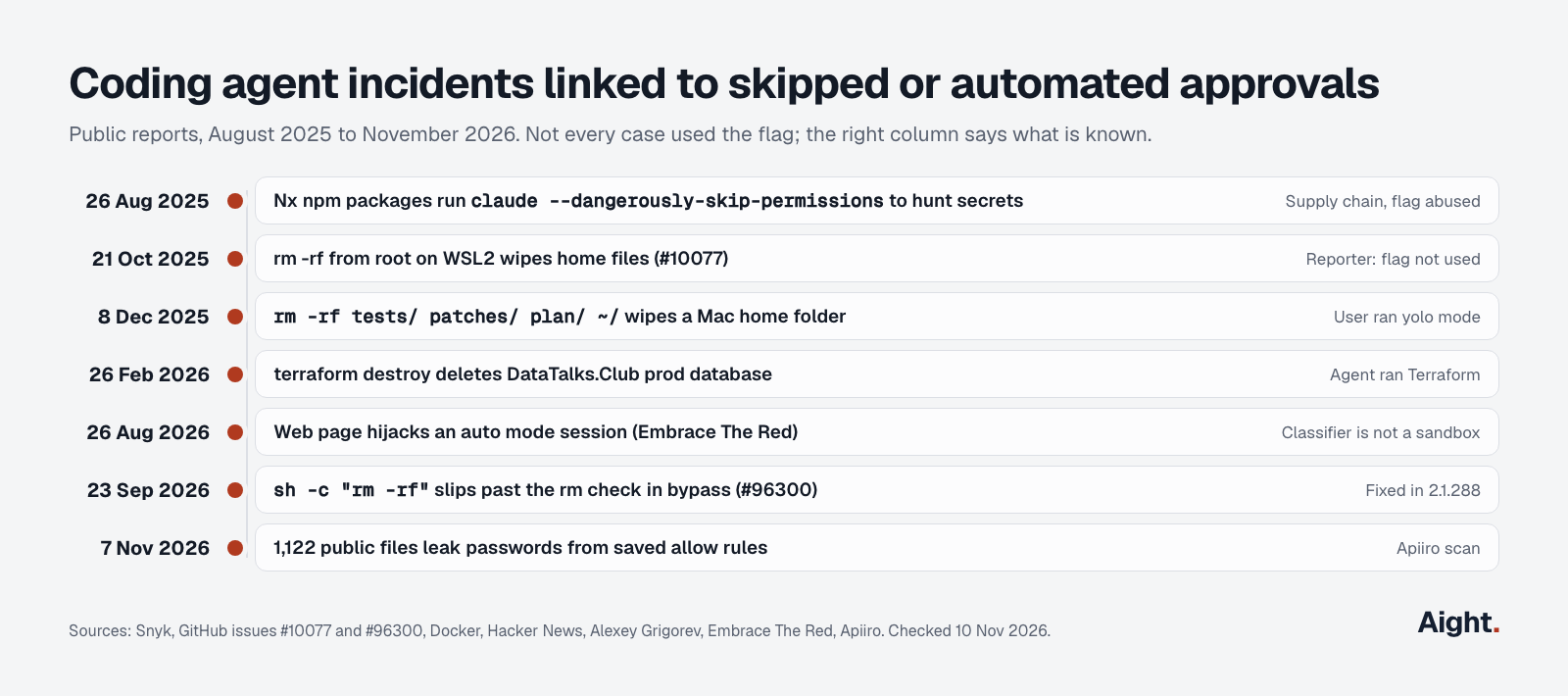
Public reports show the failure modes, though not every case used the flag:
| Date | What happened | Flag used? | Lesson |
|---|---|---|---|
| 26 Aug 2025 | Malicious nx npm versions ran claude --dangerously-skip-permissions -p, gemini --yolo -p and q chat --trust-all-tools to list secret files, then uploaded them to a public GitHub repo (Snyk) | Yes, by the malware | Any process on your machine can invoke the flag; isolation beats trusting the agent |
| 21 Oct 2025 | rm -rf from root on WSL2 deleted a user's home files in Claude Code 2.0.22 (#10077) | Reporter says no | Prompts you approve quickly fail too |
| 8 Dec 2025 | rm -rf tests/ patches/ plan/ ~/ wiped a Mac home folder, Keychain included (Docker's write-up) | The poster mentioned yolo mode | Cleanup tasks are the riskiest to leave unattended |
| 26 Feb 2026 | An agent swapped in an old Terraform state file and ran terraform destroy on DataTalks.Club's production RDS, VPC and snapshots; AWS restored a hidden snapshot after about 24 hours (Alexey Grigorev) | Not stated | Keep production credentials out of the agent's reach |
| 26 Aug 2026 | A web page steered an auto mode session into running a malicious Python module, with 60% to 80% success in small samples (Embrace The Red) | No, auto mode | The classifier is not a sandbox |
| 23 Sep 2026 | sh -c "rm -rf <cwd>" bypassed the critical-path check in bypass mode on 2.1.280 (#96300) | Yes | Text checks have gaps; fixed in 2.1.288 |
| 7 Nov 2026 | Apiiro found passwords in 1,122 public GitHub files, from "Yes, and don't ask again" rules saved in committed .claude settings (HN discussion) | No | Allowlist rules can hold secrets; keep settings.local.json out of git |
Anthropic's engineering post adds internal near misses: deleting remote git branches after misreading an instruction, uploading an engineer's GitHub token to an internal cluster, and attempting migrations against a production database. For how Codex handles the same trade-off with a sandbox on by default and its own --yolo flag, see Codex vs Claude Code.
What developers report
- "users accept 93% of them anyway," on permission prompts (Anthropic Engineering, 25 Mar 2026, link)
- "Auto Mode approval is not evidence that a command is safe." (Embrace The Red, 26 Aug 2026, link)
- A Hacker News commenter on the home-directory thread pointed to the original poster saying it was the first problem after long use of yolo mode (15 Dec 2025, link)
- A Hacker News commenter said the auto mode classifier is sometimes overloaded and slow, so they fall back to the flag (10 Aug 2026, link)
- A Hacker News commenter said auto mode refuses safe CI/CD triggers and read-only production queries, pushing their team back to other modes (7 Nov 2026, link)
- Apiiro's author said a commit co-authored by Claude changed the leaked settings file in 539 of 1,105 affected repositories (7 Nov 2026, link)
FAQ
Is --dangerously-skip-permissions the same as yolo mode?
Yes. "Yolo mode" is the community's name for running Claude Code with --dangerously-skip-permissions, borrowed from Gemini CLI's --yolo flag; Codex CLI also has a --yolo alias for --dangerously-bypass-approvals-and-sandbox. In Claude Code the mode's official name is bypassPermissions.
Can --dangerously-skip-permissions be the default?
Set "defaultMode": "bypassPermissions" under permissions in ~/.claude/settings.json or pass it with --settings. A project's .claude/settings.json can't set it: since 2.1.257 that value is ignored there and the session starts in Manual mode. A shell alias works too, but every session then runs unprotected, including ones in folders you forgot about.
Why does it fail with "cannot be used with root/sudo privileges"?
Claude Code refuses bypass mode as root on Linux and macOS, unless it detects a recognized sandbox. In a container, create a non-root user (the reference dev container uses node) and run Claude as that user rather than disabling the check.
Is auto mode safe enough to replace a sandbox?
No. Anthropic measured a 17% miss rate on real overeager actions, and a researcher hijacked auto mode through a web page in August 2026. Auto mode cuts risk compared with skipping permissions, but for unattended runs Anthropic still recommends a container or VM around it.
Does the Claude Code sandbox work on Windows?
Not natively: on Windows, Claude Code runs commands unsandboxed. Run Claude Code inside WSL2 to use the bubblewrap sandbox, or use a container, a VM or Docker Sandboxes.
How can a team block bypass mode?
Set "disableBypassPermissionsMode": "disable" under permissions in managed settings, delivered through MDM or server-managed settings on claude.ai. Managed values beat user and project settings, and the VS Code mode picker hides Bypass when it's set.
Sources
- Anthropic, Claude Code docs: Choose a permission mode, Permissions, Configure the sandboxed Bash tool, Choose a sandbox environment, Development containers, Configure auto mode, CLI reference, Settings reference, Hooks guide, Cloud sessions, Changelog
- Anthropic: Claude Code auto mode engineering post, sandbox-runtime on GitHub, reference dev container, @anthropic-ai/claude-code on npm
- GitHub issues: anthropics/claude-code #10077, anthropics/claude-code #96300
- Docker: Docker Sandboxes, Claude Code, Coding agent horror stories: the rm -rf incident
- Snyk: Weaponizing AI coding agents for malware in the Nx malicious package
- Alexey Grigorev: DataTalks.Club production database post-mortem
- Embrace The Red: Breaking Claude Code Opus 5 and Auto Mode
- Hacker News: Claude CLI home directory deletion thread, Auto mode is now the default in Claude Code, Don't Ask Again exposes passwords (Apiiro)
Checked on 10 November 2026.