An API key is a long, random secret that a program sends with every request to a service's API, so the service knows which account is calling, what that account may do, and whom to bill. It works like a password for software: anyone who has the key can use the account, which is why keys belong on a server, never in a web page or a public repository.
This guide answers "what is an API key?" in plain terms, shows what keys from OpenAI, Anthropic, Google and Stripe look like (with fake values), explains how keys are generated and why a random online API key generator is the wrong tool, and covers storing, scoping and rotating keys, with a section on AI API keys, which can run up a bill of thousands of dollars within days when one leaks. Facts were checked against each provider's documentation on 10 November 2026.
What is an API key? The meaning in plain terms
API stands for application programming interface: a way for one program to ask another for something. When your code asks OpenAI for a reply, Stripe for a payment or Google Maps for a route, it sends an HTTP request over the internet. The API key travels inside that request, usually in a header, and the service checks it before doing any work.
A typical request to an AI model looks like this (the key is fake):
curl https://api.openai.com/v1/models \
  -H "Authorization: Bearer sk-proj-EXAMPLE0000doNotUse0000000000"
The service looks the key up and answers one of three ways: it runs the request and charges the account, it refuses because the key may not do that, or it rejects the key outright. On 10 November 2026, the fake key above got an HTTP 401 with the code invalid_api_key from OpenAI.
So the API key meaning has three parts, and they matter for everything below:
- It identifies the account or project making the call, so usage lands on the right bill.
- It authorizes: a key can be limited to some models, endpoints or actions.
- It is a bearer secret. The service can't tell who holds it, only that the string is valid. A copied key works exactly like the original.
API key example: what keys look like
Every provider uses its own format, usually a short prefix followed by a long random part. The prefix tells you, and secret scanners, which service a key belongs to. Every value in the table below is fake and will not work.
| Service | API key example (fake) | Where the prefix comes from |
|---|---|---|
| OpenAI | sk-proj-EXAMPLE0000doNotUse00000000000000 | Developers on OpenAI's forum; the docs show no prefix |
| Anthropic (Claude) | sk-ant-api03-EXAMPLE0000doNotUse000000000 | Anthropic docs: keys start with sk-ant- |
| Google (Gemini, Maps) | AIzaEXAMPLE0000doNotUse000000000000000 | Security researchers; Google's docs show YOUR_API_KEY |
| Stripe, test mode | sk_test_EXAMPLE0000doNotUse0000 | Stripe docs: pk_test_, rk_test_, sk_test_ |
| Stripe, live mode | rk_live_EXAMPLE0000doNotUse0000 | Stripe docs: pk_live_, rk_live_, sk_live_ |
| Aight | sk-aight-EXAMPLE0000doNotUse0000 | Aight docs: keys start with sk-aight- |
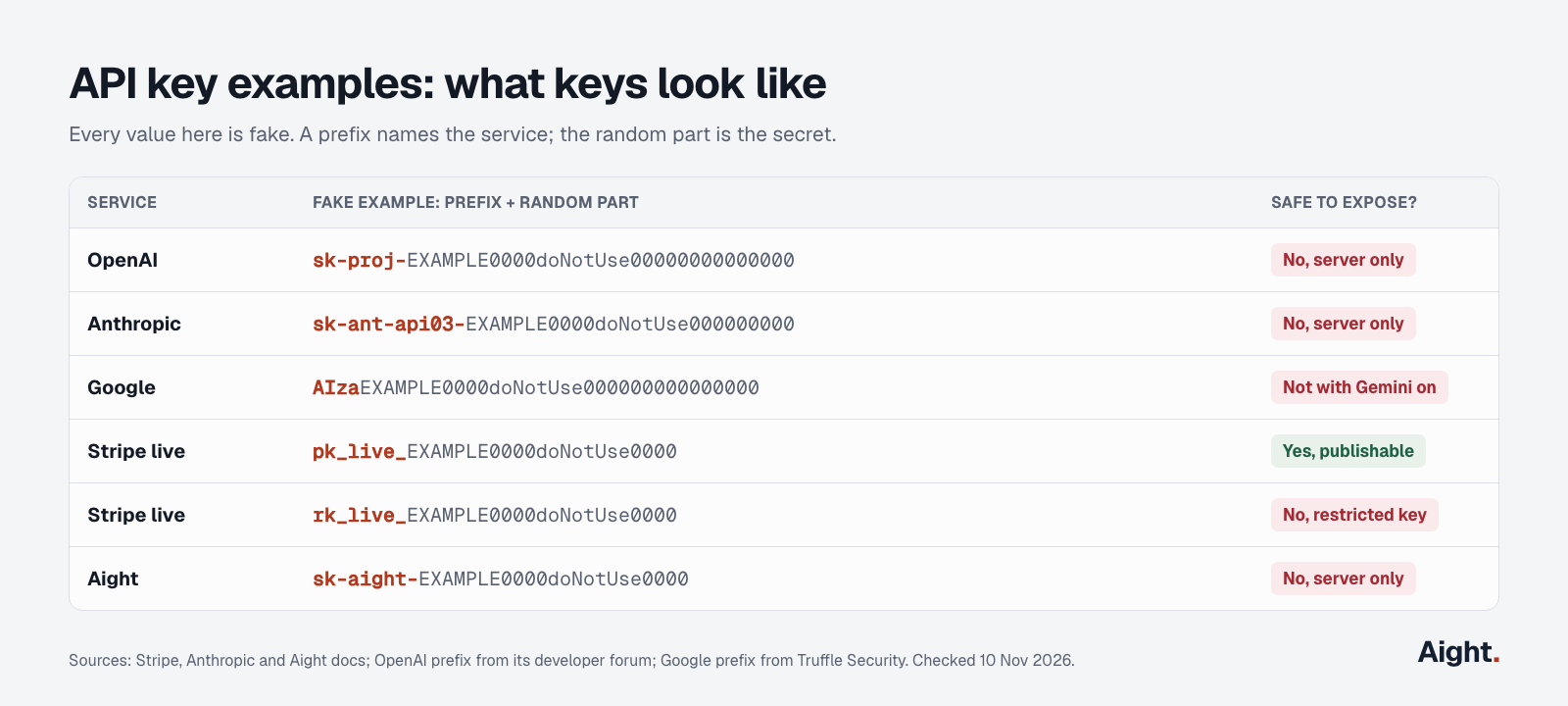
Two things to take from these examples. First, the prefix is not a format you can rely on: OpenAI doesn't document its prefixes, and developers on its forum have reported the format changing, so never validate a key by prefix or length in your code. Second, sk in a prefix usually means "secret key". Stripe is the clearest case: its key docs say the publishable pk_ key is safe to put in front-end code, while secret sk_ and restricted rk_ keys must stay on your server.
API key vs password, token and OAuth
An API key is close to a password, but it belongs to an app or project, not to a person typing it in.
| API key | Password | OAuth access token | |
|---|---|---|---|
| Who uses it | A program | A person | A program acting for a person |
| How long it lives | Until you delete it or it expires | Until changed | Minutes to hours, then refreshed |
| Who creates it | The provider, in a dashboard | The user | An authorization server, after the user approves |
| Sent with | Every request, in a header | A login form | Every request, in a header |
Providers are moving away from long-lived keys for production. OpenAI added workload identity federation on 26 May 2026, which lets a server swap its cloud identity for a short-lived OpenAI token, and Anthropic's authentication docs say its version means "There is no sk-ant-api... string to mint, distribute, or rotate." For a laptop, a script or a small app, a plain API key is still the normal way in.
How API keys are generated
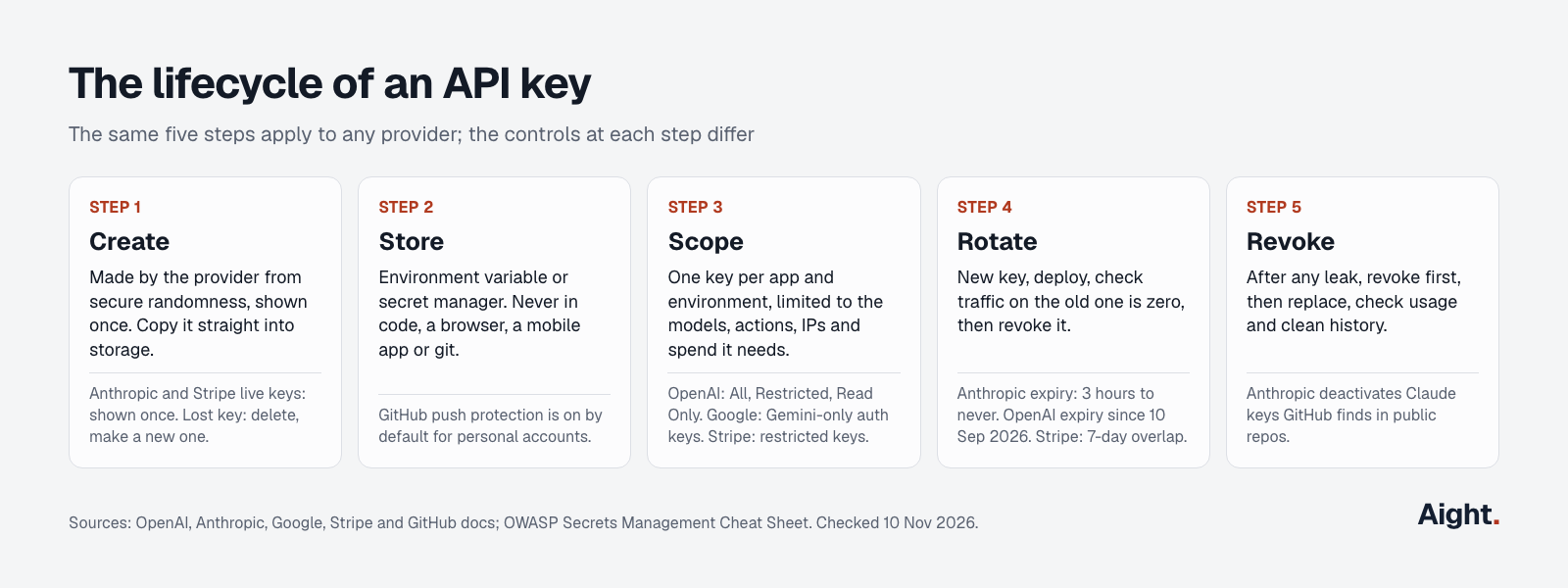
When you click "Create key" in a dashboard, the provider generates a long random string on its servers, shows it to you once, and keeps only enough to recognize it later. Anthropic says the full key is shown "only once, at creation", and Stripe says a live secret key you create can't be revealed again. That's why a lost key can't be recovered: you delete it and make a new one.
What makes a key strong is randomness from a cryptographically secure generator, not cleverness in the format. The OWASP Secrets Management Cheat Sheet says "New secrets must be securely generated and cryptographically robust enough for their purpose." Python's secrets module docs say 32 bytes (256 bits) of randomness is enough for the typical case, and warn that the random module is "designed for modelling and simulation, not security or cryptography."
If you run your own API and need to issue keys to your users, this is the whole job in Python, tested with Python 3.14.6:
import hashlib
import hmac
import secrets

def new_api_key(prefix: str = "myapp_live_") -> tuple[str, str]:
    """Return (key to show the customer once, hash to store in your database)."""
    key = prefix + secrets.token_urlsafe(32)          # 32 random bytes = 256 bits
    key_hash = hashlib.sha256(key.encode()).hexdigest()
    return key, key_hash

def check_api_key(presented: str, stored_hash: str) -> bool:
    presented_hash = hashlib.sha256(presented.encode()).hexdigest()
    return hmac.compare_digest(presented_hash, stored_hash)
token_urlsafe(32) returns 43 URL-safe characters, so the key above is 54 characters with its prefix. Show the key to the customer once, store only the hash, and compare with compare_digest, which the Python docs describe as a constant-time compare that reduces the risk of timing attacks.
From a terminal, openssl rand -base64 32 prints 32 random bytes as 44 characters, and in Node crypto.randomBytes(32).toString('base64url') does the same job.
Should you use an online API key generator?
No, not for anything real. Search "api key generator" and you'll find dozens of web pages that print a random string in your browser. They have two problems.
For AI services and other third-party APIs, you can't generate a key at all. OpenAI, Anthropic, Google, Stripe and Aight issue keys from their own dashboards and only accept keys they issued. Some generator pages offer strings "for AI providers like OpenAI, Anthropic, Google AI" in the sk-... and sk-ant-api03-... formats. The page never says the providers will accept them, and a string in the right shape is not a key. Any page or video promising a working free key for a paid AI API is either useless or handing out a stolen one, which bills someone else and can get your account closed.
For your own API, the randomness may be fine, but you'd be trusting a web page you didn't write to generate your secret and not log it, keep it or swap in a weak generator. The five lines of Python above, or openssl rand, do the same thing on your own machine with nothing to trust. Online generators are fine for test fixtures and placeholder values in docs, nothing more.
How to store API keys safely
Every provider's rules come down to the same few habits. OpenAI's API keys guide says to keep secret keys "out of browser code, mobile apps, source control, logs, and customer-facing responses." Google's Gemini API key page says "Never check API keys into source control systems" and recommends a back-end proxy for client apps.
- Put the key in an environment variable, not in code. SDKs read
OPENAI_API_KEY,ANTHROPIC_API_KEYandGEMINI_API_KEY(orGOOGLE_API_KEY, which wins if both are set) automatically. - For local projects, a
.envfile is fine as long as.envis in.gitignorebefore your first commit. - In production, use your platform's secret manager (AWS Secrets Manager, Google Secret Manager, Azure Key Vault, Vercel or GitHub Actions secrets) and inject the key at runtime.
- Never ship a secret key to a browser or a mobile app. Anyone can read it from the page source or the app bundle. Call the API from your server instead. Anthropic's docs put it plainly: "Anyone who uses a webpage can read an API key in that page's code."
- Don't paste keys into chat, email, tickets or AI coding tools you don't control. Stripe's docs say not to share keys "over email, chat or other unencrypted channels."
# macOS and Linux: this terminal only
export OPENAI_API_KEY="sk-proj-..."

# A project .env file, kept out of git
echo 'OPENAI_API_KEY=sk-proj-...' >> .env
echo '.env' >> .gitignore
GitHub helps as a safety net. Its push protection "Is enabled by default" for personal accounts and "Stops you from pushing secrets to public repositories on GitHub." It only catches key formats it recognizes, so don't rely on it alone.
Every service you paste a key into is one more place it can leak. On 17 October 2026, OpenCode said a breach of its Console affected 1.4% of users, "a subset of users who had external providers linked", meaning provider keys stored there were exposed. Give third-party tools their own key with a spend cap, so revoking it breaks nothing else.
Scope every key: least privilege
A scoped key can do only what one app needs, so a leak costs less. OWASP's rule is that secrets "must have the minimum privileges assigned to them."
- Use one key per app and per environment. Anthropic's key safety guide recommends separate keys for development, testing and production, so you can revoke one without breaking the others.
- Use one key per person or service. Anthropic's personal keys stop working when the person leaves the organization; service account keys belong to a workload. OpenAI makes the same split between user-owned project keys and service accounts.
- Limit what the key can call. OpenAI keys can be All, Restricted or Read Only. Google Cloud's API key docs say "Unrestricted API keys are insecure" and recommend both API restrictions and application restrictions. Stripe recommends restricted keys over its unrestricted secret key.
- Limit where it works. Anthropic and OpenAI support IP allowlists, and Stripe has access policies by IP address, network and country.
- Limit what it can spend. For AI APIs this matters most: set spend limits per project or workspace, as covered in the OpenAI API key spending limit guide.
How to rotate and revoke API keys
Rotating means replacing a key with a new one on a schedule or after a scare. The safe order is the same everywhere, and OpenAI's guide spells it out: "issue a replacement, update the workload, verify that it works, and revoke the previous key."
- Create the new key with the same scope.
- Deploy it to every place that reads the old one.
- Watch logs or the provider's usage page until traffic on the old key drops to zero.
- Revoke or delete the old key.
Stripe makes this easier with a grace period: when you rotate in its dashboard, "both the old and new keys work for up to 7 days." Expiration dates force rotation. Anthropic keys can expire after 3 hours, 1 day, 7 days, 30 days, a custom period or never, and the choice can't be changed after creation. OpenAI added expiration dates for project keys on 10 September 2026, and admins can set a maximum key lifetime. How often to rotate is a policy choice: Anthropic gives "every 90 days" as an example.
AI API keys: why they need more care
An AI API key is an ordinary API key with one difference: every request spends money per token, and anyone holding the key can run their own workloads on your account. A leaked key on most other APIs leaks data. A leaked AI key also leaks your bill.
The numbers from 2026 are large:
- GitGuardian's State of Secrets Sprawl 2026 counted 1,275,105 leaked AI-service secrets in public GitHub commits during 2025, up 81% on 2024, out of 28.65 million secrets overall.
- Truffle Security found 2,863 live Google API keys on public web pages that could call Gemini, many of them Maps or Firebase keys that Google once said were safe to publish.
- The Register reported a three-person startup whose stolen Google key ran up $82,314.44 between 11 and 12 February 2026, against normal spend of about $180 a month.
Here's how the main AI providers handle keys on 10 November 2026:
| OpenAI | Anthropic | Google Gemini | Aight | |
|---|---|---|---|---|
| Where you create keys | Platform dashboard, per project | Claude Console | Google AI Studio or Cloud console | Aight console |
| Environment variable | OPENAI_API_KEY | ANTHROPIC_API_KEY | GEMINI_API_KEY or GOOGLE_API_KEY | AIGHT_API_KEY in its docs |
| Expiry | Optional, since 10 Sep 2026 | 3 hours to never, fixed at creation | Dormant unrestricted keys blocked since 7 May 2026 | Optional expiry date |
| Scoping | All, Restricted or Read Only; per project | Per workspace; personal or service account | Restricted to the Gemini API by default for new keys | Allowed models list; monthly cap |
| Bad key returns | 401 invalid_api_key | 401 authentication_error | 400 API_KEY_INVALID | 401 |
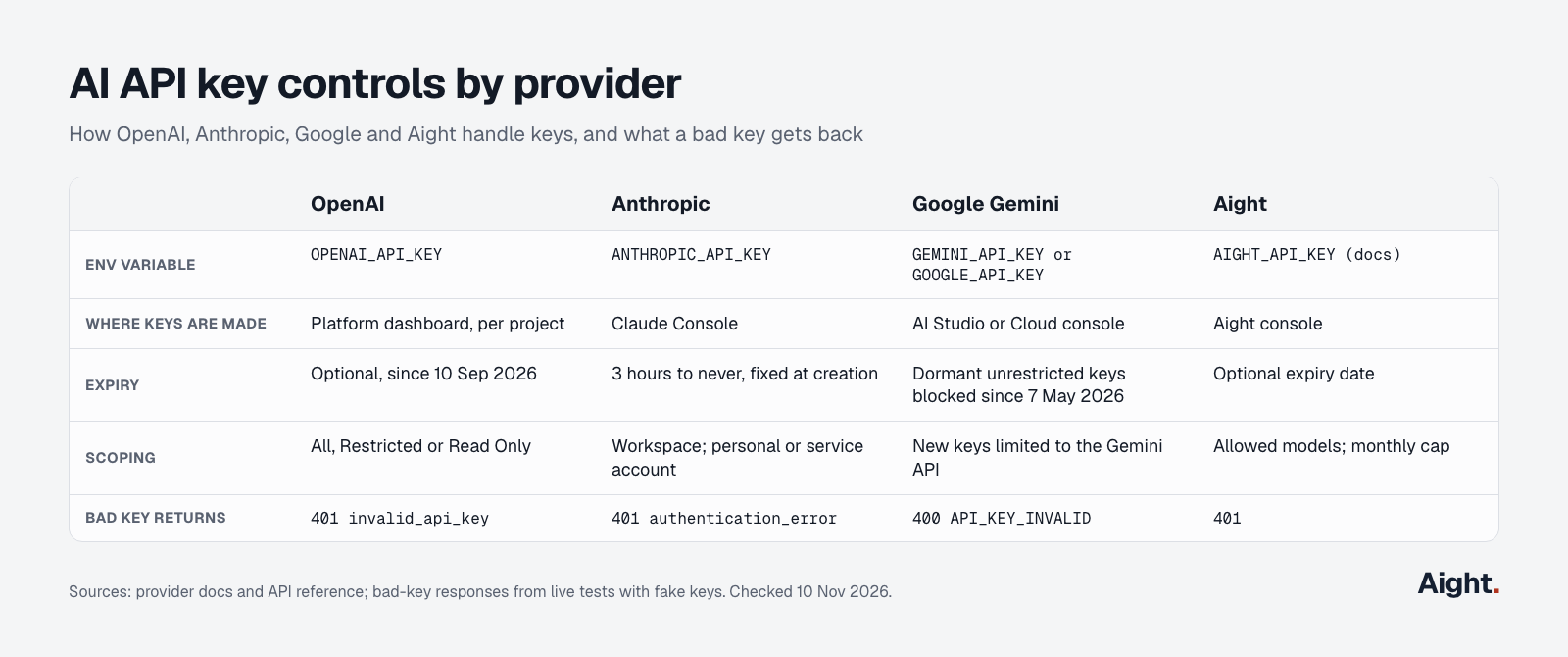
Google changed the most in 2026. Its API key page says that "Starting May 28, 2026, all new API keys created in Google AI Studio are automatically created as auth keys", which are tied to a service account and limited to the Gemini API by default, and the Gemini API now rejects unrestricted standard keys. If you have an old Google Cloud key that was ever public, check whether the Generative Language API is enabled on that project.
Two habits matter more for AI keys than for most others. Set a spend cap on every key or project, because a cap is the only thing that stops a stolen key at a fixed amount. And never put an AI key in a front-end app to "save a server": your back end should call the model and pass back the result. The API key guide for Claude and the OpenAI API key guide walk through each provider's dashboard step by step.
What to do if an API key leaks
Assume a key is compromised the moment it appears anywhere public: a commit (even one you deleted), a screenshot, a forum post, a log file or a front-end bundle. Bots scan GitHub continuously. In one OpenAI community thread from 2 October 2026, a developer wrote that "Within minutes, a malicious bot scraped the key and ran up $296.99 in charges."
- Revoke or delete the key in the provider's dashboard first. Don't wait to clean up the repository.
- Create a replacement with the same scope and deploy it.
- Check the provider's usage page for spend you don't recognize, and contact support with the dates.
- Remove the key from the code, and from git history if the repository is public. Deleting the file in a new commit leaves it in the history.
- Turn on a scanner, such as GitHub push protection or the open-source TruffleHog, so it doesn't happen again.
Some providers act for you. Anthropic says that when GitHub finds a Claude key in a public repository, "Anthropic automatically deactivates the exposed API key" and emails the owner. Don't count on it: GitGuardian found that more than 64% of secrets confirmed valid in 2022 were still valid when retested in January 2026.
What security researchers and developers report
- A tool sold on criminal forums "runs on stolen OpenAI, Anthropic and Google API keys, so the key's owner pays for the scans" (Help Net Security, reporting Bitsight research, 16 Oct 2026, link).
- Commits made with Claude Code showed a 3.2% secret-leak rate against a 1.5% baseline for all public commits (GitGuardian, 17 Mar 2026, link).
- GitGuardian also found 24,008 secrets in MCP configuration files on public GitHub, a new place for AI keys to leak (17 Mar 2026, link).
- Truffle Security's advice for any Google key with Gemini access: "If you find an exposed key, rotate it." (25 Feb 2026, link).
- A developer who pushed an OpenAI key to a public portfolio repository said a bot used it within minutes, before any spend alert arrived (OpenAI Developer Community, 2 Oct 2026, link).
Per-key limits with an Aight key
If you call several AI models, each provider gives you another key to store, scope and rotate. Aight is one OpenAI-compatible API for models from OpenAI, Anthropic, Google, DeepSeek, xAI and others, so one key covers them. Keys start with sk-aight-, are shown once, and each key can have its own monthly cap, an expiry date and a list of allowed models, per the Aight API reference. A key over its cap gets a 403 with the code key_cap_reached instead of spending more, which puts a hard ceiling on what a leaked key can cost.
That makes it easy to give each app, environment or third-party tool its own capped key. It doesn't replace the habits above: the key still belongs in an environment variable or a secret manager, and a one-provider project with spend limits set at that provider needs nothing extra. The AI gateway explainer covers when a single API in front of many models makes sense and when going direct costs less. To estimate what a key will spend, try the token cost calculator.
FAQ
Are API keys free?
Creating a key is free with every major provider. Using it is what costs money: AI APIs bill per token, and most need a payment method or a prepaid balance before the key does any work. The free LLM API guide lists the free tiers that exist.
Can someone else use your API key?
Yes, and that's the risk. The service only checks that the key is valid, not who sent it, so a copied key works from anywhere unless you've set IP allowlists or other restrictions. Scope keys tightly and set spend caps so a stolen key can't do much.
Do API keys expire?
It depends on the provider. Anthropic and OpenAI let you set an expiry date when you create a key, Google blocks unrestricted Gemini keys that sit unused, and many keys last until you delete them. A key that never expires should be rotated on a schedule you set.
Is it safe to put an API key in a mobile app or website?
Only if the provider says that kind of key is public, like Stripe's publishable pk_ keys. Secret keys, including every AI API key, can be pulled out of a page or an app bundle in minutes. Keep them on a server and have your app call that server.
Where do you find your API key?
In the provider's dashboard: platform.openai.com for OpenAI, platform.claude.com for Anthropic, Google AI Studio for Gemini. Most providers show the full key only once, so if you didn't save it, create a new key and delete the old one.
Sources
- OpenAI: API keys and service accounts guide, API changelog
- OpenAI Developer Community: leaked key thread, 2 Oct 2026
- Anthropic: Get your Claude API key, Authentication, API key best practices
- Google: Gemini API keys, Google Cloud API keys
- Stripe: API keys
- OWASP: Secrets Management Cheat Sheet
- Python: secrets module
- GitHub: About push protection
- GitGuardian: The State of Secrets Sprawl 2026
- Truffle Security: Google API keys weren't secrets, but then Gemini changed the rules
- The Register: $82,314 Gemini bill after API key theft
- Help Net Security: Stolen AI API keys power autonomous scans
- OpenCode: Console breach notice on X, 17 Oct 2026
- RandomKeygen: AI key generator page
- Aight: Docs, API reference
Checked on 10 November 2026.