Here's how to get an OpenAI API key: sign in at platform.openai.com, add a payment method and buy at least $5 of prepaid usage, then open the API keys page, pick a project and click Create new secret key. Your first key asks for a phone number by text message. Copy the key straight away, because OpenAI shows the full secret only once, and put it in the OPENAI_API_KEY environment variable, which every official SDK reads on its own.
There's no free OpenAI API key for general use, and a ChatGPT Plus subscription doesn't include one. Since 28 October 2026, only ChatGPT Pro and Business plans come with monthly API usage. A "free GPT API key" posted on a website, a Telegram channel or a GitHub repo is almost always someone else's leaked or stolen key.
A "GPT API key" or an "API key ChatGPT" is the same thing: GPT models are called through the OpenAI API with an OpenAI key. Dashboard steps are as of 5 November 2026, and the code is tested on the openai Python SDK 3.45.0.
How to get an OpenAI API key, step by step
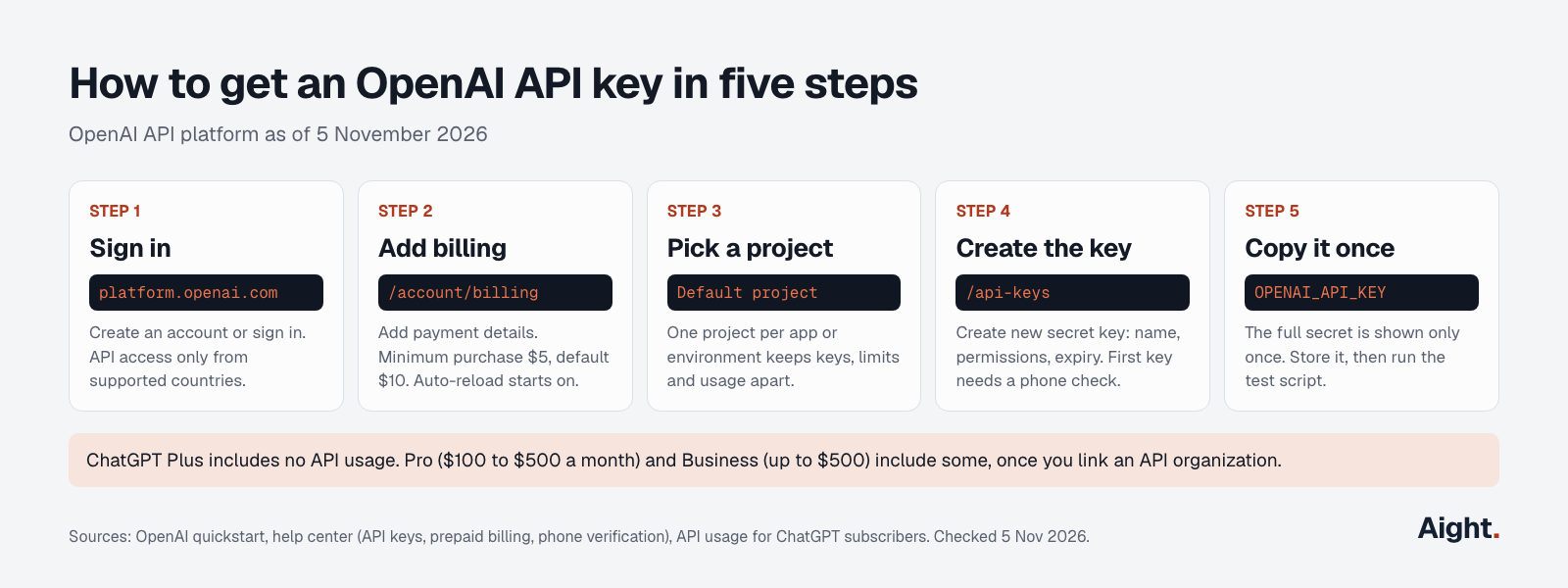
- Sign up or sign in at platform.openai.com. You can use your ChatGPT email, but the two products bill separately. The API works only from supported countries; requests from anywhere else get a 403.
- Open the billing overview, select Add payment details and make a first purchase. OpenAI's prepaid billing article sets the minimum at $5 and the default at $10. Auto-reload is on by default during setup, so turn it off or give it a monthly limit before you confirm.
- Pick a project. Every organization starts with a Default project that can't be deleted; owners can create up to 2,000 by default, and one per app or environment keeps keys, limits and usage apart.
- Open the API keys page or the project's API Keys settings and click Create new secret key. Name it, choose permissions (All, Restricted or Read only) and set an expiration date, an option added on 10 September 2026. The first time, OpenAI asks you to verify a phone number.
- Copy the key into a password manager or
.envfile, then run the test script further down.
OpenAI's phone verification article says the phone check applies to your first API key only, by SMS or, in 12 countries, WhatsApp. Landlines, VoIP and Google Voice numbers aren't accepted, and one phone number can verify at most three accounts. OpenAI may also ask for business or ID verification before some models or features, without listing which ones in its verification article.
In Codex, the OpenAI Developers plugin can create and save a project key for you.
Project keys, service accounts and admin keys
OpenAI's API keys guide separates four kinds of credentials. The one you create on the API keys page is a user-owned project key, which is right for your own development and wrong for production.
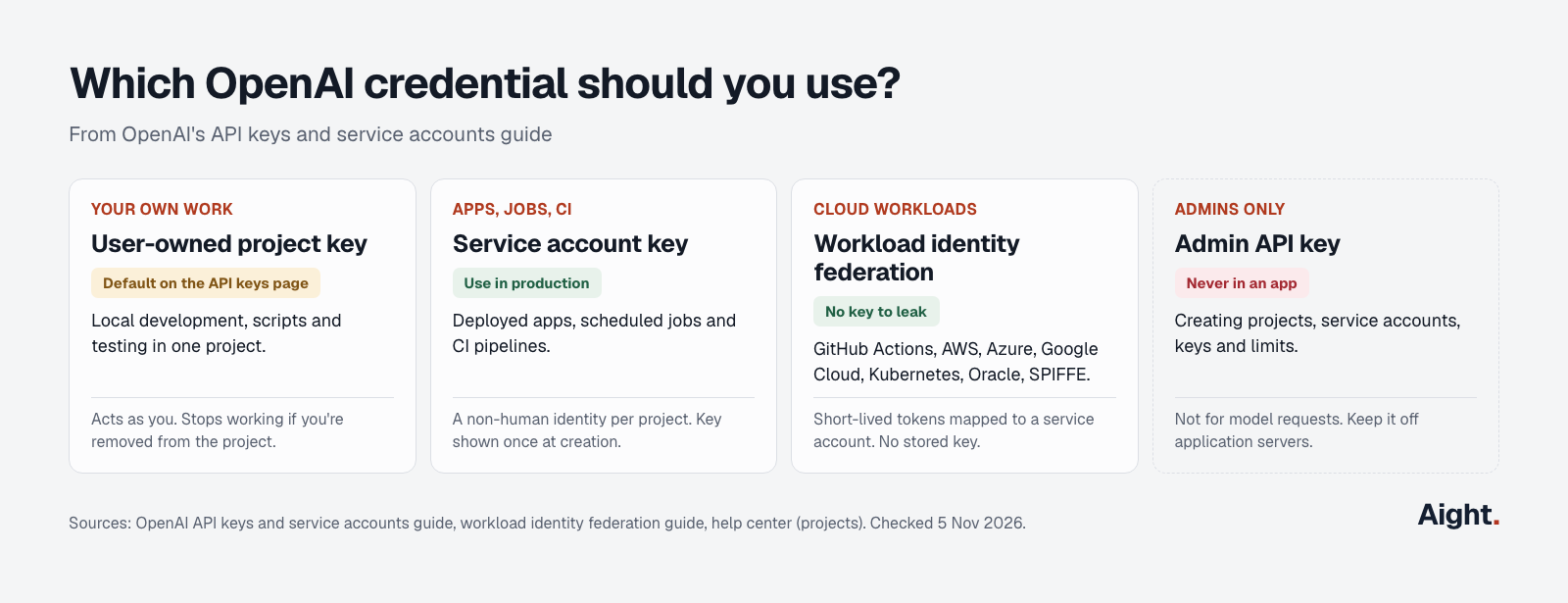
| Credential | Acts as | Use it for | Good to know |
|---|---|---|---|
| User-owned project key | You, inside one project | Your own development and scripts | Fails with a 401 if you're removed from the project |
| Service account key | A non-human identity in one project | Deployed apps, scheduled jobs, CI | Shown once when created; doesn't depend on any one person's account |
| Workload identity federation | A service account, through a short-lived token | Workloads on GitHub Actions, AWS, Azure, Google Cloud, Kubernetes, Oracle Cloud or SPIFFE | No stored key at all; launched 26 May 2026 |
| Admin API key | Organization administration | Creating projects, service accounts, keys and limits through the Admin API | Not for model requests; keep it off app servers |
OpenAI says not to share one developer's key across a team or make it a production app's identity. Create service accounts in the project's Members settings (+ Service account); each comes with its key.
Three settings are worth using from day one:
- Permissions. All is the default, Restricted sets access per endpoint or resource, and Read only reads everything.
- Expiration. OpenAI strongly recommends an expiration date and a rotation routine. Since 10 September 2026, administrators can also enforce a maximum key lifetime for the organization or a project.
- Key governance. Since 15 September 2026, admins can allow only service account keys, only user-owned project keys, or no new keys at all.
Project keys usually start with sk-proj-, according to developers on OpenAI's forum rather than the docs. Forum posts also report the format changing without notice, so don't validate keys by prefix or length.
Where to find your OpenAI API key
You can't view an existing key's secret again. OpenAI's help article on where to find your API key says the full secret "is only shown when you create it", and the Admin API returns only a redacted value such as sk-abc...def. So the answer to "where to find OpenAI API key" is either wherever you saved it, or nowhere.
Before you make a new one, look where it may already be:
# macOS and Linux: the variable, then a .env file in your project
echo $OPENAI_API_KEY
grep -s OPENAI_API_KEY .env

# Windows Command Prompt
echo %OPENAI_API_KEY%
Also check your password manager, secrets manager and CI secrets. If it isn't there:
- Create a new key in the same project on the API keys page.
- Replace the old value everywhere it's used.
- Run the test script to confirm the new key works.
- Delete the old key with the trash icon. Deleted keys stop working, so anything still using it fails.
Can't see a project's keys? Organization owners see every project; everyone else sees only their own projects, per OpenAI's projects article.
Is there a free OpenAI API key or an OpenAI API free tier?
No. There's no OpenAI API key free of charge for general use: every request draws on a prepaid balance. The "Free" tier in OpenAI's rate limits guide is a $100 monthly usage limit for organizations in supported countries that haven't made a purchase, not an allowance of free tokens. On 5 November 2026, none of the GPT-6 model pages lists a Free-tier rate limit; their limits start at Build, which takes $5 of purchases.
| Tier | Qualifies at | Monthly usage limit |
|---|---|---|
| Free | Being in a supported country | $100 |
| Build | $5 of total purchases | $500 |
| Launch | $100 of total purchases | $5,000 |
| Grow | $500 of total purchases | $200,000 |
What is actually free, and the catch with each:
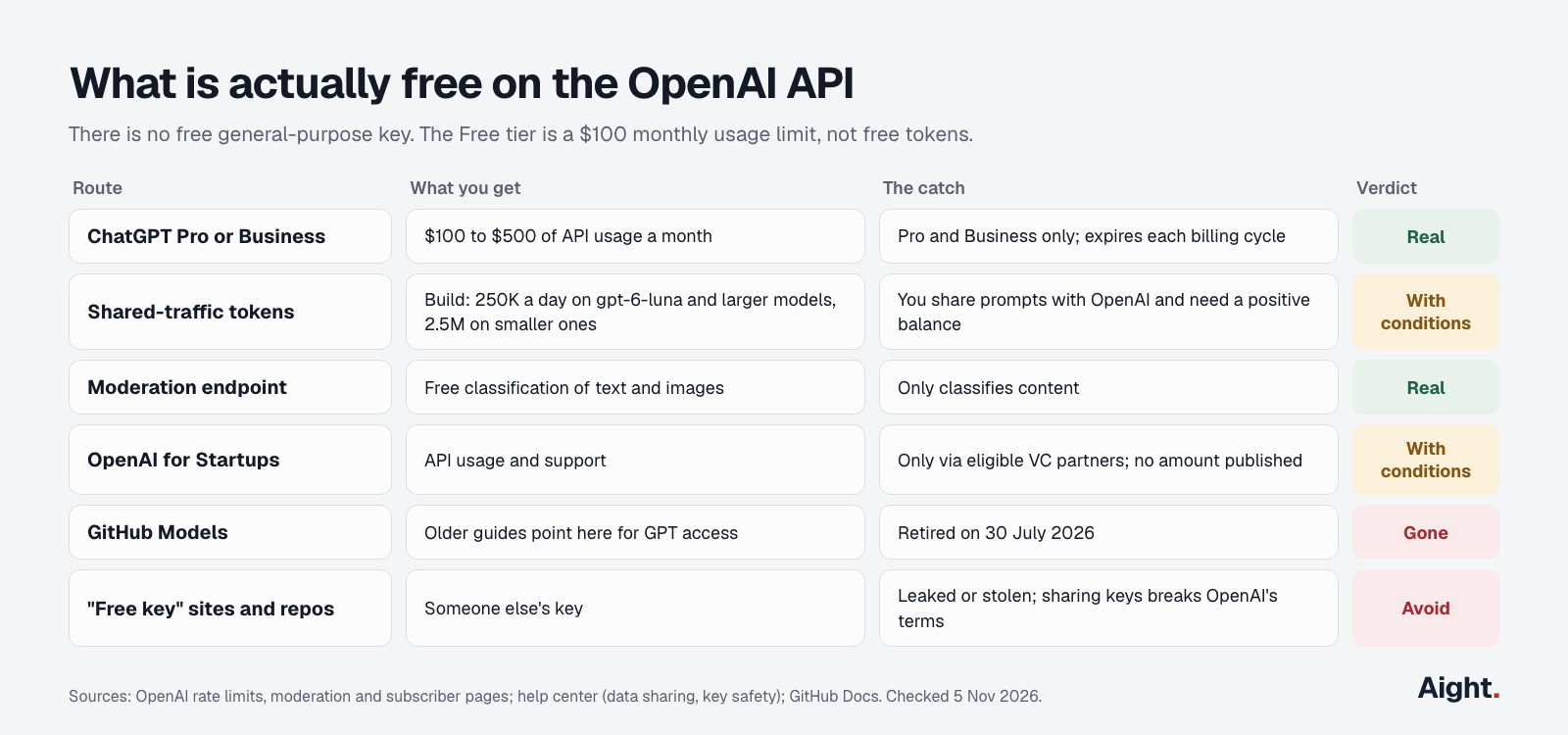
| Route | What you get | The catch |
|---|---|---|
| ChatGPT Pro or Business subscription | $100 to $500 of API usage a month | Pro and Business only; expires each billing cycle |
| Complimentary tokens for shared traffic | On Build, up to 250,000 tokens a day on gpt-6-luna, gpt-6.1-sol and gpt-6-astra, and 2.5 million on smaller models such as gpt-5.6-luna; 1 million and 10 million on Launch and Grow | You share inputs and outputs with OpenAI, need a positive balance, and only some organizations qualify |
| Moderation endpoint | Free content classification for text and images | It only classifies; 250 requests a minute and 5,000 a day on the Free tier |
| OpenAI for Startups | API usage and support for startups backed by eligible VC partners | No amount published |
| GitHub Models | Older guides point here for GPT access | GitHub retired it on 30 July 2026 |
Even the complimentary tokens need money in the account: OpenAI's data sharing article says "You need a positive account balance to use OpenAI models and the free tokens."
The $5 minimum goes a long way for testing. At 1,000 input and 500 output tokens per request (reasoning tokens count as output), at OpenAI's list prices:
| Model | Input / output per 1M | Per test request | Requests for $5 |
|---|---|---|---|
| gpt-6-luna | $0.10 / $0.50 | $0.00035 | 14,285 |
| gpt-6.1-terra | $1.00 / $5.00 | $0.0035 | 1,428 |
| gpt-6.1-sol | $2.00 / $10.00 | $0.007 | 714 |
| gpt-6-astra | $10.00 / $50.00 | $0.035 | 142 |
If you need a free API more than an OpenAI one, the free LLM API guide covers providers with real free tiers.
Why "free OpenAI API key" offers are a trap
Searches for "open ai api key free" turn up GitHub repos, Discord servers and Telegram channels handing out keys. Those keys belong to someone else, usually someone who leaked them, and OpenAI's key safety article says "The sharing of API keys is against the Terms of Use." Using one puts your prompts through an account you don't control, and it stops working once the owner or OpenAI revokes it.
Theft also runs the other way. Browser extensions and apps that ask you to paste a key can pass it on, and stolen keys are resold to run attack tools on the owner's bill; two documented cases are under "What developers report". Treat any extension or app that asks for your OpenAI key like one asking for your bank password.
ChatGPT Plus doesn't include API access
A ChatGPT Plus subscription gives you no API key and no API usage. OpenAI's billing help page says "ChatGPT and the API platform have separate billing systems," and API usage is billed separately from any ChatGPT plan.
The exception, added on 28 October 2026, covers higher plans. OpenAI's page on API usage for ChatGPT subscribers lists:
| ChatGPT plan | Monthly API usage included |
|---|---|
| Free, Go, Plus | None |
| Pro ($100 tier) | $100 |
| Pro ($200 tier) | $200 |
| Pro ($500 tier) | $500 |
| Business | $20 per paid Standard seat, $100 per paid Premium seat, capped at $500 per workspace |
| Enterprise | Not eligible |
To claim it, you must own both the subscription and the API organization, use the same email for both, and have a paid subscription at least seven days old (trials don't count). Start from Settings > Billing in ChatGPT (workspace billing settings for Business), or from Billing on the API platform. The first grant is prorated, each grant expires at the end of the billing cycle, it's spent before any balance you've bought, and no payment method is required while it lasts. It doesn't cover Codex used through API keys.
If you only want a key for Codex, you may not need one: Codex can sign in with a ChatGPT plan, and OpenAI's Codex auth docs say signing in with an API key switches it to standard API pricing. The Codex CLI install guide covers both sign-ins.
Store and rotate your OpenAI key safely
Set the key as an environment variable, as OpenAI's safety article recommends:
# macOS and Linux: this terminal only
export OPENAI_API_KEY="sk-proj-..."

# Keep it for new terminals (zsh; use ~/.bash_profile for bash)
echo 'export OPENAI_API_KEY="sk-proj-..."' >> ~/.zshrc
source ~/.zshrc

# Windows: saved for new windows, so open a new terminal afterwards
setx OPENAI_API_KEY "sk-proj-..."
For one project, a .env file that git ignores is tidier:
echo 'OPENAI_API_KEY=sk-proj-...' > .env
echo '.env' >> .gitignore
Then the rules that prevent most bills from leaked keys:
- One key per person and per app. Give each teammate their own access and each app its own project.
- In production, use a service account key from a secrets manager, or workload identity federation so there's no stored key to leak.
- Never put a key in browser code or a mobile app. OpenAI says requests should go through your own back end.
- Give keys an expiration date. To rotate, OpenAI's order is: create the replacement, update your app, confirm it works, then revoke the old key.
- Put a hard spend limit on each project. OpenAI caps spend per project, not per key, and the spending limit guide shows how. The prepaid balance isn't an instant cutoff: OpenAI says usage can run into a negative balance.
- Turn on IP allowlisting if your servers have fixed addresses. Requests from other IPs are rejected even with a valid key.
GitHub helps but doesn't save you. OpenAI keys are a supported secret scanning pattern with push protection, on by default for pushes to public repositories, and GitHub reports keys found in public repositories to OpenAI, which decides whether to revoke them. Scrapers can be faster, as the first report under "What developers report" shows.
If a key leaks, delete it on the API keys page, create a new one, and check the Usage page for calls you didn't make. Since 4 August 2026, usage and costs can be grouped by API key, which shows exactly what the leaked key spent. Then contact OpenAI support through the help center.
Test your key in Python and curl
This script checks the key with a model listing, which generates no tokens, then sends one request to gpt-6-luna, the lowest-priced current model. It ran with openai 3.45.0 (released 4 November 2026; Python 3.10 or later) and python-dotenv 1.2.4.
# pip install openai python-dotenv
import openai
from dotenv import load_dotenv
from openai import OpenAI

load_dotenv()      # copies OPENAI_API_KEY from a .env file into the environment
client = OpenAI()  # reads OPENAI_API_KEY; never paste the key into code

try:
    # 1. Check the key. Listing models generates no tokens.
    models = [m.id for m in client.models.list()]
    print("Key accepted.", len(models), "models visible")

    # 2. One real request on the lowest-priced current model
    response = client.responses.create(
        model="gpt-6-luna",
        input="In one sentence, what is an API key?",
        reasoning={"effort": "low"},
        max_output_tokens=300,  # includes reasoning tokens
    )
    print(response.output_text)
    print("Tokens in/out:", response.usage.input_tokens, response.usage.output_tokens)
except openai.AuthenticationError as e:  # 401
    print("Key rejected:", e.code, e.message)
except openai.PermissionDeniedError as e:  # 403
    print("Not allowed here:", e.code, e.message)
except openai.RateLimitError as e:  # 429: billing codes and real rate limits
    print("429:", e.code, e.message)
With a made-up key, it printed Key rejected: invalid_api_key and OpenAI's message. With no key at all, OpenAI() raised openai.OpenAIError ("Missing credentials...") before any request was sent. No real key was used for this post, so the success path wasn't run.
With curl, list the models your key can see:
curl https://api.openai.com/v1/models \
  -H "Authorization: Bearer $OPENAI_API_KEY"
OpenAI API key errors and how to fix them
The first four messages below are what api.openai.com and the Python SDK 3.45.0 returned on 5 November 2026 to a missing key, a key with a trailing space and a made-up key. The rest come from OpenAI's error codes guide.
| What you see | Status | Usual cause | Fix |
|---|---|---|---|
Missing credentials. Please pass an api_key... | None (raised by the SDK) | OPENAI_API_KEY is missing or empty in the process running the code | Set it there; cron jobs, containers and services don't read ~/.zshrc |
Connection error. | None (APIConnectionError) | A space or line break pasted at the end of the key makes the header invalid, so nothing is sent | Strip whitespace from the stored key |
Missing bearer authentication in header | 401 | No Authorization header was sent | Add Authorization: Bearer and the key |
Incorrect API key provided: sk-proj-****... | 401 invalid_api_key | A typo, a deleted or expired key, a key from another organization or project, or an empty variable in curl | Create a new key and check what's in the environment |
You must be a member of an organization to use the API | 401 | You left or were removed from the organization or project | Ask an owner to add you back |
IP not authorized | 401 | The request came from outside the IP allowlist | Send it from an allowed address, or update the list |
Country, region, or territory not supported | 403 | Access from an unsupported location | Use the API from a supported country |
credit_balance_exhausted | 429 | No prepaid balance, common on brand-new accounts | Buy at least $5; retrying won't help |
A 429 on a key that has never worked is usually billing, not traffic. The rate limit exceeded guide covers real rate limits and retries, and the OpenAI API guide covers what to build once the key works.
What developers report
- "a malicious bot scraped the key and ran up $296.99 in charges" within minutes of a key being pushed to a public GitHub repo; the balance went negative before the spend alert arrived (OpenAI Developer Community post, 2 Oct 2026, link)
- A travel business reported its paid Pro account and its API organization were both deactivated under OpenAI's distillation policy after what it believes was a compromised API key (OpenAI Developer Community post, 15 Jun 2026, link)
- A Chrome extension posing as ChatGPT, with about 10,000 installs, had sent 459 unique OpenAI keys to a Telegram chat; OpenAI revoked them and notified the owners (Obsidian Security, 27 Jan 2026, link)
- A hacking tool sold on criminal forums "runs on stolen OpenAI, Anthropic and Google API keys" (Help Net Security on Bitsight research, 16 Oct 2026, link)
- A Hacker News commenter said OpenAI's phone verification kept failing, so they couldn't create a key at all (Hacker News, 19 Aug 2026, link)
One key for OpenAI and other models: Aight
If you call GPT models next to Claude, Gemini or DeepSeek through the Chat Completions format, Aight gives you one sk-aight- key for its 138 models. API keys open as soon as your email is verified, and gpt-6-luna ($0.10 / $0.50) and gpt-6.1-sol ($2.00 / $10.00) cost the same as OpenAI's list prices.
It adds controls on the key itself: an optional monthly cap (a 403 key_cap_reached when it's hit), an expiry date and a list of allowed models. Recharges start at $5 plus 3% processing outside India, every recharge adds 10% extra (about $0.94 per $1 of list-price usage), and the balance doesn't expire, where OpenAI's purchases lapse after a year.
Where an OpenAI key is the better choice:
- Aight documents only Chat Completions, embeddings and the model list. Codex and anything built on OpenAI's Responses API need an OpenAI key.
- OpenAI's Batch API halves prices, and Aight documents no batch endpoint.
- The free moderation endpoint and the ChatGPT Pro and Business benefit exist only at OpenAI.
The one-key setup guide shows the base URL and code.
FAQ
Does an OpenAI API key expire?
Only if you set an expiration date when you create it, which project keys have allowed since 10 September 2026, or your administrators enforce a maximum lifetime. Otherwise it works until deleted. Your purchased balance still expires a year after each purchase.
Is a GPT API key the same as an OpenAI API key?
Yes. GPT, image and audio models are all called through the OpenAI API with the same kind of key. There's no separate ChatGPT API; the chat-latest model points to the model currently in ChatGPT.
Can you get an OpenAI API key without a payment method?
You can create the key, but requests need a balance, and that needs payment details and a $5 purchase. The one exception is the ChatGPT Pro or Business benefit, which OpenAI says works with no API payment method while the monthly grant lasts.
Why does a brand-new OpenAI API key return a 429?
Usually because the organization has no balance: the code is credit_balance_exhausted. Buy at least $5 and give the balance a few minutes to update. Retrying won't help.
Can several apps share one OpenAI API key?
They can, but then a leak or runaway loop hits all of them, and you can't cap or revoke one app alone. Give each app its own project, spend limit and service account key.
Sources
- OpenAI API docs: Developer quickstart, API keys and service accounts, Production best practices, Workload identity federation, Admin API: project API keys, Supported countries
- OpenAI API docs: Rate limits, Error codes, Pricing, Moderation, model pages for gpt-6-luna and omni-moderation-latest, API usage for ChatGPT subscribers, Changelog (26 May, 4 Aug, 10 Sep, 15 Sep, 6 Oct and 28 Oct 2026), OpenAI Developers plugin
- OpenAI Help Center: Where to find your API key, API key safety, Prepaid API billing, Billing for ChatGPT and the API platform, Managing projects, Phone verification, Phone number limit, Organization verification, Data sharing and complimentary tokens
- OpenAI: OpenAI for Startups; Codex authentication docs
- OpenAI Developer Community: leaked key thread, deactivated organization thread, key prefix threads (2024, 2025)
- GitHub Docs: Supported secret scanning patterns, Secret scanning for partners, About push protection, GitHub Models retirement
- Security research: Obsidian Security on the key-stealing Chrome extension, Help Net Security on Bitsight's stolen-key research
- Hacker News: comment on phone verification
- SDKs: openai on PyPI, python-dotenv on PyPI; live responses from api.openai.com with a fake key, 5 November 2026
- Aight: Docs, API reference, Models and pricing, Refund policy
Checked on 5 November 2026. Updated 17 November 2026: Aight's current model list.