To install Codex CLI on macOS or Linux, run curl -fsSL https://chatgpt.com/codex/install.sh | sh. On Windows, open PowerShell and run powershell -ExecutionPolicy ByPass -c "irm https://chatgpt.com/codex/install.ps1 | iex". Then open a project folder, run codex, and sign in with a ChatGPT plan (Plus at $20 a month or higher) or an OpenAI API key.
npm (npm install -g @openai/codex) and Homebrew (brew install --cask codex) install the same program. This guide covers every install method, both sign-in options, the config.toml settings most people change, updates, uninstalling and the common errors. Everything was checked on 5 November 2026 against Codex CLI 0.166.0, released on 29 October.
What Codex CLI is
Codex CLI is OpenAI's coding agent for the terminal. It reads and edits files in the folder you start it in and runs commands, such as your tests, inside an operating-system sandbox. It's written in Rust and open source under Apache-2.0 in the openai/codex repository.
The OpenAI Codex CLI terminal app is one of four ways to use Codex, which share models and plan usage:
| Codex CLI | IDE extension | ChatGPT desktop app | Codex cloud | |
|---|---|---|---|---|
| Where it runs | Your terminal, on your computer | VS Code, Cursor and Windsurf; Xcode and JetBrains have their own integrations | Desktop app for macOS, Windows and Linux | OpenAI-managed cloud environments |
| What it works on | Local files and commands | Local files plus open tabs and selections | Local folders and projects | Your GitHub repositories |
| Sign-in | ChatGPT or API key | ChatGPT or API key | ChatGPT or API key | ChatGPT only |
| Plans | Plus, Pro, Business, Edu, Enterprise, or an API key | Same as the CLI | Free and Go get GPT-6 Luna here as it rolls out | Plus and higher, not with an API key |
| Open source | Yes, Apache-2.0 | No | Not on OpenAI's open-source list | No |
The CLI and the IDE extension share ~/.codex/config.toml and one cached login. codex cloud in the terminal starts cloud tasks and applies their results to your local checkout. If you're still choosing an agent, Codex vs Claude Code compares the two.
Install Codex CLI: commands for each platform
There are four supported routes, and on 5 November all four delivered 0.166.0.
| Method | Platforms | Puts codex in | How it updates |
|---|---|---|---|
| Standalone script | macOS, Linux | ~/.local/bin | codex update, or rerun the script |
| Standalone script | Windows (PowerShell) | %LOCALAPPDATA%\Programs\OpenAI\Codex\bin | codex update, or rerun the script |
| npm | macOS, Linux, Windows | npm's global bin folder | npm install -g @openai/codex |
| Homebrew cask | macOS, Linux | $HOMEBREW_PREFIX/bin | brew upgrade --cask codex |
| GitHub release binary | macOS, Linux, Windows | Wherever you put it | Download the next release |
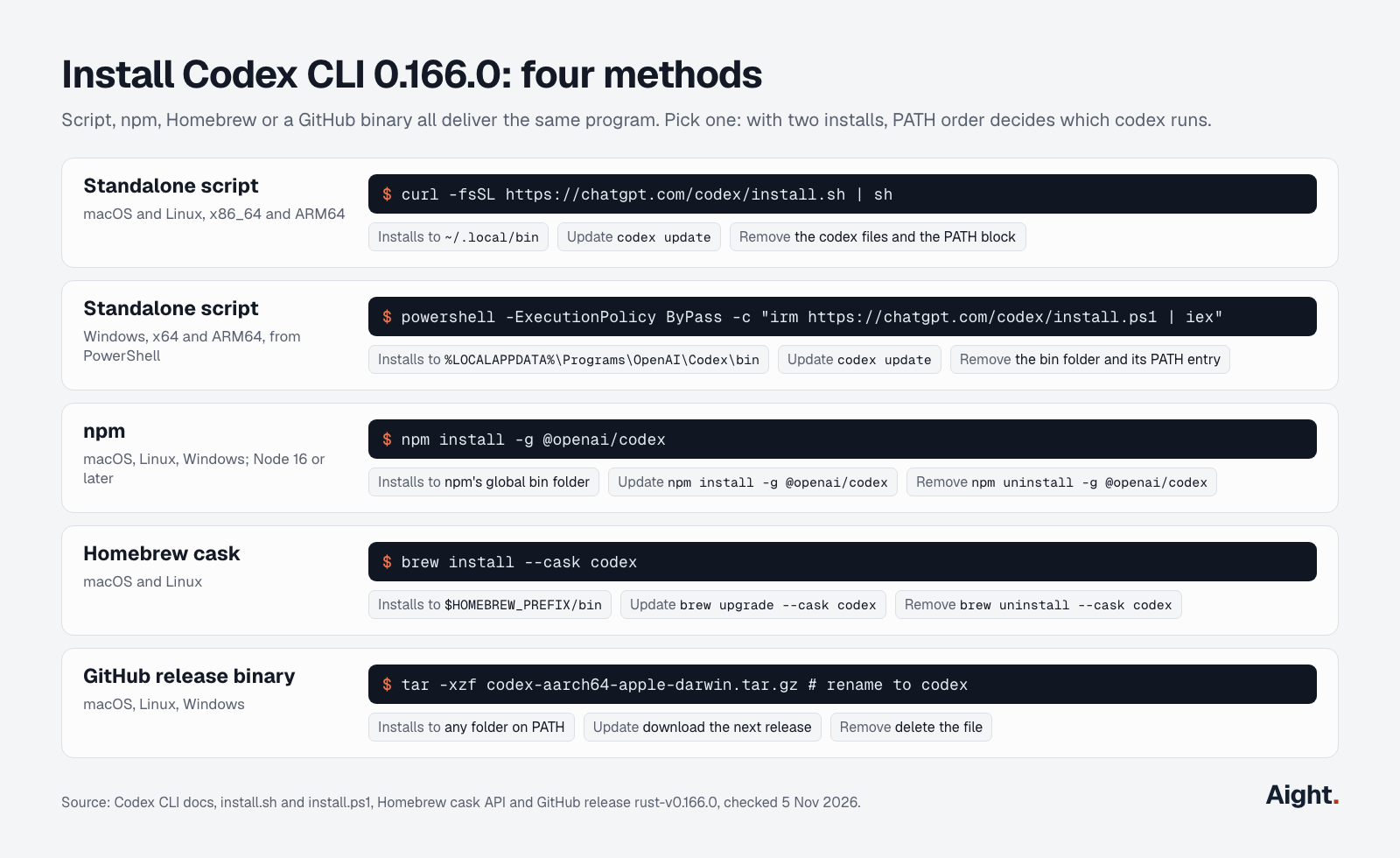
The repository's install page lists macOS 12+, Ubuntu 20.04+ or Debian 10+, and 4 GB of RAM (8 GB recommended). Its "Windows 11 via WSL2" line is out of date: the current Codex docs and installer support native Windows.
macOS and Linux
curl -fsSL https://chatgpt.com/codex/install.sh | sh
codex --version
The install script picks the build for your CPU, installs codex into ~/.local/bin, keeps the package under ~/.codex/packages/standalone, and adds ~/.local/bin to your PATH in ~/.zprofile (zsh on macOS), ~/.zshrc or ~/.bashrc (Linux). Until you open a new terminal, run export PATH="$HOME/.local/bin:$PATH". CODEX_INSTALL_DIR picks another folder, CODEX_RELEASE pins a version, and CODEX_NON_INTERACTIVE=1 skips prompts:
curl -fsSL https://chatgpt.com/codex/install.sh | CODEX_NON_INTERACTIVE=1 CODEX_RELEASE=0.166.0 shOn Linux, also install bubblewrap, which the sandbox uses:
sudo apt install bubblewrap   # Ubuntu, Debian
sudo dnf install bubblewrap   # Fedora
Windows
Codex CLI runs natively in PowerShell with its own Windows sandbox, so WSL2 is optional. From a new PowerShell window:
powershell -ExecutionPolicy ByPass -c "irm https://chatgpt.com/codex/install.ps1 | iex"The script supports x64 and ARM64 and adds its folder to your user PATH. The recommended sandbox, MXC, needs Windows 11 24H2 (build 26100.9278) or 25H2 (build 26200.9278) and prefer_mxc = true under [features] in config.toml. Without MXC, Codex falls back to its older sandboxes; if /setup-default-sandbox appears, it runs the one-time administrator setup for the stronger elevated one.
If your toolchain lives in Linux, use WSL2: wsl --install from an administrator PowerShell, then the Linux command inside WSL, with repositories under your Linux home folder rather than /mnt/c. WSL1 stopped working in Codex 0.115.
npm
npm install -g @openai/codexThe npm package is a small Node wrapper (Node 16 or later) that pulls in your platform's native binary as an optional dependency, the easiest OpenAI Codex CLI install if Node is already set up. If npm fails with EACCES because its global folder belongs to root, npm recommends a Node version manager rather than sudo.
Homebrew
brew install --cask codexCodex is a cask, not a formula, on macOS and Linux, and it installs shell completions for bash, zsh and fish.
Standalone binaries
Each GitHub release has single-file builds: codex-aarch64-apple-darwin.tar.gz (Apple Silicon), codex-x86_64-apple-darwin.tar.gz (Intel Mac), codex-x86_64-unknown-linux-musl.tar.gz and codex-aarch64-unknown-linux-musl.tar.gz (Linux), and codex-x86_64-pc-windows-msvc.exe.zip and codex-aarch64-pc-windows-msvc.exe.zip (Windows). Extract it, rename it to codex (codex.exe on Windows), and put it on your PATH. These copies don't update themselves.
Pick one method. If which -a codex (or where codex on Windows) lists more than one, PATH order decides which runs.
Sign in with ChatGPT or an API key
Run codex in a project folder and choose Sign in with ChatGPT to use your plan, or sign in with an API key to pay per token. The authentication docs are clear that a key switches Codex to standard API pricing instead of your plan's included usage, and that Codex cloud requires ChatGPT sign-in.
| ChatGPT sign-in | API key | |
|---|---|---|
| What you pay | Plan price: Plus $20 a month, Pro from $100, Business $25 a seat ($20 billed annually) | Per token: GPT-6.1 Sol $2.00 / $10.00 per million input / output tokens |
| Limits | Plus: an estimated 15 to 160 GPT-6.1 Sol local messages per 5 hours, plus weekly limits; Pro has no 5-hour limit | Your API organization's rate and spend limits |
| Models | GPT-6.1 Sol, GPT-6.1 Terra, GPT-6 Sol and GPT-6 Luna on Plus and higher | Whatever your key can call, GPT-5.5 included |
| Codex cloud, GitHub code review, Slack | Yes | No |
| Data settings | Your ChatGPT workspace's | Your API organization's |
| Suits | Daily interactive work | CI jobs, scripts, occasional use |
On the pricing page, Free and Go list only GPT-6 Luna in the desktop app, so the CLI needs Plus or higher, or an API key.
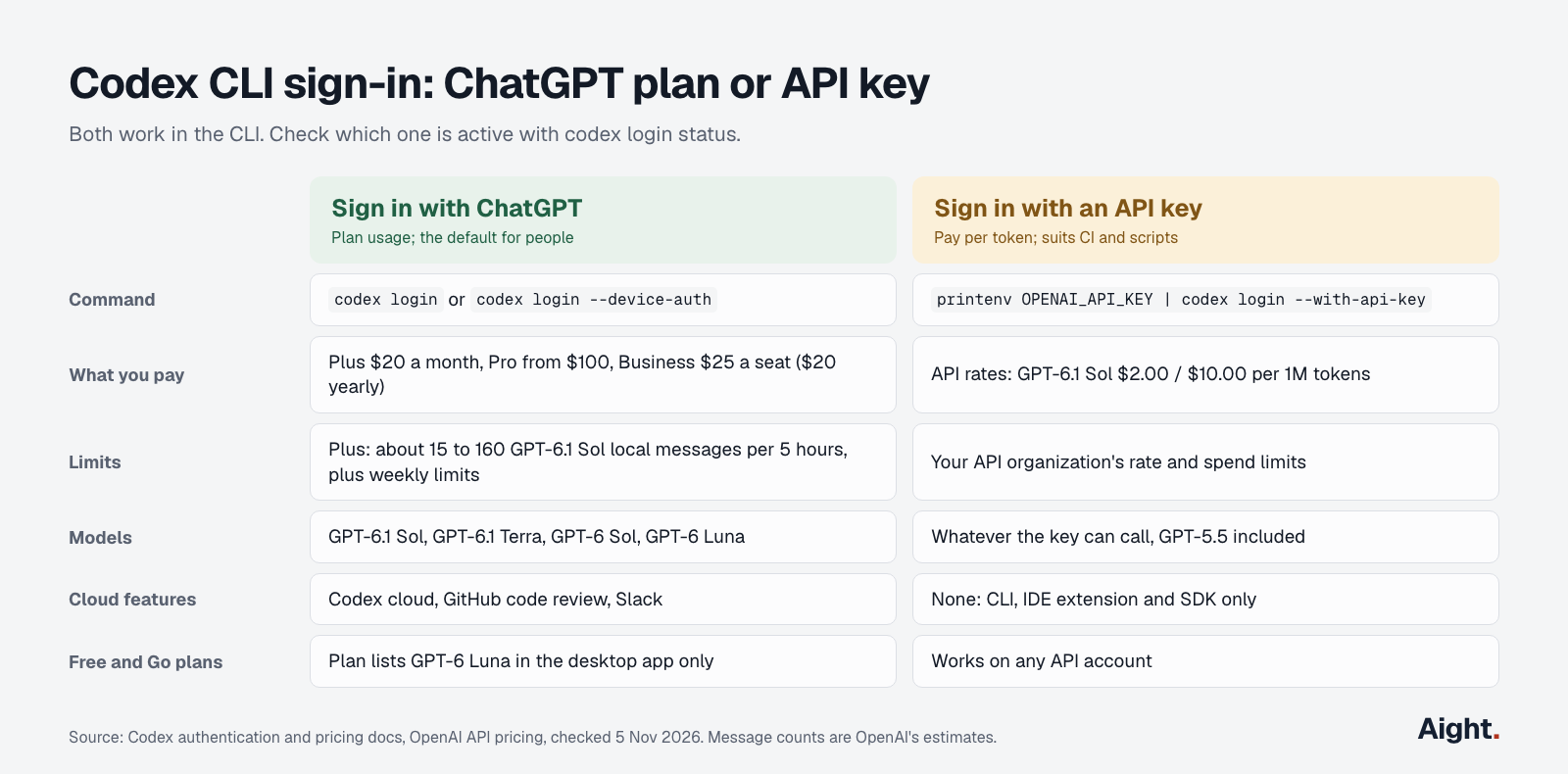
The commands:
codex login                     # ChatGPT, in your browser
codex login --device-auth       # ChatGPT on a remote or headless machine
printenv OPENAI_API_KEY | codex login --with-api-key
codex login status              # shows the active method
codex logout
Device-code sign-in is in beta and must first be enabled in your ChatGPT security settings; the alternative is ssh -L 1455:localhost:1455 user@host, then codex login on the remote machine. To create a key, see how to get an OpenAI API key; for what a month costs on each route, see the Codex pricing breakdown.
Credentials sit in ~/.codex/auth.json, a plain-text file, or your OS credential store (cli_auth_credentials_store = "keyring" forces the latter). Never commit auth.json. For CI, pass a key to one run with CODEX_API_KEY.
Run your first task
cd ~/code/my-app
git status   # start clean so every change is easy to undo
codex
On first launch in a folder, Codex asks whether to trust it. In a Git repository it recommends the Auto preset: read files, edit them and run commands inside the folder, and ask before touching anything outside it or using the network. In a folder without Git it starts read-only. Network access for commands is off by default.
Start with Tell me about this project, then a small, specific change. The commands worth knowing early:
/initwrites anAGENTS.mdscaffold; add your build, test and style rules, and Codex reads them in later sessions./modelswitches the model and reasoning effort./permissionschanges what Codex may do without asking./reviewreviews your working tree without editing it, and/diffshows the changes./statusshows the model, approval policy, writable folders, token use and remaining plan limits.codex resume --lastreopens the latest session in the current folder.
For scripts and CI, codex exec runs a task without the interactive screen:
codex exec "Run the test suite and fix any failing tests"
codex exec --json -m gpt-6.1-sol "Summarize the changes on this branch" > events.jsonl
It refuses to run outside a Git repository unless you add --skip-git-repo-check.
config.toml basics
Codex reads ~/.codex/config.toml (.codex\config.toml in your user folder on Windows, or $CODEX_HOME/config.toml if you set that variable). A repository can add its own .codex/config.toml, which loads only once you trust the project. From highest priority down: command-line flags and -c key=value, project config (the folder closest to you wins), a profile file, your user config, then built-in defaults.
A starting config, checked against the 0.166.0 config schema:
# ~/.codex/config.toml
model = "gpt-6.1-sol"
model_reasoning_effort = "medium"   # low, medium, high, xhigh, max (levels vary by model)
approval_policy = "on-request"
sandbox_mode = "workspace-write"
web_search = "cached"               # cached (default), indexed, live or disabled

[sandbox_workspace_write]
network_access = false              # true lets commands reach the network

[mcp_servers.context7]
command = "npx"
args = ["-y", "@upstash/context7-mcp"]
Override any key for one run with -c, whose values are TOML: codex -c model_reasoning_effort='"high"' or codex -c sandbox_workspace_write.network_access=true. codex mcp add context7 -- npx -y @upstash/context7-mcp writes the MCP block for you.
Models
On Plus and higher plans, the models page points to GPT-6.1 Sol, "near-Astra performance at a lower cost than Astra." GPT-6 Luna suits quick, repeatable tasks, GPT-6.1 Terra (CLI 0.159.0 or later) is fast, and GPT-6 Astra handles the hardest work. codex -m gpt-6-luna switches for one run. gpt-5.5 left Codex for ChatGPT sign-in on 14 October 2026; API-key sessions still have it.
Approval modes and sandbox
Two settings decide how independent Codex is. sandbox_mode sets what commands can technically touch, and approval_policy sets when Codex stops to ask.
| Preset | Flags | What Codex does without asking |
|---|---|---|
| Auto (default in Git repos) | --sandbox workspace-write --ask-for-approval on-request | Reads, edits and runs commands in the workspace; asks to go outside it or use the network |
| Read-only | --sandbox read-only --ask-for-approval on-request | Reads files and runs commands in a read-only sandbox; asks for more |
| Read-only CI | --sandbox read-only --ask-for-approval never | The same, but never asks; blocked actions fail |
| Auto-review | Auto plus -c approvals_reviewer=auto_review | Same sandbox as Auto; a reviewer agent answers approval requests, using extra model calls |
| Full access | --dangerously-bypass-approvals-and-sandbox (alias --yolo) | Anything, with no sandbox; only inside a VM or container that's already isolated |
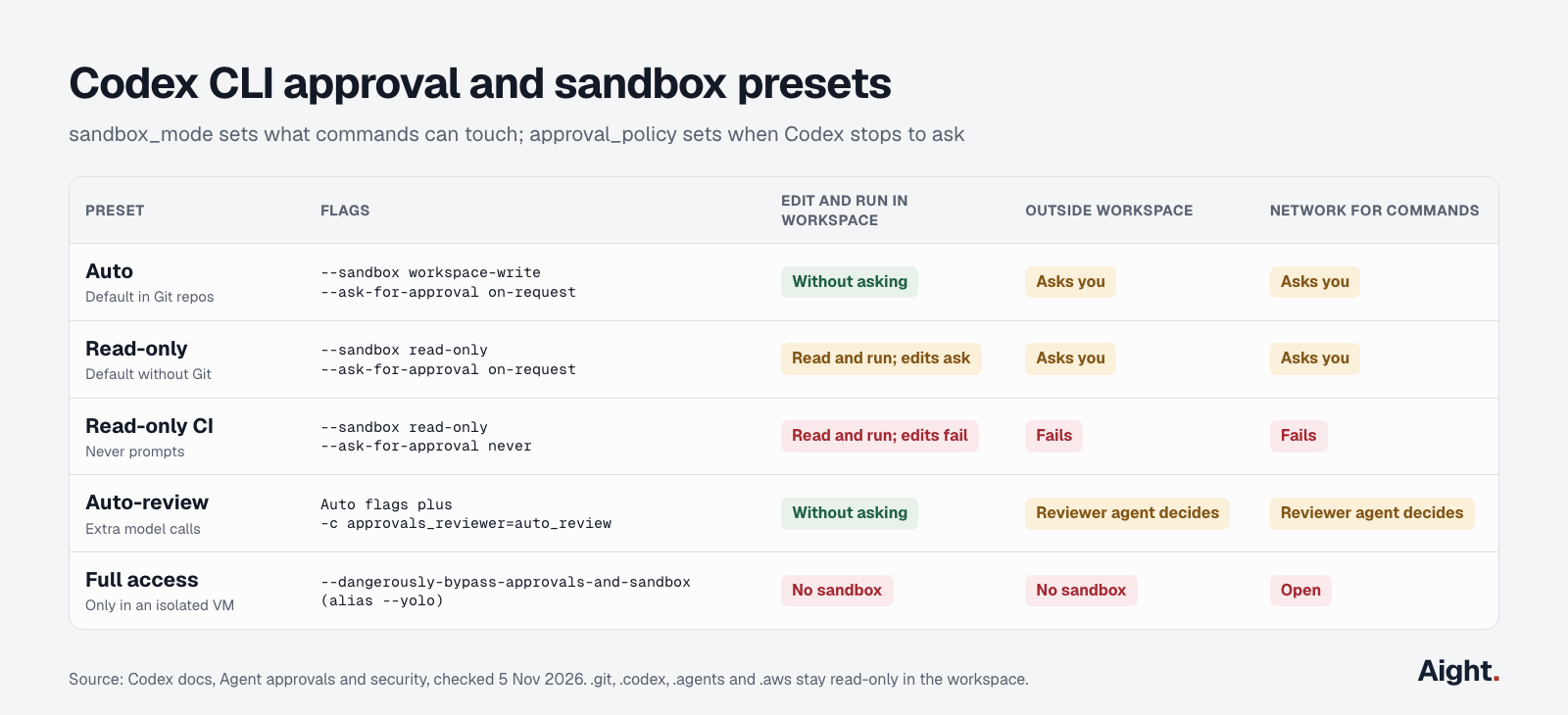
Even in workspace-write, .git, .codex, .agents and .aws stay read-only, which is why git commit usually asks first. For one more writable folder, use --add-dir rather than full access. approval_policy = "untrusted" is retired and can stop Codex from starting.
Profiles
A profile is now its own file. codex --profile ci (or -p ci) loads ~/.codex/config.toml and then overlays ~/.codex/ci.config.toml, which uses top-level keys:
# ~/.codex/ci.config.toml
model = "gpt-6-luna"
sandbox_mode = "read-only"
approval_policy = "never"
Since Codex 0.134.0 (26 May 2026), --profile ignores [profiles.name] tables inside config.toml, and profile = "name" no longer selects one, so older guides that show those tables don't work.
Custom model providers
model_provider picks a backend from [model_providers.<id>], and the default is openai. Every custom provider must speak OpenAI's Responses API. In the 0.166.0 schema, wire_api = "responses" is the only accepted value, and the docs say "Current Codex releases don't support wire_api = "chat" or a Chat Completions-only endpoint."
model = "gpt-6.1-sol"
model_provider = "company_proxy"

[model_providers.company_proxy]
name = "OpenAI models through the company proxy"
base_url = "https://llm-proxy.example.com/v1"
env_key = "PROXY_API_KEY"
wire_api = "responses"
Per the gateway requirements, the base URL must accept POST /v1/responses with streaming and tool calls intact. Built-in providers cover local models through Ollama and LM Studio (codex --oss --local-provider ollama) and OpenAI models on Amazon Bedrock (amazon-bedrock) and Google Vertex AI (gcp). To send the OpenAI provider through a proxy, set openai_base_url instead. Provider settings belong in your user config; Codex ignores them in a project's .codex/config.toml.
Update Codex CLI
codex update detects whether npm, pnpm, bun, Homebrew or the standalone script installed Codex and runs the matching command; the table above lists each one. Codex also checks for a new version at startup, unless check_for_update_on_startup = false.
Since 0.157.0 (25 September 2026), interactive sessions also start a shared background server that outlives the session. A GitHub report found it copies about 374 MB into ~/.codex/packages/app-server-daemon and runs an hourly updater. /daemon shows and restarts it, codex app-server daemon stop stops it, and codex --no-daemon runs without it. To keep it from starting, users set the flag below, which the 0.166.0 source lists as stable and on by default but the docs don't mention:
[features]
daemon_auto_start = false
Uninstall Codex CLI
Sign out and stop the background server while codex still exists, then run the line for the method you used:
codex logout
codex app-server daemon stop
npm uninstall -g @openai/codex                             # npm
brew uninstall --cask codex                                # Homebrew
rm ~/.local/bin/codex ~/.local/bin/codex-code-mode-host    # standalone script
rm -rf ~/.codex/packages                                   # downloaded packages, any method
The standalone script has no uninstall command in 0.166.0, so also delete the block between # >>> Codex installer >>> and # <<< Codex installer <<< in your shell profile. On Windows, delete %LOCALAPPDATA%\Programs\OpenAI\Codex\bin, remove it from your user PATH, and delete .codex\packages in your user folder. The rest of ~/.codex holds your config, sessions and logs; delete it too if you want nothing left.
Common errors and fixes
Start with codex doctor, which checks the install, config, login, runtime, Git and terminal and prints a report. codex doctor --network-only, new in 0.166.0, checks just connectivity.
| Error or symptom | Cause | Fix |
|---|---|---|
codex: command not found right after the script | The current shell hasn't loaded the new PATH | export PATH="$HOME/.local/bin:$PATH", or open a new terminal |
| An old version runs after updating | Two installs, and PATH order picks the old one | which -a codex, then uninstall the extra copies |
Missing optional dependency @openai/codex-... | npm skipped the platform package | npm install -g @openai/codex@latest |
Linux warning that bwrap is missing or can't create a user namespace | bubblewrap not installed, or Ubuntu 24.04's AppArmor restriction | Install bubblewrap, then load the AppArmor profile below |
| Browser sign-in never finishes over SSH | The localhost:1455 callback can't reach the remote machine | codex login --device-auth, or forward port 1455 |
| Certificate errors behind a company proxy | A private root CA | export CODEX_CA_CERTIFICATE=/path/to/ca.pem |
| Codex won't start after an upgrade | Retired approval_policy = "untrusted" in a config or profile | Remove it; use on-request with read-only |
--profile settings are ignored | The profile is still a [profiles.name] table | Move it to ~/.codex/name.config.toml |
| A custom provider fails | The endpoint only speaks Chat Completions | Use a Responses API endpoint |
| Windows: "start the Windows daemon from a non-elevated terminal" | The background server was started from an administrator terminal | A normal terminal, or codex --no-daemon |
For Ubuntu 24.04, the sandbox docs give this fix:
sudo apt install apparmor-profiles apparmor-utils
sudo install -m 0644 /usr/share/apparmor/extra-profiles/bwrap-userns-restrict \
  /etc/apparmor.d/bwrap-userns-restrict
sudo apparmor_parser -r /etc/apparmor.d/bwrap-userns-restrict
What developers report about installs and updates
- A CLI 0.157.0 user on WSL2 found the new background server copied about 374 MB into
~/.codex/packagesand checked for updates hourly, and asked for it to be opt-in (GitHub issue #48195, 25 Sep 2026, link). - "Auto-update systems have value but are not a suitable default for professional tools." (a Hacker News commenter, 12 Oct 2026, link)
- "There aren't any documented settings to disable this" (a Hacker News commenter in the same thread, who pointed to
daemon_auto_start = false, 12 Oct 2026, link) - On Windows, CLI 0.157.0 failed to start with a daemon privilege error that 0.156.1 didn't have; reporters on later versions used
codex --no-daemonas the workaround (GitHub issue #48043, 25 Sep 2026, link). - Windows users saw terminal windows flash on every request after the daemon arrived; two reporters said it stopped on 0.160.1 (GitHub issue #48074, 25 Sep to 6 Oct 2026, link).
- ChatGPT-signed-in users got "unexpected status 401 Unauthorized" with no API key set; OpenAI staff acknowledged it the same day and it cleared on OpenAI's side, so not every login error is local (GitHub issue #48237, 25 Sep 2026, link).
Codex CLI and Aight
Codex CLI can't run on Aight. Codex accepts only Responses API providers, and Aight's API reference documents POST /v1/chat/completions, POST /v1/embeddings and GET /v1/models. For Codex itself, use a ChatGPT plan or an OpenAI API key.
Aight fits next to Codex. If your scripts, or coding tools that accept an OpenAI-compatible base URL, need GPT models alongside Claude, Gemini or DeepSeek, one Aight key reaches all of them through Chat Completions. Its models page lists GPT-6.1 Sol at OpenAI's list price, $2.00 / $10.00 per million tokens with cached input at $0.10; check each model's maximum output there before long generations, since it can differ from OpenAI's.
Each key can have a monthly cap (403 key_cap_reached when reached) and a list of allowed models. A $100 recharge costs $103 with the 3% fee outside India and adds $110 of balance. The one-key setup guide covers configuration, and the OpenAI API guide explains the Responses API that Codex uses.
FAQ
Is Codex CLI free?
The software is free and open source, but running it isn't. Signing in with ChatGPT needs Plus ($20 a month) or a higher plan for the CLI; Free and Go plans get GPT-6 Luna only in the ChatGPT desktop app, as it rolls out. With an API key you pay OpenAI's per-token rates, such as $0.10 / $0.50 per million tokens on GPT-6 Luna.
Does Codex CLI work on Windows without WSL?
Yes. Install it with the PowerShell script and it runs natively with a Windows sandbox: MXC on recent Windows 11 builds, or the elevated sandbox after a one-time administrator setup. WSL2 still works if your tools live in Linux, but WSL1 hasn't worked since 0.115.
Can Codex CLI use Claude, Gemini or other models?
Only through a provider that speaks OpenAI's Responses API. The built-in providers cover OpenAI models on OpenAI, Amazon Bedrock and Google Vertex AI, plus local models through Ollama and LM Studio. Chat Completions-only gateways don't work in current releases; for Claude, Anthropic's own agent is covered in the Claude Code install guide.
Where is the Codex CLI config file?
~/.codex/config.toml on macOS and Linux, and .codex\config.toml in your user folder on Windows. Set CODEX_HOME to move the whole folder (it must already exist). A repository can add .codex/config.toml, which loads only after you trust the project.
Which npm package is codex-cli?
The official package is @openai/codex, which installs the codex command; its wrapper lives in the codex-cli folder of the openai/codex repository. On 5 November its latest tag was 0.166.0, with 0.168 under the alpha tag.
Sources
- OpenAI Codex docs: Codex CLI, CLI commands and slash commands, Authentication, Pricing, Models, Non-interactive mode
- OpenAI Codex docs, configuration: Config basics, Advanced configuration, Configuration reference, Environment variables, Gateway compatibility, MCP, AGENTS.md
- OpenAI Codex docs, security and platforms: Agent approvals and security, Sandbox, Windows sandbox, WSL, Codex cloud, IDE extension, Open source
- OpenAI, API pricing, GPT-6.1 Sol model page, Deprecations
- GitHub, openai/codex: README, release rust-v0.166.0, install.md, source at tag rust-v0.166.0 (CLI options, update logic, feature flags); issues #48043, #48074, #48195, #48237
- OpenAI install scripts: install.sh and install.ps1
- npm, @openai/codex and Resolving EACCES permissions errors
- Homebrew, codex cask
- Hacker News, Codex CLI installs a persistent, self-updating background daemon by default
- Aight, Models and pricing and API reference
Checked on 5 November 2026.