The OpenAI API is OpenAI's paid web API for using its GPT models from your own code. You send an HTTPS request to https://api.openai.com/v1 with a secret key and pay per token from a prepaid balance, separately from any ChatGPT subscription. On 5 November 2026 the lowest-priced current model, gpt-6-luna, costs $0.10 per million input tokens and $0.50 per million output tokens, and OpenAI recommends its Responses API for new projects.
This guide runs from first call to first bill: how the API differs from ChatGPT, the current models and prices, which model to start with, a key and a first request in Python and curl, Responses versus Chat Completions, rate limits and tiers, how billing works, and how to point the same code at other providers. Prices are OpenAI's list prices in US dollars per million tokens, checked on 5 November 2026.
OpenAI API vs ChatGPT
ChatGPT is OpenAI's app for people. The OpenAI API is the developer product you build your own app on. They don't share a bill: OpenAI's billing help page says "ChatGPT and the API platform have separate billing systems," so a ChatGPT Plus subscription includes no API usage, and an API balance is separate from your ChatGPT plan.
Searches for "open ai api", "chat gpt api", "api chat gpt" or the "OpenAI ChatGPT API" all lead to the same product. There is no separate ChatGPT API. Two things connect the two:
- The
chat-latestmodel "points to the latest model available in ChatGPT," according to OpenAI's changelog entry of 7 October 2026. It costs $5.00 / $30.00, its snapshot is updated regularly, it doesn't run in the Batch API, and OpenAI recommends the GPT-6 family for production instead. - Since 28 October 2026, ChatGPT Pro and Business subscribers can claim monthly API usage as a subscription benefit: $100, $200 or $500 on the three Pro tiers, $20 per Business Standard seat and $100 per Premium seat, capped at $500 per workspace. It expires at the end of each billing cycle, needs a paid subscription at least seven days old, and doesn't cover Codex through API keys. Plus, Go and Free plans aren't eligible.
OpenAI API models and prices
OpenAI's models page features four current models, and its pricing page lists a fifth GPT-6 model plus chat-latest. Standard prices for prompts up to 272,000 input tokens:
| Model | What OpenAI positions it for | Input | Cached input | Output | Knowledge cutoff |
|---|---|---|---|---|---|
| gpt-6-astra | Most capable, the hardest work | $10.00 | $1.00 | $50.00 | 30 Apr 2026 |
| gpt-6.1-sol | Near-Astra results at a lower cost | $2.00 | $0.10 | $10.00 | 30 Apr 2026 |
| gpt-6-sol | Coding and agent work (released before 6.1 Sol) | $2.00 | $0.20 | $10.00 | 20 Apr 2026 |
| gpt-6.1-terra | Visual reasoning, computer use, writing | $1.00 | $0.05 | $5.00 | 1 Jun 2026 |
| gpt-6-luna | Focused, high-volume tasks | $0.10 | $0.01 | $0.50 | 18 May 2026 |
| chat-latest | The model currently in ChatGPT | $5.00 | $0.50 | $30.00 | 20 Apr 2026 |
All five GPT-6 models have a 1,050,000-token context window and up to 128,000 output tokens, and all work through the Responses API, Chat Completions and the Batch API. chat-latest has a 400,000-token window.
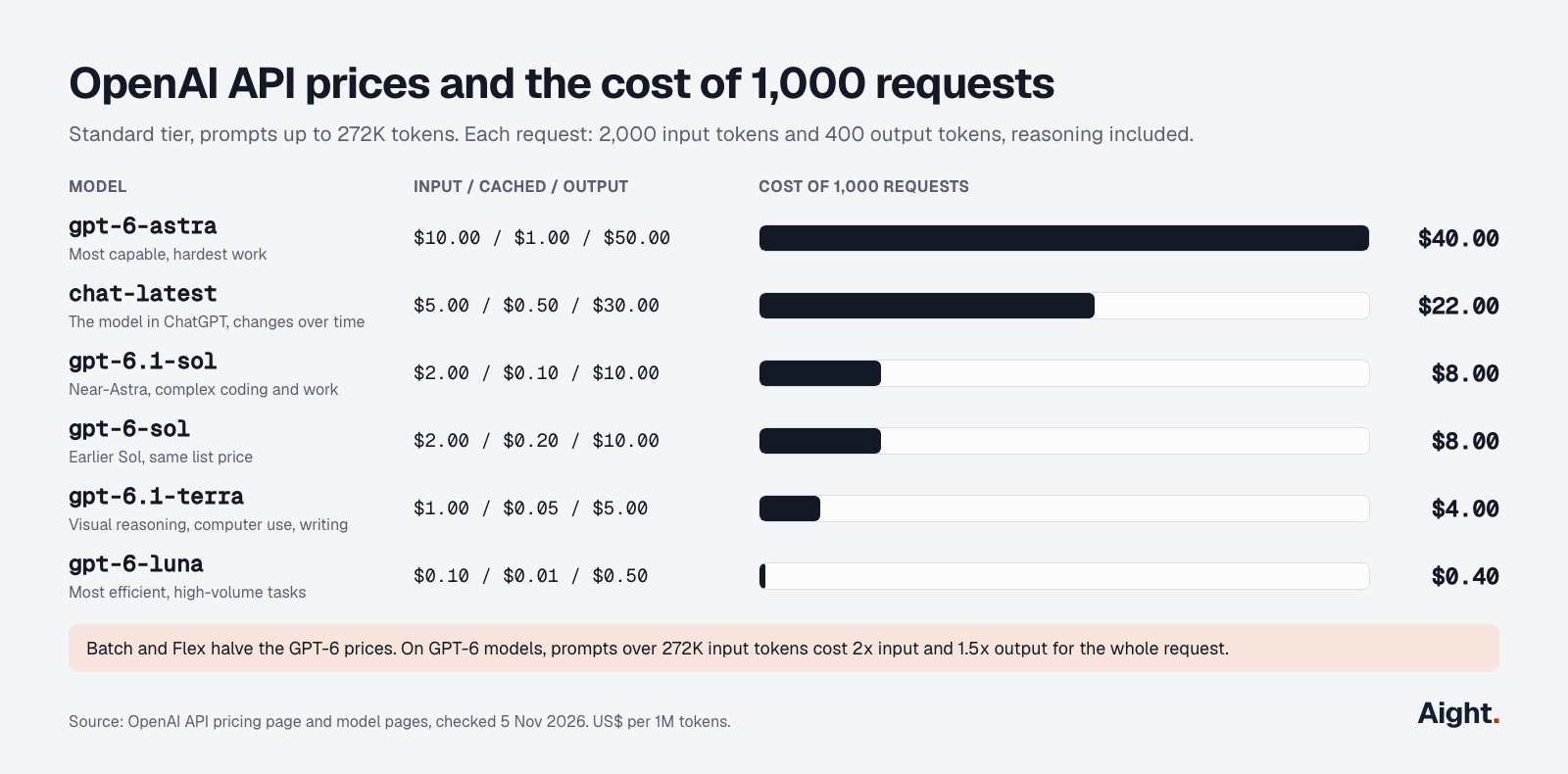
What changes the price you actually pay:
- The GPT-6 models are reasoning models, and reasoning tokens are billed as output. gpt-6-luna, gpt-6-sol, gpt-6.1-sol and gpt-6.1-terra default to
mediumeffort. - A prompt over 272,000 input tokens costs 2x input and 1.5x output for the whole request.
- The Batch API and Flex processing cost half the Standard price. Fast mode costs double.
- Cached input is 10% of the input price on gpt-6-luna, gpt-6-sol and gpt-6-astra, and 5% on the two 6.1 models. Writing a prompt to the cache costs 1.25x input for 30 minutes or 2.5x for 12 hours.
- Regional processing (data residency) adds 10% for models released on or after 5 March 2026.
- Responses and Chat Completions cost the same. OpenAI says the APIs "are not priced separately."
Embeddings with text-embedding-3-small cost $0.02 per million tokens, and the moderation model is free.
Older models are still on the pricing page, and each GPT-5.6 model costs more than its GPT-6 counterpart (gpt-5.6-luna is $0.20 / $1.20). gpt-5.6-sol is on a promotional $4.00 / $20.00 that the pricing page says runs until 30 November 2026; the August changelog entry said "at least through November 21." The deprecations page shuts down gpt-5, gpt-5-mini, gpt-5-nano, gpt-5-pro, o3 and o3-pro on 11 December 2026, and gpt-4o, gpt-4o-mini, gpt-4.1 and gpt-4.1-mini on 14 January 2027, with gpt-6-luna as the replacement for the GPT-4 models.
For per-token arithmetic, cache-write rules and long-context math, see OpenAI token pricing explained.
Which model to start with
Start with gpt-6-luna and move up only when your own tests show it falls short. At the prices above it costs a twentieth of gpt-6.1-sol and a hundredth of gpt-6-astra for the same tokens.
| If you need | Start with | Price, in / out | Things to know |
|---|---|---|---|
| Classification, extraction, routing, short chat replies | gpt-6-luna | $0.10 / $0.50 | Accepts none effort; function calls in Chat Completions only with none |
| Writing from supplied material, image understanding, computer use | gpt-6.1-terra | $1.00 / $5.00 | Tool calls need the Responses API |
| Complex coding, multi-step agent work, long documents | gpt-6.1-sol | $2.00 / $10.00 | No none effort; tool calls need the Responses API |
| The hardest reasoning and coding, when cost matters less | gpt-6-astra | $10.00 / $50.00 | No none effort, temperature or top_p |
OpenAI's own defaults point higher. Its models page says "If you're not sure where to start, use GPT-6 Astra," and its model selection guide says you can default to Astra "If cost and latency aren't a concern." The same guide maps "Luna · Low" to "simple data extraction" and "well-scoped problem-solving."
Two details save money:
- Pick gpt-6.1-sol over gpt-6-sol. They share a list price, but 6.1 Sol's cached input costs half as much, and OpenAI's GPT-6 guide lists 6.1 Sol, not 6 Sol, among its four GPT-6 models. The one reason to keep gpt-6-sol is function calling through Chat Completions with
reasoning_effortset tonone. - Set reasoning effort on every request. When effort is above
none, OpenAI's GPT-6 guide says to removetemperature,top_pandtop_logprobs, so strip them when you migrate older code.
How to get an OpenAI API key
You need an API Platform account, a first purchase of at least $5 and a key. In order:
- Sign up or sign in at platform.openai.com. Access from an unsupported country returns a 403.
- In Billing, add payment details and make a first purchase. The prepaid billing article puts the minimum at $5 and the default at $10. Auto-reload is on by default during setup, so turn it off or set a monthly reload limit before you confirm.
- Create a key under API keys. Since 10 September 2026 you can give a project key an expiry date.
- Store it in an environment variable, where every official SDK looks for it:
export OPENAI_API_KEY="sk-..."        # macOS or Linux
setx OPENAI_API_KEY "sk-..."          # Windows PowerShell
For a deployed app, OpenAI's key guide recommends a project service account and its own key, not one developer's personal key, and says to keep keys out of browser code, mobile apps, source control and logs. The step-by-step key guide covers the screens and the few ways to try the API without paying.
Your first request in Python and curl
The official OpenAI Python API library is the openai package. Version 3.45.0, released on 4 November 2026, needs Python 3.10 or later.
pip install openai==3.45.0from openai import OpenAI
client = OpenAI() # reads OPENAI_API_KEY from the environment
response = client.responses.create(
model="gpt-6-luna",
instructions="Answer in one sentence.",
input="What does an API key do?",
reasoning={"effort": "low"}, # the default is medium
max_output_tokens=2_000, # includes reasoning tokens
)
print(response.output_text)
u = response.usage
print(u.input_tokens, u.output_tokens, u.output_tokens_details.reasoning_tokens)output_text joins all the text the model returned. The usage line is what you pay for: output_tokens already includes the reasoning tokens, so an uncached call on gpt-6-luna costs input_tokens × $0.10 plus output_tokens × $0.50, divided by a million. A wrong key raises openai.AuthenticationError with HTTP 401 and the code invalid_api_key. For Node.js, npm install openai (7.50.0 on 4 November) gives the same client.responses.create call.
The same request with curl:
curl https://api.openai.com/v1/responses \
  -H "Content-Type: application/json" \
  -H "Authorization: Bearer $OPENAI_API_KEY" \
  -d '{
    "model": "gpt-6-luna",
    "instructions": "Answer in one sentence.",
    "input": "What does an API key do?",
    "reasoning": {"effort": "low"}
  }'
Raw JSON has no output_text shortcut. The text sits in the output array inside the item of type message, and that array can also hold reasoning items and tool calls. OpenAI's text generation guide warns that the text isn't safely at output[0].content[0].text, so look for the item by type. To check a prompt's size before you send it, client.responses.input_tokens.count(model=..., input=...) returns the exact input token count.
Responses API vs Chat Completions
Use the Responses API for new code, and keep Chat Completions where you need the same code to run on other providers. OpenAI's migration guide says "While Chat Completions remains supported, Responses is recommended for all new projects," and the Python SDK's README calls Chat Completions "supported indefinitely."
| Responses API | Chat Completions | |
|---|---|---|
| Endpoint | POST /v1/responses | POST /v1/chat/completions |
| Input | input (a string or a list of items) plus instructions | messages with roles |
| Reading the text | response.output_text | choices[0].message.content |
| Conversation state | Stored by default; chain turns with previous_response_id; store=False to opt out | You resend the history; stored by default for new accounts |
| Tool calls on GPT-6 models | All models | Only gpt-6-luna and gpt-6-sol, with reasoning_effort="none" |
| Reasoning effort and output cap | reasoning={"effort": ...}, max_output_tokens | reasoning_effort=..., max_completion_tokens |
| Accepted by other providers | Some (xAI, Ollama) | Nearly all OpenAI-compatible APIs |
| Price | Same | Same |
Responses also carries OpenAI's built-in tools, such as web search, file search, code interpreter and remote MCP servers. OpenAI reports, from internal tests, a 3% better SWE-bench score for reasoning models through Responses and 40% to 80% better cache use than Chat Completions.
The first request in Chat Completions form:
completion = client.chat.completions.create(
    model="gpt-6-luna",
    reasoning_effort="low",
    messages=[
        {"role": "developer", "content": "Answer in one sentence."},
        {"role": "user", "content": "What does an API key do?"},
    ],
)

print(completion.choices[0].message.content)
print(completion.usage.prompt_tokens, completion.usage.completion_tokens)
If your app calls tools on gpt-6.1-sol, gpt-6.1-terra or gpt-6-astra, or on gpt-6-luna and gpt-6-sol at any effort above none, it has to use Responses. If it only sends text and reads text back, Chat Completions keeps it portable.
OpenAI API rate limits and usage tiers
Your organization's tier sets a monthly usage limit and per-model rate limits, and it moves up automatically as total purchases pass $5, $100 and $500. OpenAI cut the tiers from five to three on 6 October 2026. From the rate limits guide:
| Tier | Qualifies at | Monthly usage limit | Astra, Sol, Terra | Luna |
|---|---|---|---|---|
| Free | Being in a supported country | $100 | Not listed | Not listed |
| Build | $5 of total purchases | $500 | 5,000 RPM, 1M TPM | 5,000 RPM, 2M TPM |
| Launch | $100 | $5,000 | 10,000 RPM, 4M TPM | 10,000 RPM, 10M TPM |
| Grow | $500 | $200,000 | 15,000 RPM, 40M TPM | 30,000 RPM, 180M TPM |
RPM is requests per minute and TPM tokens per minute. Limits apply per organization and project, not per user, and each response carries x-ratelimit-remaining-requests and x-ratelimit-remaining-tokens headers. Cached tokens still count toward TPM.
A 429 isn't always a rate limit, so read the error code before retrying:
| Status and code | Meaning | What to do |
|---|---|---|
| 429, rate limit reached | Too many requests or tokens this minute | Wait for Retry-After, then back off |
429 slow_down | Traffic rose too fast, even under your limits | Ramp up gradually |
503 server_is_overloaded | The model is temporarily overloaded | Retry after Retry-After |
429 credit_balance_exhausted | Prepaid balance is empty | Make a purchase; retrying won't help |
429 organization_usage_limit_exceeded | Tier's monthly usage limit reached | Request a higher limit |
429 project_spend_limit_exceeded | Your own hard spend limit reached | Raise it or wait for the monthly reset |
401 invalid_api_key | Wrong or revoked key | Check the key and organization |
Past 1 million input TPM, OpenAI suggests growing traffic by no more than 50% every 15 minutes. The Python SDK retries 429 and 5xx errors twice by default, so catch billing codes yourself:
import openai

try:
    response = client.responses.create(model="gpt-6-luna", input="ping")
except openai.RateLimitError as e:          # every 429
    if e.code in ("credit_balance_exhausted", "organization_usage_limit_exceeded",
                  "organization_spend_limit_exceeded", "project_spend_limit_exceeded"):
        raise SystemExit(f"Billing or limit problem, retrying won't help: {e.code}")
    raise                                    # a real rate limit: back off and retry later
except openai.APIStatusError as e:
    print(e.status_code, e.code, e.message)
The rate limit exceeded guide covers backoff code and how other providers count limits.
How OpenAI API billing works
New accounts prepay. You buy a balance, each request draws it down at the per-token prices above, and requests fail with 429 credit_balance_exhausted when it reaches zero. From OpenAI's prepaid billing article:
- The minimum purchase is $5 and the default $10. Your trust tier, based on usage and payment history, caps how much balance you can hold.
- Auto-reload buys more when the balance falls below a threshold. Its optional monthly limit caps purchases, not usage.
- Purchased balance expires after one year and is non-refundable unless law, a contract or an approved exception requires a refund.
- Cutoff isn't instant. Usage processed after the balance runs out shows as a negative balance and comes off your next purchase. OpenAI says "Do not rely on the prepaid balance as an instantaneous spending cutoff."
For a real ceiling, set a monthly hard spend limit on the organization or on each project. Requests over it return 429 project_spend_limit_exceeded or organization_spend_limit_exceeded, and spend can still run slightly past the limit. Spend alerts only send a notification. The spending limit guide walks through both, and since 4 August 2026 the usage dashboard can filter cost by API key.
A worked first bill
Take a support assistant answering 3,000 questions a day, or 90,000 a month. Each request sends 2,000 input tokens (instructions, the question and some history) and gets back 400 output tokens, reasoning included, at low effort. No prompt caching.
| Model | Per request | Month, Standard | Month, Batch API | Inside the Build tier's $500? |
|---|---|---|---|---|
| gpt-6-luna | $0.0004 | $36.00 | $18.00 | Yes |
| gpt-6.1-terra | $0.004 | $360.00 | $180.00 | Yes |
| gpt-6.1-sol | $0.008 | $720.00 | $360.00 | Only with Batch |
| gpt-6-astra | $0.04 | $3,600.00 | $1,800.00 | No |
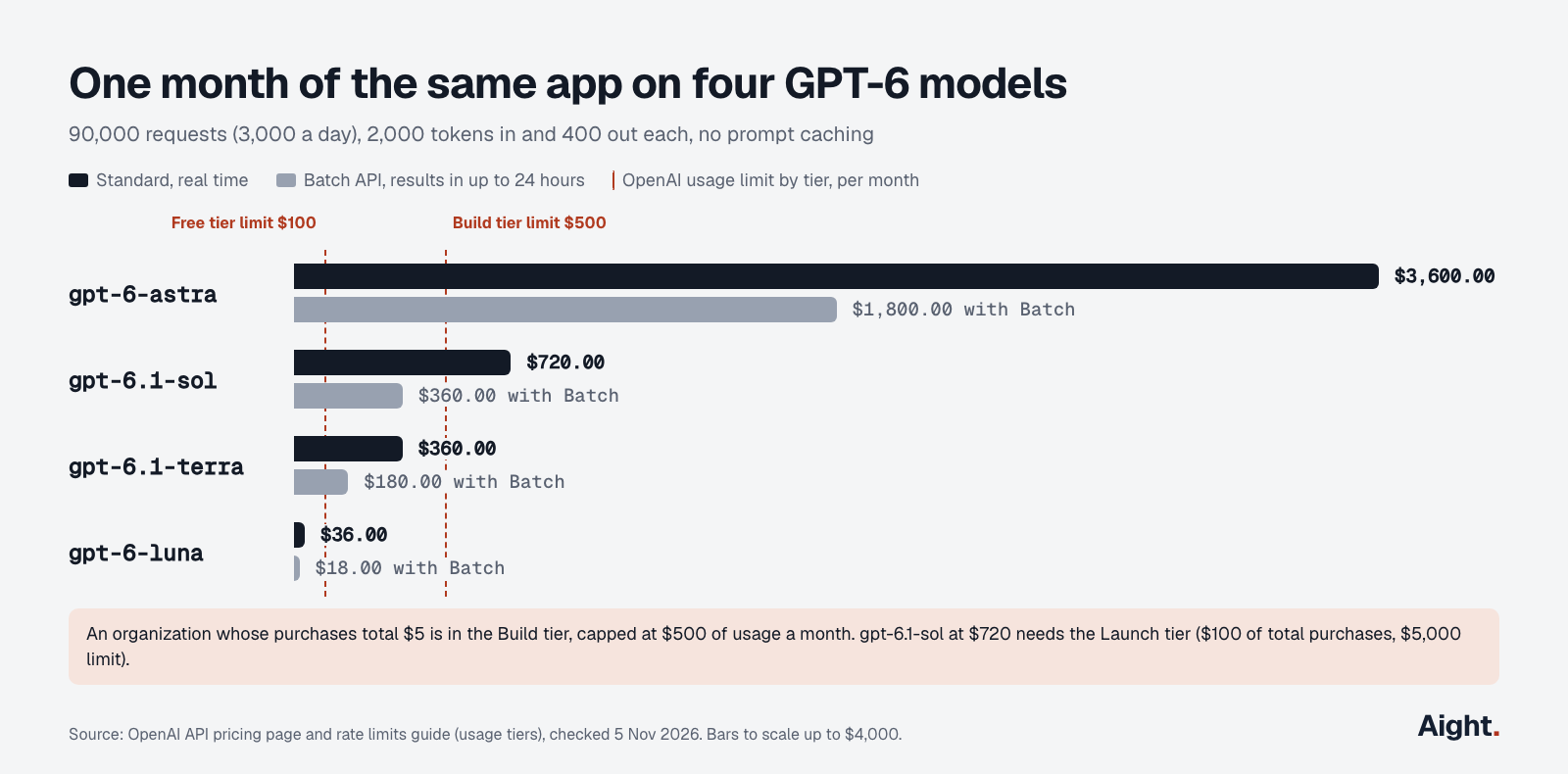
The tier column matters on day one. An organization whose purchases total $5 sits in the Build tier with a $500 monthly usage limit, so the gpt-6.1-sol version of this app stops partway through the month with organization_usage_limit_exceeded until total purchases reach $100 and the Launch tier.
The arithmetic as code, so you can swap in your own volumes:
# US$ per 1M tokens (input, output), Standard tier, prompts up to 272K tokens
PRICES = {
    "gpt-6-luna": (0.10, 0.50),
    "gpt-6.1-terra": (1.00, 5.00),
    "gpt-6.1-sol": (2.00, 10.00),
    "gpt-6-astra": (10.00, 50.00),
}

def monthly_cost(model, requests, input_tokens, output_tokens, batch=False):
    """Rough monthly bill in US$. output_tokens must include reasoning tokens."""
    price_in, price_out = PRICES[model]
    cost = requests * (input_tokens * price_in + output_tokens * price_out) / 1_000_000
    return round(cost / 2 if batch else cost, 2)

# 3,000 requests a day for 30 days, 2,000 tokens in and 400 out each
for model in PRICES:
    print(f"{model:14} ${monthly_cost(model, 90_000, 2_000, 400):>9,.2f}"
          f"  Batch ${monthly_cost(model, 90_000, 2_000, 400, batch=True):>9,.2f}")
# gpt-6-luna     $    36.00  Batch $    18.00
# gpt-6.1-terra  $   360.00  Batch $   180.00
# gpt-6.1-sol    $   720.00  Batch $   360.00
# gpt-6-astra    $ 3,600.00  Batch $ 1,800.00
Treat the output count as the weak assumption. At the default medium effort a model can spend several times more reasoning tokens, so run a day of real traffic and read usage before you trust any estimate. Caching a long fixed prompt prefix and moving work to Batch cut the bill further; the cheapest way to use the OpenAI API works through both with a full monthly example.
Point the same code at other providers with base_url
The OpenAI SDK takes a base_url argument (or the OPENAI_BASE_URL environment variable), so any provider that speaks the OpenAI format works by changing three values: base URL, key and model name.
| Provider | base_url | OpenAI-format endpoints in its docs | Caveat |
|---|---|---|---|
| OpenAI | https://api.openai.com/v1 | Responses, Chat Completions | The reference |
| Anthropic (Claude) | https://api.anthropic.com/v1/ | Chat Completions | For testing and comparison; no prompt caching; ignores reasoning_effort |
| Google (Gemini) | https://generativelanguage.googleapis.com/v1beta/openai/ | Chat Completions, embeddings, images, batch | Google calls it beta |
| xAI (Grok) | https://api.x.ai/v1 | Responses; Chat Completions as legacy | Quickstart uses responses.create |
| DeepSeek | https://api.deepseek.com | Chat Completions | Models deepseek-flash and deepseek-v4-pro |
| Ollama, local | http://localhost:11434/v1/ | Chat Completions, Responses | Needs a key value but ignores it |
Anthropic's compatibility page says its layer is "primarily intended to test and compare model capabilities," and Google's OpenAI compatibility page says support "is still in beta." Chat Completions with only model and messages is the subset nearly every provider accepts, so a config-driven client is the easiest way to switch:
import os
from openai import OpenAI

client = OpenAI(
    base_url=os.environ.get("LLM_BASE_URL", "https://api.openai.com/v1"),
    api_key=os.environ["LLM_API_KEY"],
)

completion = client.chat.completions.create(
    model=os.environ.get("LLM_MODEL", "gpt-6-luna"),
    messages=[{"role": "user", "content": "What does an API key do?"}],
)
print(completion.choices[0].message.content)
# Claude through Anthropic's compatibility layer
export LLM_BASE_URL=https://api.anthropic.com/v1/
export LLM_API_KEY=$ANTHROPIC_API_KEY
export LLM_MODEL=claude-sonnet-5-5The Anthropic, Google, xAI and DeepSeek URLs each answered a test request carrying a deliberately fake key on 5 November 2026 with an authentication or bad-request error, so the routes are live; behavior beyond model and messages differs by provider. Alternatives to the OpenAI API compares the providers on price and features.
Code that still calls the Assistants API stopped working when OpenAI shut it down on 26 August 2026. The Assistants API migration guide covers the move to the Responses API.
What developers report
- "GPT-6 Luna at $0.10/Mio input tokens and $0.50/Mio output is positively insane." (Hacker News commenter on the GPT-6 Sol and Luna launch, 22 Sep 2026, link)
- "Luna 6 is actually worse on some benchmarks than 5.6." (Hacker News commenter, same thread, 22 Sep 2026, link)
- A Hacker News commenter reported gpt-6-luna leaking tool calls and markers into its output, where gpt-5.6-terra behaved, a week after launch (GPT-6.1 Sol thread, 29 Sep 2026, link)
- A Hacker News commenter pointed out that Luna, Terra, Sol and Astra rank by price per token, but per task the order depends on how much thinking a job needs (GPT-6.1 Terra thread, 26 Oct 2026, link)
- A reply in OpenAI's Developer Community reported that subscribers billed through Google Play or the Apple App Store weren't seeing the API benefit to claim, a day after launch; other replies describe a missing link-organization button that later appeared (29 to 30 Oct 2026, link)
- An openai-python issue reported that
prompt_cache_options.ttlwas typed to accept only"30m"although the API accepts"12h". In 3.45.0 the Responses parameter accepts both, and the issue was still open on 5 November (GitHub issue #4156, opened 22 Oct 2026, link)
Using the OpenAI API through Aight
Aight is one OpenAI-compatible API for 138 models from 16 makers, and the base_url pattern above is how it connects. It lists gpt-6-luna, gpt-6-sol, gpt-6.1-sol and gpt-6-astra at OpenAI's list prices, including cached input, cache writes and the long-context rates. Every recharge adds 10% extra balance; outside India a $100 recharge costs $103 with the 3% processing fee and adds $110, about $0.94 per $1 of list-price usage. Balance doesn't expire, and unspent paid balance is refundable, where OpenAI's purchased balance expires after a year and is generally non-refundable. Each key can carry a monthly cap, an expiry date and an allowed-model list.
Where OpenAI direct works better:
- Aight's API reference documents Chat Completions, embeddings and the model list, with no Responses API, so GPT-6 tool calling, which mostly needs Responses, and OpenAI's built-in tools stay direct.
- There is no Batch API, and Batch's 50% beats the roughly 6% from the extra.
export LLM_BASE_URL=https://api.getaight.ai/v1
export LLM_API_KEY=sk-aight-...
export LLM_MODEL=gpt-6-luna
FAQ
Is the OpenAI API free?
No. New accounts prepay at least $5, and OpenAI's help center says a positive account balance is needed to use its models. The exceptions are the ChatGPT Pro and Business benefit of up to $500 a month, daily complimentary tokens for some paying organizations that share their traffic with OpenAI, and the moderation model, which is free.
Does ChatGPT Plus include OpenAI API access?
No. ChatGPT and the API platform bill separately, and Plus isn't eligible for the subscriber benefit; only Pro and Business are. A Plus subscriber who wants the API opens an API Platform account and buys a balance.
How much does one OpenAI API request cost?
It depends on the model and the tokens. A request with 2,000 input tokens and 400 output tokens costs $0.0004 on gpt-6-luna, $0.008 on gpt-6.1-sol and $0.04 on gpt-6-astra at Standard prices, and half that through the Batch API. Read usage on the response for the exact counts.
Does an OpenAI API balance expire?
Yes. Purchased balance expires one year after purchase, and OpenAI says it can't extend the date. The ChatGPT subscriber benefit expires sooner, at the end of each subscription billing cycle, and doesn't roll over.
Can the OpenAI API be used without a card?
Only through the ChatGPT Pro or Business benefit, where OpenAI's page says no API payment method is required while the monthly grant lasts. Every other route starts with adding payment details and a $5 purchase.
Sources
- OpenAI API docs: Pricing, Models, model pages for gpt-6-astra, gpt-6.1-sol, gpt-6.1-terra, gpt-6-sol, gpt-6-luna and chat-latest, Model selection, Using GPT-6, Reasoning models
- OpenAI API docs: Developer quickstart, Text generation, Migrate to the Responses API, Counting tokens, API keys and service accounts, Supported countries
- OpenAI API docs: Rate limits, Error codes, Spend limits, API usage for ChatGPT subscribers, Changelog, Deprecations
- OpenAI Help Center: Prepaid API billing, Billing for ChatGPT and the API platform, Sharing API data with OpenAI and complimentary tokens
- OpenAI SDKs: openai-python README, openai on PyPI (3.45.0), openai on npm (7.50.0), issue #4156
- OpenAI Developer Community: ChatGPT subscriber benefit announcement thread
- Anthropic: OpenAI SDK compatibility
- Google: OpenAI compatibility for the Gemini API
- xAI: Quickstart and Chat Completions (legacy)
- DeepSeek: Your first API call
- Ollama: OpenAI compatibility
- Hacker News: GPT-6 Sol and Luna, GPT 6.1 Sol, GPT-6.1 Terra
- YouTube: OpenAI, Introducing GPT-6 Astra for developers
- Aight: Models and pricing, Quickstart, API reference, Refund policy
Checked on 5 November 2026. Updated 17 November 2026: Aight's current model list.