The OpenAI Assistants API no longer works. OpenAI shut it down on 26 August 2026, one year after announcing the deprecation, and its migration guide now says it "is no longer available." The replacement is the Responses API for each model call plus the Conversations API for stored history, and any code that still calls /v1/assistants, /v1/threads or a run gets an HTTP 404.
This guide covers the dates, the one-to-one mapping from assistants, threads and runs to the new objects, Python code for each piece (instructions, history, function calling, file search, code interpreter, long runs), what changes in cost, and the errors that show up during and after the move. Everything was checked against OpenAI's docs and a live probe of the API on 10 November 2026, with the openai Python SDK 3.48.0.
Is the OpenAI Assistants API deprecated?
It is past deprecated: it is shut down. Requests to the Assistants endpoints fail on every account, and there is no extension or opt-in to keep them running.
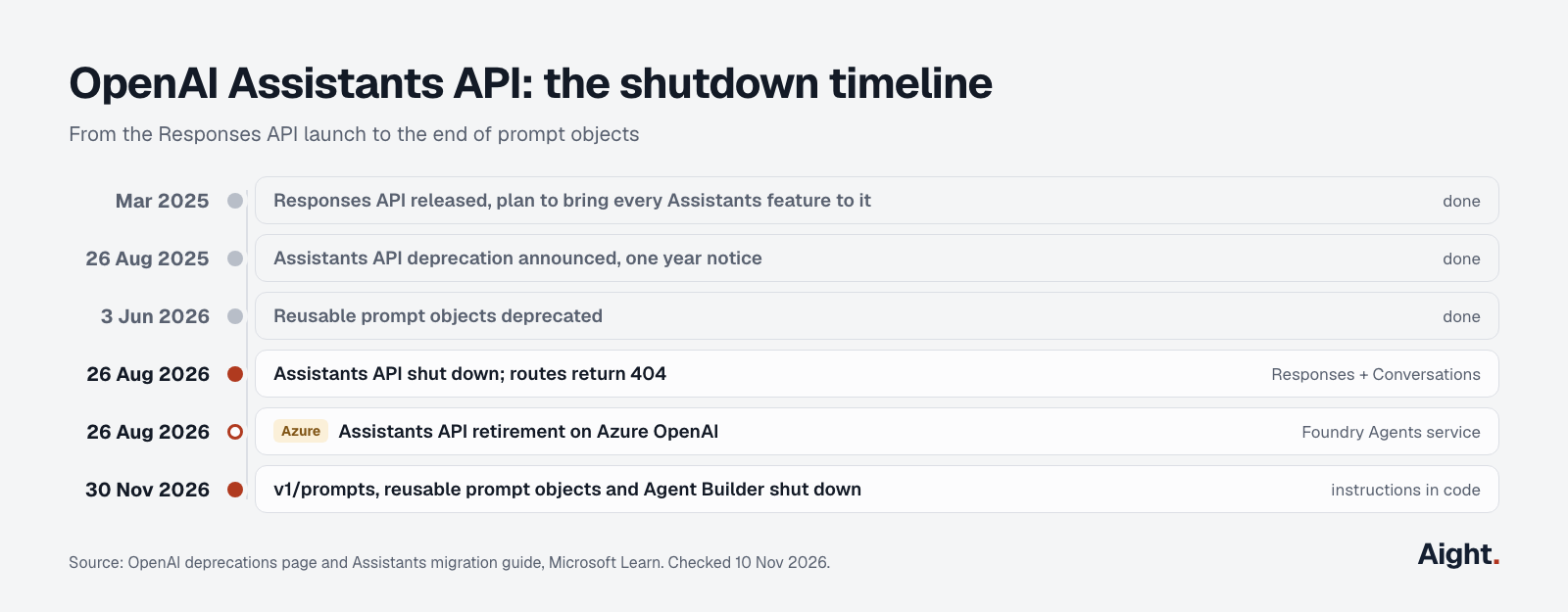
| Date | What happened | Source |
|---|---|---|
| Mar 2025 | Responses API released, with a plan to move every Assistants feature to it | Deprecations |
| 26 Aug 2025 | Deprecation announced, shutdown set for one year later | OpenAI community announcement |
| 3 Jun 2026 | Reusable prompt objects (the guide's suggested home for assistant settings) deprecated | Deprecations |
| 26 Aug 2026 | Assistants API shut down on OpenAI; Azure OpenAI's retirement date too | Migration guide, Microsoft Learn |
| 30 Nov 2026 | v1/prompts API, reusable prompts and Agent Builder scheduled to shut down | Deprecations |
OpenAI's deprecations page files the entry under a heading dated 20 August 2025, while its text says developers were notified on 26 August 2025, the date of the community announcement. The shutdown date, 26 August 2026, is the same everywhere.
Azure users are in the same position. Microsoft's Assistants concepts page now reads "The Assistants API is retired" and points to the Microsoft Foundry Agents service instead.
What replaced the Assistants API
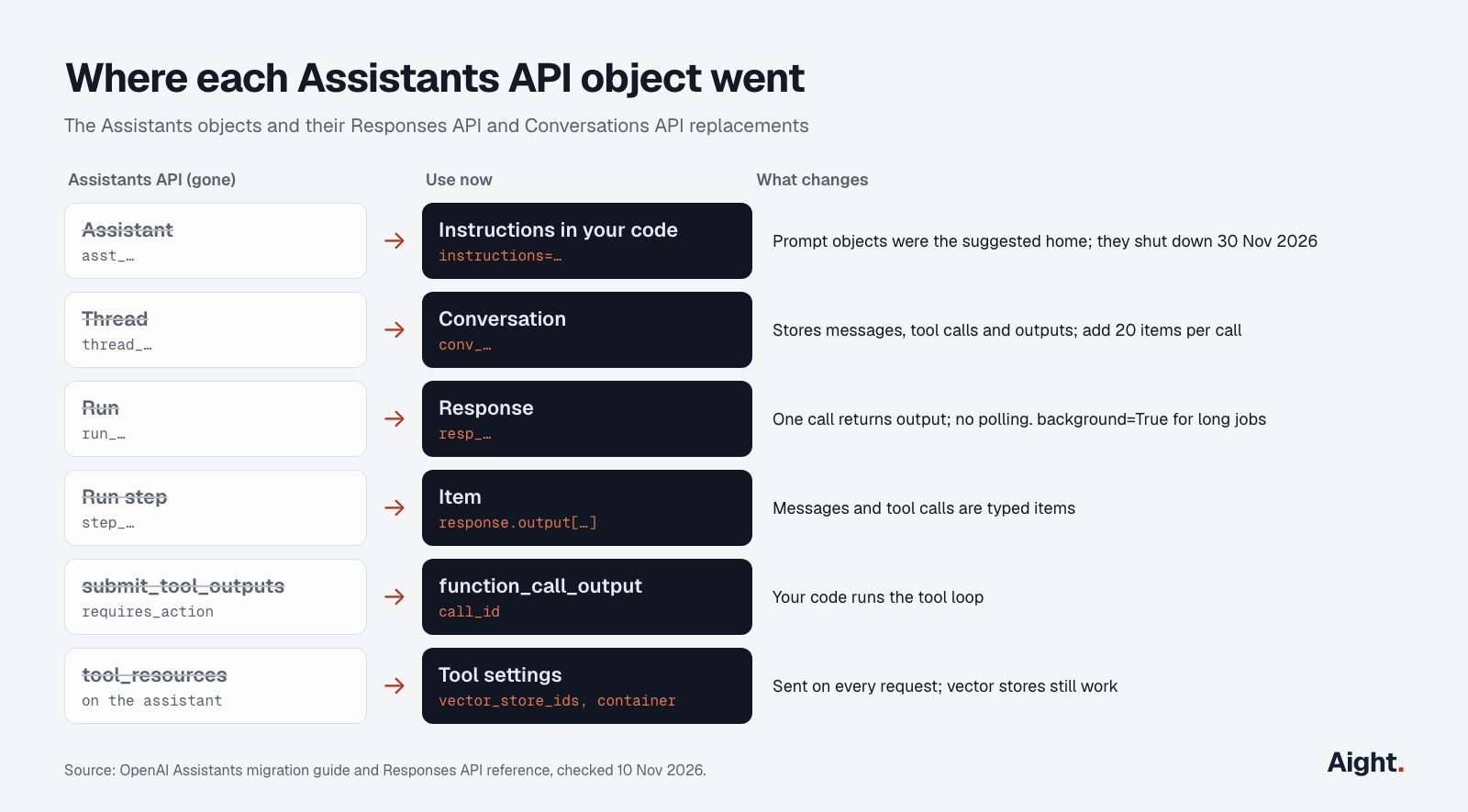
The Responses API replaced runs, and the Conversations API replaced threads. OpenAI's guide maps the four Assistants objects like this:
| Assistants API | Replacement | What changes for your code |
|---|---|---|
Assistant (asst_…) | Prompt object in the dashboard, or instructions in your code | Prompt objects shut down on 30 Nov 2026, so keep instructions in code |
Thread (thread_…) | Conversation (conv_…) | Stores items (messages, tool calls, tool outputs), not only messages |
| Run | Response (resp_…) | One synchronous call returns output items; no polling |
| Run step | Item | Tool calls and messages are typed items in response.output |
requires_action + submit_tool_outputs | function_call item + function_call_output input | Your code runs the tool loop |
tool_resources on the assistant | vector_store_ids and container on each tool | Pass them on every request |
The guide's own first step, "Create prompt" from each assistant in the dashboard, now leads to a dead end: the same page warns that reusable prompt objects are also being deprecated, and v1/prompts stops on 30 November 2026. OpenAI's prompt migration guide says to move the prompt content into application code. If you are migrating after the Assistants shutdown, skip prompt objects and go straight to instructions in code.
If you are choosing models for the new code, the OpenAI API guide compares the GPT-6 family and when to use Responses or Chat Completions. One rule matters here: OpenAI's function calling guide says GPT-6 Astra and GPT-6.1 Sol need the Responses API for tool calling.
Assistants API to Responses API: migration guide with code
The samples below use Python and SDK 3.48.0. Each one was run against the API with a fake key to confirm the SDK accepts the arguments; none needs a beta header.
Step 1: move the assistant's instructions into code
Copy each assistant's model, instructions and tool list out of your own records (the Assistants API can no longer return them) into a config module under version control.
from openai import OpenAI

client = OpenAI()

SUPPORT_AGENT = {
    "model": "gpt-6.1-sol",
    "instructions": "You are a support agent for Acme. Answer in under 120 words.",
}
Send instructions on every request. The Responses API reference says instructions from a previous response are not carried over when you chain with previous_response_id, and a conversation stores items, not your system prompt.
Step 2: replace threads with conversations
Create one conversation per chat session and pass its ID on each turn. Input and output items are added to the conversation automatically after the response completes.
conversation = client.conversations.create(metadata={"user_id": "u_123"})

response = client.responses.create(
    **SUPPORT_AGENT,
    conversation=conversation.id,
    input="Where is my order?",
)
print(response.output_text)
That replaces four Assistants calls (add a message, create a run, poll it, list messages) with one. A conversation and previous_response_id can't be combined in the same request; pick one. Conversations suit apps that kept threads server-side; previous_response_id suits short chains. Both bill every earlier input token again on each turn, per the conversation state guide.
Step 3: import old thread history
The Assistants call that listed thread messages is gone, so old history can only come from what your application stored. Convert each stored message to an item and load it in batches: the Conversations API accepts up to 20 items per call.
def to_item(role: str, text: str) -> dict:
    part = "input_text" if role == "user" else "output_text"
    return {"role": role, "content": [{"type": part, "text": text}]}

def import_history(rows: list[tuple[str, str]]) -> str:
    """rows: (role, text) pairs from your own database, oldest first."""
    items = [to_item(r, t) for r, t in rows]
    conv = client.conversations.create(items=items[:20])
    for i in range(20, len(items), 20):
        client.conversations.items.create(conv.id, items=items[i:i + 20])
    return conv.id
OpenAI's own example creates the conversation with all items in one call, which fails for any thread longer than 20 messages.
Step 4: rewrite the function-calling loop
In Assistants, a run paused in requires_action and you called submit_tool_outputs. In Responses, the model returns function_call items and you send back function_call_output items with the same call_id. Tool definitions are flat: name and parameters sit at the top level, not under a function key.
import json

tools = [{
    "type": "function",
    "name": "get_order_status",
    "description": "Look up the shipping status of an order.",
    "parameters": {
        "type": "object",
        "properties": {"order_id": {"type": "string"}},
        "required": ["order_id"],
        "additionalProperties": False,
    },
    "strict": True,
}]

def get_order_status(order_id: str) -> dict:
    return {"order_id": order_id, "status": "shipped"}  # your real lookup

def ask(conv_id: str, text: str) -> str:
    response = client.responses.create(
        **SUPPORT_AGENT, conversation=conv_id, tools=tools, input=text
    )
    while True:
        calls = [i for i in response.output if i.type == "function_call"]
        if not calls:
            return response.output_text
        outputs = [{
            "type": "function_call_output",
            "call_id": c.call_id,
            "output": json.dumps(get_order_status(**json.loads(c.arguments))),
        } for c in calls]
        response = client.responses.create(
            **SUPPORT_AGENT, conversation=conv_id, tools=tools, input=outputs
        )
Because the conversation already holds the function_call items, the follow-up request only sends the outputs. If you chain without a conversation, append response.output to your input list first, as the function calling guide shows. Set parallel_tool_calls=False if your tools can't run concurrently.
Step 5: file search and code interpreter
Vector stores and files survived the shutdown: /v1/vector_stores still answers, so existing store IDs work. Attach them to the tool on each request instead of to an assistant.
response = client.responses.create(
    **SUPPORT_AGENT,
    input="What is the refund window?",
    tools=[{"type": "file_search", "vector_store_ids": ["vs_123"], "max_num_results": 5}],
    include=["file_search_call.results"],
)
The file search guide notes that search results are not returned unless you ask for file_search_call.results; citations arrive as annotations on the output text.
Code interpreter now runs in a container. "type": "auto" creates one or reuses the active one from earlier in the context; memory_limit is 1g (default), 4g, 16g or 64g.
response = client.responses.create(
    **SUPPORT_AGENT,
    input="Chart monthly revenue from the CSV.",
    tools=[{
        "type": "code_interpreter",
        "container": {"type": "auto", "memory_limit": "1g", "file_ids": ["file-abc"]},
    }],
)
Generated files come back as container_file_citation annotations with a container_id and file_id. Download them promptly: the code interpreter guide says a container expires after 20 minutes without use, and its data is discarded.
Step 6: long runs and streaming
If you polled runs because they took minutes, use background mode and poll the response instead.
import time

resp = client.responses.create(**SUPPORT_AGENT, input="Write the quarterly report.", background=True)
while resp.status in {"queued", "in_progress"}:
    time.sleep(2)
    resp = client.responses.retrieve(resp.id)
print(resp.status, resp.output_text)
For streaming, pass stream=True and handle Responses events such as response.output_text.delta and response.completed; the old thread.run.* event handlers don't carry over.
What breaks after the migration
Most migrations fail on behavior the Assistants API handled silently. These are the ones to test for.
| What changed | Assistants API | Responses API | What to do |
|---|---|---|---|
| Context overflow | Threads truncated automatically | truncation defaults to disabled: a 400 error when input exceeds the window | Set truncation="auto", or use compaction |
| System prompt | Stored on the assistant | Not stored; not carried over with previous_response_id | Send instructions every request |
| History import | Listed from the thread by the API | Only from data your app stored, 20 items per call | Batch the import |
| File search fee | Storage only | Plus $2.50 per 1,000 calls, Responses API only | Lower max_num_results, cache answers |
| Code interpreter files | Handled inside the run | Container data deleted 20 minutes after last use | Download outputs at once |
| Stored data | Threads held the history | Responses kept 30 days by default; conversation items have no 30-day limit | Decide store per request |
For long chats, OpenAI's compaction guide adds server-side compaction: pass context_management=[{"type": "compaction", "compact_threshold": 200000}] and the server shrinks the context when it crosses the threshold, returning an opaque compaction item that carries state forward.
Data handling changes too. Responses are stored for 30 days unless you send store=False, while conversation items persist with no 30-day limit. Background requests from Zero Data Retention projects run with store=false and keep data for roughly 10 minutes to allow polling, per the background mode guide. The zero data retention guide covers what each setting keeps.
Assistants API errors you see now
A request to any Assistants route returns HTTP 404 with an empty body, before the API even checks the key. On 10 November 2026, GET /v1/assistants, GET /v1/threads and POST /v1/threads/runs all returned 404 with a deliberately invalid key, while /v1/responses, /v1/conversations and /v1/vector_stores returned 401 for the bad key, which shows those routes exist.
The Python SDK has not removed the old methods. Version 3.48.0 still ships client.beta.assistants and client.beta.threads, so code imports and runs until the first request:
DeprecationWarning: The Assistants API is deprecated in favor of the Responses API
openai.NotFoundError: Error code: 404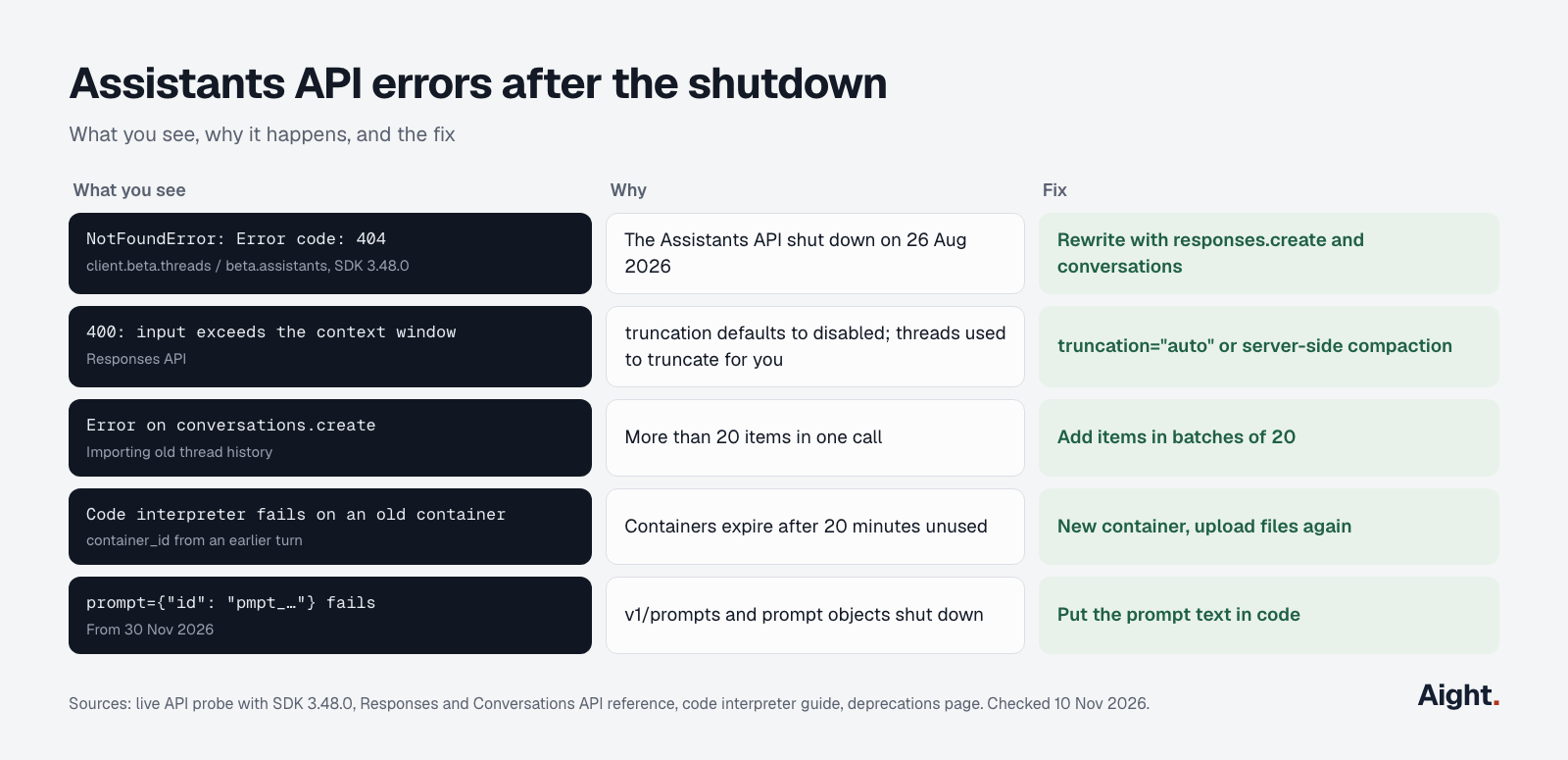
| What you see | Cause | Fix |
|---|---|---|
NotFoundError: Error code: 404 on beta.threads or beta.assistants | The Assistants API is shut down | Rewrite the call with Responses and Conversations |
| 404 from a no-code tool or plugin | The tool still calls /v1/threads | Update the tool or switch to a version built on Responses |
| 400 when input exceeds the context window | truncation defaults to disabled | Set truncation="auto" or enable compaction |
Error on conversations.create with a long history | More than 20 items in one call | Add items in batches of 20 |
Error when sending both conversation and previous_response_id | The reference says they can't be combined | Use one state method |
Code interpreter call fails on an old container_id | Container idle for 20 minutes and expired | Start a new container and upload files again |
prompt with pmpt_… stops working after 30 Nov 2026 | v1/prompts shuts down | Inline the prompt text |
A 404 can also mean a wrong model name rather than a retired route; the model not found guide covers that case.
What the migration costs
Model tokens cost the same through Responses as through any other OpenAI endpoint: gpt-6.1-sol is $2.00 / $10.00 per million tokens and gpt-6-luna $0.10 / $0.50 on the pricing page. The built-in tools are where bills change.
| Tool | Price on 10 Nov 2026 |
|---|---|
| File search calls | $2.50 per 1,000 calls (Responses API only) |
| File search storage | $0.10 per GB per day, first 1 GB free |
| Code interpreter, 1 GB container | $0.03 per 20-minute session |
| Code interpreter, 4 GB / 16 GB / 64 GB | $0.12 / $0.48 / $1.92 per 20-minute session |
| Web search | $10.00 per 1,000 calls, plus search content tokens |
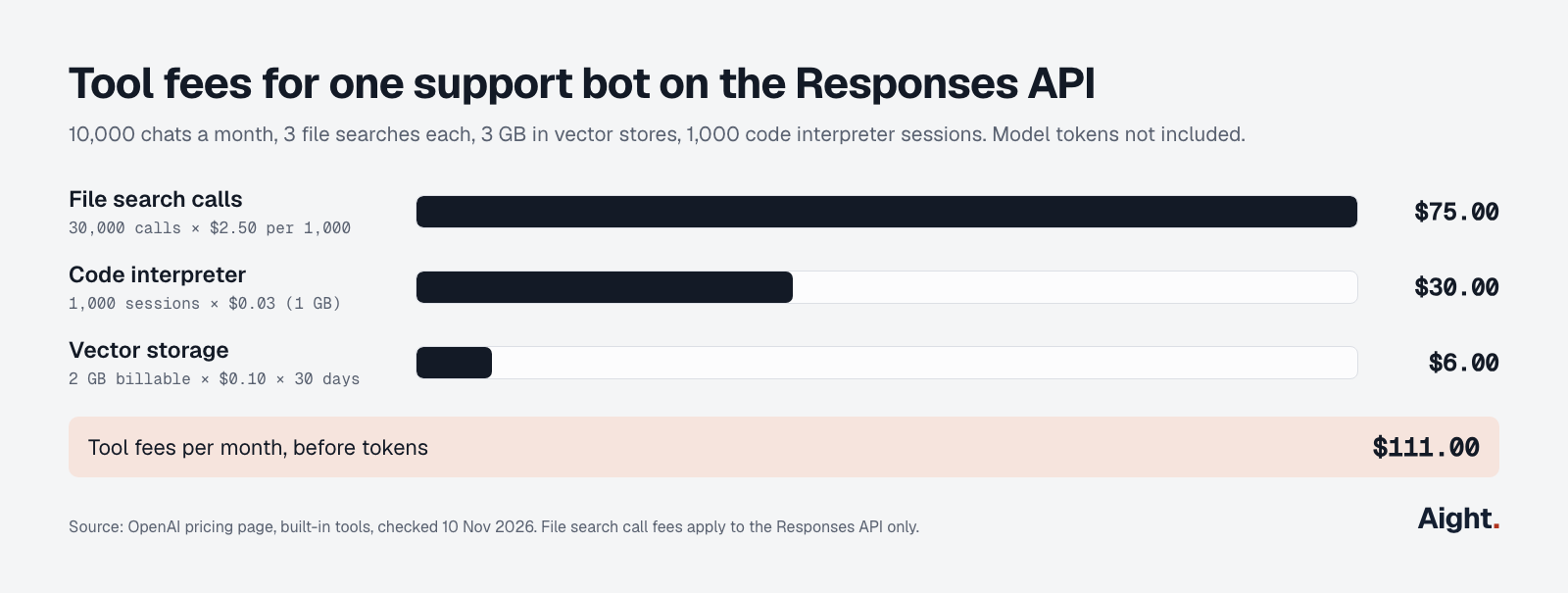
OpenAI bills eligible container sessions by the minute with a five-minute minimum. A worked example: a support bot handling 10,000 chats a month with three file searches each makes 30,000 calls, which is $75.00 in tool fees. Keeping 3 GB in vector stores adds 2 GB × $0.10 × 30 days = $6.00. If 1,000 of those chats also run a 1 GB code interpreter session, that adds $30.00, for $111.00 a month on top of tokens.
History grows the token bill the same way it did on threads: each turn resends earlier messages as input, so a long chat costs more per turn than a short one. Cached input reduces that; the OpenAI token pricing guide lists cached rates, and the free token cost calculator estimates a full chat.
Should you stay on OpenAI or move providers?
If your assistant used file search, code interpreter or hosted conversation storage, the Responses API is the shortest path, because no other provider offers the same objects under the same IDs. Your vector stores and files stay where they are.
If it only used instructions and function calling, the migration is a rewrite either way, and the result is plain stateless code that you own: messages in your database, the tool loop in your code. That code moves to Chat Completions, or to another provider, with little extra work. The OpenAI API alternatives guide compares what each job costs elsewhere and what breaks when you switch.
What developers report
- "It is NOT at feature parity" (OpenAI community forum user, replying to the deprecation announcement, 27 Aug 2025, link)
- "App owns memory, retries, orchestration, and state" (OpenAI community forum user, 6 Jan 2026, link)
- A reply in the same thread calls code interpreter containers "ridiculously short-lived, a new fee for every re-creation" (OpenAI community forum, 2026, link)
- A developer reported that Responses file search citations point to a whole file rather than the chunk used, with no OpenAI reply in the thread (OpenAI community forum, 24 Nov 2025, link)
- Another user found the docs' phrase "persisted with no 30 day TTL" confusing on the day of the announcement (OpenAI community forum, 26 Aug 2025, link)
Using Aight after the Assistants API
Aight fits only part of this migration. Its API reference documents Chat Completions, embeddings and the model list, so it has no Responses API, Conversations, vector stores, file search or code interpreter. If your assistant depended on those, stay on OpenAI.
If the rewrite leaves you with stateless chat code (history in your own database, instructions in code, no hosted tools), that code can run on Chat Completions, and Aight serves it for 138 models from 16 makers through one OpenAI-compatible endpoint. gpt-6-luna and gpt-6.1-sol are listed at OpenAI's prices, $0.10 / $0.50 and $2.00 / $10.00. Every recharge adds 10% extra balance, the balance never expires, and each key can carry a monthly spend cap. One limit: gpt-6.1-sol tool calling needs Responses on OpenAI's side, which Aight doesn't document.
FAQ
Is the OpenAI Assistants API still available?
No. OpenAI shut it down on 26 August 2026, and the Assistants routes now return HTTP 404. There is no extension, and Microsoft's docs say the Azure OpenAI version is retired too.
What is the replacement for the OpenAI Assistants API?
The Responses API for model calls and tools, plus the Conversations API for stored history. OpenAI's guide also names prompt objects as the replacement for assistants, but those shut down on 30 November 2026, so keep instructions in your code.
Can old threads be exported after the shutdown?
Not through the API. The call that listed thread messages no longer works, so history can only come from what your application saved. Load that into conversations in batches of 20 items.
Do vector stores from the Assistants API still work?
Yes. The /v1/vector_stores endpoint is live, and the Responses API's file_search tool takes existing vector store IDs in vector_store_ids. Search calls now cost $2.50 per 1,000 on top of storage.
Is the Responses API more expensive than the Assistants API?
Model tokens cost the same. The difference is tools: file search adds $2.50 per 1,000 calls through Responses, and code interpreter containers cost from $0.03 per 20-minute session. A chat app without hosted tools pays the same as before.
Sources
- OpenAI API docs: Assistants migration guide, Deprecations, Migrate from prompt objects, Conversation state, Compaction, Function calling, File search, Code interpreter, Background mode, Streaming responses, Pricing
- OpenAI API reference: Create a response, Create a conversation, Create conversation items
- OpenAI SDK: openai on PyPI (3.48.0), openai on npm (7.54.0)
- Microsoft: Azure OpenAI Assistants API concepts (classic), Microsoft Q&A on the Azure retirement date
- OpenAI community forum: Assistants API beta deprecation announcement, This is not a 1:1 migration, File search annotations reference a file rather than a chunk
- Aight: API reference, Models, Token cost calculator
- Live API probe of
api.openai.comwith an invalid key and SDK 3.48.0, 10 Nov 2026
Checked on 10 November 2026. Updated 17 November 2026: Aight's current model list.