To install Claude Code, run curl -fsSL https://claude.ai/install.sh | bash in a terminal on macOS, Linux or WSL, or irm https://claude.ai/install.ps1 | iex in Windows PowerShell. Then open a new terminal in your project folder and run claude, which opens a browser to sign in. You need a paid Claude plan (Pro, from $20 a month) or a Claude Console account billed per token; the Free plan doesn't include Claude Code.
This guide covers how to install Claude Code with every official method, then how to sign in, update, uninstall, and run it in VS Code and Cursor. Everything was checked on 5 November 2026 against Claude Code 2.1.318. The version numbers below were re-checked on 17 November, when the latest channel was on 2.1.326 and stable still on 2.1.311.
How to install Claude Code: every method at a glance
The native installer is the one Anthropic recommends in its setup docs. It needs no Node.js, installs into your home folder without admin rights, and updates itself. Homebrew, WinGet and the Linux repositories fit your usual tooling but don't update on their own by default.
| Method | Platforms | Updates itself | Version served on 17 Nov |
|---|---|---|---|
| Native installer (recommended) | macOS, Linux, WSL, Windows PowerShell and CMD | Yes, in the background | 2.1.326 (latest), or 2.1.311 on stable |
| Homebrew cask | macOS, Linux | No | claude-code 2.1.311, claude-code@latest 2.1.326 |
| WinGet | Windows | No | 2.1.318 |
| apt, dnf, apk repositories | Debian, Ubuntu, Fedora, RHEL, Alpine | Through system upgrades | stable or latest repository |
| npm | All eight supported platforms, Node.js 22+ | Yes, if the npm global folder is writable | 2.1.326 |
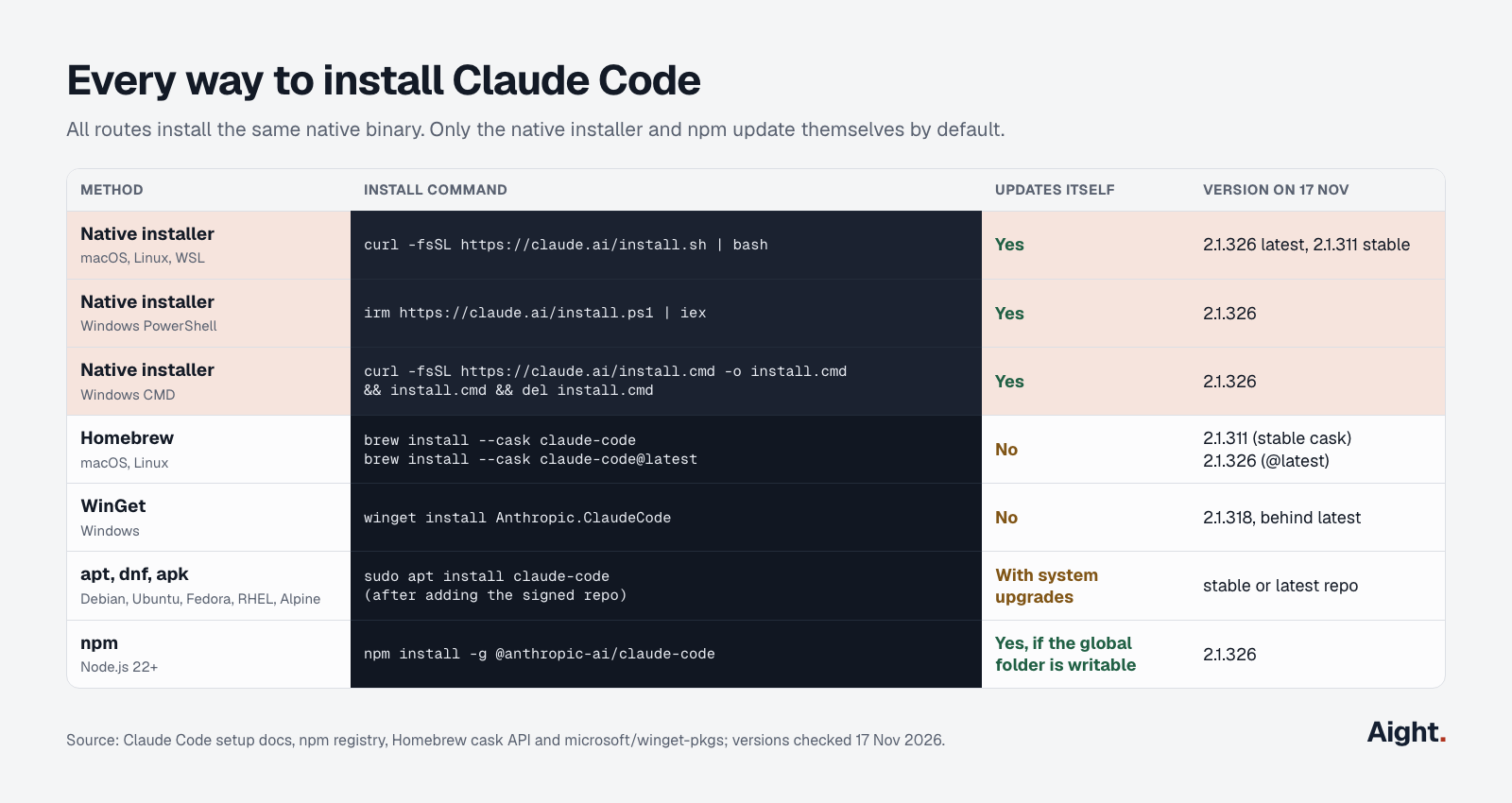
Every route installs the same native binary. It needs macOS 13.0 or later, Windows 10 version 1809 or later (or Windows Server 2019), Ubuntu 20.04, Debian 10 or Alpine 3.19 and later, 4 GB of RAM, an x64 or ARM64 processor, and a country where Anthropic offers the service.
Install Claude Code on macOS and Linux
macOS
Open Terminal and run the native installer:
curl -fsSL https://claude.ai/install.sh | bash
# then open a NEW terminal window
claude --version    # 2.1.326 (Claude Code)
The command prints nothing while it downloads, which can look like a hang. It puts a claude launcher in ~/.local/bin, linked to version folders in ~/.local/share/claude/versions/. Don't add sudo: the script stops with Error: do not run this installer with sudo., because the binary would land in root's home folder instead of yours.
If the new terminal says command not found: claude, ~/.local/bin isn't on your PATH. For Zsh, the macOS default:
echo 'export PATH="$HOME/.local/bin:$PATH"' >> ~/.zshrc
source ~/.zshrc
To use Homebrew instead, pick a cask by release channel. Neither updates itself, and if Homebrew answers Cask 'claude-code' is unavailable, run brew update first.
brew install --cask claude-code          # stable: 2.1.311 on 17 Nov
brew install --cask claude-code@latest   # latest: 2.1.326
Linux
The same one-line installer works on Linux, on x64 and ARM64. It needs about 512 MB of free memory while it runs. On a small VPS, a bare Killed line or exit code 137 means the out-of-memory killer stopped it; add swap and retry:
sudo fallocate -l 2G /swapfile && sudo chmod 600 /swapfile
sudo mkswap /swapfile && sudo swapon /swapfile
curl -fsSL https://claude.ai/install.sh | bash
To get updates with the rest of the system, use Anthropic's signed repositories. For Debian and Ubuntu on the stable channel:
sudo install -d -m 0755 /etc/apt/keyrings
sudo curl -fsSL https://downloads.claude.ai/keys/claude-code.asc \
  -o /etc/apt/keyrings/claude-code.asc
gpg --show-keys /etc/apt/keyrings/claude-code.asc   # expect 31DDDE24DDFAB679F42D7BD2BAA929FF1A7ECACE
echo "deb [signed-by=/etc/apt/keyrings/claude-code.asc] https://downloads.claude.ai/claude-code/apt/stable stable main" \
  | sudo tee /etc/apt/sources.list.d/claude-code.list
sudo apt update && sudo apt install claude-code
For the latest channel, change both stable words in the deb line to latest. Fedora and RHEL use a repo file pointing at https://downloads.claude.ai/claude-code/rpm/stable and sudo dnf install claude-code; the setup docs give the file and the apk commands.
On Alpine and other musl systems, run apk add bash curl libgcc libstdc++ ripgrep first, then set USE_BUILTIN_RIPGREP to 0 in the env block of ~/.claude/settings.json. In a Dockerfile, set WORKDIR /tmp before the install line: run from /, the installer scans the whole filesystem and can hang.
Claude Code on Windows: native or WSL
Claude Code Windows support covers 64-bit Windows 10 (1809 or later) and Windows 11, natively or inside WSL. The choice depends on where your code lives and whether you need sandboxing.
| Option | Requires | Sandboxed commands | Best for |
|---|---|---|---|
| Native Windows | Nothing; Git for Windows optional | Not supported | Windows projects and toolchains |
| WSL 2 | WSL 2 enabled | Supported | Linux toolchains, sandboxed runs |
| WSL 1 | WSL 1 enabled | Not supported | Only if WSL 2 is unavailable |
For native Windows, use the command for your shell. PowerShell shows PS C:\ at the prompt; CMD shows C:\ without the PS.
# PowerShell
irm https://claude.ai/install.ps1 | iex
:: Command Prompt (CMD)
curl -fsSL https://claude.ai/install.cmd -o install.cmd && install.cmd && del install.cmdNo Administrator prompt is needed: the binary goes to %USERPROFILE%\.local\bin\claude.exe. Open a new terminal and run claude --version. If it isn't found, the installer doesn't change PATH itself, so add the folder to your user PATH in PowerShell and open another terminal:
$currentPath = [Environment]::GetEnvironmentVariable('PATH', 'User')
[Environment]::SetEnvironmentVariable('PATH', "$currentPath;$env:USERPROFILE\.local\bin", 'User')
'irm' is not recognized means you're in CMD, and The token '&&' is not a valid statement separator means you pasted the CMD line into PowerShell. "Windows PowerShell (x86)" from the Start menu gives Claude Code does not support 32-bit Windows even on a 64-bit PC.
Git for Windows is optional. With it, Claude Code runs shell commands through Git Bash; without it, through its PowerShell tool. If Git lives somewhere unusual, set CLAUDE_CODE_GIT_BASH_PATH to its bin\bash.exe in settings.json.
For WSL, run the Linux installer inside your distribution and launch claude there. Keep repositories under /home, not /mnt/c: the docs warn that searches across the Windows filesystem run slower and can return fewer matches. On WSL 1, cannot execute binary file: Exec format error is a known regression; convert with wsl --set-version <DistroName> 2.
WinGet (winget install Anthropic.ClaudeCode) lags. On 17 November the newest version in Microsoft's winget-pkgs repository was 2.1.318, eight releases behind latest; in October, updates stalled for weeks while Microsoft's automated installer scan rejected them. Claude Code can still tell you to run winget upgrade when WinGet has nothing newer, and one GitHub report shows claude vanishing when upgrades alternate between elevated and normal prompts. Unless policy requires WinGet, use the PowerShell installer.
npm install Claude Code, and when to use it
npm install -g @anthropic-ai/claude-code still works, but it's the least recommended route. The project's GitHub README calls npm installation deprecated, while the setup docs still document it. They disagree on Node.js too: the README badge says 18 or later, but the npm package declares node >=22.0.0 and the docs say Node.js 22. Older Node prints an EBADENGINE warning and installs anyway.
node --version                                     # v22 or later
npm install -g @anthropic-ai/claude-code           # never with sudo
npm install -g @anthropic-ai/claude-code@latest    # to upgrade; avoid npm update -g
The package doesn't run Claude Code on Node. It pulls a platform binary through an optional dependency, and a postinstall step links it into place. If claude prints Error: claude native binary not installed., one of those was skipped. npm 12 skips install scripts by default, so switch to the native installer or allow the script (run npm config get allow-scripts first, because this replaces the whole list):
npm config set "allow-scripts=@anthropic-ai/claude-code" --location=user
npm install -g @anthropic-ai/claude-code
Skip sudo: Claude Code updates itself through npm without it. To move to the native installer, run it, confirm claude --version in a new terminal, then npm uninstall -g @anthropic-ai/claude-code.
How to set up Claude Code: first run and sign-in
Go to a project folder and start a session:
cd ~/code/my-project
claude
On first launch Claude Code asks how to sign in and opens your browser. If no browser opens, press c to copy the login URL. If the browser shows a code instead of returning to the terminal, paste it at the Paste code here if prompted prompt. The terminal then shows Login successful.
| Sign-in option | Who it suits | Cost on 5 Nov |
|---|---|---|
| Claude Pro, Max or Ultra | Individuals | $20, $100 or $200 a month; Pro also $200 a year |
| Claude Team seat | Teams of 2 to 150 | $25 or $125 a seat a month, $20 or $100 billed yearly |
| Claude Console (API) | Per-token billing | Opus 5.5 at $4 / $20 per million input / output tokens |
| Bedrock, Google Cloud's Agent Platform, Microsoft Foundry | Existing cloud accounts | The cloud provider's per-token price |
Anthropic's cost docs put the average at about $13 per developer per active day at API rates, so a plan usually wins for daily use; the Claude Code pricing guide works out where the break-even sits.
A Console login creates a "Claude Code" workspace for cost tracking. You can also set ANTHROPIC_API_KEY: Claude Code asks once whether to use it, and once approved the key outranks your subscription login, so usage bills to the API. In claude -p the key is always used. Run /status to see which credential is active, and see the Claude Code API key guide for keys and spend limits.
- Over SSH, in WSL 2 or in a container, the login page may fail to reach
localhost. Open the printed URL on your own machine and paste back the code, or runclaude auth login, which reads the code from standard input. - For CI,
claude setup-tokenprints a one-year OAuth token for a Claude subscription; set it asCLAUDE_CODE_OAUTH_TOKENon the runner.
Once signed in, try what does this project do?, press Shift+Tab to change how much Claude may do without asking, and see the Claude Code cheat sheet for the commands worth learning first.
How to update Claude Code and check the version
Check the version with claude --version. A native install checks for updates at startup and while it runs, downloads in the background, and switches on your next start. To update now, run claude update; it reports Successfully updated from <old version> to version <new version>, or that Claude Code is up to date.
| Installed with | Update command | Updates itself |
|---|---|---|
| Native installer | claude update | Yes |
| Homebrew | brew upgrade claude-code (or claude-code@latest) | No, unless opted in |
| WinGet | winget upgrade Anthropic.ClaudeCode | No, unless opted in |
| apt | sudo apt update && sudo apt upgrade claude-code | No |
| dnf | sudo dnf upgrade claude-code | No |
| apk | apk update && apk upgrade claude-code | No |
| npm | npm install -g @anthropic-ai/claude-code@latest | Yes |
| VS Code or Cursor extension | Extensions view | With the editor's extension updates |
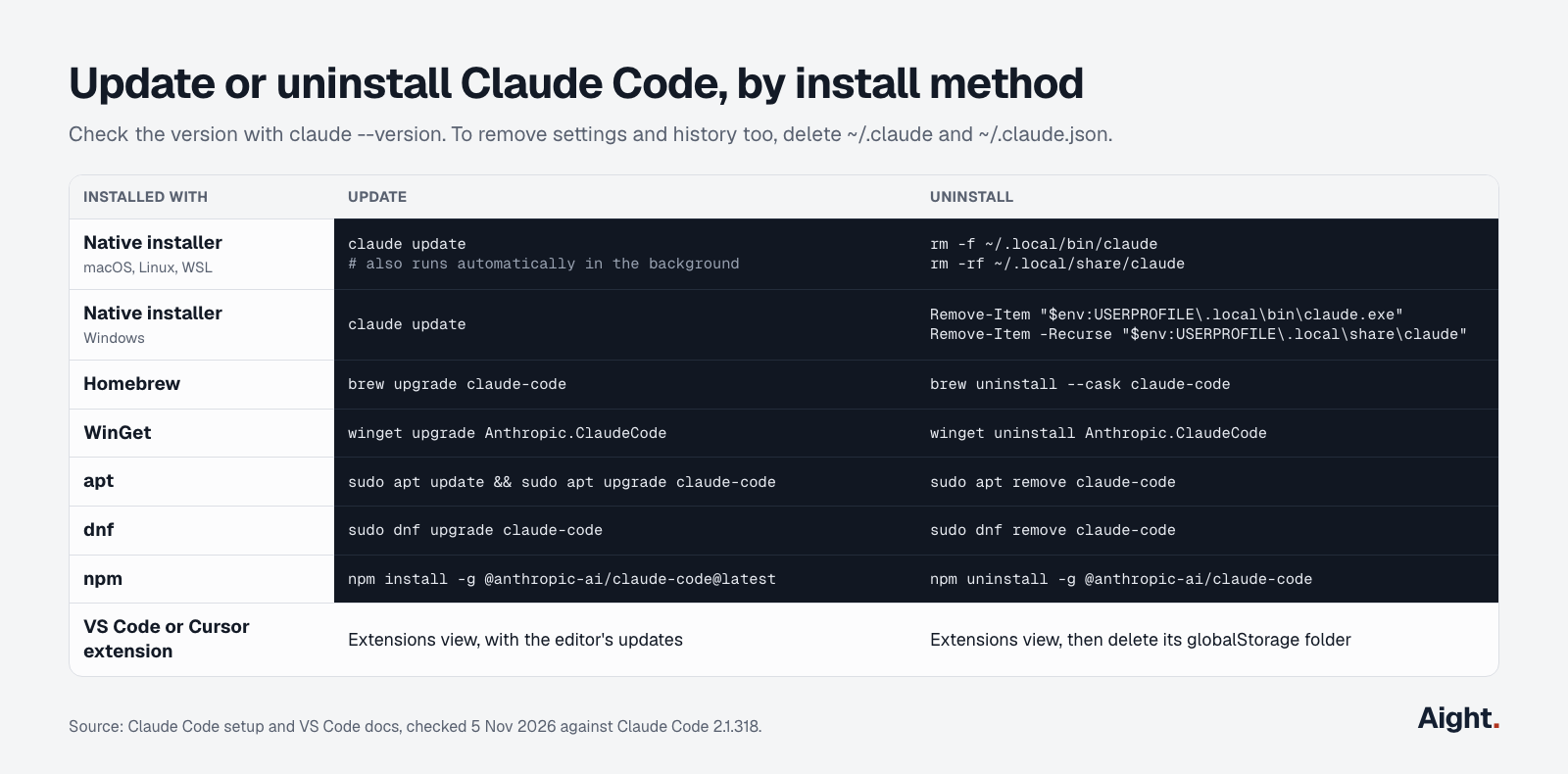
For Homebrew and WinGet, setting CLAUDE_CODE_PACKAGE_MANAGER_AUTO_UPDATE to 1 lets Claude Code run the upgrade in the background, though WinGet can fail while claude.exe is running. Homebrew keeps old versions, so run brew cleanup now and then.
Native installs follow a release channel. The default, latest, gets every release; stable serves a version about a week old that skips releases with major regressions. Set it in /config or in ~/.claude/settings.json, where minimumVersion stops the switch from downgrading you:
{
  "autoUpdatesChannel": "stable",
  "minimumVersion": "2.1.311"
}
To freeze a version, set DISABLE_AUTOUPDATER to "1" in the env block; claude update still works, while DISABLE_UPDATES blocks manual updates too. To install a specific version, run curl -fsSL https://claude.ai/install.sh | bash -s 2.1.311 or claude install 2.1.311.
How to uninstall Claude Code
Remove the binary with the command for your install method. If claude still runs afterwards, you have a second copy: which -a claude (macOS, Linux) or where.exe claude (Windows) lists every one on your PATH.
# Native installer (macOS, Linux, WSL)
rm -f ~/.local/bin/claude
rm -rf ~/.local/share/claude

# Homebrew (use claude-code@latest if that's the cask you installed)
brew uninstall --cask claude-code

# npm
npm uninstall -g @anthropic-ai/claude-code

# apt (dnf: sudo dnf remove claude-code, then delete /etc/yum.repos.d/claude-code.repo)
sudo apt remove claude-code
sudo rm /etc/apt/sources.list.d/claude-code.list /etc/apt/keyrings/claude-code.asc
# Native installer on Windows
Remove-Item -Path "$env:USERPROFILE\.local\bin\claude.exe" -Force
Remove-Item -Path "$env:USERPROFILE\.local\share\claude" -Recurse -Force
# WinGet
winget uninstall Anthropic.ClaudeCodeTo uninstall Claude Code completely, run claude auth logout before removing the binary, which deletes the stored login (on macOS it sits in the Keychain, outside ~/.claude). Then delete the configuration, which erases settings, allowed tools, MCP servers and session history:
rm -rf ~/.claude
rm -f ~/.claude.json
rm -rf .claude .mcp.json    # inside each project that has them
On Windows these are %USERPROFILE%\.claude and %USERPROFILE%\.claude.json. Uninstall the VS Code extension, JetBrains plugin and desktop app first, or they recreate ~/.claude. On Homebrew, brew uninstall --zap --cask claude-code also trashes ~/.claude.json, the ~/.local folders and caches, but removes ~/.claude only if it's empty.
How to use Claude Code in VS Code
The Claude Code VSCode extension puts the agent in a panel, with plans you can edit before accepting, side-by-side diffs and @-mentions of files and line ranges. It needs VS Code 1.94.0 or later and the same account as the CLI: any paid plan or a Console login, no API key required. To set up Claude Code in VSCode:
- Open Extensions (
Cmd+Shift+Xon a Mac,Ctrl+Shift+Xelsewhere), search for "Claude Code", and install "Claude Code for VS Code" by Anthropic. The publisher shows anthropic.com as verified; on 5 November the listing had 29.4 million installs and version 2.1.318. - Open a file and click the Spark icon in the editor toolbar, or the Claude Code item in the status bar.
- Click Sign in and finish in the browser.
- Ask about the open file. Your selection is attached automatically, and
Option+KorAlt+Kinserts an @-mention such as@file.ts#5-10.
Cmd+Esc or Ctrl+Esc moves focus between the editor and Claude. On macOS Tahoe the Game Overlay takes Cmd+Esc; clear it under System Settings, Keyboard, Keyboard Shortcuts, Game Controllers.
The extension's version is the Claude Code version it bundles, and that bundled CLI isn't added to your PATH. To type claude in VS Code's terminal, install the CLI too. With the extension present, the CLI in the integrated terminal connects to it automatically; from an outside terminal, run /ide. Both share ~/.claude/settings.json and history, so claude --resume picks up a panel conversation. The full command set, the ! shell shortcut and tab completion are CLI only. Since 2.1.318, starting claude in an editor terminal no longer installs or updates the extension; update it from the Extensions view.
- No Spark icon: open a file (a folder alone isn't enough), leave Restricted Mode, and run "Developer: Reload Window". Other AI extensions such as Cline can conflict.
- A sign-in prompt despite
ANTHROPIC_API_KEYin your shell: VS Code didn't inherit your environment. Start it from a terminal withcode .. - A blank panel: update to 2.1.309 or later and reload the window.
To remove it, uninstall from Extensions and delete ~/Library/Application Support/Code/User/globalStorage/anthropic.claude-code on macOS (~/.config/Code/User/globalStorage/anthropic.claude-code on Linux). Set autoInstallIdeExtension to false in ~/.claude.json so /ide doesn't reinstall it. JetBrains IDEs differ: their plugin runs the CLI you installed, so install the CLI first.
Claude Code in Cursor
Cursor is a VS Code fork, so the same extension installs there. Open Extensions, search for "Claude Code", check that the publisher is Anthropic and the version is 2.1.314 or later, and install it; Anthropic's docs also link cursor:extension/anthropic.claude-code. Then run claude in Cursor's terminal, or /ide from an outside one.
Claude Code in Cursor bills to your Claude account, not to Cursor. Anthropic's help center says Pro, Max and Ultra cover Claude Code in VS Code, Cursor and other forks, within the same usage limits. The reverse doesn't hold: Cursor's own agent takes an Anthropic API key billed per token, not a Claude subscription. The Cursor vs Claude Code comparison prices each combination.
Check what you install. Cursor serves extensions from Open VSX through its own proxy marketplace, and on 29 October 2026 Cursor found tampered copies of this extension, labeled 2.1.312 and 2.1.313, in that marketplace for macOS and Windows between about 2:27 am and 1:35 pm PT. Anthropic didn't build them; they tried to add an attacker's SSH key, open a reverse SSH tunnel and persist. The Visual Studio Marketplace, Open VSX and npm weren't affected, and Anthropic moved the real extension to 2.1.314. If you installed or updated it that day, run Cursor's macOS check:
grep -qs svc-telemetry ~/.ssh/authorized_keys && echo "svc-telemetry key found" || echo "No key found; machine not impacted"If the key is there, follow the notice's remediation steps and rotate credentials; uninstalling may not remove the persistence. To lower the risk, install the CLI with the native installer, which skips extension marketplaces, and set Cursor's extensions.installCooldownHours so new versions wait before installing.
Troubleshooting the most common install errors
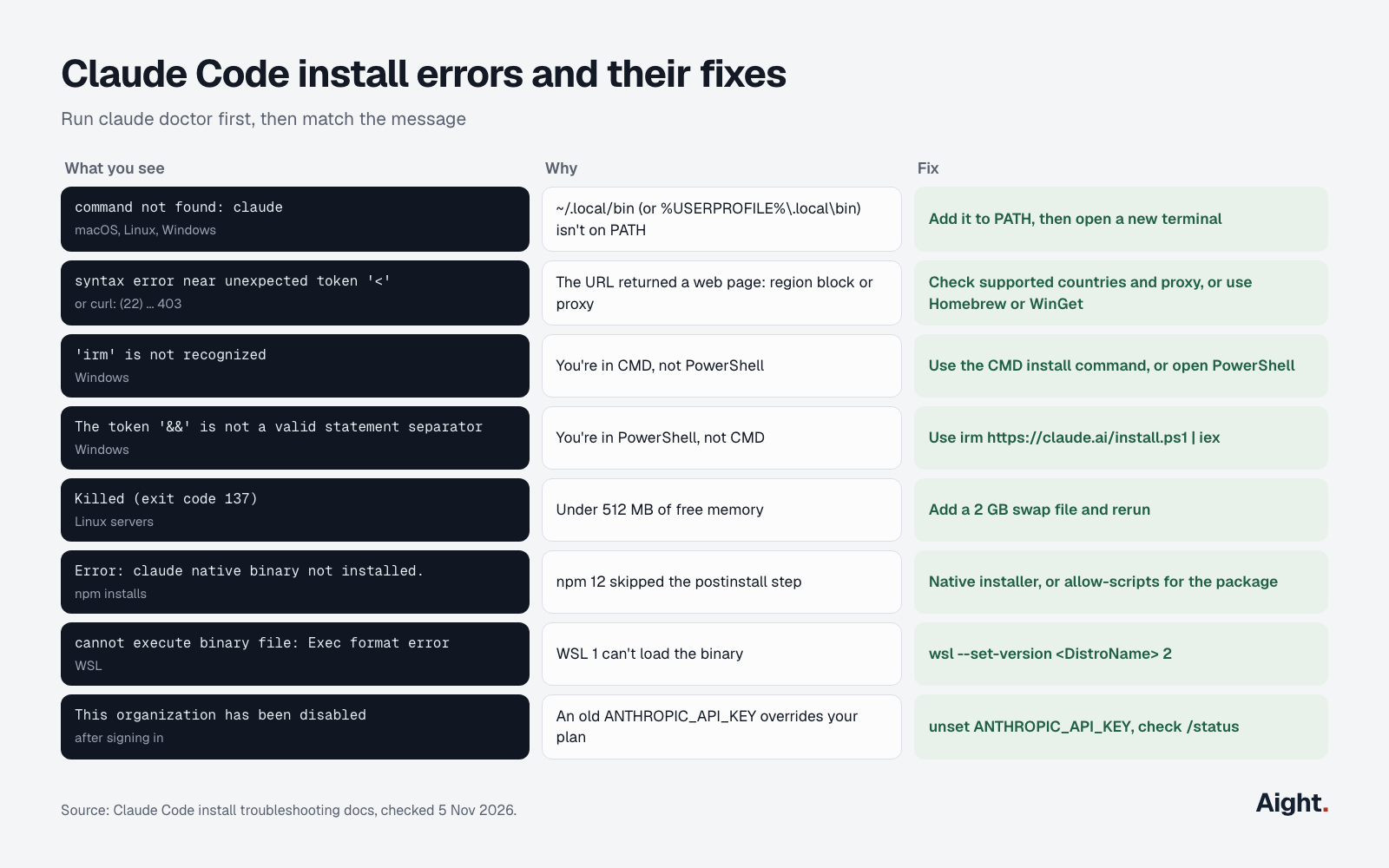
Run claude doctor first. It prints install health, settings errors and the last update attempt without starting a session; inside a session, /doctor can also apply fixes. Then match the message, from Anthropic's install troubleshooting page:
| What you see | Cause | Fix |
|---|---|---|
command not found: claude or 'claude' is not recognized | Install folder not on PATH | Add ~/.local/bin (or %USERPROFILE%\.local\bin) to PATH, open a new terminal |
syntax error near unexpected token '<' or curl: (22) ... 403 | A web page came back: region block or proxy | Check supported countries and proxy, or use Homebrew or WinGet |
'irm' is not recognized | CMD, not PowerShell | Use the CMD command, or open PowerShell |
The token '&&' is not a valid statement separator | PowerShell, not CMD | Use the PowerShell command |
Could not create SSL/TLS secure channel | Windows PowerShell 5.1 without TLS 1.2 | Run [Net.ServicePointManager]::SecurityProtocol = [Net.SecurityProtocolType]::Tls12, then the installer |
unable to get local issuer certificate | Corporate proxy inspecting TLS | curl --cacert with your CA; set NODE_EXTRA_CA_CERTS afterwards |
Killed or exit code 137 | Under 512 MB of free memory | Add swap or free memory |
Error: claude native binary not installed. | npm skipped postinstall (npm 12) or optional deps | Native installer, or allow the script in npm |
Exec format error in WSL | WSL 1 | wsl --set-version <DistroName> 2 |
Illegal instruction | CPU without AVX, or wrong architecture | No workaround for AVX; report an architecture mismatch |
API Error: 403 Request not allowed | Inactive plan, or Console user without the Claude Code role | Check claude.ai/settings, or ask a Console admin |
This organization has been disabled | An old ANTHROPIC_API_KEY overrides your plan | unset ANTHROPIC_API_KEY and remove it from your shell profile |
On Windows, if claude disappears right after an update, the updater renamed the old claude.exe to a backup and couldn't move the new one in. Rename the newest claude.exe.old.* in %USERPROFILE%\.local\bin back to claude.exe, or rerun the PowerShell installer. If nothing matches, search the GitHub issues and file one with your OS, the command and the full error.
What developers report
- "This only impacted the extension as it was hosted on the Cursor marketplace." (Dworken of Anthropic, Hacker News, 30 Oct 2026, link)
- Security researcher Kevin Beaumont estimated that roughly 5,000 developer systems might have downloaded the tampered versions in the 11 hours they were live (SecurityWeek, 2 Nov 2026, link).
- A Windows user lost the
claudecommand twice afterwinget upgradeand traced it to mixing elevated and normal prompts; staying at one elevation level avoids it (GitHub issue #103963, 21 Oct 2026, link). - Microsoft's validation bot reported it "was blocked from installing one of the installers" for the 2.1.303 manifest, and later versions queued behind it (winget-pkgs pull request #455582, from 18 Oct 2026, link).
- A user showed the CLI force-installing the newest extension when started in VS Code or Cursor terminals, overriding the editor's auto-update setting; 2.1.318 stopped that (GitHub issue #106544, 1 Nov 2026, link).
Once it runs, give each project a CLAUDE.md so every session starts with your rules: the Claude Code memory guide covers what goes in it. And if an editor or the Desktop app later reports that the Claude Code process exited with code 1, this fix list covers every cause.
Where Aight fits
Claude Code can't run on Aight. It talks to Anthropic's Messages API, and Aight documents an OpenAI-compatible Chat Completions API, so there's no base URL to swap. For daily Claude Code use, a Pro or Max plan also costs less than any per-token route, Aight included.
Aight fits a different setup: an agent extension in VS Code or Cursor that accepts an OpenAI-compatible provider and bills per token across several makers' models. Cline 4.1.26 is one. Its OpenAI Compatible provider takes a base URL, a key and a model ID, so it can be configured as an OpenAI-compatible provider pointing at Aight:
API Provider:  OpenAI Compatible
Base URL:      https://api.getaight.ai/v1
API Key:       sk-aight-...
Model ID:      claude-sonnet-5-5
On Aight's models page, Claude Sonnet 5.5 costs $2 / $10 per million input / output tokens and Opus 5.5 $4 / $20, the same as Anthropic's list prices. A $100 recharge costs $103 with processing and adds $110 of balance. Each key can carry a monthly cap and a list of allowed models, so an agent left running stops at its own limit.
FAQ
Do you need Node.js to install Claude Code?
No, unless you install through npm. The native installer, Homebrew, WinGet and the Linux packages ship a self-contained binary. The npm package declares Node.js 22 or later, although the binary it installs doesn't run on Node.
Can you install Claude Code without admin rights?
Yes. The native installer writes only to your home folder (~/.local/bin on macOS and Linux, %USERPROFILE%\.local\bin on Windows) and refuses to run under sudo. The apt, dnf and apk repositories are the exception, since system packages need root.
Does the VS Code extension install the claude command?
No. The extension bundles a private copy of the CLI for its panel and doesn't put it on your PATH. Install the CLI separately to use claude in a terminal; both read the same settings and conversation history.
How do you install an older version of Claude Code?
Pass the version to the installer, as in curl -fsSL https://claude.ai/install.sh | bash -s 2.1.311, or run claude install 2.1.311. Then set DISABLE_AUTOUPDATER to "1", or the background updater moves you forward again. The stable channel is the gentler option.
Sources
- Claude Code docs: Advanced setup, Quickstart, Troubleshoot installation and login, Troubleshooting, Authentication, CLI reference, VS Code, JetBrains IDEs, Manage costs, Changelog (2.1.314 and 2.1.318)
- Anthropic: claude-code on GitHub, issues #103963, #106316 and #106544; @anthropic-ai/claude-code on npm; the install script at claude.ai/install.sh and its release channels
- Anthropic: Plans and pricing, API pricing, Use Claude Code with your Pro, Max, or Ultra plan, supported countries
- Package registries: Homebrew casks claude-code and claude-code@latest; Microsoft winget-pkgs manifests and pull request #455582; Visual Studio Marketplace listing; Open VSX listing
- Cursor: Security notice on the Claude Code extension (29 Oct 2026), Extensions help page, forum answer on Claude subscriptions in Cursor
- News and discussion: SecurityWeek (2 Nov 2026), Hacker News thread (30 Oct 2026)
- YouTube: Installing Claude Code, Claude channel (14 May 2026)
- Tool docs: Cline OpenAI Compatible provider, Cline on Open VSX
- Aight: Models and pricing, API reference, Refund policy
Checked on 5 November 2026. Updated 17 November 2026: version numbers for every install method.