What is Cline? Cline is a free, open-source AI coding agent that runs in VS Code, JetBrains IDEs, your terminal and a desktop app. You describe a task in plain English, and Cline reads your code, edits files and runs commands, asking for your approval at each step. The tool costs nothing. You pay for the AI model it uses, either to a provider whose API key you add, or to Cline through its pay-as-you-go provider or the $9.99-a-month ClinePass.
The model is where the money goes. For the same month of daily use, the bill runs from $11.18 on DeepSeek V4.1 Flash at off-peak prices to $201.60 on Claude Sonnet 5.5, Cline's top recommended model, and $403.20 on Claude Opus 5.5. Everything below was checked on 5 November 2026 against the VS Code extension 4.1.26 and CLI 3.0.74.
What is Cline?
Cline sits between you and a model. It sends the model your request plus a set of tools (read files, search code, edit, run commands), runs what the model asks for once you approve it, and returns the result. "Cline AI" is a common name for it, but Cline isn't a model: the same agent can drive Claude, GPT, Kimi, DeepSeek or a model on your own machine.
| Cline | |
|---|---|
| Made by | Cline Bot Inc., founded by Saoud Rizwan |
| License | Apache 2.0, 71,306 stars on GitHub |
| Where it runs | VS Code and its forks (Cursor, Windsurf, VSCodium), JetBrains IDEs, a CLI, a desktop app for macOS and Windows, an SDK, and Zed or Neovim through ACP |
| Models | Your own key for 50+ providers, any OpenAI-compatible API, local models, Cline's own provider, or ClinePass |
Cline says its VS Code extension has been installed by over 11 million developers. On 5 November the VS Code Marketplace counter showed 5.8 million installs, and Open VSX, the registry Cursor and Windsurf use, 7.4 million downloads.
Who makes Cline
Saoud Rizwan published the extension on 10 July 2024; its Marketplace ID is still saoudrizwan.claude-dev. His company, Cline Bot Inc., announced $32 million of seed and Series A funding on 31 July 2025, the Series A led by Emergence Capital.
In January 2026, The Information reported that OpenAI had hired at least seven Cline staffers; Cline said it was still operating and no transaction had taken place. Since then it has shipped CLI 2.0, a rebuilt agent core and a desktop app, plus eight extension releases between 17 September and 26 October.
How Cline works: Plan and Act, tools, checkpoints and MCP
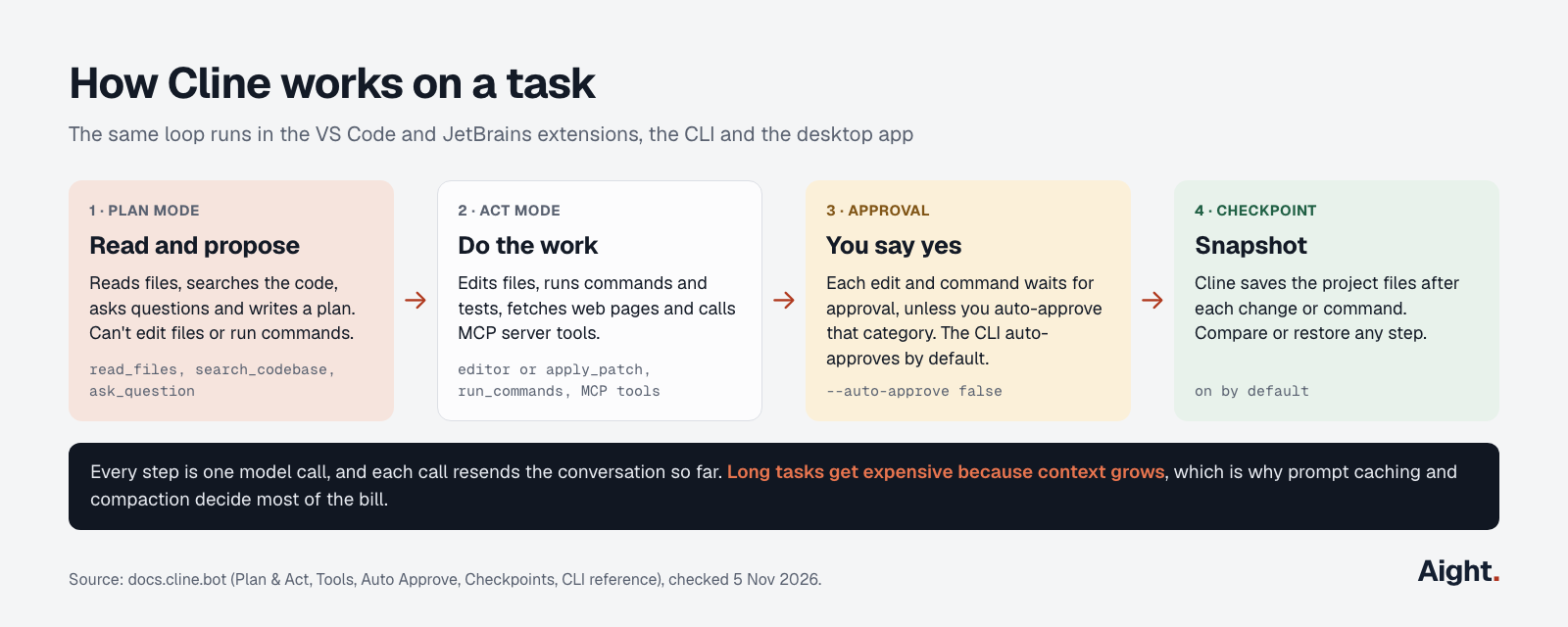
In Plan mode, Cline reads files, searches the code, asks questions and proposes an approach, but can't modify files or run commands. In Act mode it carries out the plan with the whole planning conversation in hand. The setting "Use different models for Plan and Act" lets you plan with a stronger model and build with a less expensive one.
Act mode works through built-in tools: read_files, search_codebase, run_commands, fetch_web_content, and editor or apply_patch for edits (GPT and Codex models get apply_patch). Each edit and command waits for approval unless you turn on Auto Approve for that category. There's no fixed allowlist: the model itself flags which commands need approval. The CLI differs from the extension here: cline "task" starts in Act mode with auto-approve on, so add --auto-approve false to confirm each step.
Checkpoints, on by default, snapshot the project files after every change or command, including files Git doesn't track, so you can restore any step and keep the conversation.
MCP (Model Context Protocol) servers add outside tools, such as a database or an issue tracker. Add one from the MCP Servers panel in the extension, or from the terminal:
cline mcp add files --yes -- npx -y @modelcontextprotocol/server-filesystem .For a remote server in the JSON config, set "type": "streamableHttp"; without it, Cline falls back to the older SSE transport. Project rules go in .cline/rules/ or .clinerules/, and Cline also reads AGENTS.md.
Is Cline AI free?
Yes. The extension, CLI and desktop app are free and open source, with no subscription or seat fee for individuals, according to Cline's pricing page. You pay for the model, in one of these ways:
| How the model is paid for | What it costs | Worth knowing |
|---|---|---|
| Your own API key (Anthropic, OpenAI, DeepSeek, Moonshot, Z.ai and others) | The provider's price per token | Requests go from your machine to the provider |
| Cline provider | Pay as you go through a Cline account, inference "at cost" | 100+ models; some tagged FREE for limited-time promotions |
| ClinePass | $9.99 a month | 15 curated open models, with 5-hour, weekly and monthly limits |
| Claude Code provider | Your Claude Pro ($20) or Max ($100) plan | Uses the plan's limits; image uploads and prompt caching are limited |
| Local models (Ollama, LM Studio) | Your own hardware | No per-token cost |
A ChatGPT plan also works, through the OpenAI Codex sign-in. Free model promotions rotate, and their usage may be used to improve the models. Enterprise is priced on request.
ClinePass promises "2-5x the usage" of standard API rates without publishing the quota in tokens. Read literally, $9.99 covers roughly $20 to $50 of usage at the makers' list prices, which ClinePass uses as its reference.
How much Cline costs per month
Every step Cline takes is one model call that resends the conversation so far. Most of that context is a cache hit at a fraction of the input price; the new part (fresh tool output, a file just read) is a cache miss, billed as a cache write on Claude, GPT and Kimi.
| Scenario | Active days | Calls a day | Context per call | Output per call |
|---|---|---|---|---|
| Light: a few evenings | 6 | 60 | 40,000 tokens | 600 |
| Daily: most weekdays | 20 | 300 | 60,000 tokens | 600 |
| Heavy: parallel tasks all day | 22 | 1,200 | 90,000 tokens | 700 |
In each, 85% of the context is a cache hit, close to the 76% to 89% one user measured across DeepSeek sessions in Cline (issue #14256). Output includes reasoning. Prices are list prices from Anthropic, OpenAI, Moonshot, Z.ai and DeepSeek.
| Model (input / output per 1M) | Light | Daily | Heavy |
|---|---|---|---|
| Claude Opus 5.5 ($4 / $20) | $17.57 | $403.20 | $2,555.52 |
| Kimi K3 ($3 / $15) | $13.39 | $307.80 | $1,952.28 |
| Kimi K3.1 Pro ($2 / $10) | $8.93 | $205.20 | $1,301.52 |
| Claude Sonnet 5.5 or GPT-6.1 Sol ($2 / $10) | $8.78 | $201.60 | $1,277.76 |
| GLM 5.3 ($1.40 / $4.40) | $7.16 | $171.00 | $1,105.37 |
| DeepSeek V4.1 Flash, peak ($0.30 / $1.20) | $0.98 | $22.36 | $141.21 |
| GLM 5.3 Flash ($0.15 / $0.50) | $0.80 | $19.08 | $123.29 |
| DeepSeek V4.1 Flash, off-peak ($0.15 / $0.60) | $0.49 | $11.18 | $70.61 |
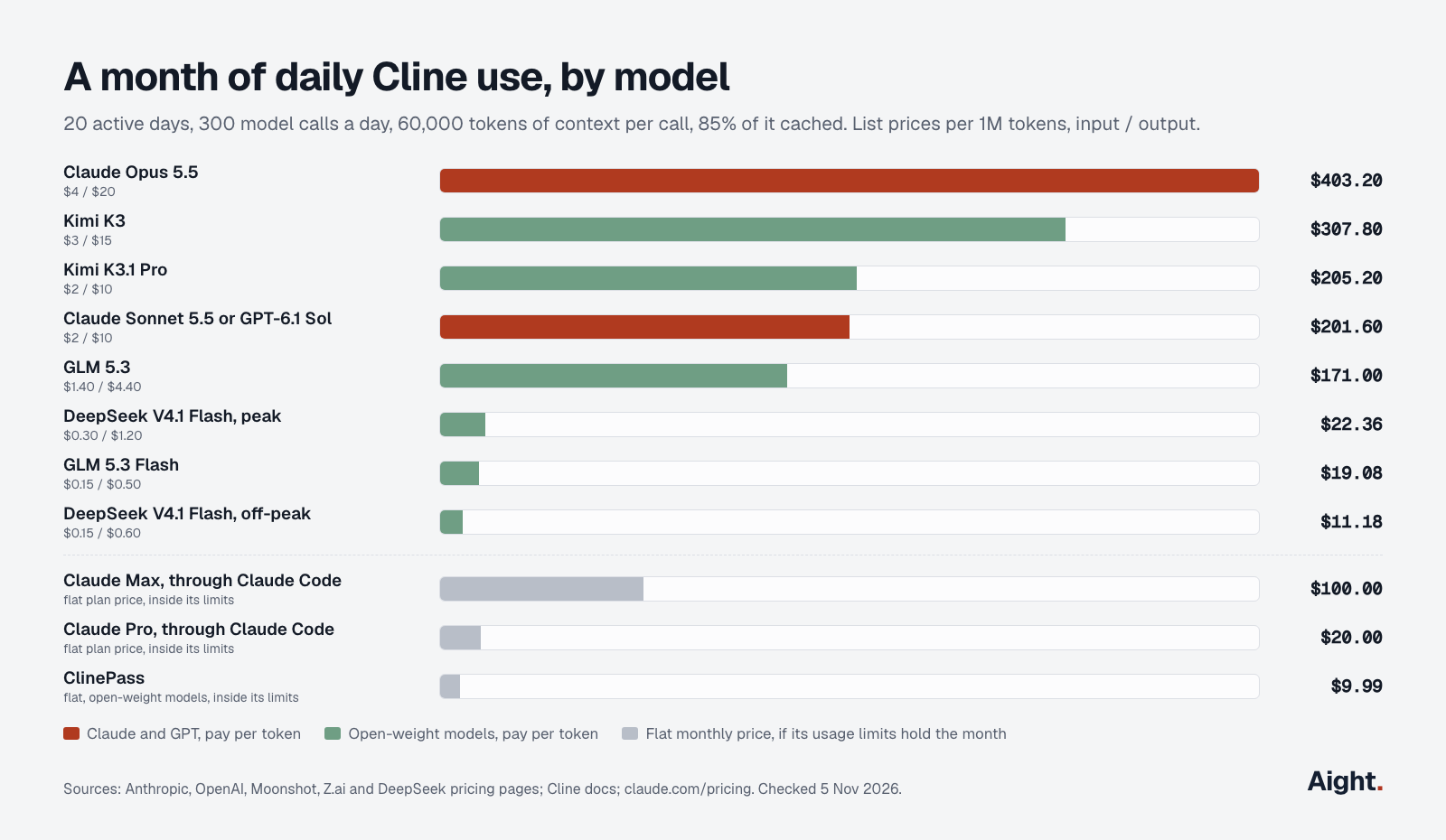
The daily month on Sonnet 5.5 breaks down into $30.60 of cache hits (306M tokens at $0.10), $135.00 of cache writes (54M at $2.50) and $36.00 of output (3.6M at $10), or $10.08 per active day. Cache misses are 15% of the tokens but 67% of the bill, so the hit rate moves the total most: $141.12 at 92% hits, $331.20 at 70%. A fresh task for each unrelated job keeps the context small.
What the table means in practice:
- Off-peak, DeepSeek V4.1 Flash costs about an eighteenth of Sonnet 5.5. Its peak hours are 01:00 to 04:00 and 06:00 to 10:00 UTC on weekdays, so a 9-to-5 workday in any mainland US time zone gets the off-peak price (details).
- ClinePass should hold a daily month on DeepSeek V4.1 Flash or GLM 5.3 Flash if its rolling limits suit you, but not one on Kimi K3.1 Pro ($205.20 at list price).
- With Claude Pro or Max, the Claude Code provider runs Cline on the plan instead of per-token billing: $20 against $201.60 of Sonnet tokens, within the plan's 5-hour and weekly limits (how they work).
To redo the math with your own numbers:
def monthly(calls, context, output, hit_price, miss_price, out_price, hit=0.85):
    """US$ for a month. Prices per 1M tokens; context and output per call."""
    ctx = calls * context / 1e6
    return round(ctx * hit * hit_price + ctx * (1 - hit) * miss_price
                 + calls * output / 1e6 * out_price, 2)

print(monthly(6_000, 60_000, 600, 0.10, 2.50, 10.00))   # Claude Sonnet 5.5: 201.6
print(monthly(6_000, 60_000, 600, 0.003, 0.15, 0.60))   # DeepSeek V4.1 Flash, off-peak: 11.18
Which models work best in Cline
Cline's own pick is Claude Sonnet 5.5, back at the top of its recommended list in 4.1.26; ClinePass now defaults to Kimi K3.1 Pro. For independent data, Vals AI's Terminal-Bench 4.0 (66 long tasks, median four hours of expert work, updated 29 October) and its archived Terminal-Bench 2.1 (shorter tasks) test the models in other agent harnesses, not Cline.
| Model | Terminal-Bench 4.0 | Cost per task | Terminal-Bench 2.1 | In ClinePass |
|---|---|---|---|---|
| Claude Opus 5.5 | 65.2% | $13.20 | 87.6% | No |
| Claude Sonnet 5.5 | 64.1% | $16.51 | 83.1% | No |
| Kimi K3.1 Pro | 63.6% | $4.57 | Not run | Yes |
| GPT-6.1 Sol | 55.1% | $1.72 | Not run | No |
| GLM 5.3 | 38.9% | $9.37 | 71.5% | Yes |
| GLM 5.3 Flash | 37.4% | $1.22 | 62.9% | Yes |
| DeepSeek V4.1 Flash (17 Oct build) | 31.8% | $0.54 | 74.5% (earlier build) | Yes |
| Kimi K3 | 17.2% | $12.48 | 80.9% | Yes |
Short-task scores don't carry over: Cline reported 82.02% for Kimi K3 on Terminal-Bench 2.0 in its own agent, yet Kimi K3 managed 17.2% on Vals' long tasks. The host matters too: Cline measured the same GLM-5.2 build at 74.2% on one provider and 61.8% through another route (Cline eval post).
How to choose:
- Start with Claude Sonnet 5.5. It's Cline's default and near the top on hard tasks.
- For long tasks on a tighter spend limit, try Kimi K3.1 Pro: within two points of Opus 5.5 at about a third of its cost per task.
- Split the modes: Opus 5.5 or Sonnet 5.5 to plan, DeepSeek V4.1 Flash or GLM 5.3 Flash for routine edits.
- GPT-6.1 Sol has the lowest cost per hard task among the strong models ($1.72); 4.1.26 fixed GPT-6 models on OpenAI-compatible endpoints.
The best LLM for coding compares these models outside Cline.
Cline vs Cursor
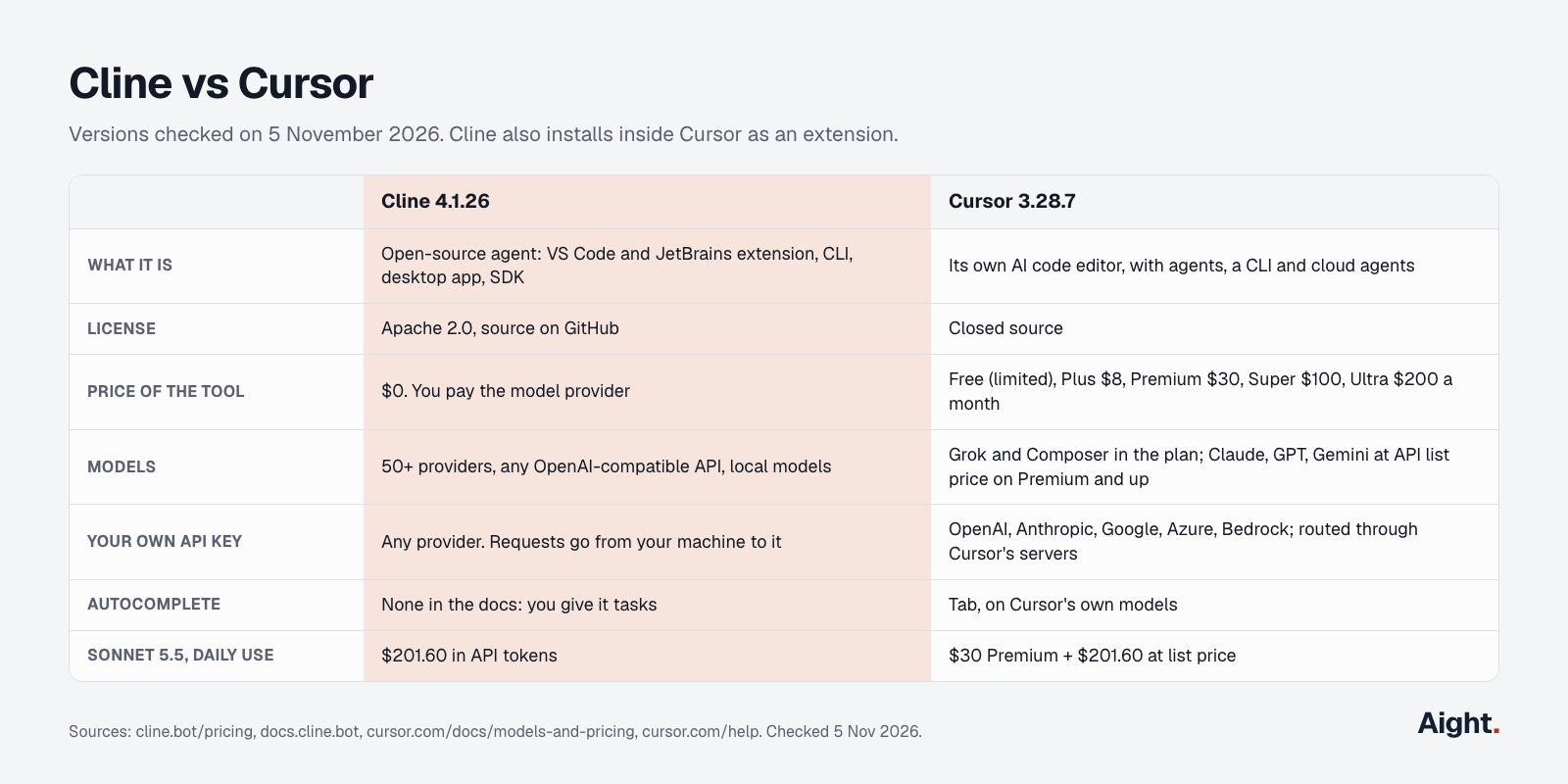
Cline is a free agent that you plug a model into; Cursor is a paid editor with its own models, autocomplete and agents. Cline vs Cursor is less either-or than it looks: Cursor installs extensions from Open VSX, so Cline runs inside Cursor too.
| Cline 4.1.26 | Cursor 3.28.7 | |
|---|---|---|
| What it is | Open-source agent for VS Code, JetBrains, terminal and desktop | Its own AI code editor, with agents, a CLI and cloud agents |
| License | Apache 2.0 | Closed source |
| Price of the tool | $0 | Free (limited), Plus $8, Premium $30, Super $100, Ultra $200 a month |
| Included models | None; you bring one | A weekly pool of Grok 4.7, 4.6, 4.5 and Composer 2.5 |
| Claude, GPT, Gemini | At your provider's price | At API list price, Premium and up |
| Your own API key | Any provider, sent straight from your machine | OpenAI, Anthropic, Google, Azure, Bedrock, routed through Cursor's servers |
| Autocomplete | None in the docs | Tab |
| Daily month on Sonnet 5.5 | $201.60 | $231.60 ($30 Premium plus tokens) |
Prices are from Cursor's models and pricing page. Plus covers only Cursor's own models and takes no API keys of your own. Cursor's own-key help page says those requests still pass through its servers and aren't covered by its zero data retention policy. The $231.60 assumes Cursor's agent spends the same tokens as Cline's, which it won't exactly.
Pick Cline to choose the model and provider per task, keep requests off a third-party server, or use open-weight and local models. Pick Cursor if inline autocomplete matters. Or run both: Tab as you type, Cline for agent tasks. Cursor vs Claude Code covers Cursor's plans in depth.
Set up Cline with an OpenAI-compatible provider
Any provider with an OpenAI-style Chat Completions endpoint works through Cline's OpenAI Compatible provider. Cline sends tool definitions and reads streamed tool calls, so the endpoint and model must support function calling and streaming.
In VS Code, Cursor, Windsurf or VSCodium:
- Press Ctrl+Shift+X (Cmd+Shift+X on a Mac), search for Cline and install it.
- Open Cline from the sidebar and click the settings gear.
- Set API Provider to OpenAI Compatible.
- Enter the full Base URL, including
/v1. Since 4.1.25, Cline uses it exactly as entered. - Paste the API key and enter the Model ID from your provider's model list.
- Under Model Configuration, set the context window, maximum output and token prices. There's no field for the cache-read price (issue #13944), so the cost display counts cached tokens as free.
In the terminal, with Node.js 20 or later (CLI reference):
npm install -g cline
cline auth -p openai-compatible -k "$PROVIDER_API_KEY" -b https://api.example.com/v1 -m your-model-id
cline -p "Explain how requests are authenticated in this repo"      # Plan mode
cline --auto-approve false "Add input validation to the signup form"
openai-compatible is the CLI's ID for this provider, and -b works only with it and OpenAI. Settings are saved in ~/.cline/data/settings/providers.json, which the extension, CLI and SDK share. Set a spend limit on the key at your provider: the extension and CLI docs describe no spending cap for your own keys.
Privacy and security before you install
- With your own key, Cline's FAQ says requests go straight from your machine to the provider. With the Cline or ClinePass providers, prompts pass through Cline's servers.
- Telemetry is on by default. It records features used, errors, token counts and model names, and no code or prompts unless you use the Cline or ClinePass providers. Turn it off under Settings, General, "Allow error and usage reporting", or with
"telemetryOptOut": truein the CLI'sglobal-settings.json. - GitHub lists three Cline security advisories in 2026: an unauthorized npm publish of CLI 2.3.0 in February, a critical Kanban server flaw in May and a Hub dashboard flaw in June. Keep the CLI current with
cline update. .clineignoreis being removed because shell commands could always read the files it listed, so don't rely on it to hide secrets.
What developers report about Cline
- A user found one Claude Sonnet 5 task had cost $49.63 at a 12% cache hit rate, and traced it to automatic compaction never firing on the model's 1M-token window; a Cline contributor pointed to manual compaction beside the context bar (GitHub issue #14329, 20 Sep 2026, link).
- In the desktop app, sessions marked failed kept running for 20 hours or more; one DeepSeek V4 Pro session made 416 calls and used 112 million input tokens (GitHub issue #14256, 18 Sep 2026, link).
- "the displayed cost significantly under-reports actual usage" (GitHub issue #13944 on OpenAI Compatible models without a cache-read price, 8 Sep 2026, link).
- Cline measured its own requests running 20% to 30% heavier than the most efficient harnesses, and reported that the five most-used models in Cline were all open-weight (Cline blog, 18 Aug 2026, link).
Where Aight fits
Aight can be configured as an OpenAI-compatible provider in Cline, with Claude Sonnet 5.5, Claude Opus 5.5, GPT-6.1 Sol and DeepSeek models behind one key:
export AIGHT_API_KEY=sk-aight-...
cline auth -p openai-compatible -k "$AIGHT_API_KEY" -b https://api.getaight.ai/v1 -m claude-sonnet-5-5
Aight's API reference documents model, messages and stream, so test tool calls with your own key before relying on it.
What Aight adds for Cline is a monthly cap on each key, which returns 403 key_cap_reached and stops a runaway session like the one in issue #14256, plus a list of models each key may call. Claude Sonnet 5.5 is at Anthropic's list price, $2 / $10, so the daily month is $201.60 of usage, about $188.77 after the 10% extra on each recharge and the 3% processing fee.
Other routes cost less in some cases. Claude Pro through Cline's Claude Code provider costs $20 if its limits hold your month. DeepSeek V4.1 Flash direct at off-peak prices costs $11.18 a month against about $20.94 on Aight, which charges DeepSeek's peak price. For open-weight models, ClinePass at $9.99 costs less while its limits hold. Claude Code alternatives compares other agents that take an OpenAI-compatible key.
FAQ
Does Cline send your code to Cline's servers?
Not with your own API key: the extension runs on your machine and sends requests straight to your provider. With the Cline or ClinePass providers, prompts and code pass through Cline's infrastructure to reach the model. Telemetry is on by default, excludes code and prompts sent to other providers, and can be turned off.
Can Cline use a Claude Pro or ChatGPT subscription?
Yes. The Claude Code provider runs Cline through the Claude CLI, so usage counts against your Pro or Max limits instead of per-token billing, though image uploads and prompt caching are limited. The OpenAI Codex provider signs in with your OpenAI account and offers the models your ChatGPT plan includes.
Does Cline work in Cursor, JetBrains or Neovim?
Yes. The extension installs in VS Code, Cursor, Windsurf, VSCodium and Antigravity, and a separate plugin covers IntelliJ IDEA, PyCharm, WebStorm, GoLand and other JetBrains IDEs. Zed, Neovim and Emacs can use Cline through its ACP mode, cline --acp.
Can Cline run local models offline?
Yes, through Ollama or LM Studio, with no API key and no per-token cost. You need enough GPU memory for a model that handles tool calls well, and smaller models score lower: Qwen 3.8 27B passed 58.4% of Vals' Terminal-Bench 2.1, against 83.1% for Claude Sonnet 5.5. Cline Desktop can download and switch local models for you.
Sources
- Cline: GitHub repository and README, releases, CHANGELOG, pricing, FAQ
- Cline docs: Overview, Installing Cline, Authorization, Cline provider, ClinePass, Free models, OpenAI Compatible, Anthropic and Claude Code, OpenAI and Codex, Plan and Act, Tools, Auto Approve, Checkpoints, MCP, Config, CLI reference, Telemetry, Deprecations, Local models
- Cline blog: Migrating 11 million users to the new harness (2 Sep 2026), Cline Desktop (14 Sep 2026), Open-sourcing evals for open-weight agents (18 Aug 2026)
- Cline source: provider IDs and CLI auth command; npm cline
- GitHub: issues #13944, #14256, #14329; advisories GHSA-9ppg-jx86-fqw7, GHSA-5c57-rqjx-35g2, GHSA-3cj3-hqcr-g934
- Install counts: VS Code Marketplace, Open VSX
- Company: Cline funding press release (31 Jul 2025); The Information, OpenAI Hires at Least Seven Staffers From Coding Startup Cline; Kilo, update on Cline and OpenAI (29 Jan 2026)
- Model prices: Anthropic, OpenAI, Moonshot AI, Z.ai, DeepSeek, Claude plans
- Benchmarks: Vals AI Terminal-Bench 4.0 and Terminal-Bench 2.1
- Cursor: Models and pricing, Bring your own API key, Tab completion, Migrate from VS Code
- Aight: Models and pricing, API reference, Refund policy
Checked on 5 November 2026. Updated 17 November 2026: Aight's current model list.