Claude Code hooks are commands, HTTP calls, MCP tool calls or model checks that Claude Code runs itself at fixed points in a session: before a tool call, after a file edit, when Claude stops, when a notification fires. Each hook gets the event as JSON on stdin and answers with an exit code or a JSON object, so a hook can block a command, rewrite its input, add context for Claude or keep Claude working until the tests pass. Unlike a line in CLAUDE.md, a hook runs every time, whatever the model decides.
This guide covers Claude Code 2.1.322, the latest release on npm on 10 November 2026 (the stable channel is on 2.1.311). It lists all 33 events with what each receives and can return, then five scripts tested with jq 1.7.1: format on save, block dangerous commands, desktop notifications, a tool-call log and a test gate. The Claude Code cheat sheet gives hooks one paragraph; this is the full version. New to the tool? Start with how to install Claude Code.
How Claude Code hooks work
A hook has three levels, per the hooks reference: an event (such as PreToolUse), a matcher group that filters it (such as "only the Bash tool") and one or more handlers that run. This is the whole shape:
{
  "hooks": {
    "PostToolUse": [
      {
        "matcher": "Edit|Write",
        "hooks": [
          { "type": "command", "command": "\"$CLAUDE_PROJECT_DIR\"/.claude/hooks/format.sh", "timeout": 30 }
        ]
      }
    ]
  }
}
Hooks live in settings files and merge rather than override each other:
| Where | Applies to | Shared with the team |
|---|---|---|
~/.claude/settings.json | All your projects | No |
.claude/settings.json | One project | Yes, commit it |
.claude/settings.local.json | One project | No |
| Managed policy settings | The whole organization | Set by admins |
A plugin's hooks/hooks.json | While the plugin is on | Yes |
| Skill or subagent frontmatter | After the skill runs, or while the subagent runs | Yes |
There are five handler types. command runs a shell command (or, with args, spawns a program directly with no shell). http POSTs the event JSON to a URL. mcp_tool calls a tool on a connected MCP server. prompt asks a Claude model for a yes or no. agent starts a subagent that can read files before deciding; the docs call it experimental.
The matcher is an exact name (Bash), a list (Edit|Write) or, if it contains any other character, an unanchored JavaScript regex, so Edit.* also matches NotebookEdit. Matchers are case-sensitive. MCP tools are named mcp__<server>__<tool>, and mcp__github alone matches nothing: write mcp__github__.*. For tool events, a handler can also carry an if rule in permission syntax, such as "if": "Bash(git *)", so the script only starts for matching commands.
Default timeouts are 600 seconds for command, HTTP and MCP tool hooks, 30 seconds for prompt hooks and 60 for agent hooks. UserPromptSubmit and the two model-switch events drop to 30 seconds, MessageDisplay to 10, and all SessionEnd hooks share 1.5 seconds unless you set a longer timeout (up to 60). Every matching hook runs in parallel, and an identical handler defined in two settings files runs once. Type /hooks to browse what's configured and where each hook comes from.
Every hook event in Claude Code 2.1.322
All hooks receive session_id, prompt_id, transcript_path, cwd, hook_event_name and, on many events, permission_mode; tool events also get effort. Inside a subagent they also get agent_id and agent_type. The table adds what each event receives on top of that and what a hook can send back.
| Event | Fires when | Matcher filters | Extra input | What a hook can return |
|---|---|---|---|---|
SessionStart | A session starts or resumes, after /clear or compaction | startup, resume, clear, compact, fork | source, model; on resume context_tokens, estimated_cache_write_usd | Context (stdout or additionalContext), sessionTitle, watchPaths, reloadSkills; can't block |
Setup | --init-only, or --init / --maintenance with -p | init, maintenance | trigger | Nothing; for CI preparation |
InstructionsLoaded | A CLAUDE.md or rules file loads | Load reason | file_path, memory_type, load_reason | Nothing |
UserPromptSubmit | You submit a prompt | None | prompt | decision: "block", context, sessionTitle |
UserPromptExpansion | A typed command expands into a prompt | Command name | command_name, command_args, prompt | Block, context |
MessageDisplay | Claude's text streams to the screen | None | delta, index, final | displayContent (screen only) |
PreToolUse | Before any tool call | Tool name | tool_name, tool_input, tool_use_id | allow, deny, ask, defer, updatedInput, context |
PermissionRequest | A permission dialog is about to appear | Tool name | tool_input, permission_suggestions | decision.behavior allow or deny, updatedInput, updatedPermissions |
PermissionDenied | Auto mode denies a call | Tool name | tool_input, reason | retry: true |
PostToolUse | A tool call succeeded | Tool name | tool_input, tool_response, duration_ms | decision: "block" with reason, context, updatedToolOutput |
PostToolUseFailure | A tool call failed | Tool name | error, is_interrupt, duration_ms | Context |
PostToolBatch | A batch of parallel calls finished | None | tool_calls | Context; block stops the loop |
Notification | Claude Code sends a notification | Notification type | message, title, notification_type | Side effects, terminalSequence |
SubagentStart | A subagent spawns | Agent type | agent_id, agent_type | Context |
SubagentStop | A subagent finishes | Agent type | last_assistant_message, stop_hook_active | decision: "block" keeps it working |
TaskCreated | A task is created | None | task_id, task_subject, task_description | Block cancels the task |
TaskCompleted | A task is marked done | None | Same, plus teammate_name | Exit 2 keeps it open |
Stop | Claude finishes responding | None | last_assistant_message, stop_hook_active, background_tasks | decision: "block" with reason, context |
StopFailure | The turn ends on an API error | Error type | error, error_details | Ignored, except terminalSequence |
TeammateIdle | An agent-team teammate goes idle | None | teammate_name, team_name | Exit 2 keeps it working |
ConfigChange | A settings or skills file changes mid-session | Settings source | source, file_path | Block (not policy settings) |
CwdChanged | The working directory changes | None | old_cwd, new_cwd | watchPaths |
DirectoryAdded | /add-dir adds a directory | slash_command, register_repo_root | directory, source | Nothing |
FileChanged | A watched file changes on disk | File names | file_path, event | watchPaths |
WorktreeCreate | A worktree is being created | None | name | The worktree path on stdout; non-zero exit fails it |
WorktreeRemove | A hook-made worktree is removed | None | worktree_path | Non-zero exit fails removal |
PreCompact | Before compaction | manual, auto | trigger, custom_instructions | Block; stdout steers the summary |
PostCompact | After compaction | manual, auto | trigger, compact_summary | Nothing |
PreModelSwitch | Before a model switch you asked for | Target model | from_model, to_model, context_tokens, estimated_cache_write_usd | allow, deny, ask |
PostModelSwitch | After the model changes | Target model | Same as PreModelSwitch | Context |
Elicitation | An MCP server asks you for input | Server name | message, mode, requested_schema | Answer, decline or cancel for you |
ElicitationResult | After you answer an MCP server | Server name | action, content | Change or block the answer |
SessionEnd | The session ends | clear, resume, logout, prompt_input_exit, other | reason | Nothing |
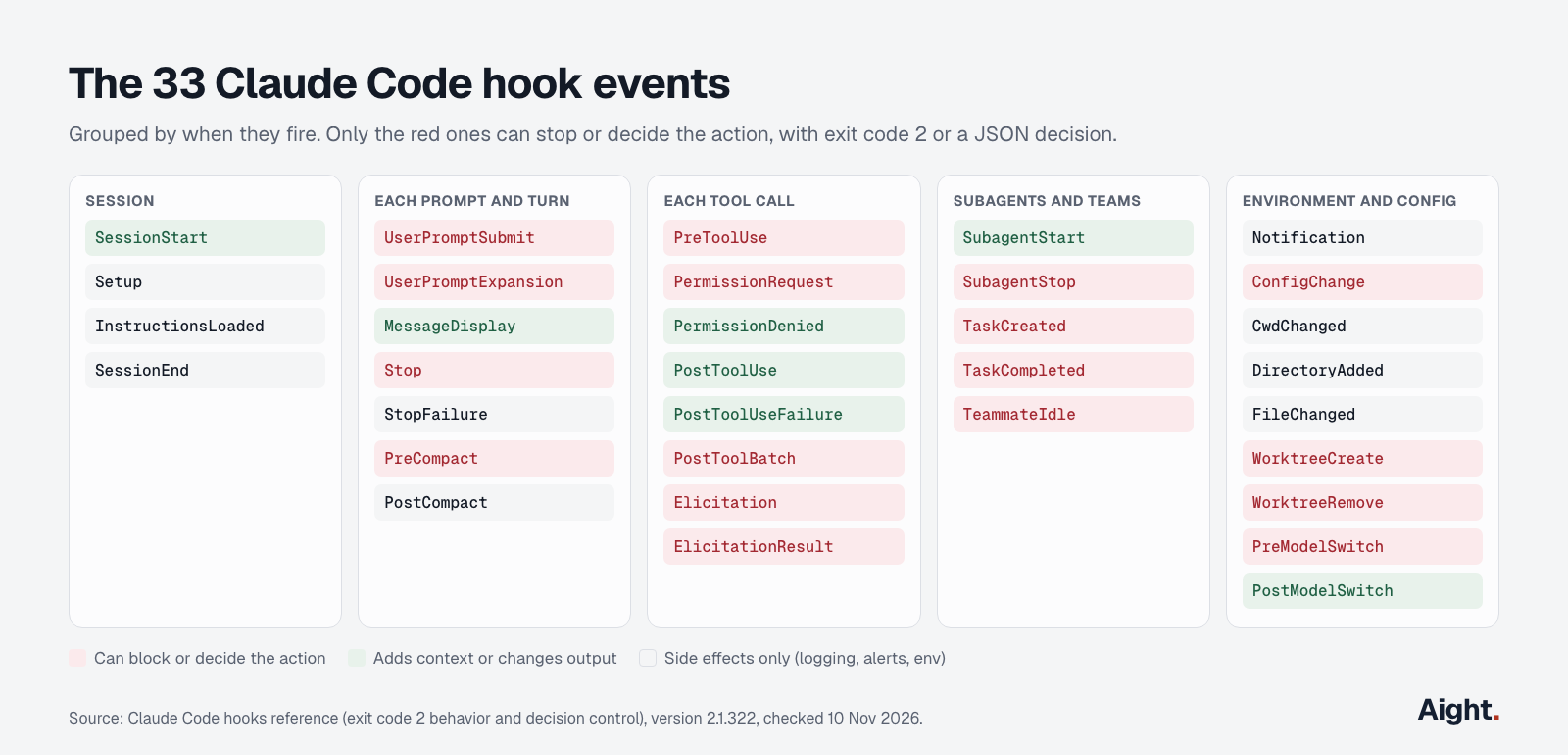
Two events get confused with their neighbors. PermissionRequest fires the moment a dialog would appear and can answer it; the permission_prompt notification only fires after the dialog has waited about six seconds. Stop fires at the end of every response, not only when a task is done, and doesn't fire when you interrupt; API errors fire StopFailure instead.
Exit codes and JSON output
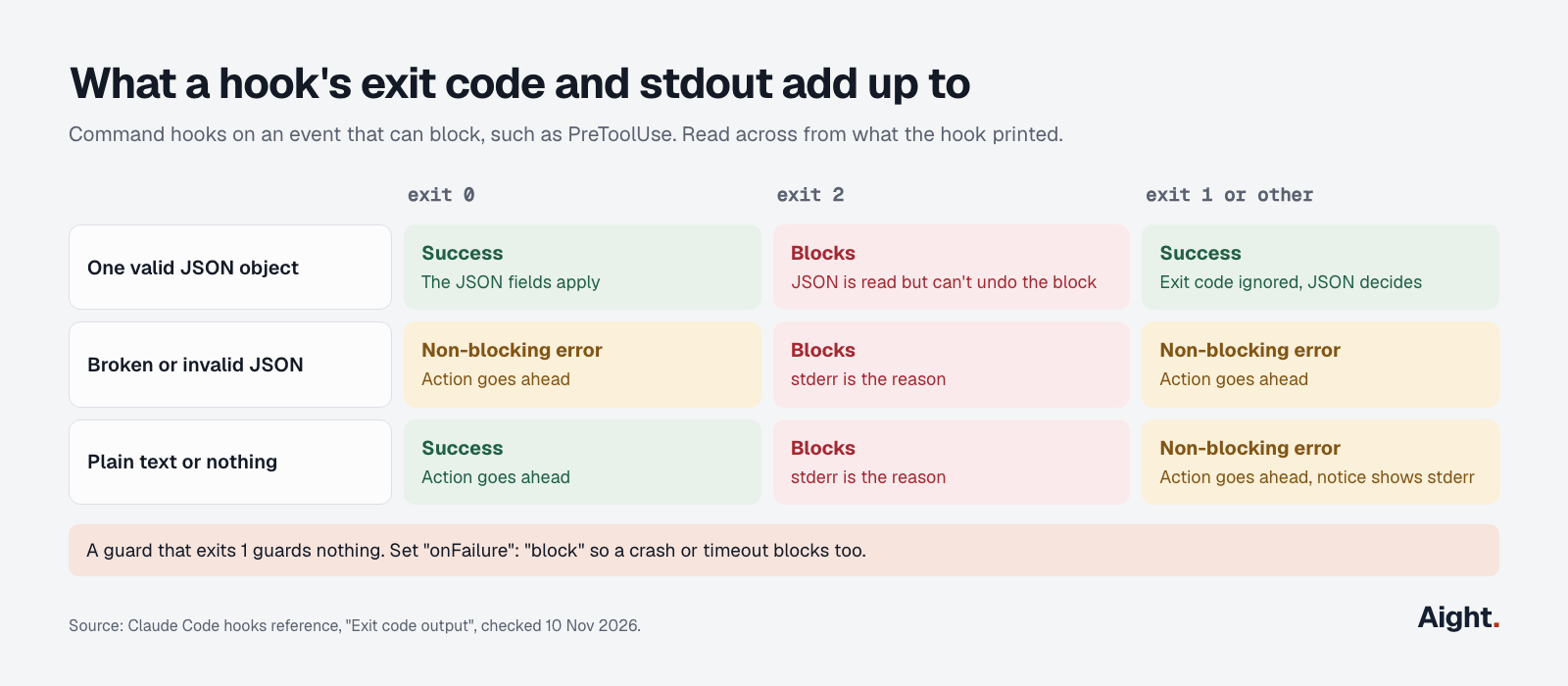
A command hook answers in one of two ways: an exit code alone, or exit 0 plus one JSON object on stdout. The exit code table is where most broken hooks go wrong:
| Exit code | Meaning | What happens |
|---|---|---|
| 0 | Success | Any JSON on stdout is applied; the action goes ahead unless the JSON blocks it |
| 2 | Blocking error | On events that can block, the action stops and stderr becomes the reason Claude sees |
| 1 or anything else | Non-blocking error | The action goes ahead and you see a hook error notice |
Exit 1 doesn't block anything. A policy hook that exits 1 on a match lets every match through. On PreToolUse, a hook that times out or can't start also lets the call through, unless you set "onFailure": "block" (Claude Code 2.1.295 and later).
Stdout counts as JSON only when it is one object and nothing else. On UserPromptSubmit, UserPromptExpansion, SessionStart and PostModelSwitch, plain-text stdout goes into Claude's context; on most other events it only reaches the debug log. Claude never sees stderr from a hook that exits 0.
Every event accepts four universal fields: continue: false with a stopReason stops Claude entirely, systemMessage shows you a warning, terminalSequence emits a desktop notification or window title, and suppressOutput is accepted but does nothing. Event-specific answers go either in a top-level decision: "block" with a reason (Stop, PostToolUse, UserPromptSubmit and others) or inside hookSpecificOutput with hookEventName set (PreToolUse, PermissionRequest, context fields). A field at the wrong level is silently ignored. additionalContext, systemMessage and plain stdout are capped at 10,000 characters each; longer text is saved to a file and Claude gets the path plus a 2,000-character preview.
When several PreToolUse hooks disagree, the strictest wins: deny, then defer, then ask, then allow. A hook's allow skips the prompt but never overrides a deny rule in settings, and a hook's deny holds even with --dangerously-skip-permissions, per the hooks guide.
Example 1: format every file Claude edits
A PostToolUse hook on Edit|Write runs a formatter on the file Claude just changed. The script picks one by extension and always exits 0, so a missing formatter never interrupts Claude. Save it as .claude/hooks/format.sh and run chmod +x on it:
#!/bin/bash
# .claude/hooks/format.sh: PostToolUse on Edit|Write
f=$(jq -r '.tool_input.file_path // empty')
[ -f "$f" ] || exit 0
case "$f" in
  *.js|*.jsx|*.ts|*.tsx|*.css|*.json|*.md) npx --no-install prettier --write "$f" >/dev/null 2>&1 ;;
  *.py) ruff format --quiet "$f" ;;
  *.go) gofmt -w "$f" ;;
esac
exit 0
Register it in .claude/settings.json with the JSON shown in the first section. Piping {"tool_input":{"file_path":"x.js"}} into it turned const a = {b:1} into const a = { b: 1 };. A successful hook prints nothing in the conversation, so check the file to confirm it ran. To also catch files that a Bash command rewrites, the guide suggests a FileChanged hook instead.
Example 2: block dangerous commands
A PreToolUse hook on Bash reads the command and returns a JSON deny with a reason Claude can act on. Returning JSON rather than exiting 2 keeps the reason clean; exiting 0 with no output leaves the call to your normal permission rules, because staying silent never approves anything.
#!/bin/bash
# .claude/hooks/guard-bash.sh: PreToolUse on Bash
cmd=$(jq -r '.tool_input.command // empty')
deny() {
  jq -nc --arg r "$1" '{hookSpecificOutput: {hookEventName: "PreToolUse",
    permissionDecision: "deny", permissionDecisionReason: $r}}'
  exit 0
}
grep -Eq 'rm[[:space:]]+-[a-zA-Z]*[rR][a-zA-Z]*f?[[:space:]]+(/|~|\$HOME)([[:space:]]|$)' <<<"$cmd" \
  && deny "Recursive delete of / or the home directory is blocked."
grep -Eq 'git[[:space:]]+push.*(--force|-f)([[:space:]]|$)' <<<"$cmd" \
  && deny "Force-push is blocked. Push a new branch instead."
grep -Eq '(curl|wget)[^|]*\|[[:space:]]*(sudo[[:space:]]+)?(ba|z)?sh' <<<"$cmd" \
  && deny "Piping a download into a shell is blocked."
grep -Eq '(^|[[:space:]])(cat|less|head|tail)[[:space:]]+[^|;&]*\.env([[:space:]]|$)' <<<"$cmd" \
  && deny ".env files hold secrets; read .env.example instead."
exit 0
In testing it denied rm -rf /, rm -rf ~, rm -fr $HOME, git push --force origin main, git push -f, curl ... | bash and cat .env, and let rm -rf ./build, git push origin feat, git push --force-with-lease, curl ... | jq and cat .env.example through. Register it in exec form with onFailure so a broken script blocks instead of failing open:
{
  "hooks": {
    "PreToolUse": [
      {
        "matcher": "Bash",
        "hooks": [
          {
            "type": "command",
            "command": "${CLAUDE_PROJECT_DIR}/.claude/hooks/guard-bash.sh",
            "args": [],
            "onFailure": "block",
            "timeout": 10
          }
        ]
      }
    ]
  },
  "permissions": { "deny": ["Read(./.env)", "Read(./secrets/**)"] }
}
The Read deny rules cover what the hook can't: Claude's own file tools reading secrets. Any check that matches command text, a hook's or a permission rule's, misses other spellings: this script lets bash -c 'rm -rf /' through, because the quote after the slash breaks the pattern. The permissions docs show Bash(rm *) failing to stop bash -c 'rm -rf build/' in the same way. For a boundary that doesn't depend on the text, turn on the sandbox.
Example 3: get a notification when Claude needs you
The Notification event fires when Claude is waiting: permission_prompt after a dialog has sat about six seconds, idle_prompt about 60 seconds after Claude finishes and you haven't typed. The simplest version, from the hooks guide, goes in ~/.claude/settings.json:
{
  "hooks": {
    "Notification": [
      {
        "matcher": "permission_prompt|idle_prompt",
        "hooks": [
          {
            "type": "command",
            "command": "osascript -e 'display notification \"Claude Code needs your attention\" with title \"Claude Code\"'"
          }
        ]
      }
    ]
  }
}
On Linux use notify-send 'Claude Code' 'Claude Code needs your attention'. On macOS, osascript fails silently until Script Editor has notification permission in System Settings. Over SSH, have Claude Code write a terminal notification for you, since hooks can't open /dev/tty:
#!/bin/bash
# .claude/hooks/notify.sh: Notification
msg=$(jq -r '.message // "Claude Code needs your attention"')
seq=$(printf '\033]777;notify;Claude Code;%s\007' "$msg")
jq -nc --arg s "$seq" '{terminalSequence: $s}'
OSC 777 works in Ghostty, Warp and urxvt; use OSC 9 for iTerm2, Windows Terminal and WezTerm, and OSC 99 for Kitty. Inside tmux 3.3 or later, add set -g allow-passthrough on. To be alerted the instant a permission dialog appears, hook PermissionRequest instead and exit 0 without a decision.
Example 4: log every tool call
An audit trail of what Claude ran is one jq line. Mark the hook async: true so it never slows the session; async hooks can't block anything, which is fine for a logger:
#!/bin/bash
# ~/.claude/hooks/log-tools.sh: PostToolUse and PostToolUseFailure, async
mkdir -p "$HOME/.claude/logs"
jq -c '{ts: (now | todate), session: .session_id, event: .hook_event_name,
        tool: .tool_name, ms: .duration_ms, cwd,
        target: (.tool_input.command // .tool_input.file_path // .tool_input.url // null),
        error: (.error // null)}' >> "$HOME/.claude/logs/tools.jsonl"
{
"hooks": {
"PostToolUse": [
{ "hooks": [{ "type": "command", "command": "\"$HOME\"/.claude/hooks/log-tools.sh", "async": true }] }
],
"PostToolUseFailure": [
{ "hooks": [{ "type": "command", "command": "\"$HOME\"/.claude/hooks/log-tools.sh", "async": true }] }
]
}
}No matcher means every tool, including MCP tools and subagents' calls. Each line looks like {"ts":"2026-11-10T05:27:00Z","session":"abc","event":"PostToolUse","tool":"Bash","ms":812,"cwd":"/p","target":"npm test","error":null}. The script logs only the command or path, not tool_input.content, so file contents and pasted secrets stay out of the log.
Example 5: a test gate that won't let Claude stop on red
A Stop hook that exits 2 sends Claude back to work with stderr as its instructions. This one runs the tests only when the working tree has changes, and checks stop_hook_active so it blocks once per stop rather than looping:
#!/bin/bash
# .claude/hooks/test-gate.sh: Stop
input=$(cat)
[ "$(jq -r '.stop_hook_active' <<<"$input")" = "true" ] && exit 0
cd "$CLAUDE_PROJECT_DIR" || exit 0
[ -z "$(git status --porcelain 2>/dev/null)" ] && exit 0   # nothing changed
if ! out=$(npm test --silent 2>&1); then
  echo "Tests fail. Fix them before finishing. Last 30 lines:" >&2
  tail -n 30 <<<"$out" >&2
  exit 2
fi
exit 0
{ "hooks": { "Stop": [ { "hooks": [ { "type": "command", "command": "\"$CLAUDE_PROJECT_DIR\"/.claude/hooks/test-gate.sh", "timeout": 300 } ] } ] } }Tested against a throwaway repo: a failing npm test returned exit 2 with the output on stderr; passing tests, a clean tree and stop_hook_active: true each returned 0. Without the stop_hook_active check, Claude Code still overrides a Stop hook after eight blocks in a row with no tool call in between (CLAUDE_CODE_STOP_HOOK_BLOCK_CAP raises it). onFailure: "block" has no effect on Stop hooks. The built-in /goal command is a shortcut for a session-scoped prompt hook on Stop.
To show a softer message instead of an error, print {"hookSpecificOutput":{"hookEventName":"Stop","additionalContext":"Run the test suite before finishing"}} and exit 0: the transcript labels it Stop hook feedback.
Prompt and agent hooks, and what they cost
A prompt hook sends the event JSON ($ARGUMENTS) and your rule to a model, which answers {"ok": false, "reason": "..."} to block. On Stop, the reason becomes Claude's next instruction; on PreToolUse, the call is denied and the turn ends unless you set continueOnBlock: true. An agent hook can also read files and run checks for up to 50 turns before answering.
{ "hooks": { "Stop": [ { "hooks": [ { "type": "prompt", "prompt": "Context: $ARGUMENTS. Answer ok:false with a reason if the user's request is not fully done." } ] } ] } }Each fire is a model request on the background model: Haiku 5.5 on Anthropic's API, Haiku 4.5 on Bedrock and Vertex. At $0.10 / $0.50 per million tokens, a Stop check that sends 2,000 tokens and gets 100 back costs about $0.00025, or $0.05 for 200 turns; on Pro or Max it counts against your plan's usage instead. Command hooks cost nothing in tokens unless they return text. The cost docs even use one to save tokens: a PreToolUse hook that rewrites test commands so Claude sees only the failures. What a month of Claude Code costs overall is in Claude Code pricing.
Claude Code hooks security
"Command hooks execute shell commands with your full user permissions," the reference warns, and the OS sandbox doesn't cover them: it wraps shell commands only. Hooks are code that ships with a repository, so treat .claude/settings.json like a script you're about to run.
- Interactive sessions hold back hooks from every settings file until you accept the workspace trust dialog for that folder. Read
.claude/settings.jsonin a repo you didn't write before you click yes. claude -pand the Agent SDK never show the dialog and treat the folder as trusted, so a repository's hooks run. For untrusted code, use--bare,--setting-sources useror--settings '{"disableAllHooks": true}'. SettingdisableAllHooksin your user settings alone isn't enough, because project settings take precedence.- This is a real attack path. Check Point Research showed that hooks in a cloned repo's
.claude/settings.jsonran shell commands, including a reverse shell, without further confirmation. Anthropic fixed it on 26 August 2025 (GHSA-ph6w-f82w-28w6); the write-up was published 25 February 2026. - Quote every variable, use
${CLAUDE_PROJECT_DIR}with exec form ("args": []), reject paths containing.., and skip.env,.git/and keys. Build JSON withjq, not string concatenation. - Policy hooks should set
"onFailure": "block", or a typo in the path silently turns the guard off. - Admins can force their own hooks with managed settings, which user and project
disableAllHookscan't turn off, andallowManagedHooksOnlyblocks every user, project and plugin hook.allowedHttpHookUrlslimits where HTTP hooks may send data.
What --dangerously-skip-permissions changes, and safer ways to run unattended, are covered in Claude Code dangerously-skip-permissions.
Debugging Claude Code hooks
Test a script outside Claude Code first by piping sample JSON into it and checking the exit code:
echo '{"tool_name":"Bash","tool_input":{"command":"rm -rf /"}}' | .claude/hooks/guard-bash.sh; echo "exit $?"
claude --debug-file /tmp/claude.log    # then: tail -f /tmp/claude.log
claude --debug writes to ~/.claude/debug/<session-id>.txt and prints nothing to the terminal; /debug turns logging on mid-session. From 2.1.296, each hook leaves a line such as Hooks: PostToolUse:Write [...] finished with status 0 (31ms), which also finds slow hooks. Ctrl+O opens the transcript, where blocks and hook error notices appear.
| Symptom | Likely cause | Fix |
|---|---|---|
| Hook never runs | Wrong event, matcher case, or invalid settings JSON | Check /hooks; remove trailing commas; match Bash, not bash |
if seems ignored | if placed on the matcher group | Put if on each handler, one rule per handler |
| Block doesn't block | Script exits 1 | Exit 2, or exit 0 with a deny |
| JSON has no effect | Shell profile prints text first, or a field at the wrong level | Search the log for Hook output does not start with { or unrecognized keys |
No such file or directory notice | Wrong path or not executable | Use ${CLAUDE_PROJECT_DIR}, chmod +x |
| Claude keeps going after it should stop | Stop hook blocks every time | Check stop_hook_active |
Skill hook missing from /hooks | Skill not invoked yet, or past the 1,024-hook limit per source | Invoke the skill; search the log for registers none of its hooks |
What developers report
- A Claude Code maintainer closed a report of an
if-scoped hook firing on every call:ifplaced on the matcher group is silently ignored, and "the silent ignoring of a misplacedifis a real footgun" (GitHub issue #84632, 25 Aug 2026, link). - "Only exit code 2 blocks tool execution." A docs request asking for a louder warning about exit 1 was closed as not planned (GitHub issue #44707, opened 7 Apr 2026, link).
- A Hacker News commenter had Claude write a hook to deny
find /and later found it approved other commands that existing permissions would have stopped (7 Nov 2026, link). Review generated hooks for strayallowdecisions. - A Hacker News commenter pointed out that the
permission_promptnotification waits about six seconds whilePermissionRequestfires at once (31 Oct 2026, link). - A Hacker News commenter called it unsatisfactory that file tools, MCP servers and hooks run outside the sandbox (6 Nov 2026, link).
FAQ
Where do Claude Code hooks go?
In the hooks key of a settings file: ~/.claude/settings.json for every project, .claude/settings.json to share with your team, or .claude/settings.local.json for yourself in one project. Plugins, skills and subagents can carry hooks too. Edits are picked up automatically; /hooks shows what loaded.
What is the difference between exit code 1 and exit code 2?
Exit 2 blocks the action on events that can block, and its stderr goes to Claude as the reason. Exit 1, like any code other than 0 and 2, is a non-blocking error: the action goes ahead and you see a notice. A guard that exits 1 guards nothing.
Can a hook approve commands automatically?
Yes. A PreToolUse hook can return permissionDecision: "allow", and a PermissionRequest hook can return behavior: "allow", optionally with updatedPermissions to stop asking. Neither overrides a deny rule in your settings. Keep the matcher narrow, because an empty matcher would approve every prompt.
Do hooks run in subagents and in claude -p?
Yes. Tool events inside subagents fire the same hooks, with agent_id and agent_type in the input. In claude -p hooks run without a trust prompt, and async hooks still running at the end are cancelled.
How do you turn hooks off?
Set "disableAllHooks": true in a settings file, or pass --settings '{"disableAllHooks": true}' for one run. There's no switch for a single hook; delete its entry instead. Managed hooks can only be turned off in managed settings.
Sources
- Anthropic, Claude Code docs: Hooks reference, Hooks guide, Permissions, Sandboxing, Manage costs, Model configuration, Settings
- Anthropic, Claude Code changelog (2.1.295 to 2.1.322) and @anthropic-ai/claude-code on npm (dist-tags checked through the registry)
- Anthropic, API pricing
- Anthropic, Hooks in Claude Code (YouTube, 6 May 2026)
- Check Point Research, RCE and API token exfiltration through Claude Code project files
- GitHub, anthropics/claude-code issues #84632 and #44707
- Hacker News comments 50409124, 50315459 and 50389368
- jq 1.7.1, used to test every script in this post
Checked on 10 November 2026.