To add Claude Code MCP servers, run claude mcp add --transport http <name> <url> for a hosted server or claude mcp add <name> -- <command> for one that runs on your machine. Add --scope project to share it through a .mcp.json file or --scope user to load it in every project, check it with claude mcp list, and delete it with claude mcp remove <name>. Inside a session, /mcp shows each server's status, signs you in and turns servers on or off.
On cost: Claude Code defers MCP tool definitions by default, so a connected server adds only its tool names and instructions until Claude uses it. Measured on 10 November 2026, GitHub's server with its default toolsets is about 490 tokens deferred and about 17,400 tokens if its tools load upfront. Everything below was checked against the docs for Claude Code 2.1.322, the latest release on npm on 10 November 2026 (the stable channel is on 2.1.311).
How to add an MCP server to Claude Code
The Model Context Protocol is an open standard that lets Claude call tools in other systems: an issue tracker, a database, a browser. Claude Code is the client; each server exposes a set of tools. Pick the command by what the server's setup page gives you, per the Claude Code MCP docs:
| The setup page gives you | Transport | Command |
|---|---|---|
An https:// URL | HTTP (recommended for remote servers) | claude mcp add --transport http notion https://mcp.notion.com/mcp |
An old /sse URL | SSE (deprecated) | Same --transport http command on v2.1.265 or later; it falls back to SSE |
An npx, uvx or binary command | stdio (runs locally) | claude mcp add playwright -- npx @playwright/mcp@latest |
A wss:// URL | WebSocket | claude mcp add-json events '{"type":"ws","url":"wss://…"}' |
An mcpServers JSON block | Any | claude mcp add-json <name> '<the inner object>' |
Remote servers that take an API key get it as a header; local ones get environment variables with --env:
# Remote server with a token
claude mcp add --transport http context7 https://mcp.context7.com/mcp \
  --header "Authorization: Bearer YOUR_CONTEXT7_KEY"

# Local server with an environment variable
claude mcp add --env AIRTABLE_API_KEY=YOUR_KEY --transport stdio airtable \
  -- npx -y airtable-mcp-server

# Paste JSON written for Claude Desktop or Cursor: pass the object inside "mcpServers"
claude mcp add-json example '{"command":"npx","args":["-y","@example/mcp-server"]}'
Three details trip people up. Everything after -- goes to the server untouched, so the server's own flags (-y, --port) must come after it. --env takes several KEY=value pairs, so if the server name comes straight after it, the CLI reads the name as another pair and fails; put --transport stdio in between. And a JSON entry with a url but no type is read as a stdio server and skipped with has a "url" but no "type"; add "type": "http".
Server names may use only letters, numbers, hyphens and underscores. claude mcp add-from-claude-desktop imports servers from Claude Desktop (macOS and WSL only), and if you sign in to Claude Code with a claude.ai plan, connectors you added at claude.ai/customize/connectors appear in /mcp without any command. They don't load when an API key, apiKeyHelper, Amazon Bedrock or Google Cloud supplies the login. Anthropic lists reviewed remote servers in the Anthropic Directory; any of them can be added with claude mcp add.
If Claude Code isn't installed yet, start with the Claude Code install guide.
List, check, disable and remove servers
claude mcp list            # every server with a health status
claude mcp get github      # one server's config, scope and any error
claude mcp logout github   # revoke stored OAuth tokens (where the server supports it)
claude mcp remove github   # delete it; add --scope user|project|local if the name exists in several
claude mcp list prints a status next to each server: ✔ Connected, ! Needs authentication, ✘ Failed to connect (with the HTTP status or error code appended), ⏸ Pending approval for a project server you haven't approved, or ⊘ Disabled for this project. claude mcp remove deletes the stored OAuth tokens on your machine but doesn't revoke them with the provider, which is why logout comes first.
Inside a session, /mcp opens the same list with sign-in, reconnect and an on/off toggle per server. The typed forms skip the menu: /mcp disable github turns a server off for this project without losing its config, /mcp enable github brings it back, and /mcp reconnect all retries every server that failed or needs sign-in (v2.1.284 or later). For one session only, claude --strict-mcp-config --mcp-config ./mcp.json loads just the servers in that file.
MCP scopes: local, project and user
Every claude mcp add writes to one of three scopes. The default is local.
| Scope | Flag | Loads in | Shared with your team | Stored in |
|---|---|---|---|---|
| Local | --scope local (default) | The project where you added it | No | ~/.claude.json, under that project's path |
| Project | --scope project | This project | Yes, by committing the file | .mcp.json in the project root |
| User | --scope user | All your projects | No | ~/.claude.json |
Use local for anything with a personal token, project for servers the whole team should get, and user for tools you want everywhere. MCP "local" scope lives in your home directory, not in .claude/settings.local.json.
When the same name exists in several places, Claude Code connects once, using the whole entry from the highest source: local, then project, then user, then plugin servers, then claude.ai connectors. Fields aren't merged. A server your organization provides through managedMcpServers outranks all of them.
A committed .mcp.json shouldn't hold secrets. Reference environment variables instead, with an optional default:
{
  "mcpServers": {
    "api-server": {
      "type": "http",
      "url": "${API_BASE_URL:-https://api.example.com}/mcp",
      "headers": { "Authorization": "Bearer ${API_KEY}" }
    }
  }
}
Expansion works in command, args, env, url and headers. One exception catches people out: in a remote server's url and headers, Claude Code reads its own and your cloud's credential variables (ANTHROPIC_API_KEY, ANTHROPIC_AUTH_TOKEN, AWS_BEARER_TOKEN_BEDROCK, NPM_TOKEN and similar) as empty, so a repo can't ship your keys to a server it names. The server then gets Bearer with nothing after it and answers 401. Copy the value into a variable with your own name.
Signing in: OAuth, tokens and headers
Many hosted servers (Sentry, Notion, Linear, Asana) use OAuth. Add the server, then open /mcp, pick it and finish the sign-in in your browser; Claude Code stores the tokens and refreshes them. From a shell, claude mcp login sentry does the same, and claude mcp login sentry --no-browser prints the URL for SSH sessions (connect with ssh -t, because you paste the redirect URL back).
Servers that take a token instead, such as GitHub's, need it in --header. claude mcp add doesn't check the token, so a placeholder saves fine and fails later with a 401 under claude mcp get. If a configured Authorization header is rejected, Claude Code reports a failed connection and doesn't fall back to OAuth; fix or remove the header.
claude -p scripts can't run an OAuth flow, so sign in interactively first. Anthropic-hosted connectors for Microsoft 365, Gmail and Google Calendar refuse local OAuth; connect those on claude.ai.
Useful Claude Code MCP servers and their token cost
Published figures for GitHub's server range from about 3,100 tokens (a dev.to test) to 42,000 (a May 2026 Unblocked analysis), with Anthropic's November 2025 post at 26,000 for 35 tools, and most don't say whether tool search was on. So the tool lists below were pulled from each server on 10 November 2026, sized as Claude receives them (name, description, input schema) and converted at about 2.7 characters per token, from Anthropic's glossary (3.5 on older models, about 30% more tokens from Claude 4.7). Treat them as estimates; /context all shows exact figures.
| Server | Add it with | Tools | Deferred (default) | Loaded upfront |
|---|---|---|---|---|
| GitHub, default toolsets | claude mcp add --transport http github https://api.githubcopilot.com/mcp/ --header "Authorization: Bearer YOUR_PAT" | 44 | ~490 | ~17,400 |
| GitHub, all toolsets | URL https://api.githubcopilot.com/mcp/x/all | 92 | ~1,100 | ~37,900 |
| Chrome DevTools 1.12.0 | claude mcp add chrome-devtools --scope user npx chrome-devtools-mcp@latest | 32 | ~430 | ~10,300 |
| Playwright 0.0.85 | claude mcp add playwright npx @playwright/mcp@latest | 25 | ~330 | ~6,900 |
| Filesystem 2.2.0 | claude mcp add fs -- npx -y @modelcontextprotocol/server-filesystem ~/notes | 16 | ~190 | ~3,900 |
| AWS Knowledge | claude mcp add --transport http aws-knowledge https://knowledge-mcp.global.api.aws | 5 | ~80 | ~2,800 |
| Context7 | claude mcp add --transport http context7 https://mcp.context7.com/mcp | 2 | ~280 | ~2,100 |
| Microsoft Learn | claude mcp add --transport http microsoft-learn https://learn.microsoft.com/api/mcp | 3 | ~630 | ~2,000 |
| DeepWiki | claude mcp add --transport http deepwiki https://mcp.deepwiki.com/mcp | 3 | ~1,480 | ~1,870 |
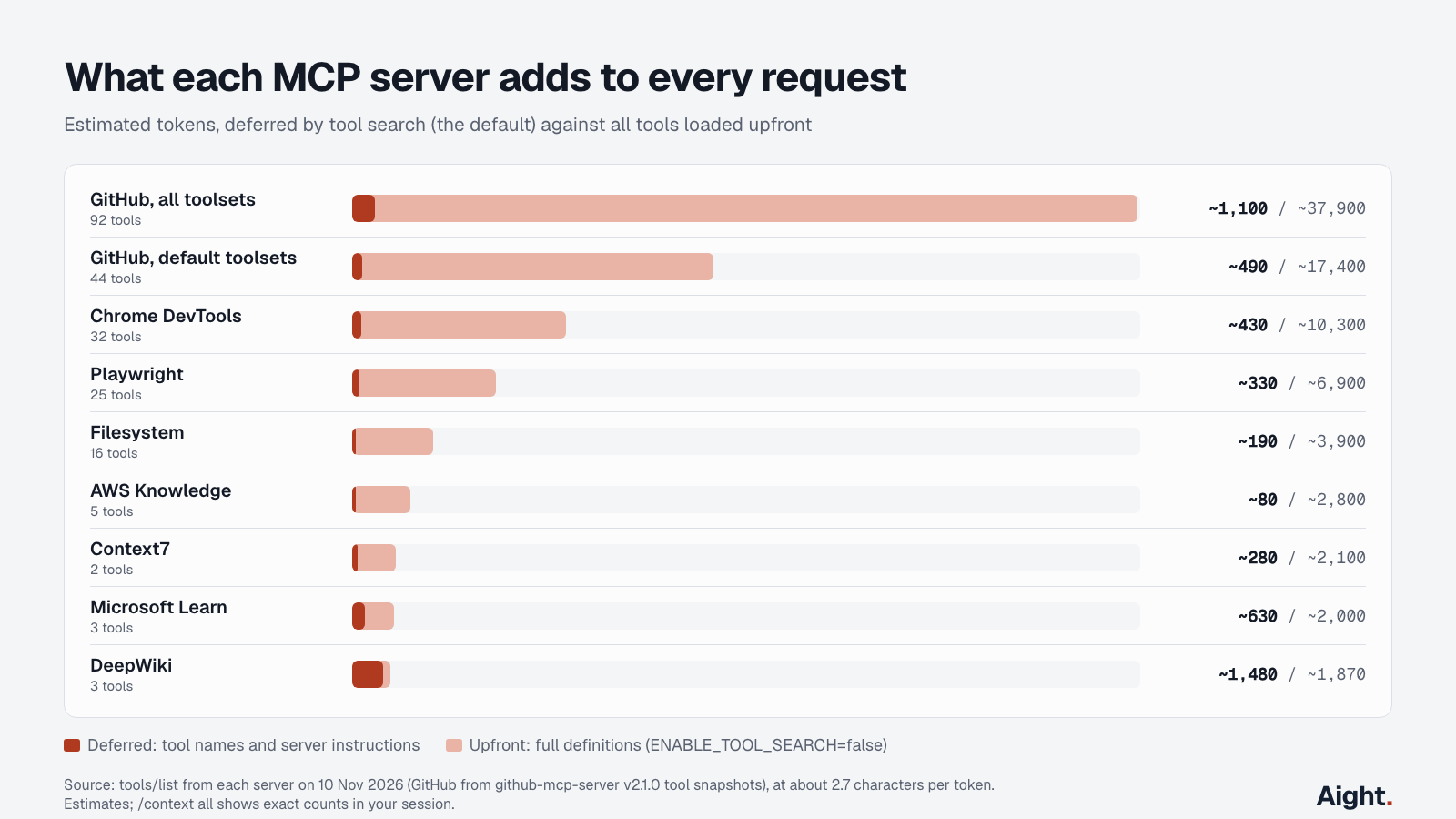
GitHub's figures come from the tool snapshots in the github-mcp-server repo (release v2.1.0) for the five default toolsets: context, repos, issues, pull requests and users. The hosted server's defaults can differ slightly. Sentry, Notion and Linear need a sign-in to list their tools, so they aren't measured here.
Two things stand out. The big servers are the browser and GitHub ones, and the cost scales with the toolsets you enable, so GitHub's per-toolset URLs (/mcp/x/issues, /mcp/x/pull_requests) and /readonly suffix cut both tokens and risk. Small servers are dominated by their instructions, not their tools: DeepWiki's 3,890-character instructions make it the most expensive deferred server in the table with only three tools.
What it costs in money depends on the cache. Tool definitions are resent with every request, and on an API key most of that resend is a cache hit. Using the daily scenario from the Claude Code pricing breakdown (6,000 requests a month, 92% cache hits at $0.20 and 8% five-minute writes at $5 per million tokens on Opus 5.5, per Anthropic's pricing):
| Setup | Tokens per request | Opus 5.5 cost per month |
|---|---|---|
| GitHub default, deferred | ~490 | $1.72 |
| GitHub default, upfront | ~17,400 | $60.97 |
| GitHub + Playwright + Context7, deferred | ~1,100 | $3.85 |
| GitHub + Playwright + Context7, upfront | ~26,400 | $92.40 |
On a Pro, Max or Ultra plan the same tokens count against your usage limits instead of a bill. Plug your own request counts into the token cost calculator to see the effect of a different model or cache rate.
How tool search keeps MCP tokens down
Tool search is on by default on Claude Opus 4, Sonnet 4, Haiku 4.5 and later models. "Only tool names and server instructions load at session start," per the docs; when Claude needs a tool, it searches, and the full definition loads then. The ENABLE_TOOL_SEARCH variable controls it:
| Value | What happens |
|---|---|
unset or true | All MCP tools deferred (the default) |
auto | Tools load upfront until their definitions reach 10% of the context window, then deferral starts |
auto:5 | The same with a 5% threshold |
false | Every tool loads upfront |
auto is a trap on current models. Opus 5.5, Sonnet 5.5 and Haiku 5.5 run with a 1M-token window by default, so the 10% threshold is about 100,000 tokens, and the GitHub, Playwright and Context7 stack above (2.6% of the window) would load in full on every request. Leave it unset unless a tool must always be visible, and then exempt just that server with "alwaysLoad": true in its config.
Three more settings shape the cost:
- Tool results are their own cost. Claude Code warns when one MCP result passes 10,000 tokens and caps it at 25,000 by default (
MAX_MCP_OUTPUT_TOKENS); text results over 50,000 characters are saved to a file and Claude reads it as needed. - A CLI usually costs less than a server. The cost docs say
gh,aws,gcloudandsentry-cli"don't add any per-tool listing"; if Claude can already rungh pr view, a GitHub server mostly adds tokens. - Adding or removing a server mid-session breaks the prompt cache, so the next request rewrites the whole conversation at the write price. Settle your servers before you start, as the Claude Code cheat sheet explains in its cost habits.
To see the real numbers, run /context for the overall split and /context all for every loaded tool. On a plan, /usage attributes usage to individual MCP servers.
MCP security in Claude Code
An MCP server is code you run or a service you hand a token to. Anthropic's security page says it reviews Directory connectors against listing criteria but "does not security-audit or manage any MCP server." The risks fall into three groups.
Prompt injection comes first. A server that returns outside content (issues, web pages, emails, support tickets) can carry instructions aimed at Claude, and those instructions run with every other tool Claude has. GitHub's server has a lockdown mode (--lockdown-mode locally) that hides public-repo content from authors without push access, which GitHub calls "best-effort" and "not an authorization boundary".
Second, a repo can bring its own servers. In an interactive session, Claude Code asks before using servers from a project's .mcp.json, and a cloned repo can't approve its own servers through a committed .claude/settings.json until you trust the folder. But claude -p, Agent SDK runs and some cloud sessions load project servers without asking. That gap was behind CVE-2026-47751: in Anthropic's claude-code-action before 1.0.78, a .mcp.json in a pull request branch started an attacker's server on the CI runner, with access to workflow secrets. In CI on untrusted code, run with --strict-mcp-config or list unwanted servers in disabledMcpjsonServers.
Third, tokens and environments leak. A stdio server inherits your whole shell environment unless you set CLAUDE_CODE_MCP_ALLOWLIST_ENV=1, which gives it a safe baseline plus its configured env. Version 2.1.321 (9 November 2026) also fixed MCP OAuth sending refresh tokens to another host when a server redirected, one more reason to stay on a current release.
The habits that follow from this:
- Install servers from the vendor or ones you've read, and pin versions (
@playwright/mcp@0.0.85) instead of@latestwhere you can. - Give each server the narrowest token: a fine-grained GitHub token limited to the repos Claude needs, GitHub's
/readonlyURL, a read-only database user for DBHub. - Use permission rules:
mcp__github__*indenyoraskcovers a whole server, andmcp__github__merge_pull_requestnames one tool, per the permissions docs. Deny rules hold in every permission mode, which matters if you run with --dangerously-skip-permissions. - Check
/mcp, not just.mcp.json: user-scope servers, plugins and claude.ai connectors load from outside the repo. - For a team, admins can deploy
managed-mcp.json(macOS/Library/Application Support/ClaudeCode/, Linux/etc/claude-code/, WindowsC:\Program Files\ClaudeCode\) or setallowedMcpServersanddeniedMcpServersin managed settings.
Troubleshooting Claude Code MCP servers
Start with claude mcp get <name>, which shows the error the server returned, then claude --debug='mcp,startup' for the connection log.
| Symptom | Likely cause | Fix |
|---|---|---|
✘ Failed to connect with 401 | Bad or empty token; a credential variable read as empty | Fix the header, or rename the variable |
! Needs authentication | OAuth sign-in missing or expired | /mcp, pick the server, sign in; or claude mcp login <name> |
⏸ Pending approval | Project server not yet approved | Run claude in the repo and approve; reset with claude mcp reset-project-choices |
| Server added but never appears | url with no type, reserved name, or missing ${VAR} | Read the warning in claude mcp list |
ENOENT on a stdio server | Command not on PATH, or flags placed before -- | Use a full path; put the server's flags after -- |
| Slow or failing start | Startup timeout (30 seconds by default) | MCP_TIMEOUT=60000 claude |
/mcp lists a tool Claude can't call | Full tool name over 128 characters | Rename the server to something shorter |
disconnected · open /mcp to reconnect | A remote server failed five reconnect attempts | /mcp reconnect <name> or /mcp reconnect all |
| Every request fails behind a gateway | Gateway rejects tool search fields | 2.1.305 and later retry without tool search; or set ENABLE_TOOL_SEARCH=false |
| claude.ai connectors missing | API key or cloud provider login is active | /status, then /login with your claude.ai account |
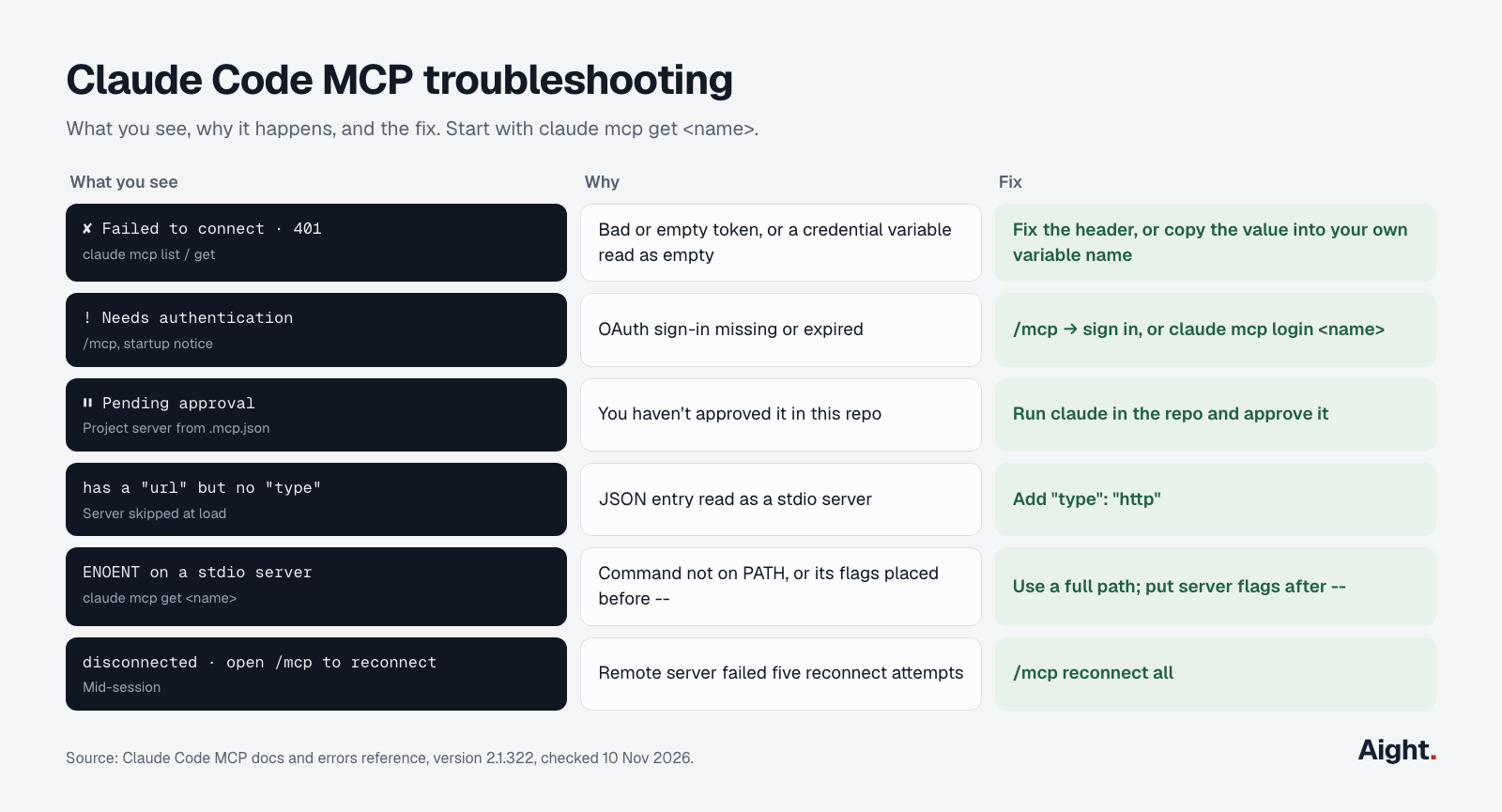
A token pasted with a trailing newline shows Leading or trailing whitespace in: headers.Authorization and isn't trimmed for you. To log or block MCP calls automatically, match mcp__github__.* in a hook, as the Claude Code hooks guide shows.
What developers report
- On macOS, several
claudeprocesses at once can rewrite stored MCP sign-ins with empty tokens, so every server needs re-authenticating each session (GitHub issue #93537, 11 Sep 2026, link). - The OAuth callback host is fixed:
localhostbreaks Atlassian and Azure allowlists, while127.0.0.1breaks Salesforce and Slack (GitHub issue #91846, 3 Sep 2026, link). - A Hacker News commenter measured about half the token use with Atlassian's CLI compared with its MCP server, with more accurate results (Hacker News, 21 Sep 2026, link).
- A commenter who works on an MCP server noted that a test claiming heavy overhead hadn't enabled tool search, and that the prompt cache spreads the cost over long sessions (Hacker News, 4 Sep 2026, link).
- "a much smaller and more explicit attack surface" (a Hacker News commenter on building a narrow MCP server instead of granting a broad token, 4 Sep 2026, link)
- Servers that declared a draft-07 output schema, including MongoDB's, failed on every call until a client fix (GitHub issue #86142, 12 Aug 2026, closed 17 Aug, link).
FAQ
What's the difference between claude mcp add and /mcp?
claude mcp add, list, get and remove run in your shell and change configuration. /mcp runs inside a session: it shows live status and tool counts, signs you in with OAuth, reconnects servers and turns them on or off for the project.
Do MCP servers use up Claude Code's context window?
Yes, but little by default. With tool search on, each server adds its tool names and instructions, a few hundred tokens for most servers measured here; full definitions load only when Claude uses a tool. Results from tool calls are the bigger cost, capped at 25,000 tokens each by default.
Can Claude Code itself be an MCP server?
Yes. claude mcp serve starts Claude Code as a stdio server that exposes its tools, such as file reading and editing, to another MCP client like Claude Desktop. The client is then responsible for asking you before each tool call.
How many MCP servers can you add to Claude Code?
There's no fixed limit on servers or tools; the docs call the context window the practical limit. Claude Code connects up to 3 local and 20 remote servers in parallel at startup, so a long list slows startup even when the tools stay deferred.
Sources
- Anthropic, Claude Code docs: MCP, MCP quickstart, Managed MCP, Security, Permissions, Manage costs, Context window, Extend Claude Code
- Anthropic, Claude Code docs: Commands, CLI reference, Environment variables, Model configuration, Errors, Changelog
- Anthropic, @anthropic-ai/claude-code on npm (dist-tags checked through the registry)
- Anthropic, Claude API docs: Pricing, Glossary
- Anthropic Engineering, Introducing advanced tool use (24 Nov 2025)
- Anthropic, MCP in Claude Code (video, 9 May 2026)
- Model Context Protocol, Introduction
- GitHub, github-mcp-server README, tool snapshots and remote server docs (v2.1.0)
- Microsoft, Playwright MCP; Google Chrome, Chrome DevTools MCP; Upstash, Context7; Model Context Protocol, filesystem server; Bytebase, DBHub
- Remote servers queried directly on 10 Nov 2026: Context7, Microsoft Learn, DeepWiki and AWS Knowledge MCP endpoints
- Tenable Research, TRA-2026-27: claude-code-action arbitrary code execution via MCP configuration (CVE-2026-47751)
- GitHub, anthropics/claude-code issues #93537, #91846, #86142
- Hacker News comments: 49786751, 49562869, 49561457
- Independent measurements: dev.to, wartzar-bee; Unblocked, MCP token cost analysis (14 May 2026)
Checked on 10 November 2026.