Claude Code Remote Control lets you drive a Claude Code session running on your own computer from the Claude app on your phone or from claude.ai/code in a browser. Run claude remote-control (or type /rc in an open session), scan the QR code, and the conversation appears on your phone while the code, files and MCP servers stay on your machine.
It comes with every Claude plan that includes Claude Code (Pro, Max, Ultra, Team and Enterprise), costs nothing extra, and doesn't work with an API key. Below: setup on each surface, what the connection exposes, and when SSH with tmux or a cloud session is the better way to run Claude Code remote. Commands match Claude Code 2.1.322, the latest npm release on 10 November 2026.
The short answer
- Claude runs on your machine the whole time, so the machine must stay on and
claudemust keep running. - Plans: Pro ($20 a month, $17 billed yearly), Max ($100), Ultra ($200), Team and Enterprise, where an Owner must turn it on. Free has no Claude Code.
- It needs a claude.ai login talking to
api.anthropic.com. An API key, Bedrock, Vertex, Foundry or anANTHROPIC_BASE_URLgateway turns it off. - No inbound port opens. Traffic goes through Anthropic over TLS, and Anthropic stores the transcript while you're connected. It is not end-to-end encrypted.
- Laptop closing? Use a cloud session. API key or another agent? Use SSH with tmux.
What Claude Code Remote Control is
The claude remote-control subcommand arrived in version 2.1.51 on 24 February 2026, per the Claude Code changelog. Since then it has gained push notifications (2.1.110), model picking from the phone (2.1.238) and, on 9 November 2026, a --settings <file> option for server mode (2.1.321).
Per the official docs, a connected phone or browser gets:
- Your filesystem, MCP servers, tools and project configuration, with
@autocompleting local file paths. - The conversation, subagents and workflows in sync on every device, so you can type in the terminal and on the phone in turn.
- Photo and file attachments. Non-image files are downloaded to your machine and passed in as
@references. - A git diff pane, and automatic reconnection after the laptop sleeps or the network drops.
Cloud sessions share the claude.ai/code interface but run in an Anthropic VM; the docs call --cloud and --remote-control unrelated flags.
Which plans include Remote Control
Every plan with Claude Code includes it at no extra charge. Sessions draw on the same usage limits as the rest of your Claude use; the Claude Code pricing post explains those limits.
| Plan | Price (US, before tax) | Remote Control | Cloud sessions | Dispatch |
|---|---|---|---|---|
| Free | $0 | No (no Claude Code) | No | No |
| Pro | $20/month, or $17/month billed yearly | Yes | Yes | Yes |
| Max | $100/month | Yes | Yes | Yes |
| Ultra | $200/month | Yes | Yes | Yes |
| Team | $25 standard seat ($20 yearly), $125 premium ($100 yearly) | Owner must enable | Yes | No |
| Enterprise | $20/seat/month yearly plus usage at API rates | Owner must enable | Premium or Chat + Claude Code seats | No |
Prices from claude.com/pricing; availability from Anthropic's feature availability table, both checked 10 November 2026.
It is unavailable, even on an eligible plan, when:
- You authenticate with
ANTHROPIC_API_KEY,ANTHROPIC_AUTH_TOKEN, anapiKeyHelperor aclaude setup-tokentoken. "API keys are not supported," say the docs, so pay-per-token users (see the Claude Code API key post) need SSH. - Claude Code runs on Bedrock, Google Cloud's Agent Platform or Microsoft Foundry, or
ANTHROPIC_BASE_URLpoints anywhere butapi.anthropic.com, which rules out every LLM gateway and claude-code-router. CLAUDE_CODE_DISABLE_NONESSENTIAL_TRAFFICorDISABLE_GROWTHBOOKis set.DISABLE_TELEMETRYalone is fine from 2.1.283.- Your organization uses Zero Data Retention or the HIPAA configuration (more in the zero data retention post).
How to set up Remote Control on desktop
Run claude update, then /login with your claude.ai account. New to Claude Code? Start with the install guide. Then pick one of five starting points.
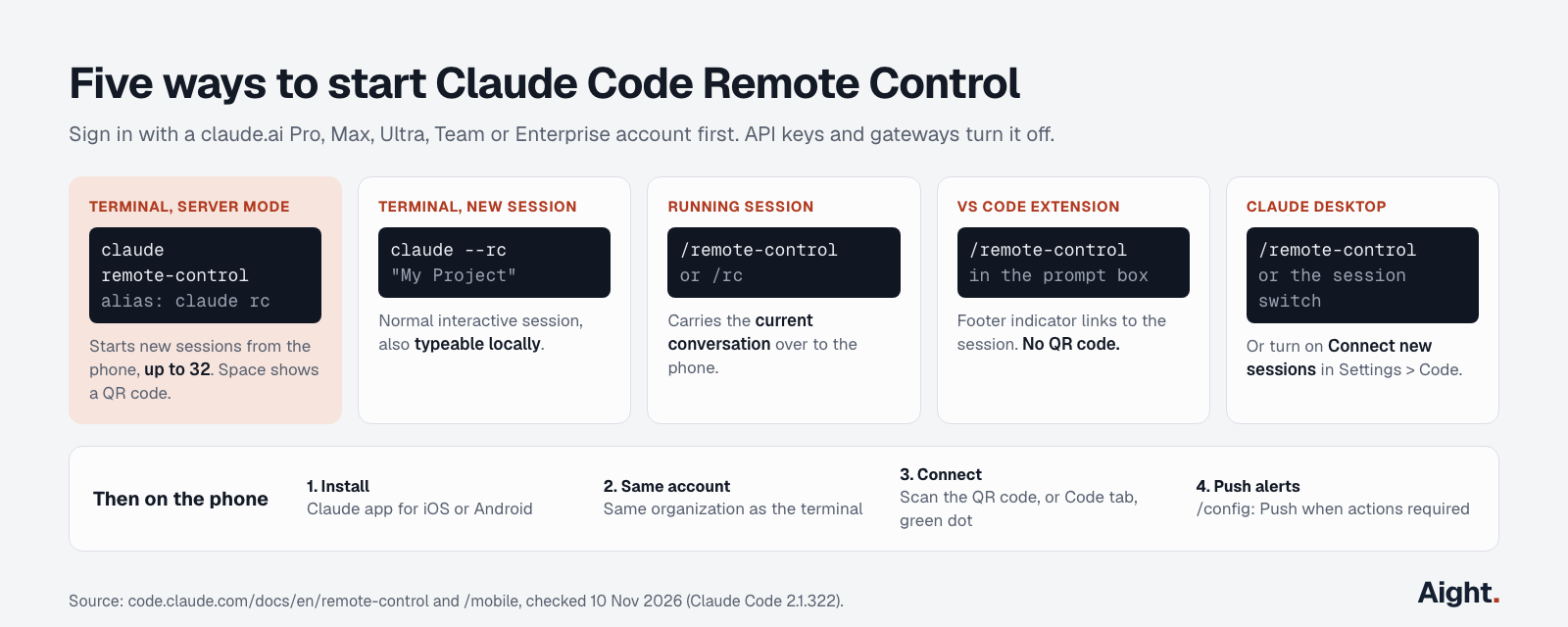
| Where | How to start | What you get |
|---|---|---|
| Terminal, server mode | claude remote-control (alias claude rc) | Starts new sessions on demand, up to 32; space shows a QR code |
| Terminal, new session | claude --rc "My Project" | A normal session you can also type into locally |
| Terminal, running session | /remote-control or /rc | Carries the current conversation to the phone |
| VS Code extension | /remote-control in the prompt box | Footer indicator; no name argument or QR code |
| Claude Desktop, Code tab | /remote-control or the session's switch | Session appears at claude.ai/code and in the app |
Server mode is the one to use if you want to start sessions from your phone:
cd ~/code/my-app
claude remote-control --name "my-app" --spawn worktree
The first run asks Enable Remote Control? (y/n) and, in an untrusted folder, Trust <directory>? [y/N]. Trust is never saved for your home directory, so start in a project folder.
| Flag | What it does |
|---|---|
--spawn same-dir, worktree or session | Share one folder, give each session its own git worktree, or serve one session only (w switches the first two) |
--capacity <N> | Maximum concurrent sessions, default 32 |
--permission-mode acceptEdits | Starting permission mode for the server's sessions |
--continue, --session-id <id> | Bring sessions back after stopping the server, for about four hours |
--settings <file> | Apply a settings file to every session (2.1.321+) |
--sandbox was removed in 2.1.300; turn sandboxing on in a settings file instead. The cheat sheet lists the rest of the CLI.
To connect every interactive session automatically, set Enable Remote Control for all sessions in /config, or "remoteControlAtStartup": true in ~/.claude/settings.json. A checked-in project settings file can turn it off for a repository but not on. In the Desktop app the switch is Connect new sessions to Remote Control under Settings > Code.
Connect Claude Code Remote Control from your phone
There's no separate Claude Code app. Remote Control lives in the Code tab of the Claude app for iOS and Android.
- Install the app (
/mobilein Claude Code shows a QR code to the right store). - Sign in with the same account and organization as the terminal. A Team login on the laptop won't see a personal Pro login on the phone.
- Scan the terminal's QR code, or tap Code and pick the session; online sessions show a computer icon with a green dot.
- For alerts, run
/configon the computer and turn on Push when Claude decides or Push when actions required. You can also ask Claude in a prompt to send a push when the tests finish.
From the phone you can type, attach photos, approve tool calls and switch model or effort. The app offers Manual, Accept edits, Plan and Auto modes, never Bypass permissions, per the mobile docs. Terminal-UI commands such as /plugin and /resume only work at the computer; others take arguments instead of pickers, like /model sonnet or /config key=value. A line starting with ! goes to Claude as text, not to your shell.
Remote Control security model
Remote Control opens no inbound port. In the docs' words, your session "makes outbound HTTPS requests only and never opens inbound ports on your machine."
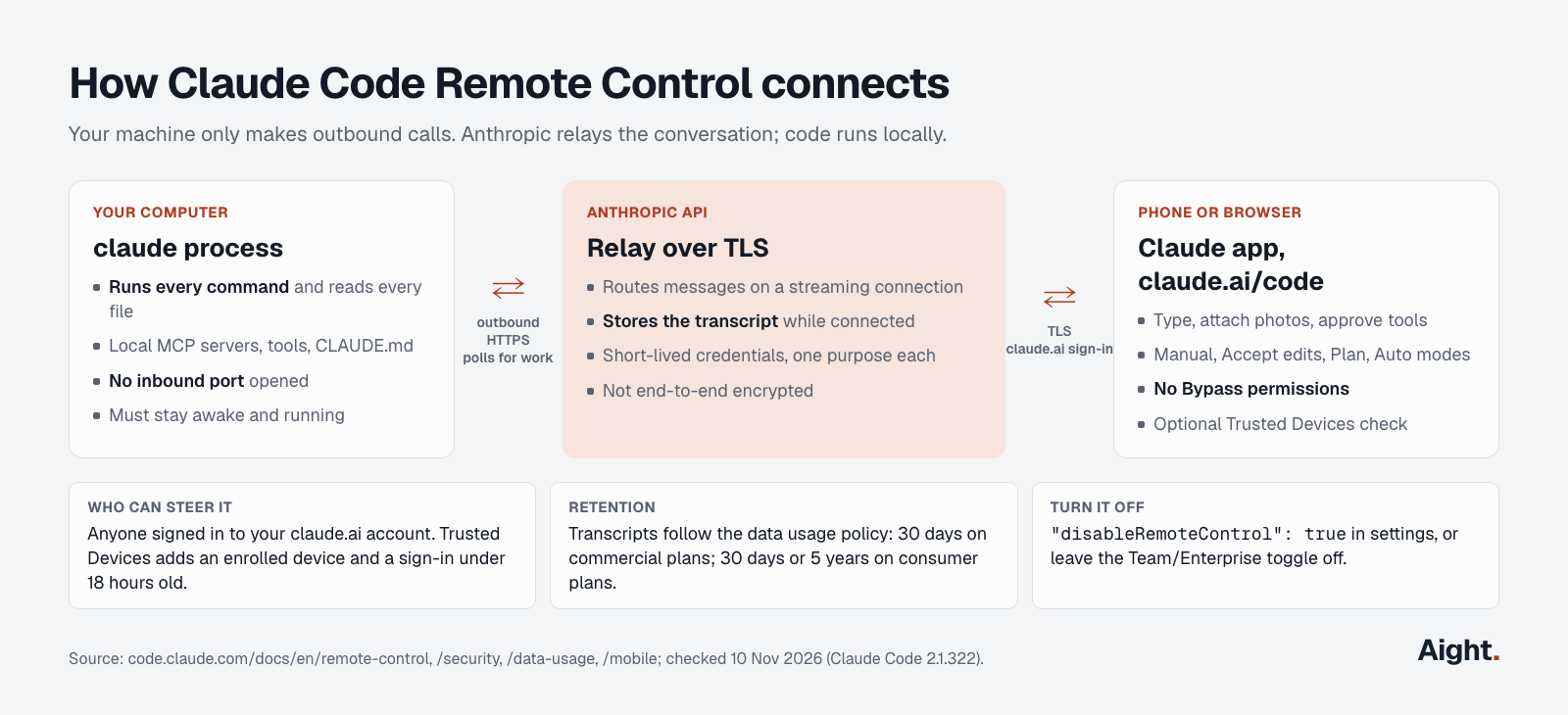
From the connection and security section and the security page:
- Claude Code registers with the Anthropic API and polls for work.
- When a phone or browser connects, Anthropic routes messages between it and your session over a streaming TLS connection.
- Several short-lived credentials, each for one purpose, limit "the blast radius of any single compromised credential."
- Commands run only on your machine. No cloud VM or sandbox is involved.
What that means in practice:
- Anthropic stores the transcript (messages, replies, tool activity) while you're connected. The data usage policy applies: 30 days on commercial plans; 30 days or 5 years on consumer plans, depending on your model-improvement setting.
- It's TLS to Anthropic, not end-to-end encryption, whatever some third-party guides claim.
- Your claude.ai account is the key to your shell. Anyone signed in as you can steer a connected session within its permission mode, so protect the account with SSO or a passkey, and keep Auto and Accept edits off machines that hold production secrets.
Trusted Devices
Trusted Devices (beta) adds a device check: steering a session needs an enrolled device and a sign-in under 18 hours old, refreshed with Face ID, Touch ID, Windows Hello or a passkey. Anthropic stores only the device's public key and metadata, no biometrics. On Pro, Max and Ultra, turn on Require trusted devices in your Account or Cowork settings. On Team and Enterprise, an Owner enables it under Organization settings > Capabilities > Remote sessions. Remove a lost phone under Trusted devices at claude.ai/settings/account.
Turning it off
"disableRemoteControl": true in ~/.claude/settings.json blocks every way of starting it; in managed settings it enforces that per device. Team and Enterprise have it off until an Owner flips the toggle at claude.ai/admin-settings/claude-code, and Enterprise custom roles need both the cloud sessions and Claude Code remote control permissions.
Limits and errors to expect
- One remote session per interactive
claudeprocess; server mode handles many. - Closing the terminal, VS Code or the Desktop app takes the session offline.
- Server mode exits after about 10 minutes without network; interactive sessions keep retrying.
- Permission prompts wait indefinitely, but other forwarded dialogs close after 5 minutes (
dialogExpiryaccepts60s,5m,10mornever).
| Message | Cause | Fix |
|---|---|---|
Remote Control requires a claude.ai subscription | Signed out, or an API key or token takes precedence | claude auth login; unset ANTHROPIC_API_KEY or ANTHROPIC_AUTH_TOKEN |
Remote Control requires a full-scope login token | claude setup-token or CLAUDE_CODE_OAUTH_TOKEN in use | claude auth login |
Remote Control is only available when using Claude via api.anthropic.com | Bedrock, Vertex, Foundry or a custom ANTHROPIC_BASE_URL | Unset the variable it names, restart |
Remote Control isn't enabled for this account | Stale plan cache after an upgrade | claude auth logout, claude auth login; claude doctor shows the failed check |
Remote Control is disabled by your organization's policy | Admin toggle off, ZDR, HIPAA, disableRemoteControl, or an old Team login | /status shows the organization; ask an Owner |
Claude Code remote alternatives: SSH, tmux and cloud sessions
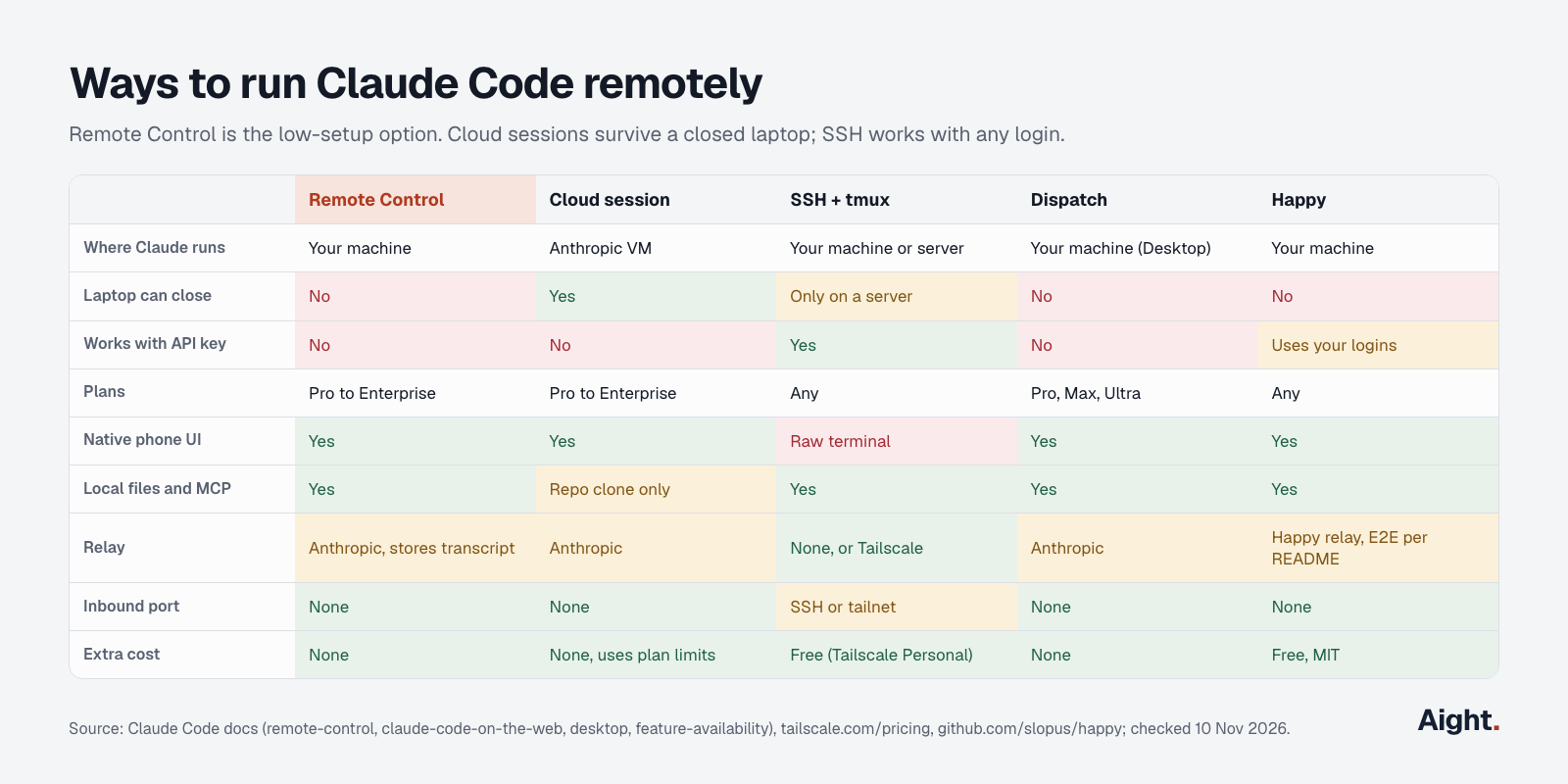
| Remote Control | Cloud session | SSH + tmux | Dispatch | Happy (open source) | |
|---|---|---|---|---|---|
| Where Claude runs | Your machine | Anthropic VM | Your machine or a server | Your machine (Desktop) | Your machine |
| Laptop can close | No | Yes | Only on a server | No | No |
| Auth | claude.ai plan | claude.ai plan | Anything, API keys too | Pro, Max, Ultra | Your Claude, Codex or Grok login |
| Phone UI | Native app | Native app | Raw terminal | Native app | Native app |
| Local files and MCP servers | Yes | Repository clone only | Yes | Yes | Yes |
| Relay | Anthropic, stores transcript | Anthropic | None, or Tailscale | Anthropic | Happy's relay, end-to-end encrypted per its README |
| Inbound port | None | None | SSH port or tailnet | None | None |
| Extra cost | None | None, uses plan limits | Tailscale Personal is free | None | None, MIT licence |
Cloud sessions (Claude Code on the web)
A cloud session clones your GitHub repository into a VM (about 4 vCPUs, 16 GB RAM) and keeps working with the laptop closed:
claude --cloud "Fix the flaky test in auth.spec.ts"
claude --teleport            # pull a cloud session into this checkout
The VM is free but draws on plan limits, and five parallel sessions use them about five times as fast, says Anthropic's cloud sessions post of 6 October 2026. It clones your pushed branch, not your local checkout, and can't reach your laptop's databases or MCP servers. Use cloud for long unattended or parallel work, Remote Control for work that needs your local setup.
SSH with tmux (and Tailscale or mosh)
This route works with any login, including an API key or gateway, and with any agent:
# on the computer or server
tmux new -s claude
claude
# detach with Ctrl+b then d; Claude keeps running

# from the phone's SSH app
ssh you@100.101.102.103      # the machine's Tailscale IP, from `tailscale ip -4`
tmux attach -t claude
Tailscale reaches a home machine behind NAT without port forwarding; its Personal plan is free for up to 6 users. Mosh survives Wi-Fi to cellular switches (mosh you@host -- tmux attach -t claude). The cost is the interface: a Hacker News commenter called terminals on phones "a pretty terrible experience using your thumbs." In return, nothing passes through Anthropic beyond the usual model calls.
Dispatch, channels and Happy
Dispatch (Pro, Max and Ultra) takes a task messaged from the phone and lets the Desktop app spawn a Code session for it. Channels, in research preview, push Telegram, Discord or iMessage messages into a running session; the OpenClaw comparison covers both. Happy is an MIT-licensed mobile client (about 24,500 GitHub stars) that wraps Claude Code and Codex via npm install -g happy and happy claude. It's a third-party relay, so read its code before trusting it with a shell.
What developers report
- A Claude Desktop user reported that background auto-updates relaunch the app while nobody is at the machine, dropping every Remote Control session (GitHub issue #95364, 18 Sep 2026, link).
- On Windows, the Desktop setting that lets the phone start sessions caps its folder list at 6; a request to raise it is open (GitHub issue #100284, 7 Oct 2026, link).
- A feature request notes that
/voiceuses only the computer's microphone, so the phone's Code tab has no voice input (GitHub issue #104372, 22 Oct 2026, link). - "Commands are relayed through Anthropic's servers with a client polling mechanism." (Hacker News commenter, 25 Feb 2026, link)
- Another Hacker News commenter argued the key difference from SSH setups is that Remote Control needs no inbound connections, removing a class of security problems (25 Feb 2026, link).
FAQ
Is Claude Code Remote Control free?
There's no extra charge, but you need a plan with Claude Code: Pro from $17 a month billed yearly, Max, Ultra, Team or Enterprise. Sessions count toward your normal usage limits.
Does Remote Control work with an API key?
No. It needs a claude.ai subscription login and refuses to start while ANTHROPIC_API_KEY, ANTHROPIC_AUTH_TOKEN or a setup-token token is in use. With API billing, use SSH and tmux.
Does the computer have to stay on?
Yes. The session runs on the computer, so a sleeping laptop is offline until it wakes and reconnects. For work that should continue with the lid closed, use claude --cloud.
Can a new session start from the phone?
Yes, if claude remote-control is running in server mode: it creates sessions on demand, up to 32 by default, optionally each in its own git worktree. With /rc or --remote-control you only continue the session you started.
Is Remote Control end-to-end encrypted?
No. Traffic travels over TLS through Anthropic's API, and Anthropic stores the transcript while you're connected. Code still runs only on your machine, with no inbound port.
What is the difference between Remote Control and Claude Code on the web?
Claude Code on the web runs sessions in Anthropic cloud VMs that clone your GitHub repository. Remote Control uses the same interface to drive a session on your own machine, with your local files, tools and MCP servers.
Sources
Anthropic, Claude Code docs:
- Remote Control
- Use Claude Code in the cloud
- Claude Code on mobile
- Feature availability
- Security
- Data usage
- Settings reference
- Desktop app
- Cloud environments
- Channels
- Changelog
Anthropic, other:
- Claude pricing
- Claude Code in the cloud, Claude blog, 6 Oct 2026
- @anthropic-ai/claude-code on npm
- Using Claude Code Remote Control (YouTube)
- Coding on the go with Claude Code (YouTube)
GitHub:
- anthropics/claude-code issue #95364
- anthropics/claude-code issue #100284
- anthropics/claude-code issue #104372
- slopus/happy README
- tmux wiki: Getting Started
Other:
Checked on 10 November 2026.