Claude Cowork vs Claude Code comes down to the kind of work. Claude Code is Anthropic's coding agent: it runs on your machine in the terminal, an IDE or the desktop app's Code tab, reads your repository, edits files and runs commands. Claude Cowork is the same agent design aimed at documents, spreadsheets and research, and on Pro, Max and Ultra it now runs on Anthropic's servers, reaching your folders only through the desktop app. Claude chat answers questions and makes quick files in a sandbox, and since September 2026 it hands bigger tasks to Cowork inside the same conversation.
All three come with every paid Claude plan and draw from the same usage limits. The Free plan gets chat only. This guide covers what each one is, what it can reach on your computer, the plans and limits, and which to open for which job, checked on 10 November 2026 against Anthropic's Help Center and Claude Code 2.1.322.
Claude Cowork vs Claude Code vs chat at a glance
| Claude chat | Claude Cowork | Claude Code | |
|---|---|---|---|
| Built for | Questions, writing, quick files | Documents, spreadsheets, research, recurring office tasks | Writing, debugging and shipping code |
| Where the work runs | An isolated sandbox at Anthropic | Anthropic's cloud (Pro, Max, Ultra since 6 Oct 2026) | Your machine by default; a cloud VM if you choose |
| Your files | Only what you upload, up to 30MB each | Folders you connect, through the desktop app while it's open | The folder it starts in; Bash commands run as your user |
| Your apps and browser | Connectors only | Browser use, and computer use in beta, through the desktop app | Chrome integration; computer use from the CLI on macOS |
| Works with the laptop shut | No | Yes, including scheduled tasks | Cloud sessions only |
| Where you use it | Web, desktop, mobile | Web, desktop, mobile, Chrome side panel | Terminal, VS Code, JetBrains, desktop Code tab, web, mobile |
| Plans | Free and all paid plans | Pro, Max, Ultra, Team, Enterprise | Pro, Max, Ultra, Team, Enterprise, or an API key |
| Usage | Plan limits | Same limits, used faster than chat | Same limits, or per token with an API key |
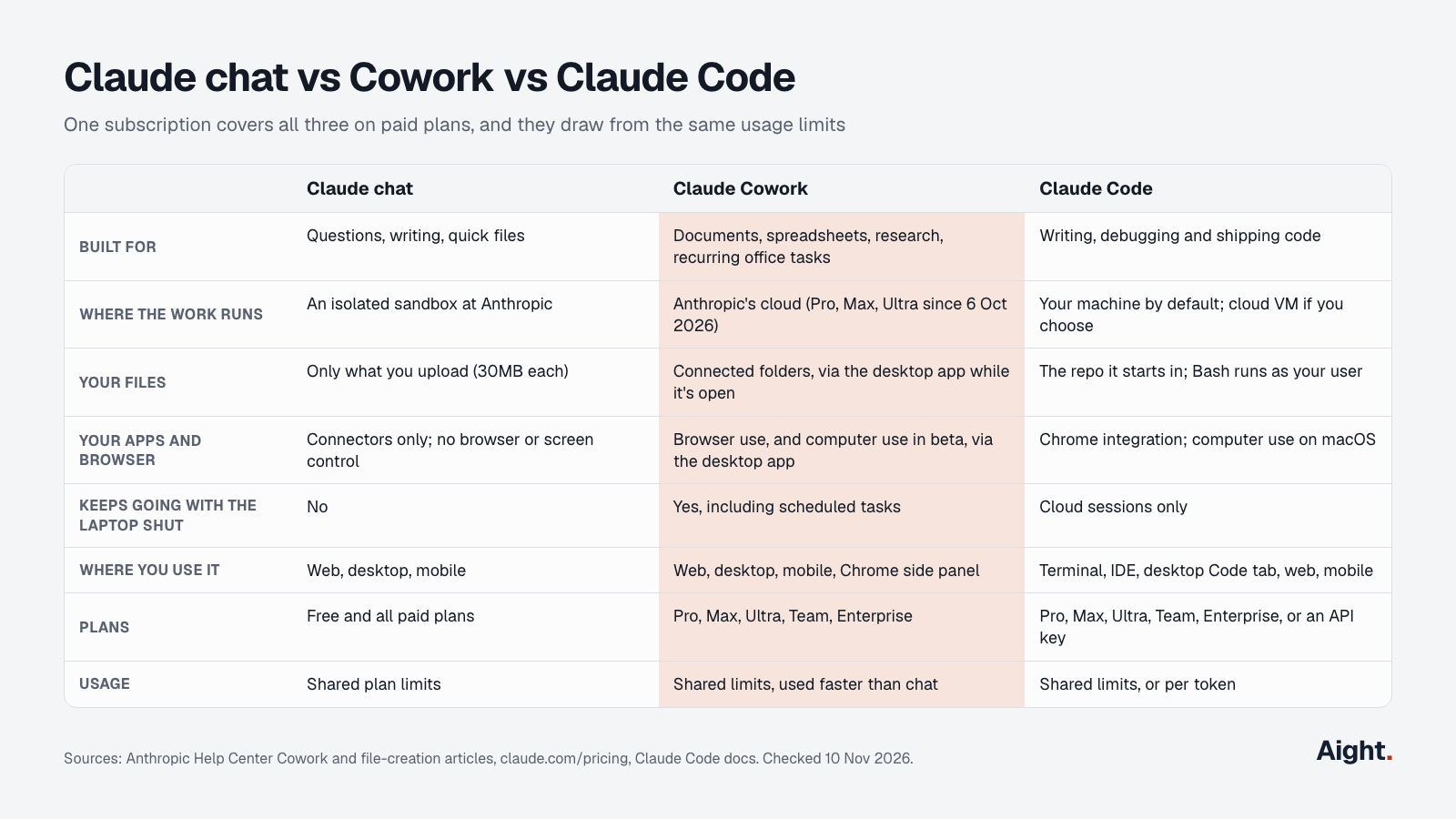
Anthropic draws the line itself. The Cowork product page calls Claude Code "built for software engineering" and Cowork "built for non-coding knowledge work," and says Cowork "uses the same agentic approach as Claude Code."
What changed in 2026
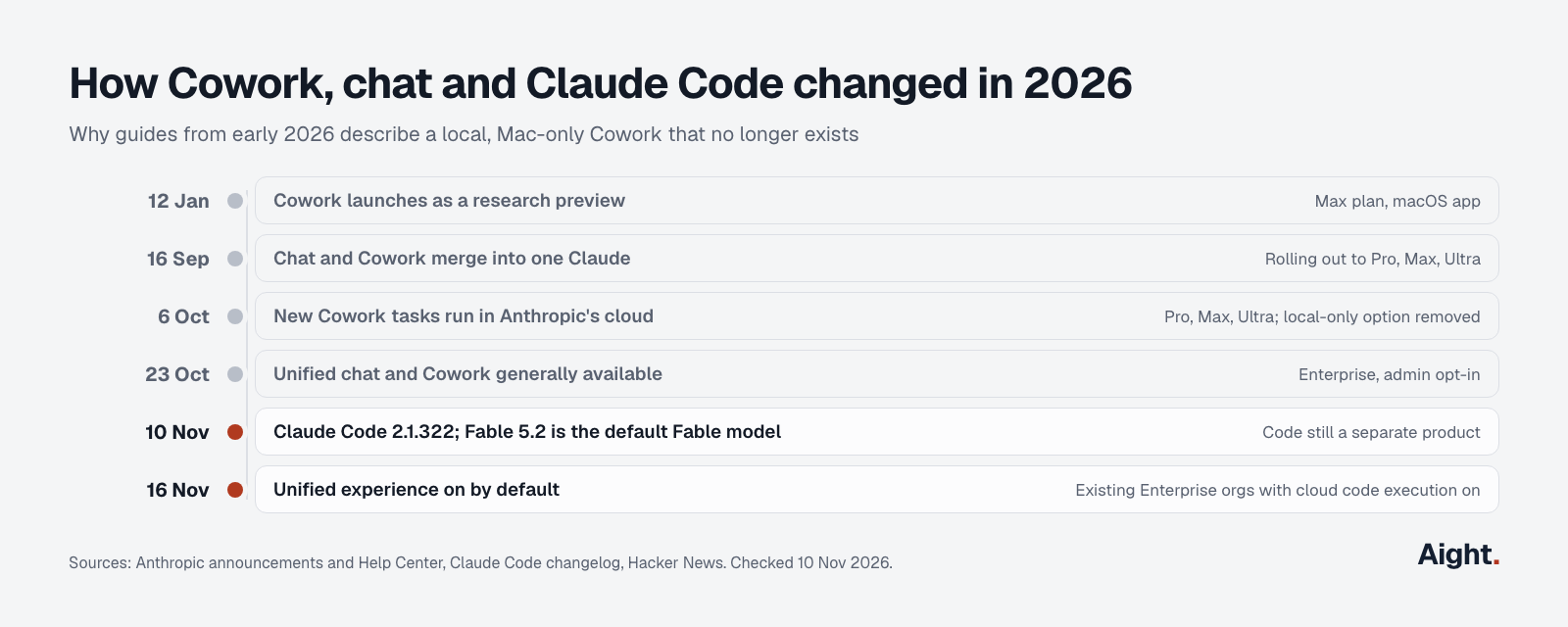
Much of what ranks for "claude code vs cowork" describes a product that no longer exists. Cowork launched on 12 January 2026 as a research preview for Max subscribers in the macOS app, working on your computer in a folder you picked. Three changes since then matter:
- On 16 September, Anthropic merged chat and Cowork into one Claude, rolling out to Pro, Max and Ultra. You no longer pick a mode; Claude decides what the task needs.
- On 6 October, new Cowork tasks moved to the cloud on Pro, Max and Ultra. The "Only on your computer" setting was removed and can't be restored. Tasks started locally before that date stay local so you can finish them.
- On 23 October, the unified experience became generally available for Enterprise. Anthropic's admin guide says it turns on by default on 16 November 2026 in existing organizations that have chat and cloud code execution enabled.
Claude Code wasn't merged. In the unified experience, Anthropic says "Claude Code and Claude in Chrome usage is still reported under those products."
What Claude chat does
Claude chat is the conversation on claude.ai, the desktop app and the mobile apps. It answers, drafts, explains, searches the web and builds Artifacts. It can also run code and create files, including Excel, PowerPoint, Word and PDF documents, in an isolated container that Anthropic says is never shared between users. Uploads and downloads cap at 30MB a file, and file creation uses more of your limit than a plain chat.
Chat is the only one of the three on the Free plan. Claude's pricing page lists "Search the web, create files, and run code" and connectors for Free, and marks Claude Code, Claude in Chrome, and "Hand off and schedule tasks" as paid only.
What chat can't do on its own is work through a folder on your computer, drive a browser, or keep going after you close the app. On paid plans with the unified experience, that's the point where the conversation turns into Cowork.
What Claude Cowork is
Claude Cowork is an agent for multi-step knowledge work. You give it a goal, it plans, works across your files and connected tools, and returns the finished piece for review. Anthropic's examples include a weekly marketing readout built from analytics and Google Drive, a spreadsheet that reconciles regional exports and flags variances, and a first-pass review memo for each inbound contract checked against a playbook.
Per the Cowork Help Center article, on Pro, Max and Ultra:
- Every new session runs on Anthropic's servers, with no setting to choose a location.
- Sessions keep working after you close your laptop, and scheduled tasks run with no device online.
- Sessions are saved to your account, so a task started on desktop can be checked from your phone, which gets a notification when it finishes or needs input.
- Projects group related tasks with their own files, instructions and memory.
Cowork works on desktop (macOS, Windows, and Linux in beta), web, mobile and the Claude in Chrome side panel. On web and mobile it covers Pro, Max, Ultra and Team (beta), and Enterprise once an owner turns it on.
In the unified experience there's no Cowork switch. Every conversation starts as chat, and when a task needs to run code or work with files, Claude "continues the same conversation in an isolated cloud sandbox," each with its own Anthropic-managed virtual machine. Where the rollout hasn't reached your account, a Cowork selector sits in the bottom left of the message box.
What Claude Code is
Claude Code is a coding agent that reads your codebase, edits files, runs commands and works with your development tools. The current release is 2.1.322, published 10 November 2026 on npm. The Claude Code install guide covers setup on each platform.
It runs in more places than the other two. The platforms page lists:
- The CLI, the most complete surface, and the only one with scripting and the Agent SDK.
- The VS Code and JetBrains extensions.
- The Code tab in the Claude desktop app, with diff review, parallel sessions and app previews.
- Cloud sessions from the browser at claude.ai/code or the mobile app, which run in an Anthropic-managed VM against a GitHub repository and continue after you disconnect.
- Remote Control, which lets you steer a session running on your machine from a phone or browser. Claude Code Remote Control covers the setup.
Claude Code also runs on Amazon Bedrock, Google Cloud's Agent Platform and Microsoft Foundry, or with a Claude Console API key billed per token. Cowork and chat need a claude.ai account, except in Claude Desktop on third-party platforms, an enterprise deployment that runs chat, Cowork and Code against your own cloud provider with a local sandbox VM.
For the chat app against the coding agent alone, see Claude vs Claude Code.
What each can touch on your computer
This is the difference that matters most for privacy and for what each one can actually get done.
| Claude chat | Claude Cowork | Claude Code (local) | |
|---|---|---|---|
| Local files | Uploads only | Connected folders only, via the desktop app while open; cloud tasks get copies of the files they need | Its working folder freely; elsewhere in Manual mode it asks first |
| Shell commands | In Anthropic's sandbox | In Anthropic's cloud environment, not on your computer | On your machine, as your user account |
| Browser | No | Built-in browser or your Chrome, via the desktop app | Your Chrome, via the Chrome integration |
| Desktop apps and screen | No | Computer use, beta on Pro, Max, Ultra | Computer use from the CLI on macOS, Pro, Max, Ultra |
| Local MCP servers | No | Through the desktop app | Yes |
| Default permission mode | Not applicable | Auto on Pro, Max, Ultra, Team | Auto in the terminal and VS Code since v2.1.283 |
Cowork's safety article says its work runs "in an isolated environment on Anthropic's servers, separate from your computer and your network," and that "Claude can only read and write files in folders you've connected." It needs your explicit permission before permanently deleting files. Auto mode screens actions for data exfiltration and prompt injection, and the article adds that "no defense is perfect." Local file access, browser use and computer use all need the desktop app open on macOS or Windows.
Claude Code is the reverse: by default it acts directly on your machine. Its security docs say the working-folder boundary in Manual mode is a permission prompt, so "a Bash command you approve can still write anywhere your user account can." For OS-level limits, turn on the sandbox with /sandbox, or run Claude Code in a dev container. Cloud sessions are the isolated option: each runs in its own VM, and your GitHub credentials stay on Anthropic's servers instead of entering it.
Two practical consequences follow. If files must not leave your machine, Cowork on Pro, Max or Ultra no longer fits, because cloud tasks copy what they need to Anthropic. Claude Code in local mode still sends prompts and the file contents it reads to the model, but your files stay on disk and commands run locally. And if your Cowork setup relied on local paths and scheduled jobs, check it: since the cloud move, Cowork's file tools edit cloud copies, and at least one user reported edits that never reached disk (see the reports below).
Plans, prices and shared limits
Every paid plan includes all three. Plans and prices as of 10 November 2026, before tax:
| Plan | Price | Chat | Cowork | Claude Code |
|---|---|---|---|---|
| Free | $0 | Yes, limited | No | No |
| Pro | $20 a month, or $200 a year | Yes | Yes | Yes |
| Max | $100 a month, 5x Pro | Yes | Yes | Yes |
| Ultra | $200 a month, 10x Pro weekly | Yes | Yes, with more Cowork usage | Yes |
| Team | $25 or $125 a seat a month ($20 or $100 yearly) | Yes | Yes, web and mobile in beta | Yes |
| Enterprise | $20 a seat a month yearly, plus usage at API rates | Yes | Yes; web and mobile once an owner enables it | Yes |
The limits are shared. Anthropic's Claude Code plan article says limits "are shared across Claude and Claude Code, meaning all activity in both tools counts against the same limits," and the usage-limit article says all Claude product surfaces count toward the same limit. Pro, Max and Team have a 5-hour session limit and a weekly limit; verified Ultra accounts have only the weekly one.
What differs is how fast each spends it. The Cowork page states plainly: "Claude Cowork consumes limits faster than Chat," because each step of a multi-step task uses tokens. A Cowork afternoon on a large folder can leave less for Claude Code that week. Anthropic's advice is to group related work into one task, start a new conversation for unrelated work, and watch Settings > Usage. In Claude Code, /usage shows the same bars. The Claude Code pricing guide breaks down each plan's limits and when Max or Ultra pays off.
Claude chat vs Cowork: when to use which
For the "claude chat vs cowork" question, the answer since September is mostly automatic: on Pro, Max and Ultra with the unified experience, you type the request and Claude escalates when the task needs files or several steps. An Anthropic team member described it on Hacker News: at your computer, Claude can use your local files and apps; after you close the laptop, it keeps working on its own computer.
It still helps to know which side you're on, because the cost differs:
- Stay in chat for answers, drafts, explanations and one-off analysis of a file you upload. It uses less of your limit.
- Use Cowork when the output is a finished document, deck or spreadsheet built from several sources, when it should pull from connected folders or apps, or when it should run on a schedule.
- On the Free plan, chat is the only option; Cowork and scheduled tasks need Pro or above.
The Claude Cowork vs chat choice is still a manual toggle where the rollout hasn't arrived: the Cowork selector in the message box.
Claude Code vs Cowork: which to use for which job
Claude Code vs Cowork is a split by deliverable. If the result is a commit, a pull request or a passing test run, use Claude Code. If it's a document, a spreadsheet or a summary for a person, use Cowork.
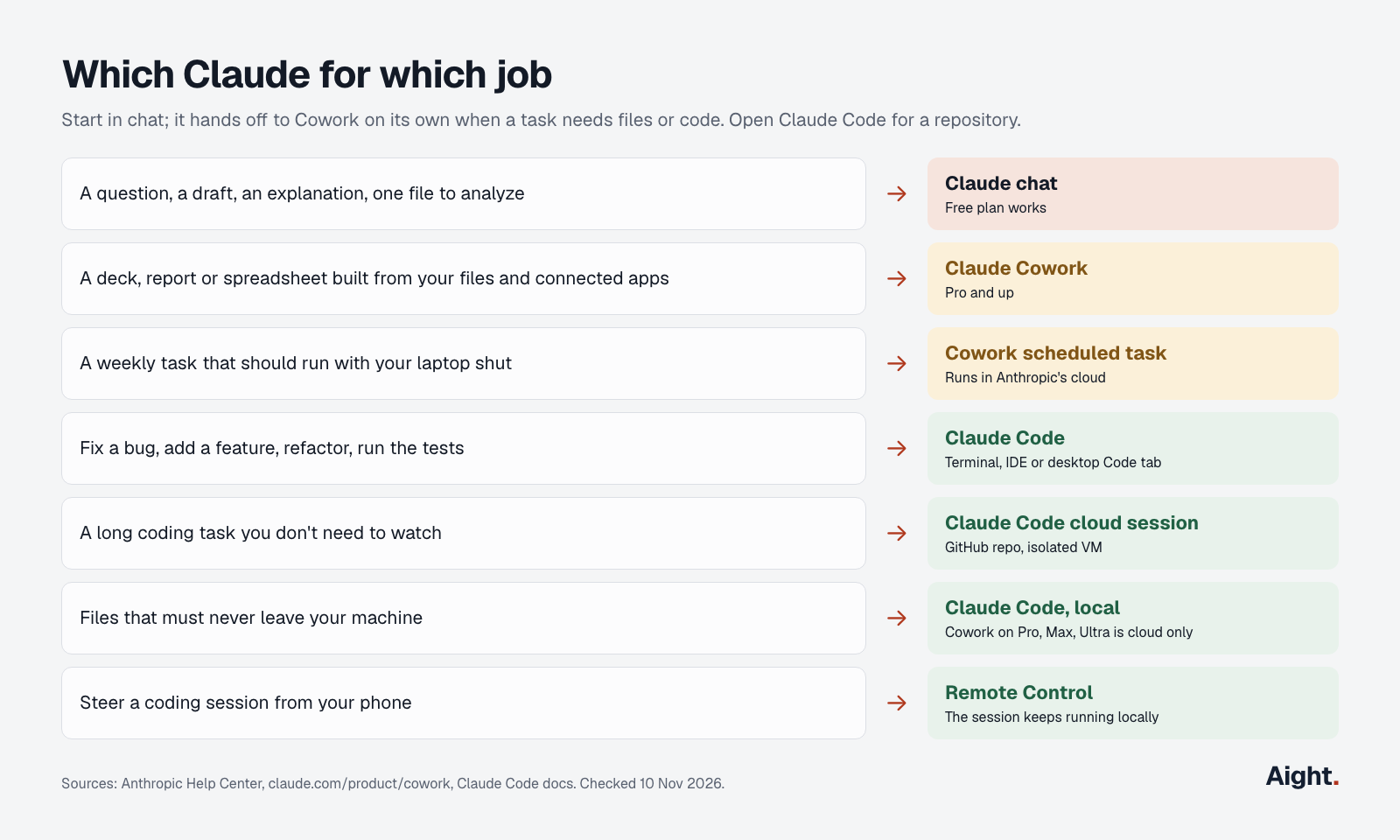
- A question, a draft or one file to analyze: Claude chat.
- A deck, report or spreadsheet built from your files and connected apps: Claude Cowork.
- A weekly task that should run with your laptop shut: a Cowork scheduled task, which runs in the cloud.
- Fixing a bug, adding a feature, refactoring, running tests: Claude Code in the terminal, IDE or desktop Code tab.
- A long coding task you don't need to watch: a Claude Code cloud session on a GitHub repository.
- Files that must stay on your machine: Claude Code locally, since Cowork on Pro, Max and Ultra runs in the cloud.
- Steering a running coding session from your phone: Remote Control.
Where they overlap, pick by where the work lives. Cowork can write and run scripts in its cloud environment, so a one-off data cleanup works there. But a GitHub issue from 3 November reports that Cowork's task composer has no repository picker and that its cloud sessions were refused access to the user's own repositories. Anything that ends in a repository belongs in Claude Code.
Developers who want the agent to handle the non-code side too can stay in Claude Code: its Chrome integration fills forms and reads pages, and computer use opens apps from the CLI on macOS. Non-developers have no reason to install the CLI for document work; Cowork does it without a terminal.
Moving work between Cowork and Claude Code
A Cowork task can move to Claude Code. Open the task, choose "Download task data," unzip it, open the folder in Claude Code and run /port-task-data, as described in the Cowork Help Center article. Use it when a document task turns into a codebase, or when you want a task's files on your own disk again.
Two remote features overlap and are easy to confuse:
- Dispatch sends a task from your phone to the desktop app, which runs it on your computer. It's in limited beta on some Pro, Max and Ultra plans, closed to new users, and needs the computer awake.
- Remote Control drives a Claude Code session already running in your terminal, desktop app or VS Code. Code and files stay local.
API prices for builders
Only Claude Code has a pay-per-token route for individuals. Sign in with a Claude Console account or set ANTHROPIC_API_KEY, and Claude Code bills at API rates. Chat and Cowork are app features with no API key option, apart from the enterprise third-party deployment above.
| Model | Input per 1M tokens | Output per 1M tokens | Cache read |
|---|---|---|---|
| Fable 5.2 | $8.00 | $40.00 | $0.20 |
| Opus 5.5 (Claude Code's default) | $4.00 | $20.00 | $0.20 |
| Sonnet 5.5 | $2.00 | $10.00 | $0.10 |
| Haiku 5.5, prompts up to 100K | $0.10 | $0.50 | $0.01 |
Fable 5.2 arrived with Claude Code 2.1.321 and replaced Fable 5.1 ($10 / $50) as the fable alias. Anthropic's cost docs put the average at about $13 per developer per active day, so a plan costs less than per-token use for anyone coding more than a couple of days a month. If you'd rather build your own agent, the Claude API pricing guide covers Batch and caching discounts.
What users report about the Cowork and chat merge
- "Most normal users have no idea whether to choose chat or cowork." (a Hacker News commenter on the merge announcement, 16 Sep 2026, link)
- An administrator said the merge would mean rewriting internal usage guides, since users lost the option of a mode that wouldn't start multi-step work (Hacker News, 16 Sep 2026, link).
- A Windows user reported that a desktop update moved Cowork sessions to the cloud without warning, that file tools then acted on cloud copies, and that edits never reached disk, breaking 38 scheduled tasks and 18 local MCP servers (GitHub issue #96187, 22 Sep 2026, link).
- An Ultra subscriber found Cowork cloud sessions blocked from every one of their GitHub repositories with a 403, though the integration settings showed all green (GitHub issue #106865, 3 Nov 2026, link).
- In January, PromptArmor showed the local Cowork preview could be tricked by a hidden instruction in a file into uploading files, writing "At no point in this process is human approval required." (PromptArmor, Jan 2026, link)
FAQ
Is Claude Cowork free?
No. Cowork needs Pro ($20 a month) or a higher plan. The Free plan includes chat, file creation and code execution in a sandbox, but not Cowork, scheduled tasks, Claude in Chrome or Claude Code.
Does Cowork share usage limits with Claude Code?
Yes. Chat, Cowork and Claude Code on the same account all draw from the same 5-hour and weekly limits. Cowork uses them faster than chat because each step of a task costs tokens, so heavy Cowork use leaves less for coding that week.
Can Claude Cowork still run only on your computer?
Not for new tasks on Pro, Max or Ultra. Since 6 October 2026 every new Cowork session runs in Anthropic's cloud, and the local-only option can't be turned back on. Your folders stay on your computer, and Cowork reaches the connected ones through the desktop app, copying the files a task needs.
Is Cowork just Claude Code with a different interface?
It uses the same agent architecture, without a terminal, but the products differ. Cowork works on documents and connected apps in Anthropic's cloud and has no repository workflow; Claude Code works in your repository, runs commands on your machine, and integrates with Git, IDEs and CI.
Do you need the desktop app for Cowork?
No for cloud tasks, which run from web and mobile too. Yes for anything on your computer: local folders, local MCP servers, browser use and computer use all go through the desktop app on macOS or Windows, and only while it's open.
Sources
- Anthropic Help Center: Use Claude Cowork on web, desktop, and mobile, Let Claude use your computer in Cowork, Set up the unified Claude experience for Enterprise, Create and edit files with Claude, Use Claude Code with your Pro, Max, or Ultra plan, How do usage and length limits work?, Assign tasks from anywhere (Dispatch)
- Anthropic: Plans and pricing, Claude Cowork product page, Claude Cowork and chat are now one Claude, Claude Desktop on third-party platforms, API pricing
- Claude Code docs: Platforms and integrations, Security, Permission modes, Desktop application, Use Claude Code in the cloud, Authentication, Model configuration, Manage costs, Changelog
- npm: @anthropic-ai/claude-code
- GitHub, anthropics/claude-code issues #96187 and #106865
- TechCrunch, Anthropic merges Claude chat and Cowork in one interface, 16 Sep 2026
- Hacker News: Cowork: Claude Code for the rest of your work (12 Jan 2026) and Claude Cowork and chat are now one Claude (16 Sep 2026)
- PromptArmor, Claude Cowork exfiltrates files
- Claude on YouTube, Claude Cowork and chat are now one Claude
Checked on 10 November 2026.